not sure if asked yet

aimlessanomaly

New member
i am attempting to ascertain if there is a way to remove the "Common Tasks" (i believe it is called that) from windows.

i am usually best friends with google, however, since i'm not aware of the element's proper name i have been unable to locate any relevant information.

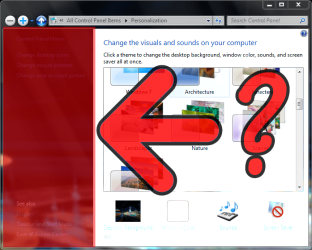
anyway, the element in question is marked with a red rectangle on my attached screenshot
 

Attachments
  • wat.png
    wat.png
    228.8 KB · Views: 20

My Computer

OS
Windows 7
CPU
Intel Core2 Quad Q6600 @2.40
Motherboard
790i FTW
Memory
2 gigs DDR3
Graphics Card(s)
Zotac 8800GT - 1 gig
Monitor(s) Displays
POS
Screen Resolution
1280 x 1024
Hard Drives
NVIDIA STRIPE 74.53 gigs
WDC WD16 00YS-01SHB1 SCSI DISK DEVICE 153 gigs
PSU
Coarsair 750 watt
Case
POS
Cooling
none
Keyboard
wireless POS
Mouse
Logitech...something..the standard 7 button mouse
Internet Speed
currently around 3mb/s

My Computer

Computer Manufacturer/Model Number
Custom
OS
Win7 HP (x64)/Win7 Ultimate (x64)
CPU
Core i7 920
Motherboard
Intel X58
Memory
6 x 2GB Corsair XMS3
Graphics Card(s)
CF HD4890
Sound Card
Asus Xonar
Monitor(s) Displays
Dell 2408WFP
Screen Resolution
1920 x 1200
Hard Drives
2 x 150GB WDC Velociraptors (Raid 0)
1 x 1TB Seagate
1 x 1.5TB Seagate
PSU
Corsair HX1000W
Case
Antec 1200
Keyboard
Razer Lycosa/N52te
Mouse
Razer Lachesis
Hi

It's called the navigation pane and a tutorial on how to achieve what you want is here:

Navigation Pane - Turn On or Off (credits to Brink)

Hope this helps and regards
the element i am attempting to remove is the one that sits on the left of the window when you are in the "personalize" or "network and sharing center" (among others) screen.

i believe the panel in question is an independent element, although i may be incorrect.

(i have also gone through the steps to turn off the navigation pane long ago, so i am positive it will not remove the element in question)
 

My Computer

OS
Windows 7
CPU
Intel Core2 Quad Q6600 @2.40
Motherboard
790i FTW
Memory
2 gigs DDR3
Graphics Card(s)
Zotac 8800GT - 1 gig
Monitor(s) Displays
POS
Screen Resolution
1280 x 1024
Hard Drives
NVIDIA STRIPE 74.53 gigs
WDC WD16 00YS-01SHB1 SCSI DISK DEVICE 153 gigs
PSU
Coarsair 750 watt
Case
POS
Cooling
none
Keyboard
wireless POS
Mouse
Logitech...something..the standard 7 button mouse
Internet Speed
currently around 3mb/s
I don't believe it's possible to remove that pane from the sub menus in Control Panel.

You're talking about this area yes?
 

Attachments

  • controlpanelpane.png
    controlpanelpane.png
    315.6 KB · Views: 8

My Computer

Computer Manufacturer/Model Number
Apple Macbook Pro (April 2009)
OS
W7 Ult. x64 | OS X
CPU
Intel Mobile Core 2 Duo 2.93Ghz [T9800 Penryn]
Motherboard
NVIDIA nForce 730i Rev. B1 [Mac-F2268EC8 (U2E1)]
Memory
4096MB Samsung DDR3 Dual Channel [PC3-8500F 1066Mhz]
Graphics Card(s)
NVIDIA GeForce 9600M GT 512MB [G96M Rev. C1]
Sound Card
SB X-Fi Surround 5.1 USB | Onboard Realtek (Disabled)
Monitor(s) Displays
Acer x223wbd 22" | Apple Anti-Glare 17" (Disabled)
Screen Resolution
{Current} 1440x900 {Acer} 1680x1050 {Apple} 1920x1200
Hard Drives
{Internal}
Seagate Momentus 320GB 2.5" 7200RPM [ST9320421AS]

{Externals}
LaCie 320GB USB 2.0 HDD [301284UR]
LaCie 750GB USB 2.0 FW400 eSATA HDD [301314U]
LaCie 1TB USB 2.0 HDD [301304UR]
PSU
Magsafe
Case
Aluminum/Unibody (MBP52)
Cooling
2 x 6000 RPM Fans
Keyboard
Logitech G-15v2 [PN 920-000379]
Mouse
Logitech G-9 [PN 910-000338]
Internet Speed
12Mbps/2.5Mbps w/ 24Mbps Speed Boost [Comcast]
Other Info
Logitech X-540 Speakers [PN 970223-0122]
Sennheiser PC-151 Headset

My Computer

OS
Windows 7
CPU
Intel Core2 Quad Q6600 @2.40
Motherboard
790i FTW
Memory
2 gigs DDR3
Graphics Card(s)
Zotac 8800GT - 1 gig
Monitor(s) Displays
POS
Screen Resolution
1280 x 1024
Hard Drives
NVIDIA STRIPE 74.53 gigs
WDC WD16 00YS-01SHB1 SCSI DISK DEVICE 153 gigs
PSU
Coarsair 750 watt
Case
POS
Cooling
none
Keyboard
wireless POS
Mouse
Logitech...something..the standard 7 button mouse
Internet Speed
currently around 3mb/s
just out of curiosity - why would you want to remove it ?? What are you trying to achieve.
 

My Computer

Computer Manufacturer/Model Number
HP, Dell, Gateway, Toshiba - 4 laptops and 2 desktops
OS
Vista, Windows7, Mint Mate, Zorin, Windows 8
CPU
from 1.6GHz Duo to i7
Monitor(s) Displays
2x HP w2207
Hard Drives
5x HDD, 7x SSD, 12x Externals
Keyboard
with trackball - no mices
Mouse
Trackball mice
Internet Speed
DSL 6000
just out of curiosity - why would you want to remove it ?? What are you trying to achieve.
i don't see it as a necessary element.

i may be incorrect in assuming i can access all the places it links to, but if i am correct, it would be nice to save some space.

it is mostly an aesthetic issue.
 

My Computer

OS
Windows 7
CPU
Intel Core2 Quad Q6600 @2.40
Motherboard
790i FTW
Memory
2 gigs DDR3
Graphics Card(s)
Zotac 8800GT - 1 gig
Monitor(s) Displays
POS
Screen Resolution
1280 x 1024
Hard Drives
NVIDIA STRIPE 74.53 gigs
WDC WD16 00YS-01SHB1 SCSI DISK DEVICE 153 gigs
PSU
Coarsair 750 watt
Case
POS
Cooling
none
Keyboard
wireless POS
Mouse
Logitech...something..the standard 7 button mouse
Internet Speed
currently around 3mb/s
I really doubt that is possible to remove. The image is located in shell32.dll, but to remove it, it would need hex editing and (maybe) registry editing as well.
 

My Computer

Computer type
Laptop
Computer Manufacturer/Model Number
ASUS G60-RBBX05
OS
Win7 Home Premium 64x
CPU
Intel Core 2 Duo P7450 / 2.13 GHz (2.29 with Extreme Turbo)
Memory
4 GB PC-6400 Hyundai (2X2) at 800Mhz
Graphics Card(s)
NVIDIA GeForce GTX 260M 1GB DDR3 VRAM
Monitor(s) Displays
16" LED Backlit
Screen Resolution
1366 x 768 on laptop 1600x1050 max res on 22" external mon
Hard Drives
OCZ Agility 3 60GB SSD / 320 GB - Serial ATA-150 - 7200 rpm
PSU
6-cell Lithium ion { lasts 1.5 hours }
Case
ASUS G60 Laptop
Keyboard
Chicklet type back-lit (white light) keyboard
Mouse
Logitech G9 Laser Mouse 3200dpi and 1000 reports per minute
Internet Speed
Comcast 8.60mb/s up - 3.11mb/s down
Antivirus
MSE
Browser
Firefox
Other Info
General mid-budget gaming Comp. Low batterylife - High FrameRates - currently overheating problems :(

2nd Rig: Case: Rosewill BLACKHAWK Gaming ATX Mid Tower Computer Case

Mobo: GIGABYTE GA-990FXA-UD3
CPU: AMD FX-6200 Zambezi 3.8GHz (4.1GHz Turbo)
Heatsink: COOLER MASTER V8 CPU Cooler
RAM: Patriot Viper 3 8GB (2 x 4GB) 240-Pin DDR3 SDRAM 1866 (PC3 15000)
GPU: SAPPHIRE Radeon HD 6850 1GB 2
Back
Top