Win 7 Pro decresed my CPU Clock speed by 600mhz!

AC73

New member
Local time
11:45 PM
Messages
15
Location
Southern Ontario, Hamilton
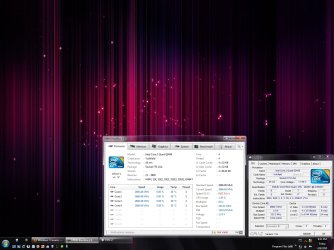
I ordered Win7 Pro 2 weeks ago and I have been loving it since I installed it. I'm really digging the level of customizing that you can do, and this site is a godsend. Thank you all for your efforts and tutorials! However, I just noticed today that my Core2Quad Q9450 is now running at 2.0Ghz instead of 2.66Ghz:( Also the the memory has been clocked down 33% according to BlackBox 2.0.
Can anyone tell me why this is? I was going to start overclocking soon, but if this is a problem I would like to have it fixed first. I haven't touched the BOIS. I did not have this machine overclocked with XP either, I had it running at stock speeds. All I did was a clean install with a format of my system drive.
I haven't checked the BIOS yet, I'm going to later, I have to leave the computer on for the next 20-30 mins. I just thought I'd check to see if this has happened to anyone else.
Thanks in advance for any feedback.
 

Attachments

  • 2010-04-09_162550.jpg
    2010-04-09_162550.jpg
    195.9 KB · Views: 378

My Computer My Computer

At a glance

Windows 7 Professional 64bit - RetailIntel Core i5 4590S Haswell-DT Refresh Rev.C0...16 GB (A-Data DDR-1600)NVIDIA GeForce GTX 960 Mini-SFF (GM206)
Computer type
PC/Desktop
Computer Manufacturer/Model Number
Custom and Self Built
OS
Windows 7 Professional 64bit - Retail
CPU
Intel Core i5 4590S Haswell-DT Refresh Rev.C0 Stepping 3
Motherboard
ASUS H97M-E (CSM) MicroATX
Memory
16 GB (A-Data DDR-1600)
Graphics Card(s)
NVIDIA GeForce GTX 960 Mini-SFF (GM206)
Sound Card
ASUS Xonar DSX Audio PCI-E
Monitor(s) Displays
Dell U2311H
Screen Resolution
1920x1080
Hard Drives
Samsung SSD 840 EVO 120GB ATA Device
300GB Velociraptor
150GB Raptor
Many external drives via Esata and USB 3.0
PSU
Corsair HX650 Single +12V rail - Modular
Case
Silverstone TJ-08-E
Cooling
Intel Stock
Keyboard
Razer BlackWidow Ultimate Stealth Edition
Mouse
Gigabyte M8000X
Internet Speed
Bell DSL (Latest test -13.31mbps down, 10.37mbps up)
Antivirus
ESET Internet Security
Browser
Waterfox x64
Other Info
Silicon Image SiI 3132 SATALink Controller x2 eSATA ports -

Windows Experience Index - 6.6
I fail to see how an operating system (or any program) can change the clock speed of a processor. What is odd though is that Win7 reports the right clock speed and the other 2 programs do not. Absolutely mysterious.
 

My Computer My Computer

At a glance

Vista, Windows7, Mint Mate, Zorin, Windows 8from 1.6GHz Duo to i7
Computer Manufacturer/Model Number
HP, Dell, Gateway, Toshiba - 4 laptops and 2 desktops
OS
Vista, Windows7, Mint Mate, Zorin, Windows 8
CPU
from 1.6GHz Duo to i7
Monitor(s) Displays
2x HP w2207
Hard Drives
5x HDD, 7x SSD, 12x Externals
Keyboard
with trackball - no mices
Mouse
Trackball mice
Internet Speed
DSL 6000
AC73, welcome to the forums.

Any chance you have Speedsstep or any other power saving modes enabled in the bios? If so then between that and Windows 7 own power settings (default is Balanced), that would explain it. Clock speeds are lowered as well as voltages in most cases when the computer isn't under load, and ramps back up to full speed when needed.
 

My Computer My Computer

At a glance

Win 7 Ultimate x64FX-8350 @ 4.6 GHz so farADATA XPG V1 Series Black 8GB DDR3 1600Sapphire R9 270x Dual-X
Computer type
PC/Desktop
Computer Manufacturer/Model Number
Me
OS
Win 7 Ultimate x64
CPU
FX-8350 @ 4.6 GHz so far
Motherboard
Asus M5A97 EVO
Memory
ADATA XPG V1 Series Black 8GB DDR3 1600
Graphics Card(s)
Sapphire R9 270x Dual-X
Sound Card
Xonar DGX w/ Corsair Vengence 1300
Monitor(s) Displays
Acer S232HL Abid
Screen Resolution
1920x1080
Hard Drives
120 GB OCZ Vertex 3
500 GB Seagate 7200.12
PSU
Antec Earthwatts 650W Green
Case
Antec Three Hundred
Cooling
Cooler Master 212 EVO
Keyboard
Logitech G510
Mouse
Logitech G500s
Internet Speed
35000/3000
Clock speeds are lowered as well as voltages in most cases when the computer isn't under load, and ramps back up to full speed when needed.
+1.
 

My Computer My Computer

At a glance

Windows 7 Ultimate x64 ®™Intel Core 2 Duo (2.2 GHz)2x 2GB Corsair (667 MHz)NVIDIA 8600M GS (256MB)
Computer Manufacturer/Model Number
Sony Vaio FZ21Z
OS
Windows 7 Ultimate x64 ®™
CPU
Intel Core 2 Duo (2.2 GHz)
Motherboard
Sony (Intel Chipset)
Memory
2x 2GB Corsair (667 MHz)
Graphics Card(s)
NVIDIA 8600M GS (256MB)
Sound Card
Sigmatel
Monitor(s) Displays
15.4" TFT X-Black
Screen Resolution
1280x800
Hard Drives
Western Digital 300GB Scorpio Black (7200rpm)
Mouse
Logitech Anywhere MX
Internet Speed
Sky 5MB
+2
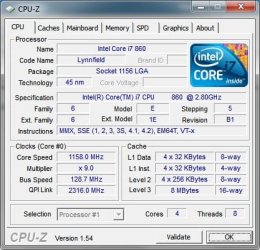
I have Speedstep running on my i7-860 and see the same thing.
Not worried as I know it will ramp up as needed
 

Attachments

  • CPU-Z.jpg
    CPU-Z.jpg
    40.1 KB · Views: 28

My Computer My Computer

At a glance

Win 7 Professional 64bitintel i7-8604GB Corsair XMS3 DHX DDR3 1333/PC3-10666ATI Radeon HD5670 512MB
Computer Manufacturer/Model Number
N/A
OS
Win 7 Professional 64bit
CPU
intel i7-860
Motherboard
Asus P7P55D-E
Memory
4GB Corsair XMS3 DHX DDR3 1333/PC3-10666
Graphics Card(s)
ATI Radeon HD5670 512MB
Sound Card
onboard Via HD
Monitor(s) Displays
Dell 2408WFP
Screen Resolution
1920x1200
Hard Drives
(1) 500GB Samsung F3
(2) 500GB Seagate
PSU
OCZ Modstream 600watt
Case
CM Centurion 534+
Cooling
(3) 120mm fans
Keyboard
MS Natural 4000
Mouse
Logitech Performance Mouse MX
Internet Speed
20Meg Fiber
AC73, welcome to the forums.

Any chance you have Speedsstep or any other power saving modes enabled in the bios? If so then between that and Windows 7 own power settings (default is Balanced), that would explain it. Clock speeds are lowered as well as voltages in most cases when the computer isn't under load, and ramps back up to full speed when needed.


Well after a reboot, all is well it seems. I don't really understand why this happened. I was unaware that C2Q's had speedstep. I thought it was introduced in the Lynnfield CUP's? I have my system specs in my profile for all too see, I don't think my system is compatible with speedstep.
I'm not using any power saving modes in the BIOS or other wise. The only power saving option I have selected in Windows is to turn off the monitor after 30mins.

Thanks for the replies. I'll check periodically to see if this happens again. If so I'll let you all know.
Now its back to customizing Windows with the awesome tutorials here.
Thanks again.
 

Attachments

  • 2010-04-09_201118.jpg
    2010-04-09_201118.jpg
    190.8 KB · Views: 87

My Computer My Computer

At a glance

Windows 7 Professional 64bit - RetailIntel Core i5 4590S Haswell-DT Refresh Rev.C0...16 GB (A-Data DDR-1600)NVIDIA GeForce GTX 960 Mini-SFF (GM206)
Computer type
PC/Desktop
Computer Manufacturer/Model Number
Custom and Self Built
OS
Windows 7 Professional 64bit - Retail
CPU
Intel Core i5 4590S Haswell-DT Refresh Rev.C0 Stepping 3
Motherboard
ASUS H97M-E (CSM) MicroATX
Memory
16 GB (A-Data DDR-1600)
Graphics Card(s)
NVIDIA GeForce GTX 960 Mini-SFF (GM206)
Sound Card
ASUS Xonar DSX Audio PCI-E
Monitor(s) Displays
Dell U2311H
Screen Resolution
1920x1080
Hard Drives
Samsung SSD 840 EVO 120GB ATA Device
300GB Velociraptor
150GB Raptor
Many external drives via Esata and USB 3.0
PSU
Corsair HX650 Single +12V rail - Modular
Case
Silverstone TJ-08-E
Cooling
Intel Stock
Keyboard
Razer BlackWidow Ultimate Stealth Edition
Mouse
Gigabyte M8000X
Internet Speed
Bell DSL (Latest test -13.31mbps down, 10.37mbps up)
Antivirus
ESET Internet Security
Browser
Waterfox x64
Other Info
Silicon Image SiI 3132 SATALink Controller x2 eSATA ports -

Windows Experience Index - 6.6
All of Intel's Core line have Speedstep and other power saving features. (less power == less heat)
Windows 7 offers the ability to configure how much to step the processor in advance power settings.

You notice in the first screenshot CPU-Z reports the Multiplier as x6.0 while in the latest it is reported as x8.0. That was Speedstep's doing.
 

My Computer My Computer

At a glance

Windows 10 Pro (x64)Intel Core i7-3930K (3.2GHz - 4.5GHz)4x Samsung 4GB PC3-12800 DDR3 (16GB 1600MHz)Nvidia Geforce GTX 690
Computer type
PC/Desktop
Computer Manufacturer/Model Number
Alienware Aurora ALX R4
OS
Windows 10 Pro (x64)
CPU
Intel Core i7-3930K (3.2GHz - 4.5GHz)
Motherboard
Alienware Aurora-R4 x79
Memory
4x Samsung 4GB PC3-12800 DDR3 (16GB 1600MHz)
Graphics Card(s)
Nvidia Geforce GTX 690
Sound Card
SteelSeries Siberia Elite
Monitor(s) Displays
Dell UltraSharp U3011
Screen Resolution
2560x1600
Hard Drives
Samsung 850 Pro 256 GB, Seagate 1TB Desktop Hybrid HDD, 2x Western Digital 4TB Green HDD
PSU
875W Some Dell PSU <.<
Case
Alienware Aurora ALX
Cooling
Custom Liquid Cooling (EK CPU & GPU blocks) dual EK 480RAD
Keyboard
Logitech G710+ Mechanical
Mouse
Logitech G700s
Internet Speed
Verizon Fios (50 mbps average)
Other Info
Server: Intel NUC D54250WYK: i5-4250U, 16GB, 256 GB mSATA, Windows Server 2012 R2
All of Intel's Core line have Speedstep and other power saving features. (less power == less heat)
Windows 7 offers the ability to configure how much to step the processor in advance power settings.

You notice in the first screenshot CPU-Z reports the Multiplier as x6.0 while in the latest it is reported as x8.0. That was Speedstep's doing.
Does Intel i3 have Speedstep as well? And if so...how do I go about chcking this "Speedstep to see if it powered back my laptop as well? Thanks for your time!:)
 

My Computer My Computer

At a glance

Win 7 Home Premium-64bit2.34 gig
Computer Manufacturer/Model Number
Gateway
OS
Win 7 Home Premium-64bit
CPU
2.3
Memory
4 gig
All of Intel's Core line have Speedstep and other power saving features. (less power == less heat)
Windows 7 offers the ability to configure how much to step the processor in advance power settings.

You notice in the first screenshot CPU-Z reports the Multiplier as x6.0 while in the latest it is reported as x8.0. That was Speedstep's doing.

I noticed the mutiplier. I thought the multiplier was locked on my CPU. I just bought an OEM without a HSF, does this mean that speedstep and change the multiplier but I cannot in the BIOS?
I am going to OC, just not right now, I'm a bit busy for the next week or so. I don't have any games installed yet anyways.
 

My Computer My Computer

At a glance

Windows 7 Professional 64bit - RetailIntel Core i5 4590S Haswell-DT Refresh Rev.C0...16 GB (A-Data DDR-1600)NVIDIA GeForce GTX 960 Mini-SFF (GM206)
Computer type
PC/Desktop
Computer Manufacturer/Model Number
Custom and Self Built
OS
Windows 7 Professional 64bit - Retail
CPU
Intel Core i5 4590S Haswell-DT Refresh Rev.C0 Stepping 3
Motherboard
ASUS H97M-E (CSM) MicroATX
Memory
16 GB (A-Data DDR-1600)
Graphics Card(s)
NVIDIA GeForce GTX 960 Mini-SFF (GM206)
Sound Card
ASUS Xonar DSX Audio PCI-E
Monitor(s) Displays
Dell U2311H
Screen Resolution
1920x1080
Hard Drives
Samsung SSD 840 EVO 120GB ATA Device
300GB Velociraptor
150GB Raptor
Many external drives via Esata and USB 3.0
PSU
Corsair HX650 Single +12V rail - Modular
Case
Silverstone TJ-08-E
Cooling
Intel Stock
Keyboard
Razer BlackWidow Ultimate Stealth Edition
Mouse
Gigabyte M8000X
Internet Speed
Bell DSL (Latest test -13.31mbps down, 10.37mbps up)
Antivirus
ESET Internet Security
Browser
Waterfox x64
Other Info
Silicon Image SiI 3132 SATALink Controller x2 eSATA ports -

Windows Experience Index - 6.6

My Computer My Computer

At a glance

Windows 10 Pro (x64)Intel Core i7-3930K (3.2GHz - 4.5GHz)4x Samsung 4GB PC3-12800 DDR3 (16GB 1600MHz)Nvidia Geforce GTX 690
Computer type
PC/Desktop
Computer Manufacturer/Model Number
Alienware Aurora ALX R4
OS
Windows 10 Pro (x64)
CPU
Intel Core i7-3930K (3.2GHz - 4.5GHz)
Motherboard
Alienware Aurora-R4 x79
Memory
4x Samsung 4GB PC3-12800 DDR3 (16GB 1600MHz)
Graphics Card(s)
Nvidia Geforce GTX 690
Sound Card
SteelSeries Siberia Elite
Monitor(s) Displays
Dell UltraSharp U3011
Screen Resolution
2560x1600
Hard Drives
Samsung 850 Pro 256 GB, Seagate 1TB Desktop Hybrid HDD, 2x Western Digital 4TB Green HDD
PSU
875W Some Dell PSU <.<
Case
Alienware Aurora ALX
Cooling
Custom Liquid Cooling (EK CPU & GPU blocks) dual EK 480RAD
Keyboard
Logitech G710+ Mechanical
Mouse
Logitech G700s
Internet Speed
Verizon Fios (50 mbps average)
Other Info
Server: Intel NUC D54250WYK: i5-4250U, 16GB, 256 GB mSATA, Windows Server 2012 R2
I fail to see how an operating system (or any program) can change the clock speed of a processor. What is odd though is that Win7 reports the right clock speed and the other 2 programs do not. Absolutely mysterious.

I don't know about Intel so much but AMD actually has downloadable drivers for just that purpose... It's called Cool and Quiet... My AMD 64x2 idles along at 900mhz and ramps up to 2.4ghz when needed... There is also a BIOS setting for it but you also need the drivers to detect CPU load and switch the multipliers.

Also my ASRock ION 330 comes with their "OC Tuner" which sits in the taskbar and lets me overclock it without even rebooting... During startup the service part of the program changes the CPU speeds to my settings.
 

My Computer My Computer

At a glance

XP Pro SP3 X86 / Win7 Pro X86Amd 64 x2 4200 (2.4ghz)Kingston DDR2 800 2gbNvidia GF-8400
Computer Manufacturer/Model Number
Homebrew
OS
XP Pro SP3 X86 / Win7 Pro X86
CPU
Amd 64 x2 4200 (2.4ghz)
Motherboard
Asus M2N-MX SE Plus
Memory
Kingston DDR2 800 2gb
Graphics Card(s)
Nvidia GF-8400
Sound Card
Realtek on Motherboard
Monitor(s) Displays
Acer x-193bw
Screen Resolution
1440 x 900
Hard Drives
Western Digital 500g
PSU
350watt In-Win
Case
In-Win
Cooling
Air
Keyboard
yes
Mouse
yes
Internet Speed
5mpbs
Other Info
Also ASRock ION 330 as HTPC (on XP).
Acer Aspire as GP netbook (on XP).
I don't know about Intel so much but AMD actually has downloadable drivers for just that purpose... It's called Cool and Quiet..

Which is needed in Windows 7 as it is already built-in/supported natively, just needs to be enabled in the bios.
 

My Computer My Computer

At a glance

Win 7 Ultimate x64FX-8350 @ 4.6 GHz so farADATA XPG V1 Series Black 8GB DDR3 1600Sapphire R9 270x Dual-X
Computer type
PC/Desktop
Computer Manufacturer/Model Number
Me
OS
Win 7 Ultimate x64
CPU
FX-8350 @ 4.6 GHz so far
Motherboard
Asus M5A97 EVO
Memory
ADATA XPG V1 Series Black 8GB DDR3 1600
Graphics Card(s)
Sapphire R9 270x Dual-X
Sound Card
Xonar DGX w/ Corsair Vengence 1300
Monitor(s) Displays
Acer S232HL Abid
Screen Resolution
1920x1080
Hard Drives
120 GB OCZ Vertex 3
500 GB Seagate 7200.12
PSU
Antec Earthwatts 650W Green
Case
Antec Three Hundred
Cooling
Cooler Master 212 EVO
Keyboard
Logitech G510
Mouse
Logitech G500s
Internet Speed
35000/3000
Back
Top