
Chrome - Multiple Processes

not so gray matter

מעשוגע פ
I just downloaded Chrome to test it out again. I had it when it first came out, but I didn't like it much then. Anyway, I just checked my task manager to see what the difference was between firefox (120k w/ a bunch of tabs) and chrome. What I found was interesting... Multiple chrome processes all between 10 and 30k.

My Question: Is this normal?
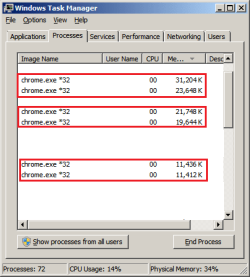
chrometweak.png

In total, with three tabs open Chrome had: ~119k in processes, thats not much of an improvement over Firefox :/
 

My Computer

Computer Manufacturer/Model Number
Apple Macbook Pro (April 2009)
OS
W7 Ult. x64 | OS X
CPU
Intel Mobile Core 2 Duo 2.93Ghz [T9800 Penryn]
Motherboard
NVIDIA nForce 730i Rev. B1 [Mac-F2268EC8 (U2E1)]
Memory
4096MB Samsung DDR3 Dual Channel [PC3-8500F 1066Mhz]
Graphics Card(s)
NVIDIA GeForce 9600M GT 512MB [G96M Rev. C1]
Sound Card
SB X-Fi Surround 5.1 USB | Onboard Realtek (Disabled)
Monitor(s) Displays
Acer x223wbd 22" | Apple Anti-Glare 17" (Disabled)
Screen Resolution
{Current} 1440x900 {Acer} 1680x1050 {Apple} 1920x1200
Hard Drives
{Internal}
Seagate Momentus 320GB 2.5" 7200RPM [ST9320421AS]

{Externals}
LaCie 320GB USB 2.0 HDD [301284UR]
LaCie 750GB USB 2.0 FW400 eSATA HDD [301314U]
LaCie 1TB USB 2.0 HDD [301304UR]
PSU
Magsafe
Case
Aluminum/Unibody (MBP52)
Cooling
2 x 6000 RPM Fans
Keyboard
Logitech G-15v2 [PN 920-000379]
Mouse
Logitech G-9 [PN 910-000338]
Internet Speed
12Mbps/2.5Mbps w/ 24Mbps Speed Boost [Comcast]
Other Info
Logitech X-540 Speakers [PN 970223-0122]
Sennheiser PC-151 Headset
Yep each tab has its own process and in newer dev builds even each addon has its own process. The idea is that if a tab or an addon crashes, it wont bring down the whole browser. I regularly have about 20 processes open from chrome and therefore dont much like the idea. Ive been looking for a way to disable it.
 

My Computer

Computer Manufacturer/Model Number
self built
OS
Windows 7 Professional 64-bit
CPU
Intel E8400 3GHz
Motherboard
Intel DX48BT2
Memory
Kingston PC3-10700H 4Gb
Graphics Card(s)
XFX Radeon HD 5850 BlackEd.
Sound Card
Asus Xonar DG
Monitor(s) Displays
2x Samsung SM-T220HD 22"
Screen Resolution
1680x1050 on two monitors
Hard Drives
OCZ Vertex 2 120gb 3.5" (OS)
Seagate Momentus XT 500gb
Samsung F3 1Tb (games)
2x Samsung F1 1Tb
PSU
Thermaltake ToughPower 850w
Case
Thermaltake Armor
Cooling
Scythe Mugen II
Keyboard
Microsoft Comfort Curve USB
Mouse
Razer Diamondback 3G
Internet Speed
8128/443
People were talking about how much of a memory hog firefox is, Chrome actually uses 30% more memory on my system. That's with identical tabs open and more add-ons in firefox than chrome.

It may have to do with the fact that I have Aero off which tunes firefox's need for skin memory down and chrome has its own special skin.
 

My Computer

Computer Manufacturer/Model Number
Apple Macbook Pro (April 2009)
OS
W7 Ult. x64 | OS X
CPU
Intel Mobile Core 2 Duo 2.93Ghz [T9800 Penryn]
Motherboard
NVIDIA nForce 730i Rev. B1 [Mac-F2268EC8 (U2E1)]
Memory
4096MB Samsung DDR3 Dual Channel [PC3-8500F 1066Mhz]
Graphics Card(s)
NVIDIA GeForce 9600M GT 512MB [G96M Rev. C1]
Sound Card
SB X-Fi Surround 5.1 USB | Onboard Realtek (Disabled)
Monitor(s) Displays
Acer x223wbd 22" | Apple Anti-Glare 17" (Disabled)
Screen Resolution
{Current} 1440x900 {Acer} 1680x1050 {Apple} 1920x1200
Hard Drives
{Internal}
Seagate Momentus 320GB 2.5" 7200RPM [ST9320421AS]

{Externals}
LaCie 320GB USB 2.0 HDD [301284UR]
LaCie 750GB USB 2.0 FW400 eSATA HDD [301314U]
LaCie 1TB USB 2.0 HDD [301304UR]
PSU
Magsafe
Case
Aluminum/Unibody (MBP52)
Cooling
2 x 6000 RPM Fans
Keyboard
Logitech G-15v2 [PN 920-000379]
Mouse
Logitech G-9 [PN 910-000338]
Internet Speed
12Mbps/2.5Mbps w/ 24Mbps Speed Boost [Comcast]
Other Info
Logitech X-540 Speakers [PN 970223-0122]
Sennheiser PC-151 Headset
I believe each extension you have on counts as another process as well. I'm not currently on my main computer, on this laptop I have 2 process of chrome.exe One is the Browser and one of the tab.

I've noticed on my desktop the many processes of chrome.exe and I have multiple extensions there.

You can hit Shift+Escape to see how many processes chrome says are running.
 

My Computer

OS
Home Premium x64
CPU
Intel e7400 2.8GHz Dual Core, OC @ 3.36GHz
Motherboard
Gigabyte GA-EP43-DS3L/S3L
Memory
4GB DDR2 1066
Graphics Card(s)
Nvidia GeForce 9800 GT
Sound Card
Realtek Surround Onboard.
Monitor(s) Displays
ASUS VW224, 22 Inch and Samsung SyncMaster 713v
Screen Resolution
Main Screen @1680x1050, Secondary @ 1280x1024
Hard Drives
Western Digital WD3200AAKS 320GB 7200 RPM SATA 3.0Gb/s
PSU
Thermaltake Purepower W0100RU 500W
Case
Rosewill R5601-BK Screw-less
Cooling
Two 120mm fans and Stock CPU fans
Keyboard
Old Dell Keyboard my neighbor gave me.
Mouse
Logitech MX518
Internet Speed
6Kbps
Other Info
Logitech X-540 70 watts 5.1 Speakers
Yep each extension, tab, and plugin runs in its own process. This "process isolation" is better for security and stability and Internet Explorer 8 does this as well. Soon Firefox and Safari will implement this too. There is more memory overhead per process, but all memory is freed when a tab (process) is closed. Overall it results in less memory bloat because of less fragmentation. If you run Firefox for a long time you can see the memory usage grow and grow. I never see this with Chrome.

This method makes sense when you run web applications in separate tabs. You don't want a security vulnerability, a memory leak, a hang, or a crash in one application to disrupt the other tabs.
 

My Computer

Computer Manufacturer/Model Number
Intel WBIBX10J
OS
Linux (Debian, Android)
CPU
Intel Core i7 860
Motherboard
Intel DP55WB
Memory
2x 2GB Kingston DDR3-1333
Graphics Card(s)
AMD Radeon HD 5750
Sound Card
Realtek ALC888
Monitor(s) Displays
2x Dell Inc. E248WFP
Screen Resolution
3840x1200
Hard Drives
Intel X25-V
Samsung HD103SJ
PSU
Corsair CX400
Case
Silverstone GD05
Cooling
Stock
Keyboard
Dell Inc. Bluetooth Wireless
Internet Speed
30 Mbps
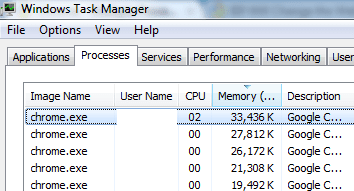
Yeah it seems that chrome uses a bit of memory. But if you have 2 gigs of ram (like me) it doesn't really matter at all if chrome is using 120 000 kb of memory.
 

Attachments

  • Untitled.png
    Untitled.png
    22.2 KB · Views: 23

My Computer

Computer Manufacturer/Model Number
Self-built on 31/1/11
OS
Windows 7 Ultimate 64 bit
CPU
Intel i5 2400 @ 3.80 GHz
Motherboard
Ashrock P67 Extreme 4
Memory
Mushkin Silverline 996768 4GB
Graphics Card(s)
MSI GTX 460 760MB Cyclone Overclocked
Sound Card
Integrated
Monitor(s) Displays
Asus VH202T 20" Widescreen
Screen Resolution
1600x900
Hard Drives
SSD: OCZ Vertex 2 60GB
HDD: Hitachi Deskstar 7K1000.C 500GB
PSU
Silverstone Strider 500W
Case
Zalman Z9 Plus
Cooling
Cooler Master Hyper 212 Plus
Keyboard
Logitech Wireless Keyboard MK520
Mouse
Logitech M310
Internet Speed
3 Mbps
Other Info
UEFI: Ashrock P67/
Network Card :TP-Link WN350GD/
WEI: 7.4/
ODD: Lite-On IHAS324
I have 3 extensions so I guess that explains why bringing up about:blank shows 4 processes. I have one PC with 2 GB and one with 8 GB. So far it runs pretty snappy on both without bogging other stuff afaict. The way it's set up I think I'd only end up with maybe 1/2 dozen extensions tops. I'd like to be able to sync bookmarks without using google account like SyncPlaces uses my ftp account. The other major fix would be handling multiple accounts on the same site like Opera or Firefox with Secure Login can do. Other than that I'm really liking it. I'm running the latest Alpha of SRWare Iron.

The other thing that would be nice is the ability to set a limit on the disk cache.. but that should be built-in, not an extension.

Before finding this browser I had Portable Firefox loading from a Ramdisk, in addition to regular Firefox, just so it could get off the dime when my disk is busy. I removed all that Ramdisk bit. This browser snaps right up there!

I still use Firefox but I'm going to have to work out how to do the bookmark and password syncing cross browser etc.. It would be ideal if SyncPlaces was ported with the ability to service both browsers transparently.
 

My Computer

Computer Manufacturer/Model Number
HP Media Center
OS
Windows 7 32 bit
CPU
AMD 5200+ dual core
Memory
2 GB
Graphics Card(s)
NVidia GeForce 6150SE 128 MB
Monitor(s) Displays
CRT
Screen Resolution
1280x1024
Hard Drives
500 GB Sata internal :

SIIG USB 3.0 docking stations w/WD Caviar Black 6 Gb/s drives
Keyboard
PS/2
Mouse
PS/2 Wheel Mouse
Other Info
SIIG USB 3.0 PCIexpress card.
Wow, flashback to 1998, when I started working desktop support for a company that used Netscape as their browser. I would say 80% of all trouble calls there were from slow/locked up systems due to Netscape launching multiple processes(and never closing them on exit). Some users by the end of a week or 2 had 50-100 Netscape.exes running....
 

My Computer

OS
Windows 7
CPU
i5-750
Motherboard
Asus
Memory
4GB DDR3 1600
Graphics Card(s)
GT220
This isnt the same thing Desslok. In the cases your referring to, they are crashed instances. Modern Chrome compartmentalises its tabs/addons in to individual processes.
 

My Computer

Computer Manufacturer/Model Number
self built
OS
Windows 7 Professional 64-bit
CPU
Intel E8400 3GHz
Motherboard
Intel DX48BT2
Memory
Kingston PC3-10700H 4Gb
Graphics Card(s)
XFX Radeon HD 5850 BlackEd.
Sound Card
Asus Xonar DG
Monitor(s) Displays
2x Samsung SM-T220HD 22"
Screen Resolution
1680x1050 on two monitors
Hard Drives
OCZ Vertex 2 120gb 3.5" (OS)
Seagate Momentus XT 500gb
Samsung F3 1Tb (games)
2x Samsung F1 1Tb
PSU
Thermaltake ToughPower 850w
Case
Thermaltake Armor
Cooling
Scythe Mugen II
Keyboard
Microsoft Comfort Curve USB
Mouse
Razer Diamondback 3G
Internet Speed
8128/443
In regards to bloating... You're talking about fragmentation. Isn't this nullified when I defragment once a week?

In regards to memory usage... I'm not that worried about using more memory, especially since I have 4GB DDR3 and 6GB in Readyboost, but I figured if one was going to bloat like crazy and the other wasn't I would switch. But since the difference isn't that pronounced, I'll stick with what I know unless I find a way to make chrome look and function more like traditional explorer Windows. I don't use Aero or any of the "Glass" looks so I like my Windows to look more traditional. Chrome sort of throws this out the Window. If anyone can find a Chrome theme that looks like a Windows Classic explorer window w/out the blue bars on the top I might try it out for a while longer.
 

My Computer

Computer Manufacturer/Model Number
Apple Macbook Pro (April 2009)
OS
W7 Ult. x64 | OS X
CPU
Intel Mobile Core 2 Duo 2.93Ghz [T9800 Penryn]
Motherboard
NVIDIA nForce 730i Rev. B1 [Mac-F2268EC8 (U2E1)]
Memory
4096MB Samsung DDR3 Dual Channel [PC3-8500F 1066Mhz]
Graphics Card(s)
NVIDIA GeForce 9600M GT 512MB [G96M Rev. C1]
Sound Card
SB X-Fi Surround 5.1 USB | Onboard Realtek (Disabled)
Monitor(s) Displays
Acer x223wbd 22" | Apple Anti-Glare 17" (Disabled)
Screen Resolution
{Current} 1440x900 {Acer} 1680x1050 {Apple} 1920x1200
Hard Drives
{Internal}
Seagate Momentus 320GB 2.5" 7200RPM [ST9320421AS]

{Externals}
LaCie 320GB USB 2.0 HDD [301284UR]
LaCie 750GB USB 2.0 FW400 eSATA HDD [301314U]
LaCie 1TB USB 2.0 HDD [301304UR]
PSU
Magsafe
Case
Aluminum/Unibody (MBP52)
Cooling
2 x 6000 RPM Fans
Keyboard
Logitech G-15v2 [PN 920-000379]
Mouse
Logitech G-9 [PN 910-000338]
Internet Speed
12Mbps/2.5Mbps w/ 24Mbps Speed Boost [Comcast]
Other Info
Logitech X-540 Speakers [PN 970223-0122]
Sennheiser PC-151 Headset
In regards to bloating... You're talking about fragmentation. Isn't this nullified when I defragment once a week?

Memory (in RAM) fragmentation is different to Hard Drive fragmentation.

Memory usage should only become a concern when you have large amounts of hard faults.
 

My Computer

Computer type
PC/Desktop
Computer Manufacturer/Model Number
Alienware Aurora ALX R4
OS
Windows 10 Pro (x64)
CPU
Intel Core i7-3930K (3.2GHz - 4.5GHz)
Motherboard
Alienware Aurora-R4 x79
Memory
4x Samsung 4GB PC3-12800 DDR3 (16GB 1600MHz)
Graphics Card(s)
Nvidia Geforce GTX 690
Sound Card
SteelSeries Siberia Elite
Monitor(s) Displays
Dell UltraSharp U3011
Screen Resolution
2560x1600
Hard Drives
Samsung 850 Pro 256 GB, Seagate 1TB Desktop Hybrid HDD, 2x Western Digital 4TB Green HDD
PSU
875W Some Dell PSU <.<
Case
Alienware Aurora ALX
Cooling
Custom Liquid Cooling (EK CPU & GPU blocks) dual EK 480RAD
Keyboard
Logitech G710+ Mechanical
Mouse
Logitech G700s
Internet Speed
Verizon Fios (50 mbps average)
Other Info
Server: Intel NUC D54250WYK: i5-4250U, 16GB, 256 GB mSATA, Windows Server 2012 R2
In regards to bloating... You're talking about fragmentation. Isn't this nullified when I defragment once a week?

Memory (in RAM) fragmentation is different to Hard Drive fragmentation.

Memory usage should only become a concern when you have large amounts of hard faults.

I get a hard fault once in a while but not often at all...

resources.png

That's w/ 3 firefox windows, 4 explorer windows, everest ultimate editon and a host of other processes.
 

My Computer

Computer Manufacturer/Model Number
Apple Macbook Pro (April 2009)
OS
W7 Ult. x64 | OS X
CPU
Intel Mobile Core 2 Duo 2.93Ghz [T9800 Penryn]
Motherboard
NVIDIA nForce 730i Rev. B1 [Mac-F2268EC8 (U2E1)]
Memory
4096MB Samsung DDR3 Dual Channel [PC3-8500F 1066Mhz]
Graphics Card(s)
NVIDIA GeForce 9600M GT 512MB [G96M Rev. C1]
Sound Card
SB X-Fi Surround 5.1 USB | Onboard Realtek (Disabled)
Monitor(s) Displays
Acer x223wbd 22" | Apple Anti-Glare 17" (Disabled)
Screen Resolution
{Current} 1440x900 {Acer} 1680x1050 {Apple} 1920x1200
Hard Drives
{Internal}
Seagate Momentus 320GB 2.5" 7200RPM [ST9320421AS]

{Externals}
LaCie 320GB USB 2.0 HDD [301284UR]
LaCie 750GB USB 2.0 FW400 eSATA HDD [301314U]
LaCie 1TB USB 2.0 HDD [301304UR]
PSU
Magsafe
Case
Aluminum/Unibody (MBP52)
Cooling
2 x 6000 RPM Fans
Keyboard
Logitech G-15v2 [PN 920-000379]
Mouse
Logitech G-9 [PN 910-000338]
Internet Speed
12Mbps/2.5Mbps w/ 24Mbps Speed Boost [Comcast]
Other Info
Logitech X-540 Speakers [PN 970223-0122]
Sennheiser PC-151 Headset
Back
Top