Belkin Network

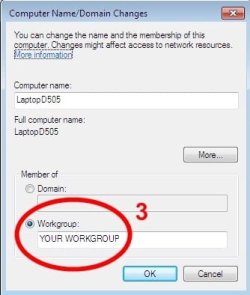
Notsograymatter is correct on step 3. Win 7's homegroup is designed for computers all running Win 7. You can make homegroup accept an XP computer; but you have to jump through some hoops. To create a group of computers using different OS's, use workgroup. You will save yourself some frustration. Chev put me on the right path to getting the XP machine working on my homegroup.
Is workgroup different than having "work" as the type of network? I'm not sure about the primary, since it has been a while since I set it up, but I do recall something in the original setup for the adapter (I think), asking for a workgroup, and I left it at the default (mshome). However, when I just reinstalled the software for the adapter a bit earlier, I didn't see anything like this.
Work, Home and Public are types or kind of groups and the selection sets the sharing. Work and home essentially use the same sharing. Public is what you would use in an internet cafe or a public wi-fi hotspot. It tightens sharing down to protect you since you are no longer behind your own router. It keeps someone else from seeing what is on your computer.

Homegroup and workgroup define your actual local group. Homegroup designed is for machines all running Win7. Workgroup makes it easier to set up machines of various OS's.

Am I clear as mud?
 

My Computer

Computer Manufacturer/Model Number
Home built
OS
Windows 7 Ultimate 32 bit
CPU
Intel(R) Pentium(R) 4 CPU 3.00GHz
Motherboard
ASUS P4P800-VM Motherboard Chipset: Intel 865G + ICH5
Memory
2.50 GB RAM
Graphics Card(s)
NVIDIA GeForce 7600 GS
Sound Card
SoundMax Integrated Digital Audio (Chip)
Monitor(s) Displays
ViewSonic VX 1962 wm
Screen Resolution
1680 X 1050
Hard Drives
Seagate Barracuda 7200.10 80 GB
ST380215A ATA Device 18.6 GB
Western Digital "My Book" external hard drive 750 GB
Cooling
Fan based
Keyboard
Microsoft Comfort Curve Keyboard 2000 v10 USB
Mouse
Logitec optic USB
Internet Speed
3.01 Mb/s download 0.64 Mb/s upload
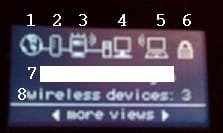
First, here's a short explanation of your routers main display:

17042010570.jpg
  1. = connected to Internet
  2. = Modem
  3. = Router (wave symbols top right = WiFi enabled)
  4. = At least one wired device connected
  5. = At least one wireless device connected
  6. = WiFi encryption ON
  7. = SSID
  8. = Number of wireless connected devices

As you can see, I have currently three wireless devices connected, two rigs and a printer. One of the rigs is connected with Belkin N+ USB adapter.

Here's how I did it earlier before all my rigs got Seven and I changed from workgroup to homegroup i.e. when I still got a Vista rig and an XP rig in same network with Seven. I'm not saying this is the one and only solution, I'm just telling what worked for me, after trying almost every possible method:
  • Disconnect the computer which is going to use Belkin USB adapter from network
  • Uninstall all wireless devices, shut down the computer
  • Reset modem and router
  • Setup the router (Belkin's web interface, forget the included CD!). Use a hardwired computer to setup (not the one which is using Belkin adapter)
  • Boot the rig which has Belkin USB adapter. For first boot after uninstalling wireless devices, hardwire it
  • Let Windows install wireless drivers
  • Set network type to 'Home' in all rigs (it's your home network, I've understood, so it makes sence to allow as much as possible by default)
That's it, at least my home network worked after this. Of course you have to take care that all rigs are in the same subnet and workgroup.

Good luck!

Kari
 

My Computer

Computer type
Laptop
Computer Manufacturer/Model Number
HP ENVY 17-1150eg
OS
Windows 10 Pro x64 EN-GB
CPU
1.6 GHz Intel Core i7-720QM Processor
Memory
6 GB
Graphics Card(s)
ATI Mobility Radeon HD 5850 Graphics
Sound Card
Beats sound system with integrated subwoofer
Monitor(s) Displays
17" laptop display, 22" LED and 32" Full HD TV through HDMI
Screen Resolution
1600*900 (1), 1920*1080 (2&3)
Hard Drives
Internal: 2 x 500 GB SATA Hard Disk Drive 7200 rpm
External: 2TB for backups, 3TB USB3 network drive for media
Cooling
As Envy runs a bit warm, I have it on a Cooler Master pad
Keyboard
Logitech diNovo Media Desktop Laser (bluetooth)
Mouse
Logitech Performance Mouse MX
Internet Speed
50/10 Mbps VDSL
Antivirus
Windows Defender 4.3.9431.0
Browser
Maxthon 3.5.2., IE11
Notsograymatter is correct on step 3. Win 7's homegroup is designed for computers all running Win 7. You can make homegroup accept an XP computer; but you have to jump through some hoops. To create a group of computers using different OS's, use workgroup. You will save yourself some frustration. Chev put me on the right path to getting the XP machine working on my homegroup.
Is workgroup different than having "work" as the type of network? I'm not sure about the primary, since it has been a while since I set it up, but I do recall something in the original setup for the adapter (I think), asking for a workgroup, and I left it at the default (mshome). However, when I just reinstalled the software for the adapter a bit earlier, I didn't see anything like this.
Work, Home and Public are types or kind of groups and the selection sets the sharing. Work and home essentially use the same sharing. Public is what you would use in an internet cafe or a public wi-fi hotspot. It tightens sharing down to protect you since you are no longer behind your own router. It keeps someone else from seeing what is on your computer.

Homegroup and workgroup define your actual local group. Homegroup designed is for machines all running Win7. Workgroup makes it easier to set up machines of various OS's.

Am I clear as mud?

You may be crystal clear, and it is my understanding that is muddy. When I go to Network And Sharing Center, and go to the link where you set the type of network, does that determine the workgroup also? In other words, I'm confused as to definitions of network vs workgroup. As I said, my network is set at work on the primary, and unknown on the secondary, because I have not found a means of configuring it in the wireless utility.
 

My Computer

Computer Manufacturer/Model Number
DIY
OS
W7x64 Pro, SuSe 12.1/** W7 x64 Pro, XP MCE
CPU
Phenom II 1090T w/Noctua NH-D14 /**4400+ X2 w/CM Hyper TX 3
Motherboard
ASRock 890FX Deluxe 4/**A8N-SLI
Memory
2 x 2GB Patriot PGS34g1600LLKA/**4x1GB Corsair VS
Graphics Card(s)
EVGA GTX460 SC/**EVGA 8800GTS
Sound Card
Asus Xonar D2X/**Xonar D1
Monitor(s) Displays
Acer X233H, Dell E152FPc /**LG M237-WD
Screen Resolution
1920x1080 & 1024x768/**1980x1080
Hard Drives
WDC 2TB, 1.5TB, 1TB, 500GB,Seagate 500GB , Maxtor 80GB /**500GB Seagate & WDC 1TB Black
PSU
CM RS600 w/ APC BX1000G/**Antec 500 TP w/ APC BX1000
Case
HAF922/**Antec 1040IIB
Cooling
3x200mm, 1x140 and 1x120mm/**5x80mm fans
Keyboard
Logitech Media USB/**Saitek Eclipse
Mouse
Cordless Trackman Wheel/**Ditto
Internet Speed
3.3Mbps
Other Info
SB 560 5.1 w/ Sennheiser RS140/**Creative T20 speakers, Dvico FusionHDTV7 Gold RT, Cisco E3000, HP 5510V AIO, Linksys E3000, Belkin F5U237 hub and **F5D8055 adapter
(** = 2nd rig)
Here is another option that I don't understand:

If an external Registrar is available, you can also enter Router's PIN at the external Registrar. To change Router's PIN, click "Generate New PIN". Or click "Restore Default PIN" to reset the PIN to factory default.
What to heck is an external registrar?
 

My Computer

Computer Manufacturer/Model Number
DIY
OS
W7x64 Pro, SuSe 12.1/** W7 x64 Pro, XP MCE
CPU
Phenom II 1090T w/Noctua NH-D14 /**4400+ X2 w/CM Hyper TX 3
Motherboard
ASRock 890FX Deluxe 4/**A8N-SLI
Memory
2 x 2GB Patriot PGS34g1600LLKA/**4x1GB Corsair VS
Graphics Card(s)
EVGA GTX460 SC/**EVGA 8800GTS
Sound Card
Asus Xonar D2X/**Xonar D1
Monitor(s) Displays
Acer X233H, Dell E152FPc /**LG M237-WD
Screen Resolution
1920x1080 & 1024x768/**1980x1080
Hard Drives
WDC 2TB, 1.5TB, 1TB, 500GB,Seagate 500GB , Maxtor 80GB /**500GB Seagate & WDC 1TB Black
PSU
CM RS600 w/ APC BX1000G/**Antec 500 TP w/ APC BX1000
Case
HAF922/**Antec 1040IIB
Cooling
3x200mm, 1x140 and 1x120mm/**5x80mm fans
Keyboard
Logitech Media USB/**Saitek Eclipse
Mouse
Cordless Trackman Wheel/**Ditto
Internet Speed
3.3Mbps
Other Info
SB 560 5.1 w/ Sennheiser RS140/**Creative T20 speakers, Dvico FusionHDTV7 Gold RT, Cisco E3000, HP 5510V AIO, Linksys E3000, Belkin F5U237 hub and **F5D8055 adapter
(** = 2nd rig)
You may be crystal clear, and it is my understanding that is muddy. When I go to Network And Sharing Center, and go to the link where you set the type of network, does that determine the workgroup also? In other words, I'm confused as to definitions of network vs workgroup. As I said, my network is set at work on the primary, and unknown on the secondary, because I have not found a means of configuring it in the wireless utility.
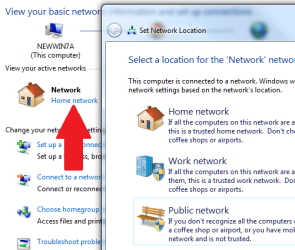
This MS link describes this as "Network Location". These are "pre-set" security settings depending on where you are using the network access:

Choosing a network location

Hope this helps some.

Cheers!
Robert
 

My Computer

OS
...
The security settings for a simple "unsecured home network" is "Home". To change from "Work" to "Home" click the work link with the mouse and select "Home".

change_network_location.png

I am using "Home" so that is why "Home" is shown in the screen shot.

Cheers!
Robert
 

My Computer

OS
...
Workgroup is a network where joined computers belong to same subnet and IP address space. In one network you can have more workgroups, by default only computers belonging to same workgroup can share (drives, folders, external devices). Microsoft has made this a little bit more complicated by using the default name Workgroup for workgroup ;)

Homegroup is kind of 'Workgroup v.2'.

Network type can be Home, Work or Public. This determines the default share level. For instance when using a public HotSpot (airports, hotels etc.), because of that Microsoft's default workgroup name it is very likely that a lot of users have workgroup name 'Workgroup'. If these users choose network type 'Home' when using these public access points, they could get in to each other's computers. Choosing 'Public' kind of closes the access to your shares.

Kari
 

My Computer

Computer type
Laptop
Computer Manufacturer/Model Number
HP ENVY 17-1150eg
OS
Windows 10 Pro x64 EN-GB
CPU
1.6 GHz Intel Core i7-720QM Processor
Memory
6 GB
Graphics Card(s)
ATI Mobility Radeon HD 5850 Graphics
Sound Card
Beats sound system with integrated subwoofer
Monitor(s) Displays
17" laptop display, 22" LED and 32" Full HD TV through HDMI
Screen Resolution
1600*900 (1), 1920*1080 (2&3)
Hard Drives
Internal: 2 x 500 GB SATA Hard Disk Drive 7200 rpm
External: 2TB for backups, 3TB USB3 network drive for media
Cooling
As Envy runs a bit warm, I have it on a Cooler Master pad
Keyboard
Logitech diNovo Media Desktop Laser (bluetooth)
Mouse
Logitech Performance Mouse MX
Internet Speed
50/10 Mbps VDSL
Antivirus
Windows Defender 4.3.9431.0
Browser
Maxthon 3.5.2., IE11
First, here's a short explanation of your routers main display:

View attachment 67730
  1. = connected to Internet
  2. = Modem
  3. = Router (wave symbols top right = WiFi enabled)
  4. = At least one wired device connected
  5. = At least one wireless device connected
  6. = WiFi encryption ON
  7. = SSID
  8. = Number of wireless connected devices

As you can see, I have currently three wireless devices connected, two rigs and a printer. One of the rigs is connected with Belkin N+ USB adapter.

Here's how I did it earlier before all my rigs got Seven and I changed from workgroup to homegroup i.e. when I still got a Vista rig and an XP rig in same network with Seven. I'm not saying this is the one and only solution, I'm just telling what worked for me, after trying almost every possible method:
  • Disconnect the computer which is going to use Belkin USB adapter from network
  • Uninstall all wireless devices, shut down the computer
  • Reset modem and router
  • Setup the router (Belkin's web interface, forget the included CD!). Use a hardwired computer to setup (not the one which is using Belkin adapter)
  • Boot the rig which has Belkin USB adapter. For first boot after uninstalling wireless devices, hardwire it
  • Let Windows install wireless drivers
  • Set network type to 'Home' in all rigs (it's your home network, I've understood, so it makes sence to allow as much as possible by default)
That's it, at least my home network worked after this. Of course you have to take care that all rigs are in the same subnet and workgroup.

Good luck!

Kari

Okay, going down the checklist... items 1-4 are the same as mine. Item 5 remains blank. Item 6 & 7 are the same. Item 8 remains at 0.

I will follow your setup procedure and see what happens.
 

My Computer

Computer Manufacturer/Model Number
DIY
OS
W7x64 Pro, SuSe 12.1/** W7 x64 Pro, XP MCE
CPU
Phenom II 1090T w/Noctua NH-D14 /**4400+ X2 w/CM Hyper TX 3
Motherboard
ASRock 890FX Deluxe 4/**A8N-SLI
Memory
2 x 2GB Patriot PGS34g1600LLKA/**4x1GB Corsair VS
Graphics Card(s)
EVGA GTX460 SC/**EVGA 8800GTS
Sound Card
Asus Xonar D2X/**Xonar D1
Monitor(s) Displays
Acer X233H, Dell E152FPc /**LG M237-WD
Screen Resolution
1920x1080 & 1024x768/**1980x1080
Hard Drives
WDC 2TB, 1.5TB, 1TB, 500GB,Seagate 500GB , Maxtor 80GB /**500GB Seagate & WDC 1TB Black
PSU
CM RS600 w/ APC BX1000G/**Antec 500 TP w/ APC BX1000
Case
HAF922/**Antec 1040IIB
Cooling
3x200mm, 1x140 and 1x120mm/**5x80mm fans
Keyboard
Logitech Media USB/**Saitek Eclipse
Mouse
Cordless Trackman Wheel/**Ditto
Internet Speed
3.3Mbps
Other Info
SB 560 5.1 w/ Sennheiser RS140/**Creative T20 speakers, Dvico FusionHDTV7 Gold RT, Cisco E3000, HP 5510V AIO, Linksys E3000, Belkin F5U237 hub and **F5D8055 adapter
(** = 2nd rig)
Okay, going down the checklist... items 1-4 are the same as mine. Item 5 remains blank. Item 6 & 7 are the same. Item 8 remains at 0.

I will follow your setup procedure and see what happens.
Important thing to remember is that symbols 4 & 5 don't show how many devices are connected, they are just showing that at least one (wired & wireless) is connected.
 

My Computer

Computer type
Laptop
Computer Manufacturer/Model Number
HP ENVY 17-1150eg
OS
Windows 10 Pro x64 EN-GB
CPU
1.6 GHz Intel Core i7-720QM Processor
Memory
6 GB
Graphics Card(s)
ATI Mobility Radeon HD 5850 Graphics
Sound Card
Beats sound system with integrated subwoofer
Monitor(s) Displays
17" laptop display, 22" LED and 32" Full HD TV through HDMI
Screen Resolution
1600*900 (1), 1920*1080 (2&3)
Hard Drives
Internal: 2 x 500 GB SATA Hard Disk Drive 7200 rpm
External: 2TB for backups, 3TB USB3 network drive for media
Cooling
As Envy runs a bit warm, I have it on a Cooler Master pad
Keyboard
Logitech diNovo Media Desktop Laser (bluetooth)
Mouse
Logitech Performance Mouse MX
Internet Speed
50/10 Mbps VDSL
Antivirus
Windows Defender 4.3.9431.0
Browser
Maxthon 3.5.2., IE11
In regards to workgroups and setting them up. If you set up your workgroup properly and join it with each and every computer, you shouldn't have issues with computers not showing up in the Network portion of explorer. There are exceptions, but it'll work 10 times better than trying to configure the Homegroup portion. Once you set it up, you can share files/folders with others in your work group by right clicking on the item and going to Share with...

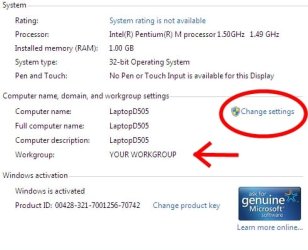
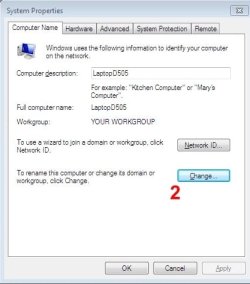
7: Join or create a workgroup
Vista: Windows Fanatics
XP: Microsoft Corporation

Generalized installation instructions for your router:
How to Install a Belkin N1 Wireless Router | eHow.com

How to set up a WPA secured network on a Belkin Router:
Belkin : Support : Protecting your network with WPA/WPA2 security

Your settings in your router shouldn't effect your network, as long as you're not using any specialized settings.

PS... Make sure you're on a "Home Network" not a "Work Network". The work network will cause certain features to be locked by default.
 

My Computer

Computer Manufacturer/Model Number
Apple Macbook Pro (April 2009)
OS
W7 Ult. x64 | OS X
CPU
Intel Mobile Core 2 Duo 2.93Ghz [T9800 Penryn]
Motherboard
NVIDIA nForce 730i Rev. B1 [Mac-F2268EC8 (U2E1)]
Memory
4096MB Samsung DDR3 Dual Channel [PC3-8500F 1066Mhz]
Graphics Card(s)
NVIDIA GeForce 9600M GT 512MB [G96M Rev. C1]
Sound Card
SB X-Fi Surround 5.1 USB | Onboard Realtek (Disabled)
Monitor(s) Displays
Acer x223wbd 22" | Apple Anti-Glare 17" (Disabled)
Screen Resolution
{Current} 1440x900 {Acer} 1680x1050 {Apple} 1920x1200
Hard Drives
{Internal}
Seagate Momentus 320GB 2.5" 7200RPM [ST9320421AS]

{Externals}
LaCie 320GB USB 2.0 HDD [301284UR]
LaCie 750GB USB 2.0 FW400 eSATA HDD [301314U]
LaCie 1TB USB 2.0 HDD [301304UR]
PSU
Magsafe
Case
Aluminum/Unibody (MBP52)
Cooling
2 x 6000 RPM Fans
Keyboard
Logitech G-15v2 [PN 920-000379]
Mouse
Logitech G-9 [PN 910-000338]
Internet Speed
12Mbps/2.5Mbps w/ 24Mbps Speed Boost [Comcast]
Other Info
Logitech X-540 Speakers [PN 970223-0122]
Sennheiser PC-151 Headset
Is workgroup different than having "work" as the type of network? I'm not sure about the primary, since it has been a while since I set it up, but I do recall something in the original setup for the adapter (I think), asking for a workgroup, and I left it at the default (mshome). However, when I just reinstalled the software for the adapter a bit earlier, I didn't see anything like this.
Work, Home and Public are types or kind of groups and the selection sets the sharing. Work and home essentially use the same sharing. Public is what you would use in an internet cafe or a public wi-fi hotspot. It tightens sharing down to protect you since you are no longer behind your own router. It keeps someone else from seeing what is on your computer.

Homegroup and workgroup define your actual local group. Homegroup designed is for machines all running Win7. Workgroup makes it easier to set up machines of various OS's.

Am I clear as mud?

You may be crystal clear, and it is my understanding that is muddy. When I go to Network And Sharing Center, and go to the link where you set the type of network, does that determine the workgroup also? In other words, I'm confused as to definitions of network vs workgroup. As I said, my network is set at work on the primary, and unknown on the secondary, because I have not found a means of configuring it in the wireless utility.

Go with WORK as the TYPE of NETWORK. The GROUP you create will be a WORKGROUP. Or you can go with HOME as the type or location of the NETWORK. But still go with WORKGROUP for your GROUP.
 

My Computer

Computer Manufacturer/Model Number
Home built
OS
Windows 7 Ultimate 32 bit
CPU
Intel(R) Pentium(R) 4 CPU 3.00GHz
Motherboard
ASUS P4P800-VM Motherboard Chipset: Intel 865G + ICH5
Memory
2.50 GB RAM
Graphics Card(s)
NVIDIA GeForce 7600 GS
Sound Card
SoundMax Integrated Digital Audio (Chip)
Monitor(s) Displays
ViewSonic VX 1962 wm
Screen Resolution
1680 X 1050
Hard Drives
Seagate Barracuda 7200.10 80 GB
ST380215A ATA Device 18.6 GB
Western Digital "My Book" external hard drive 750 GB
Cooling
Fan based
Keyboard
Microsoft Comfort Curve Keyboard 2000 v10 USB
Mouse
Logitec optic USB
Internet Speed
3.01 Mb/s download 0.64 Mb/s upload
Thank you Kari and Robert for stepping in. I appreciate it.

Kari and Robert both know what they are doing.
 

My Computer

Computer Manufacturer/Model Number
Home built
OS
Windows 7 Ultimate 32 bit
CPU
Intel(R) Pentium(R) 4 CPU 3.00GHz
Motherboard
ASUS P4P800-VM Motherboard Chipset: Intel 865G + ICH5
Memory
2.50 GB RAM
Graphics Card(s)
NVIDIA GeForce 7600 GS
Sound Card
SoundMax Integrated Digital Audio (Chip)
Monitor(s) Displays
ViewSonic VX 1962 wm
Screen Resolution
1680 X 1050
Hard Drives
Seagate Barracuda 7200.10 80 GB
ST380215A ATA Device 18.6 GB
Western Digital "My Book" external hard drive 750 GB
Cooling
Fan based
Keyboard
Microsoft Comfort Curve Keyboard 2000 v10 USB
Mouse
Logitec optic USB
Internet Speed
3.01 Mb/s download 0.64 Mb/s upload
Most of the time I'm absolutely not sure what I'm doing ;) It's just that I have exactly the same devices than Seekermeister, Belkin N1 Vision router and Belkin N+ USB adapter.
 

My Computer

Computer type
Laptop
Computer Manufacturer/Model Number
HP ENVY 17-1150eg
OS
Windows 10 Pro x64 EN-GB
CPU
1.6 GHz Intel Core i7-720QM Processor
Memory
6 GB
Graphics Card(s)
ATI Mobility Radeon HD 5850 Graphics
Sound Card
Beats sound system with integrated subwoofer
Monitor(s) Displays
17" laptop display, 22" LED and 32" Full HD TV through HDMI
Screen Resolution
1600*900 (1), 1920*1080 (2&3)
Hard Drives
Internal: 2 x 500 GB SATA Hard Disk Drive 7200 rpm
External: 2TB for backups, 3TB USB3 network drive for media
Cooling
As Envy runs a bit warm, I have it on a Cooler Master pad
Keyboard
Logitech diNovo Media Desktop Laser (bluetooth)
Mouse
Logitech Performance Mouse MX
Internet Speed
50/10 Mbps VDSL
Antivirus
Windows Defender 4.3.9431.0
Browser
Maxthon 3.5.2., IE11
Most of the time I'm absolutely not sure what I'm doing ;) It's just that I have exactly the same devices than Seekermeister, Belkin N1 Vision router and Belkin N+ USB adapter.

And I was just letting some pictures do the talkin ...

;)

Not only do you two know what you are doing, but you are modest, too! :D
 

My Computer

Computer Manufacturer/Model Number
Home built
OS
Windows 7 Ultimate 32 bit
CPU
Intel(R) Pentium(R) 4 CPU 3.00GHz
Motherboard
ASUS P4P800-VM Motherboard Chipset: Intel 865G + ICH5
Memory
2.50 GB RAM
Graphics Card(s)
NVIDIA GeForce 7600 GS
Sound Card
SoundMax Integrated Digital Audio (Chip)
Monitor(s) Displays
ViewSonic VX 1962 wm
Screen Resolution
1680 X 1050
Hard Drives
Seagate Barracuda 7200.10 80 GB
ST380215A ATA Device 18.6 GB
Western Digital "My Book" external hard drive 750 GB
Cooling
Fan based
Keyboard
Microsoft Comfort Curve Keyboard 2000 v10 USB
Mouse
Logitec optic USB
Internet Speed
3.01 Mb/s download 0.64 Mb/s upload
I would like to show that statement to some co-workers... Could you print it out and sign it, then fax it to me? Please use your full military rank when signing ;)
 

My Computer

Computer type
Laptop
Computer Manufacturer/Model Number
HP ENVY 17-1150eg
OS
Windows 10 Pro x64 EN-GB
CPU
1.6 GHz Intel Core i7-720QM Processor
Memory
6 GB
Graphics Card(s)
ATI Mobility Radeon HD 5850 Graphics
Sound Card
Beats sound system with integrated subwoofer
Monitor(s) Displays
17" laptop display, 22" LED and 32" Full HD TV through HDMI
Screen Resolution
1600*900 (1), 1920*1080 (2&3)
Hard Drives
Internal: 2 x 500 GB SATA Hard Disk Drive 7200 rpm
External: 2TB for backups, 3TB USB3 network drive for media
Cooling
As Envy runs a bit warm, I have it on a Cooler Master pad
Keyboard
Logitech diNovo Media Desktop Laser (bluetooth)
Mouse
Logitech Performance Mouse MX
Internet Speed
50/10 Mbps VDSL
Antivirus
Windows Defender 4.3.9431.0
Browser
Maxthon 3.5.2., IE11
I would like to show that statement to some co-workers... Could you print it out and sign it, then fax it to me? Please use your full military rank when signing ;)

:roflmao::roflmao::roflmao::roflmao::thumbsup:
 

My Computer

Computer Manufacturer/Model Number
Home built
OS
Windows 7 Ultimate 32 bit
CPU
Intel(R) Pentium(R) 4 CPU 3.00GHz
Motherboard
ASUS P4P800-VM Motherboard Chipset: Intel 865G + ICH5
Memory
2.50 GB RAM
Graphics Card(s)
NVIDIA GeForce 7600 GS
Sound Card
SoundMax Integrated Digital Audio (Chip)
Monitor(s) Displays
ViewSonic VX 1962 wm
Screen Resolution
1680 X 1050
Hard Drives
Seagate Barracuda 7200.10 80 GB
ST380215A ATA Device 18.6 GB
Western Digital "My Book" external hard drive 750 GB
Cooling
Fan based
Keyboard
Microsoft Comfort Curve Keyboard 2000 v10 USB
Mouse
Logitec optic USB
Internet Speed
3.01 Mb/s download 0.64 Mb/s upload
I would like to show that statement to some co-workers... Could you print it out and sign it, then fax it to me? Please use your full military rank when signing ;)

I would gladly second that statement.

My rank is General Failure, and I am reading your hard drive. Does that help? :)
 

My Computer

Computer Manufacturer/Model Number
Gateway, Toshiba Laptop, and Home Brew
OS
Windows 7 x64 HP, Windows 7 HP, Windows 7 Ult
CPU
Intel I3, Cerelon, Pentium 4 @ 3Ghz
Motherboard
Intel, Intel, Asus
Memory
8G, 3G, 3G
Graphics Card(s)
On-board Intel, On-board nVidia, nVIDIA card
Sound Card
on-board, on-board, SoundBlaster
Monitor(s) Displays
Hannspree HF237, Toshiba, SyncMaster 931B
Screen Resolution
default (all)
Hard Drives
1T internal, 320G internal, 160G internal, 1T networked
PSU
300w, unk, 650w
Case
black, black, grey
Cooling
air (all)
Keyboard
standard wired (all)
Mouse
standard wired (all)
Internet Speed
6M down, 768K up
Other Info
Home LAN through Linksys hub to 4 port and wireless switch/router. Networked HP 2600n. Wife's computer running Windows 7, and spare laptop running Ubuntu "Karmic Kola" (9.10).
Your mention of letting Windows install driver made me remember that I had disabled WLAN on the secondary rig in services long ago, before I had even considered a network at all. I reenabled it and checked it in the primary services also, which was still enabled. On reboot, Windows opened the new hardware wizard, and I pointed it to the driver on the CD, since it failed to find anything on it's own. There were two choices, one for Vista and one for XP/2000. I chose the latter, since XP is the OS of the secondary.

I then reinstalled the wireless utility, because the connection wizard that Window opened ask for a network ID, which I was not sure of. Still, in the Belkin utility, I get the same results as before.

Shouldn't the router's display show wireless devices, even before making a connection>
 

My Computer

Computer Manufacturer/Model Number
DIY
OS
W7x64 Pro, SuSe 12.1/** W7 x64 Pro, XP MCE
CPU
Phenom II 1090T w/Noctua NH-D14 /**4400+ X2 w/CM Hyper TX 3
Motherboard
ASRock 890FX Deluxe 4/**A8N-SLI
Memory
2 x 2GB Patriot PGS34g1600LLKA/**4x1GB Corsair VS
Graphics Card(s)
EVGA GTX460 SC/**EVGA 8800GTS
Sound Card
Asus Xonar D2X/**Xonar D1
Monitor(s) Displays
Acer X233H, Dell E152FPc /**LG M237-WD
Screen Resolution
1920x1080 & 1024x768/**1980x1080
Hard Drives
WDC 2TB, 1.5TB, 1TB, 500GB,Seagate 500GB , Maxtor 80GB /**500GB Seagate & WDC 1TB Black
PSU
CM RS600 w/ APC BX1000G/**Antec 500 TP w/ APC BX1000
Case
HAF922/**Antec 1040IIB
Cooling
3x200mm, 1x140 and 1x120mm/**5x80mm fans
Keyboard
Logitech Media USB/**Saitek Eclipse
Mouse
Cordless Trackman Wheel/**Ditto
Internet Speed
3.3Mbps
Other Info
SB 560 5.1 w/ Sennheiser RS140/**Creative T20 speakers, Dvico FusionHDTV7 Gold RT, Cisco E3000, HP 5510V AIO, Linksys E3000, Belkin F5U237 hub and **F5D8055 adapter
(** = 2nd rig)
Back
Top