SATA Drivers - Slipstream into Windows XP CD

How to slipstream SATA drivers into Windows XP setup CD, on your dual boot PC with Windows 7 or Vista

When you install Win XP, setup can not find your Hard Drive.

1.PNG

2.PNG


1) Download & Install nLite
nLite - Deployment Tool for the bootable Unattended Windows installation

2) Make a new folder for your Windows XP image.
Note: for this example, I am using the name Win XP Sata.

3) Insert XP CD & start nLite

4) Click Next.
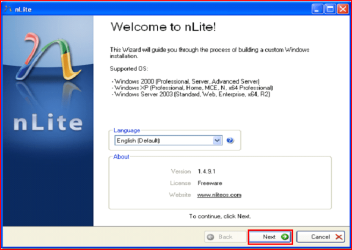
3.PNG
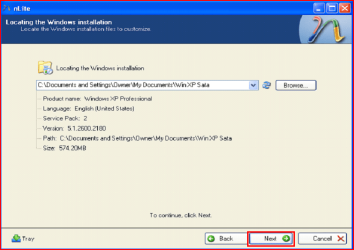
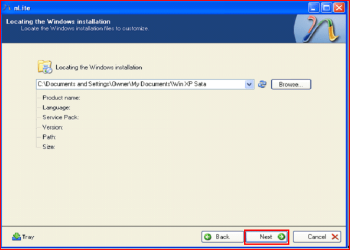
5) Choose your Windows XP image folder, & Click Next, than OK.
Note: nLite will put the image into your folder.
4.PNG

5.PNG
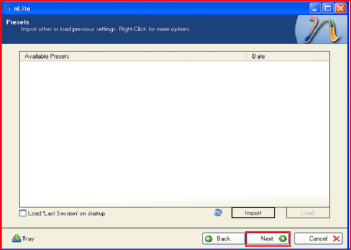
6) Click Next.
6.PNG
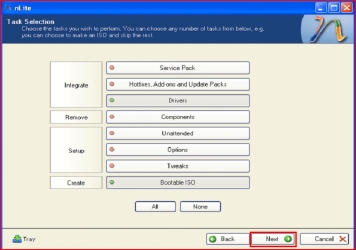
7) Click Next.
7.PNG
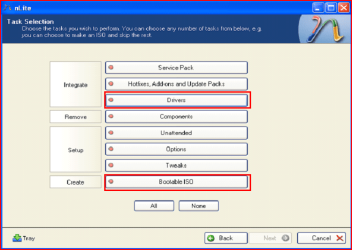
8) Choose Integrate Drivers & Create Bootable ISO
8.PNG
9) Click Next.
9.PNG
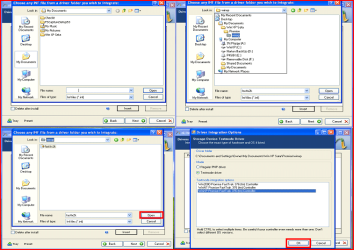
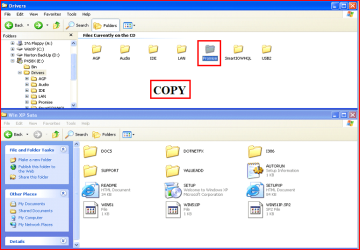
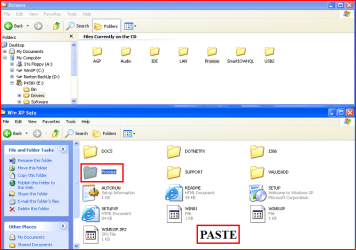
10) Copy & Paste your Sata Driver to your image folder.
Note: for this example, I am using Promise Fastrak 376.
10.PNG

11.PNG
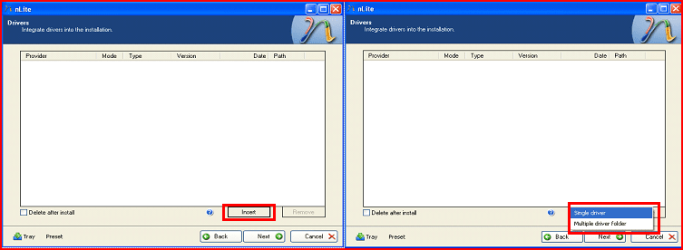
11) Click Insect, than Single Driver.
12.PNG
12) Locate your Sata Setup Inf file.
Click Open, than OK.
Note: for this example the file is called fasttx2k.
Note: for this example, I am using Promise Fastrak 376.
13.PNG
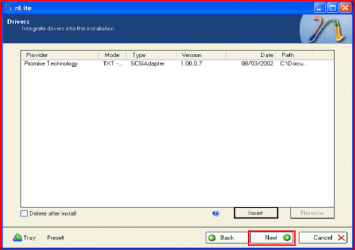
13) Click Next.
14.PNG
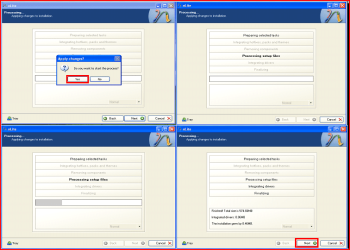
14) Click Yes, than Next.
15.PNG
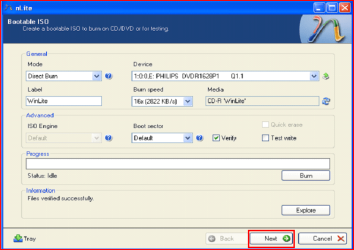
15) Choose Direct Burn.
Click Burn, than Yes.
Note: nLite will now burn your new CD.
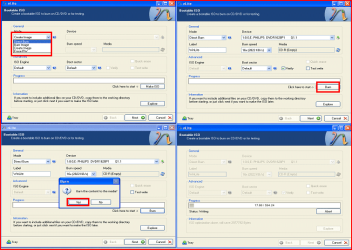
16.PNG
16) Click Next.
17.PNG
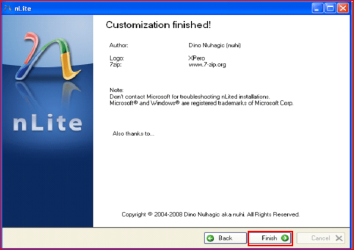
17) Click Finish.
18.PNG
Your Sata drive will now show up in setup.
19.PNG

 
Last edited by a moderator:
Thanks so much, theog.

This is valuable help now that XP installer no longer can keep up with SATA drives.

The use of screenshots is also far beyond anything else out there on the web for this.

Will be giving this out several times per week, I'm sure.
 
Thanks so much, theog.

This is valuable help now that XP installer no longer can keep up with SATA drives.

The use of screenshots is also far beyond anything else out there on the web for this.

Will be giving this out several times per week, I'm sure.

Thank you, Greg.

Ray.
 

My Computer

OS
ME/XP/Vista/Win7
I have an alienware aurora. I am trying to set up a dual boot so i can run xp and windows 7. Windows 7 is currently installed and it does not work with pro-tools 8 to my liking which is why i would like to install xp. where would i find the sata drivers for my machine?
 

My Computer

Computer Manufacturer/Model Number
alienware
OS
windows 7
Memory
12g
Graphics Card(s)
nvidia
Monitor(s) Displays
2 acer 22 inches
Cooling
alienware cooling system

My Computer

OS
ME/XP/Vista/Win7
Hi theog :)

I have a asus motherboard and I have followed your steps but its not working I can not integrate my drivers into my Win XP cd.
Can you plz tell me what is the problem?
 

My Computer

OS
Windows XP
Hi theog :)

I have a asus motherboard and I have followed your steps but its not working I can not integrate my drivers into my Win XP cd.
Can you plz tell me what is the problem?

Did you UNZIP the Sata driver download?

Can you post a link to download.
 

My Computer

OS
ME/XP/Vista/Win7
Studio XPS 8100 iastor issue

Hello,
I have a pre-installed Win7 Home Premium crate, but need XP to run my favourite apps. I have tried to make a new bootable disk with the SATA drivers included, but keep getting ''iastor.sys is corrupt''. I believe I've done everything that can be done, so don't know where to go from here.
I have tried to use 'R245418' driver from Dell in bembeded in nLite ISO. I selected 'Intel ICH8R/ICH9R/ICH10R/DO/5 SERIES/3400 SERIES' when presented with the option because that's what is in 'Manage/Device Manager/Storage Controller'.
Once I've made and burnt my new XP ISO, I try to install on my already 'shrunk' partition and I get past the F6 option then, 'iastor.sys is corrupt'.

Please, any help?
 

My Computer

Computer Manufacturer/Model Number
Dell Studio XPS 8100
OS
Windows 7 Home Premium
CPU
Intel i5
Motherboard
???
Memory
8Gb DDR3
Graphics Card(s)
nVidia GTS 240
Sound Card
Integrated 7.1
Monitor(s) Displays
Dell HD
Hard Drives
SATA Raid 0
Hello,
I have a pre-installed Win7 Home Premium crate, but need XP to run my favourite apps. I have tried to make a new bootable disk with the SATA drivers included, but keep getting ''iastor.sys is corrupt''. I believe I've done everything that can be done, so don't know where to go from here.
I have tried to use 'R245418' driver from Dell in bembeded in nLite ISO. I selected 'Intel ICH8R/ICH9R/ICH10R/DO/5 SERIES/3400 SERIES' when presented with the option because that's what is in 'Manage/Device Manager/Storage Controller'.
Once I've made and burnt my new XP ISO, I try to install on my already 'shrunk' partition and I get past the F6 option then, 'iastor.sys is corrupt'.

Please, any help?

Try the Intel drivers.

32-bit Floppy Configuration Utility
 

My Computer

OS
ME/XP/Vista/Win7
ASUSTeK Computer Inc.-Support-
find P4S800D-X and there you will find RAID to download :)
I have unziped and integrate it in xp cd with nlite, and when boot up xp says no hard drive found :S
Is there other way to integrate this drivers?
 

My Computer

OS
Windows XP
Theog,
Thanks for your advice, it pointed me in the right direction. I was definately selecting the wrong driver. My install got further than it ever had previously (day 3).
Tried again, didn't work, but it turns out I overlooked a few things (duh), forgot to 'slip' service pack 2.
Can't connect to the net on my XP though for some reason, thinking I need 32bit drivers or something.

Mate, thanks very much for you assistance, literally wouldn't have done it without ya!

Cheers!
 
Last edited:

My Computer

Computer Manufacturer/Model Number
Dell Studio XPS 8100
OS
Windows 7 Home Premium
CPU
Intel i5
Motherboard
???
Memory
8Gb DDR3
Graphics Card(s)
nVidia GTS 240
Sound Card
Integrated 7.1
Monitor(s) Displays
Dell HD
Hard Drives
SATA Raid 0
Theog,
Thanks for your advice, it pointed me in the right direction. I was definately selecting the wrong driver. My install got further than it ever had previously (day 3).
Tried again, didn't work, but it turns out I overlooked a few things (duh), forgot to 'slip' service pack 2.
Can't connect to the net on my XP though for some reason, thinking I need 32bit drivers or something.

Mate, thanks very much for you assistance, literally wouldn't have done it without ya!

Cheers!

You are welcome, & good luck.
 

My Computer

OS
ME/XP/Vista/Win7
Need some help

Hi guys,

I've been reading the forums the whole day on how to make my NEO B3230 a dual boot and I'm stuck with trying to Slipstream a SATA driver in my setup CD. Basically, the problem is that I couldn't find which driver I should download. I've been searching for the right driver and its been a headache. Anyway, here are the specs:

Pre-installed OS: Windows 7 Starter
Desired secondary OS: Windows XP Pro SP3
Processor: Intel Atom N450
Core Logic (I don't know if this will help): INtel NM10 Express Chipset
HDD: 320GB SATA (partitioned into 5 parts)

Hope anybody here could help me. I need it badly.

Cheers!
 

My Computer

OS
Windows 7
Hi guys,

I've been reading the forums the whole day on how to make my NEO B3230 a dual boot and I'm stuck with trying to Slipstream a SATA driver in my setup CD. Basically, the problem is that I couldn't find which driver I should download. I've been searching for the right driver and its been a headache. Anyway, here are the specs:

Pre-installed OS: Windows 7 Starter
Desired secondary OS: Windows XP Pro SP3
Processor: Intel Atom N450
Core Logic (I don't know if this will help): INtel NM10 Express Chipset
HDD: 320GB SATA (partitioned into 5 parts)

Hope anybody here could help me. I need it badly.

Cheers!

Try here:

http://downloadcenter.intel.com/Sea...t=Intel®+Rapid+Storage+Technology+(Intel®+RST)
 

My Computer

OS
ME/XP/Vista/Win7
Thanks so muc, Theog!

I downloaded this

Confirm Download

I've got a problem with the setup though. I've tried hitting F6 during my setup but that doesn't work. Do you know any alternative key (keys) to hit so that this will work? I've tried it countless times and it doesn't work.
 

My Computer

OS
Windows 7
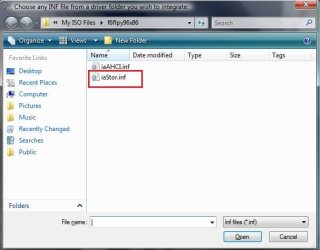
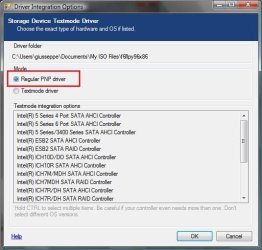
I also got another problem when slipstreaming my downloaded driver into my setup cd. I don't know which .inf file to use since there are two (I used iaStor.inf). Also I don't know which driver integration option to pick. There are also two options here (Regular PNP driver and Textmode driver). If I choose Textmode driver I get to have a lot of Textmode integration options to choose from which I don't really know which one to choose. So, I just selected regular PNP driver instead.

Let me know your thoughts. Refer to screenshots:


Thanks!
 

Attachments

  • inf files.jpg
    inf files.jpg
    37.6 KB · Views: 3,174
  • Driver Integration Options.jpg
    Driver Integration Options.jpg
    49.8 KB · Views: 4,421

My Computer

OS
Windows 7
I also got another problem when slipstreaming my downloaded driver into my setup cd. I don't know which .inf file to use since there are two (I used iaStor.inf). Also I don't know which driver integration option to pick. There are also two options here (Regular PNP driver and Textmode driver). If I choose Textmode driver I get to have a lot of Textmode integration options to choose from which I don't really know which one to choose. So, I just selected regular PNP driver instead.

Let me know your thoughts. Refer to screenshots:


Thanks!

Use both files.

I alway use Textmode.
 

My Computer

OS
ME/XP/Vista/Win7
I don't get the 10 step. what file is needed to copy for dell xps m1330? eg. Promise Fastrak 376. same problem with giusseppe.
 

My Computer

OS
Windows 7 Ultimate 64-bit
Last edited:

My Computer

OS
ME/XP/Vista/Win7
Back
Top