Blank White Screen Upon Start Up

KittyLoaf

New member
Local time
4:35 AM
Messages
1
I did a system scan with Spybot Search and Destroy along with Hijackthis. The computer was working just fine until start up. When everything loads a white blank screen randomly pops up and disappears. The computer is running just fine but it's bugging me what the white screen is cause it never happened before. I restarted the computer a few times to see if I can crash the white screen which I did. It gave me a CPAX20 error. I did some research on it and it says that I must of downloaded an adware which I don't think can be possible because I've been dealing with virus, maware, and adware for years and I can't find anything I've recently downloaded that would have any viruses because I download programs from a friend that's very reliable.

Anyone have any idea on what this is?

(Note: If this is in the wrong section then I apologize before hand)
 

My Computer My Computer

OS
Windows 7
Last edited:

My Computer My Computer

Computer Manufacturer/Model Number
WALLONN7 / LIN BLACK SERIES II
OS
Windows 7 Ultimate x64 SP1
CPU
AMD PHENOM II X6 1090T 3.2GHz
Motherboard
GIGABYTE GA-890FXA-UD7
Memory
8GB G.SKILL RIPJAWS - F3-10666CL7D
Graphics Card(s)
SAPPHIRE ATI RADEON HD 5870 VAPOR X OC
Sound Card
REALTEK DOLBY HOME THEATER
Monitor(s) Displays
LED LG W2486L
Screen Resolution
1080p
Hard Drives
SEAGATE 1TB -ST31000528AS - AHCI MODE - AS SATA
PSU
ZALMAN ZM1000-HP 1000W
Case
THERMALTAKE XASER VI VG4000SWA
Cooling
140MM x3 / 120MM x1 AIR COOLING - THERMALTAKE
Keyboard
MICROSOFT DIGITAL MEDIA KEYBOARD 3000 - USB
Mouse
MICROSOFT BASIC OPTICAL MOUSE 2.0 - USB
Internet Speed
600KBPS
Other Info
MICROSOFT XBOX 360 CONTROLLER
Hi man.
First of all, you need to put ALL system spec. If you don't know it, download and install:

Speccy from > hXXp://www.piriform.com/speccy/download


And let me know the results.


"PLEASE REP ANYONE WHO HELPS YOU"

Wallonn7, please include a warning when suggesting Beta software.

~~~~~~~~~~~~~~~

Hi, KittyLoaf.

It isn't necessary to know your system specs. Let's just double-check for malware with MBAM. Please download Malwarebytes' Anti-Malware to your desktop.


  • Double-click mbam-setup.exe and follow the prompts to install the program.
  • At the end, be sure a checkmark is placed next to Update Malwarebytes' Anti-Malware and Launch Malwarebytes' Anti-Malware, then click Finish.
  • If an update is found, it will download and install the latest version.
  • Once the program has loaded, be sure Quick scan is selected, then click Scan.
  • When the scan is complete, click OK, then Show Results to view the results.
  • Be sure that everything is checked, EXCEPT items in System Restore as shown in this sample:
    MBAM_SR.png
  • Click Remove Selected.
  • When completed, a log will open in Notepad. Please save it to a convenient location. The log can also be found here on Windows XP: C:\Documents and Settings\Username\Application Data\Malwarebytes\Malwarebytes' Anti-Malware\Logs\log-date.txt and C:\Users\UserName\AppData\Roaming\Malwarebytes\Malwarebytes' Anti-Malware\Logs\log-date.txt on Windows Vista and Windows 7.
  • Please post contents of that file in your next reply.
 

My Computer My Computer

OS
Windows 7 & Windows Vista Ultimate
HTML:
Wallonn7, please include a warning when suggesting Beta software.
Hi, Corrine.
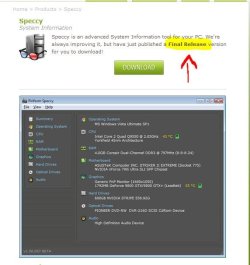
What I've suggested is not a beta anymore!!! Take a look at Piriform Website!!!
 

Attachments

  • Captu.JPG
    Captu.JPG
    43.4 KB · Views: 46

My Computer My Computer

Computer Manufacturer/Model Number
WALLONN7 / LIN BLACK SERIES II
OS
Windows 7 Ultimate x64 SP1
CPU
AMD PHENOM II X6 1090T 3.2GHz
Motherboard
GIGABYTE GA-890FXA-UD7
Memory
8GB G.SKILL RIPJAWS - F3-10666CL7D
Graphics Card(s)
SAPPHIRE ATI RADEON HD 5870 VAPOR X OC
Sound Card
REALTEK DOLBY HOME THEATER
Monitor(s) Displays
LED LG W2486L
Screen Resolution
1080p
Hard Drives
SEAGATE 1TB -ST31000528AS - AHCI MODE - AS SATA
PSU
ZALMAN ZM1000-HP 1000W
Case
THERMALTAKE XASER VI VG4000SWA
Cooling
140MM x3 / 120MM x1 AIR COOLING - THERMALTAKE
Keyboard
MICROSOFT DIGITAL MEDIA KEYBOARD 3000 - USB
Mouse
MICROSOFT BASIC OPTICAL MOUSE 2.0 - USB
Internet Speed
600KBPS
Other Info
MICROSOFT XBOX 360 CONTROLLER
I suggest you edit your link then, Wallonn7, as it states the following:

Please note this is a beta version of Speccy and should only be used by advanced users on test machines. We recommend you wait for a final release version before downloading. {emphasis added}
 

My Computer My Computer

OS
Windows 7 & Windows Vista Ultimate
I suggest you edit your link then, Wallonn7, as it states the following:

Please note this is a beta version of Speccy and should only be used by advanced users on test machines. We recommend you wait for a final release version before downloading. {emphasis added}


Link is corrected now!!! Thanks Corrine!!!
 

My Computer My Computer

Computer Manufacturer/Model Number
WALLONN7 / LIN BLACK SERIES II
OS
Windows 7 Ultimate x64 SP1
CPU
AMD PHENOM II X6 1090T 3.2GHz
Motherboard
GIGABYTE GA-890FXA-UD7
Memory
8GB G.SKILL RIPJAWS - F3-10666CL7D
Graphics Card(s)
SAPPHIRE ATI RADEON HD 5870 VAPOR X OC
Sound Card
REALTEK DOLBY HOME THEATER
Monitor(s) Displays
LED LG W2486L
Screen Resolution
1080p
Hard Drives
SEAGATE 1TB -ST31000528AS - AHCI MODE - AS SATA
PSU
ZALMAN ZM1000-HP 1000W
Case
THERMALTAKE XASER VI VG4000SWA
Cooling
140MM x3 / 120MM x1 AIR COOLING - THERMALTAKE
Keyboard
MICROSOFT DIGITAL MEDIA KEYBOARD 3000 - USB
Mouse
MICROSOFT BASIC OPTICAL MOUSE 2.0 - USB
Internet Speed
600KBPS
Other Info
MICROSOFT XBOX 360 CONTROLLER
white screen on boot up

Apple Macbook Pro 15
Windows 7 Ultimate
CPU Intel 2.20Ghz
Ram: 8
Motherboard: Mac
Graphics: AMD Radeon HD 6750M
Hard Drive: 1GB

Since last windows 12 updates, I now get white screen on boot up, I let it run all night thinking it was part of updates.
This morning I rebooted and white aagain
So I rebooted with F8 and nothing
I disconected all my external drive, mouse, keyboard, it boots with F8, white without
I ran Norton 360 virus program long mode and states 110 virus, so Norton is not catching these in background, not sure if it is virus, only states risk dedected and cleaned
Still boots in white screen, not sure if Microsoft updates has something to do with it.

This is bothering me, because I have a lot of work to do and write contracts, this has consumed 2 days of my time.

help if you have seen more oif this issue lately
 

My Computer My Computer

Computer Manufacturer/Model Number
Aple macbook pro
OS
windows 7 64 bit
Memory
8
Hard Drives
1 gb
malwarebytes

Hi man.
First of all, you need to put ALL system spec. If you don't know it, download and install:

Speccy from > hXXp://www.piriform.com/speccy/download

And let me know the results.


"PLEASE REP ANYONE WHO HELPS YOU"

Wallonn7, please include a warning when suggesting Beta software.

~~~~~~~~~~~~~~~

Hi, KittyLoaf.

It isn't necessary to know your system specs. Let's just double-check for malware with MBAM. Please download Malwarebytes' Anti-Malware to your desktop.


  • Double-click mbam-setup.exe and follow the prompts to install the program.
  • At the end, be sure a checkmark is placed next to Update Malwarebytes' Anti-Malware and Launch Malwarebytes' Anti-Malware, then click Finish.
  • If an update is found, it will download and install the latest version.
  • Once the program has loaded, be sure Quick scan is selected, then click Scan.
  • When the scan is complete, click OK, then Show Results to view the results.
  • Be sure that everything is checked, EXCEPT items in System Restore as shown in this sample:
    MBAM_SR.png
  • Click Remove Selected.
  • When completed, a log will open in Notepad. Please save it to a convenient location. The log can also be found here on Windows XP: C:\Documents and Settings\Username\Application Data\Malwarebytes\Malwarebytes' Anti-Malware\Logs\log-date.txt and C:\Users\UserName\AppData\Roaming\Malwarebytes\Malwarebytes' Anti-Malware\Logs\log-date.txt on Windows Vista and Windows 7.
  • Please post contents of that file in your next reply.
I also downloaded the program as noted, but it wants me to pay first, are you selling these? No mention of it in the article above,
 

My Computer My Computer

Computer Manufacturer/Model Number
Aple macbook pro
OS
windows 7 64 bit
Memory
8
Hard Drives
1 gb
Malwarebytes has a 'paid' and free download ... download (free version) Malwarebytes' Anti-Malware to your desktop
Malwarebytes Anti-Malware Download
* Double-click mbam-setup.exe and follow the prompts to install the program.Right click to run as Administrator, using Windows 7 or Vista.
* At the end, be sure a checkmark is placed next to Update Malwarebytes' Anti-Malware and Launch Malwarebytes' Anti-Malware, then click Finish.
* If an update is found, it will download and install the latest version.
* Once the program has loaded, select Perform full scan, then click Scan.
* When the scan is complete, click OK, then Show Results to view the results.
* Be sure that everything is checked, and click Remove Selected.
 

My Computer My Computer

Computer type
PC/Desktop
Computer Manufacturer/Model Number
Bruce ... somewhere in his 40's
OS
Windows 7 Ultimate 32bit SP1
CPU
Intel(R) Core(TM)2 Quad CPU @ 2.40GHz, 2400 MHz
Motherboard
INTEL/D975XBX2
Memory
4 GB
Graphics Card(s)
ATI Radeon HD 2600 Pro
Monitor(s) Displays
Samsung SyncMaster 914v
Screen Resolution
1280 x 1024
Hard Drives
2/500GB each ... ST3500630AS ATA Device.
One is not connected
PSU
Rocketfish 700 W
Case
G.Skill Gigabyte Chassis
Keyboard
Standard PS/2 Keyboard
Mouse
Microsoft PS/2 Mouse
Internet Speed
DSL
Antivirus
Avira Internet Security
Browser
IE 11
Other Info
ATI HDMI Audio
Back
Top