JavaScript is disabled. For a better experience, please enable JavaScript in your browser before proceeding.
You are using an out of date browser. It may not display this or other websites correctly.
You should upgrade or use an
alternative browser .
April 4/27/2010 Windows 7 x64 updates = menu problem
I just installed two April 4/27/2010 Windows 7 x64 updates [KB975496 & KB980408]. After I rebooted, I noticed a strange problem. All my menus now open towards the left! Anyone else have this problem? Can this be fixed?
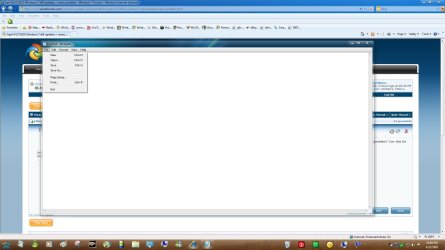
No, I installed those updates and mine is opening like this...
note.jpg
125.1 KB
· Views: 102
Win 10 Pro x64 Intel I5-2500K @3.3GHz 16GB G.Skill Ripjaws X (4x4GB) EVGA GeForce 750 Ti SC 2GB PC/Desktop Self Built Win 10 Pro x64 Intel I5-2500K @3.3GHz Asrock P67 Extreme4 16GB G.Skill Ripjaws X (4x4GB) EVGA GeForce 750 Ti SC 2GB ASUS Xonar DG 5.1 Channels 24-bit 96KHz PCI Interface Sound auria eq2367 1920 x 1080 250GB Samsung 850 EVO SSD SeaSonic X 650W 80 Plus Gold Corsair Obsidian 750D Corsair H60, Three 140mm case fans Logitech Wireless Keyboard K520 Logitech Wireless Mouse M310 Wave Broadband ~ 100 dn 5 up Windows Defender, Malwarebytes Premium Edge, IE11, Chrome Laptop specs: HP g7-1365dx /
New member
Member
Thread Starter
i just uninstalled the 2 updates and the problem is still there...
It looks like you have your notepad minimized, does it do that if you open it full size?
Win 10 Pro x64 Intel I5-2500K @3.3GHz 16GB G.Skill Ripjaws X (4x4GB) EVGA GeForce 750 Ti SC 2GB PC/Desktop Self Built Win 10 Pro x64 Intel I5-2500K @3.3GHz Asrock P67 Extreme4 16GB G.Skill Ripjaws X (4x4GB) EVGA GeForce 750 Ti SC 2GB ASUS Xonar DG 5.1 Channels 24-bit 96KHz PCI Interface Sound auria eq2367 1920 x 1080 250GB Samsung 850 EVO SSD SeaSonic X 650W 80 Plus Gold Corsair Obsidian 750D Corsair H60, Three 140mm case fans Logitech Wireless Keyboard K520 Logitech Wireless Mouse M310 Wave Broadband ~ 100 dn 5 up Windows Defender, Malwarebytes Premium Edge, IE11, Chrome Laptop specs: HP g7-1365dx /
The Contemplator, (1963-2013)
Guru
Gold Member
Windows 8.1 Pro RTM x64 Intel Core-i5-3570K 4-core @ 3.4GHz (Ivy Brid... 4 x 4GB DDR3-1600 Corsair Vengeance CMZ8GX3M2... MSI GeForce GTX770 Gaming OC 2GB PC/Desktop Dwarf Dwf/11/2012 r09/2013 Windows 8.1 Pro RTM x64 Intel Core-i5-3570K 4-core @ 3.4GHz (Ivy Bridge) (OC 4.4GHz) ASRock Z77 Extreme4-M 4 x 4GB DDR3-1600 Corsair Vengeance CMZ8GX3M2A1600C9B (16GB) MSI GeForce GTX770 Gaming OC 2GB Realtek High Definition on board solution (ALC 898) ViewSonic VA1912w Widescreen (VGA) 1440x900 OCZ Agility 3 SSD 120GB SATA III x2 (RAID 0) XFX Pro Series 850W Semi-Modular Gigabyte IF233 1 x 120mm Front Inlet 1 x 120mm Rear Exhaust Microsoft Comfort Curve Keyboard 3000 (USB) Microsoft Comfort Mouse 3000 for Business (USB) NetGear DG834Gv3 ADSL Modem/Router (Ethernet) ~4.0 Mb/s (O2) Avast! 8.0.1497 IE 11 Optical Drive: HL-DT-ST BD-RE BH10LS30 SATA Bluray
New member
Member
Thread Starter
thanks that fixed it!
The Contemplator, (1963-2013)
Guru
Gold Member
You're welcome.
Windows 8.1 Pro RTM x64 Intel Core-i5-3570K 4-core @ 3.4GHz (Ivy Brid... 4 x 4GB DDR3-1600 Corsair Vengeance CMZ8GX3M2... MSI GeForce GTX770 Gaming OC 2GB PC/Desktop Dwarf Dwf/11/2012 r09/2013 Windows 8.1 Pro RTM x64 Intel Core-i5-3570K 4-core @ 3.4GHz (Ivy Bridge) (OC 4.4GHz) ASRock Z77 Extreme4-M 4 x 4GB DDR3-1600 Corsair Vengeance CMZ8GX3M2A1600C9B (16GB) MSI GeForce GTX770 Gaming OC 2GB Realtek High Definition on board solution (ALC 898) ViewSonic VA1912w Widescreen (VGA) 1440x900 OCZ Agility 3 SSD 120GB SATA III x2 (RAID 0) XFX Pro Series 850W Semi-Modular Gigabyte IF233 1 x 120mm Front Inlet 1 x 120mm Rear Exhaust Microsoft Comfort Curve Keyboard 3000 (USB) Microsoft Comfort Mouse 3000 for Business (USB) NetGear DG834Gv3 ADSL Modem/Router (Ethernet) ~4.0 Mb/s (O2) Avast! 8.0.1497 IE 11 Optical Drive: HL-DT-ST BD-RE BH10LS30 SATA Bluray
Context Menus 1. Start the ‘Run’ command 2. Type in: shell:::{80F3F1D5-FECA-45F3-BC32-752C152E456E} – click on OK 3. This will start the Tablet PC Settings configuration dialog - even if you do not have a Tablet PC 4. Select the ‘Other’ tab 5. Under the ‘Handedness’ setting select: ‘Left-handed…’ – click on Apply and then Ok
thank you very much Dwarf
that help me alot...
to all.. remember after you do, just
make sure to "log off" than "log in" Or "Restart" your windows
it also work for x86
just like mine
Windows 7 Home Premium 32bit
Windows 7 Home Premium 32bit