Well I’ve finally got my i7 system, and it’s up and running without issue. I upgraded from a Core 2 Quad Q6600 (2.4GHz) overclocked to 2.9GHz on an
Intel D975XBX2 MB with 4gig of Corsair Dominator RAM - TWIN2X4096-8500C5DF (1066MHz)
The upgrade included a Core 17-930 (2.80) processor on a
Gigabyte GA-X58A-UD5 MB with 6gig of
Corsair Dominator RAM - TR3X6G1600C8D. And yes…the memory IS running at 1600MHz out the box! You just need to make sure XMP is enabled in your BIOS!!! And no… the system ISN’T overclocked! I’ve read plenty of reviewers complaining that this memory won’t do 1600. You can put that one to rest!
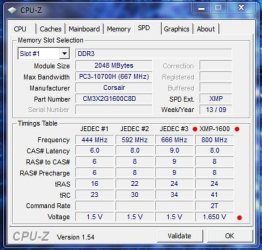
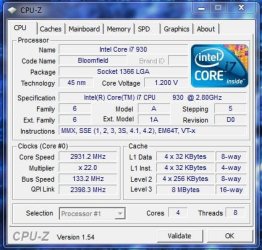
And as I stated earlier, this is the first non-Intel motherboard since my first two Abit boards at the end of the 90’s. Since 2000 I’ve been using Intel’s motherboards with great success. Sure they’re not the great overclockers some of the other manufacture’s are known for, but they’re rock solid stable.
This Gigabyte board is sweet looking and has a solid feel and look to it. It was kind of funny cause when I pulled my D975XBX2 board out of the case it felt cheap and flimsy compared to the Gigabyte board. Not saying the D975 is a cheap board because it isn’t; in fact the 975 was (is) an excellent board.
At any rate, the Gigabyte’s BIOS here is a bit intimidating compare to the D975, so many settings. LOL.
Some quick notes on the upgrade….
I’m still using my
Antec P182 case without issue and plenty of room. I was worried it would be a little cramped. It’s not and I’m happy. Man I love the simplistic looks of this case.
I’m also still using my
ZALMAN CNPS9500 AT CPU cooler. All I had to do was purchase a
ZM-CS4A socket 1366 clip kit, and wholla, my CPU cooler is tightly secured and working OK. Be aware that the MB needs to be removed to install this kit. It also had to be removed for the cooler itself. I prefer it this way anyway as I detest those clip type coolers.
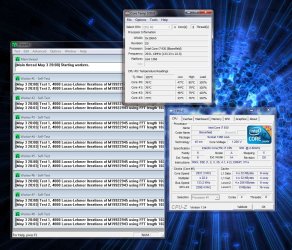
Now, if you’ve read the
reviews on the UD5, you’ve heard people complain about the location of the IDE and Floppy connectors. I guess that would depend on the MB. While I don’t have use for an IDE drive, I did have a floppy drive. Now, since I have an Antec P182 case, the floppy bay is just about the power supply bay which is located at the bottom of the case. Which, is coincidentally, is where the floppy connector on the MB is located. So…this meant I was able to use a short 3 inch floppy cable without issue.
However I wound up removing the floppy drive and cable altogether (do we really need a floppy drive?) because of the design of the MB and it’s PCI(E) layout. Oooookaaaaaay.
Here’s my cards… One GPU (ATI 4890) dual slot, an X-Fi Titanium Pro soundcard (PCI Express), and an ATI TV Wonder Pro 650 (PCI)
Now…because of the board’s layout/design, you automatically lose one mini PCIE port because of the location of the heat exchange…. Unless you have an extremely short (less than an inch) card.
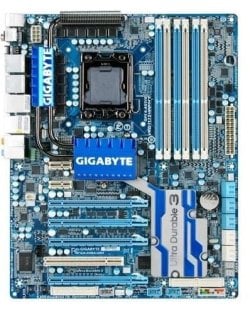
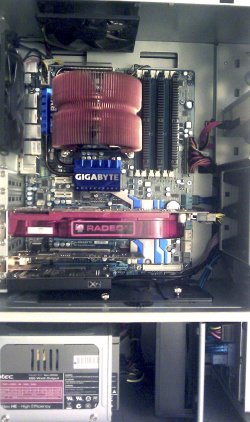
So, this leave’s the second mini PCIE port, well….. If you put your GPU in the first PCIEX16 port (and you should), a card using the second mini port will wind up be overheated by the proximity of the GPU! This is exactly what happened to my soundcard and I was forced to move it to the last (bottom) PCIEX8 port. Thus the final decision to get rid of the floppy drive and cable as the cable prevented the use of the PCIE port in my situation (small clearance between PS bay and bottom edge of MB)
Now since the PCI slot is located between the PCIEX16_2 and PCIEX8_2 slots there isn’t any clearance issues…. unless you want to go Crossfire or SLI using dual slot cards! If so, a standard PCI card can windup blocking part of the fan opening of the second GPU using the second PCIEX16 slot (PCIEX16_2)!
So….although there are six PCIE slots and one PCI slot, depending on your configuration, example mine, you can only use three slots effectively because of cooling/clearance concerns!
And then there’s this Note 3 about X16 lane performance on page 12 of the user’s manual…
The PCIEX8_1 and PCIEX8_2 slots share bandwidth with the PCIEX16_1 and PCIEX16_2 slots respectively. When PCIEX8_1 is populated with an expansion card, the PCIEX16_1 slot will operate at up to x8 mode; when PCIEX8_2 is populated with an expansion card, the PCIEX16_2 slot will operate at up to x8 mode.
In short, if I was to put my GPU in PCIEX16 and my soundcard in PCIEX8, the GPU slot would run at X8 speeds. Hmmm…..
Other notes of interest….
Once I got the board prepped and set up, out of curiosity I tried booting into my current Winodw7 install and Windows booted, loaded a few drivers and once rebooted seemed to function fine; it did however show that I had 3 days to register Windows! However to avoid any potential problems I went ahead and reinstalled Windows anyway. The reinstall was flawless; in fact I was amazed at how quickly Windows installed. Pretty quick.
I did have a strange issue with my Logitech wireless mouse and keyboard. I installed the Logitech SetPoint 6 drivers and things worked fine… until Windows entered sleep mode, than the issue happened… I could wake windows with the mouse, but then the mouse and keyboard would immediately freeze and the only way to get them working again was to do a hard restart.
This happened every time Windows went into sleep mode. Ensuring the mouse and keyboard was set to Legacy in the BIOS didn’t help and I was set to give tech support a call but happened upon
Brink’s tutorial on Sleep Mode plus a couple of driver updates (chipset and NEC USB) and so far the issue is gone. Phew!!!
I’m still using my trusty old
Antec Neo HE 550 power supply and things are running smooth; although I’ll do an upgrade to it next month since I need a power supply and case for my old system.
That’s it. I’m extremely happy with the build thus far, and it’s pretty fast as is. Now I just have to get my overclock going.
That’s it for now, Peace

PS. Micro Center has the
Core i7-930 for $199.99 boxed!!! Don’t know how long this deal will last so…
Compare New Egg @ $294.99



