
Home network ICS with router

Fredrol

New member
Local time
12:29 PM
Messages
8
Hey!

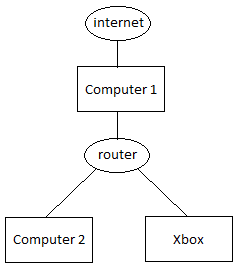
I'm having a bit of trouble setting up my home network, which looks something like in the image below.

I've got Computer 1 connected to the internet via NIC 1 and connected to the router via NIC 2.

What i want to do is
A) is share the internet connection with the rest of the network via the router.
B) be able to access computer 1 shares from the rest of the network

Any suggestions?

/F

EDIT: The router is a D-Link DIR-100
 

Attachments
  • Untitled.png
    Untitled.png
    1.4 KB · Views: 972

My Computer My Computer

OS
Windows 7
You would be better served to have the router connected directly to the modem then have everything plugged into the router. I can't think of a good reason to use ICS when you already have a router. The router will also use a common default gateway which will allow for file sharing.

Internet>modem>router> switch, >all pc's connected to either the router or a switch.
 

My Computer My Computer

Computer type
PC/Desktop
Computer Manufacturer/Model Number
Home built
OS
Windows 7 Ult, Windows 8.1 Pro,
CPU
Q9650-4.275GHz, E8600 4.5GHz, E6750-3.8GHz
Motherboard
Evga 780i FTW
Memory
G.Skill PC2 9600 1200Mhz 5 5 5 15 2T
Graphics Card(s)
GTX480
Sound Card
Asus Xonar D2
Monitor(s) Displays
HannsG
Screen Resolution
1680X1050
Hard Drives
GSkill Phoenix Pro 120GB SSD
PSU
ThermalTake Toughpower 1000Watt modular
Case
ThermalTake XaserV
Cooling
Xigmatek S1283
Keyboard
Logitech G15
Mouse
Logitech G9
Internet Speed
T1
Hey and thank you for your fast reply!

I have a pretty high speed fiber connection and the router cant handle that. When downloading torrents or files from servers with high bandwith, the whole network fails. I suppose i could get a better router, but I can't afford it, since I'm a poor student :p The same goes for a switch... I suppose I could get one next month, but, as it is now, this router is what I have to work with.

EDIT: That's why I want computer 1 to be connected directly to the internet, so I can do all the downloading on that one and then share it to the rest of the network if needed. I still need internet access on the other units for browsing, and using online services on the x-box.

I think you get the picture ^^

/F
 

My Computer My Computer

OS
Windows 7
Hey and thank you for your fast reply!

I have a pretty high speed fiber connection and the router cant handle that. When downloading torrents or files from servers with high bandwith, the whole network fails. I suppose i could get a better router, but I can't afford it, since I'm a poor student :p The same goes for a switch... I suppose I could get one next month, but, as it is now, this router is what I have to work with.

EDIT: That's why I want computer 1 to be connected directly to the internet, so I can do all the downloading on that one and then share it to the rest of the network if needed. I still need internet access on the other units for browsing, and using online services on the x-box.

I think you get the picture ^^

/F

Thats not really how it works, you need to have everything plugged in down stream of the router. The bandwidth will be the same either way and there is only so many torrents you can load up at once without it hogging all the bandwidth. I think I can load up like 5 or 6 before it bogs down my network.
 

My Computer My Computer

Computer type
PC/Desktop
Computer Manufacturer/Model Number
Home built
OS
Windows 7 Ult, Windows 8.1 Pro,
CPU
Q9650-4.275GHz, E8600 4.5GHz, E6750-3.8GHz
Motherboard
Evga 780i FTW
Memory
G.Skill PC2 9600 1200Mhz 5 5 5 15 2T
Graphics Card(s)
GTX480
Sound Card
Asus Xonar D2
Monitor(s) Displays
HannsG
Screen Resolution
1680X1050
Hard Drives
GSkill Phoenix Pro 120GB SSD
PSU
ThermalTake Toughpower 1000Watt modular
Case
ThermalTake XaserV
Cooling
Xigmatek S1283
Keyboard
Logitech G15
Mouse
Logitech G9
Internet Speed
T1
Thats not really how it works, you need to have everything plugged in down stream of the router. The bandwidth will be the same either way and there is only so many torrents you can load up at once without it hogging all the bandwidth. I think I can load up like 5 or 6 before it bogs down my network.

Well, I'm 100% positive that the router starts struggling at around 25 Mb/s and at 100Mb/s it can't keep up at all... I've tried it before and it really doesn't work.

The network works fine as it is now; my main computer (computer 1) has direct access to the internet and can access all the other units via the router. Now i just want to share that internet access to all the other units.

To clarify: Computer 1 has two ip addresses on two different nics. One public, which is given by my isps dhcp and it is, of course, via this nic i get internet access. And then i have an internal ip on the second nic (192.168.0.101) given by the router, and it is via this nic i access the rest of the network.

Isn't there any way to, like, share the internet access to the router if i connect computer 1 to the WAN port, or something like that?

/F
 

My Computer My Computer

OS
Windows 7
Thats not really how it works, you need to have everything plugged in down stream of the router. The bandwidth will be the same either way and there is only so many torrents you can load up at once without it hogging all the bandwidth. I think I can load up like 5 or 6 before it bogs down my network.

Well, I'm 100% positive that the router starts struggling at around 25 Mb/s and at 100Mb/s it can't keep up at all... I've tried it before and it really doesn't work.

The network works fine as it is now; my main computer (computer 1) has direct access to the internet and can access all the other units via the router. Now i just want to share that internet access to all the other units.

To clarify: Computer 1 has two ip addresses on two different nics. One public, which is given by my isps dhcp and it is, of course, via this nic i get internet access. And then i have an internal ip on the second nic (192.168.0.101) given by the router, and it is via this nic i access the rest of the network.

Isn't there any way to, like, share the internet access to the router if i connect computer 1 to the WAN port, or something like that?

/F

I didn't realize you were attempting a dual NIC set up. Not much info on that for Windows 7 as yet. It can be done I believe but it's not a supported configuration. You will need to google for a dual NIC set up for Windows 7.
 

My Computer My Computer

Computer type
PC/Desktop
Computer Manufacturer/Model Number
Home built
OS
Windows 7 Ult, Windows 8.1 Pro,
CPU
Q9650-4.275GHz, E8600 4.5GHz, E6750-3.8GHz
Motherboard
Evga 780i FTW
Memory
G.Skill PC2 9600 1200Mhz 5 5 5 15 2T
Graphics Card(s)
GTX480
Sound Card
Asus Xonar D2
Monitor(s) Displays
HannsG
Screen Resolution
1680X1050
Hard Drives
GSkill Phoenix Pro 120GB SSD
PSU
ThermalTake Toughpower 1000Watt modular
Case
ThermalTake XaserV
Cooling
Xigmatek S1283
Keyboard
Logitech G15
Mouse
Logitech G9
Internet Speed
T1
Yeah, I've googled it can't find that much information. In those threads I've found the answer always seems to be "put all computers behind the router" which isn't really what I want.

BTW, this thread is the first hit on google when searching for "dual nic windows 7 router ics" :D
 

My Computer My Computer

OS
Windows 7
Yes I looked all over but there wasn't really a Windows 7 type set up procedure for this, I know it can be done but the procedure seems to be different depending on the Op system and the router being used.
 

My Computer My Computer

Computer type
PC/Desktop
Computer Manufacturer/Model Number
Home built
OS
Windows 7 Ult, Windows 8.1 Pro,
CPU
Q9650-4.275GHz, E8600 4.5GHz, E6750-3.8GHz
Motherboard
Evga 780i FTW
Memory
G.Skill PC2 9600 1200Mhz 5 5 5 15 2T
Graphics Card(s)
GTX480
Sound Card
Asus Xonar D2
Monitor(s) Displays
HannsG
Screen Resolution
1680X1050
Hard Drives
GSkill Phoenix Pro 120GB SSD
PSU
ThermalTake Toughpower 1000Watt modular
Case
ThermalTake XaserV
Cooling
Xigmatek S1283
Keyboard
Logitech G15
Mouse
Logitech G9
Internet Speed
T1
Shouldn't bridging NIC1 and NIC2 in computer1 do the trick?
 

My Computer My Computer

Computer type
Laptop
Computer Manufacturer/Model Number
HP ENVY 17-1150eg
OS
Windows 10 Pro x64 EN-GB
CPU
1.6 GHz Intel Core i7-720QM Processor
Memory
6 GB
Graphics Card(s)
ATI Mobility Radeon HD 5850 Graphics
Sound Card
Beats sound system with integrated subwoofer
Monitor(s) Displays
17" laptop display, 22" LED and 32" Full HD TV through HDMI
Screen Resolution
1600*900 (1), 1920*1080 (2&3)
Hard Drives
Internal: 2 x 500 GB SATA Hard Disk Drive 7200 rpm
External: 2TB for backups, 3TB USB3 network drive for media
Cooling
As Envy runs a bit warm, I have it on a Cooler Master pad
Keyboard
Logitech diNovo Media Desktop Laser (bluetooth)
Mouse
Logitech Performance Mouse MX
Internet Speed
50/10 Mbps VDSL
Antivirus
Windows Defender 4.3.9431.0
Browser
Maxthon 3.5.2., IE11
I'm not really sure what bridging does, but it doesn't seem to help.

But I solved the problem... It might be a bit, eh, ghetto, but it works.

I used ICS to share the connection from nic 1, which have internet access to to nic 2 and then connected nic 2 to the wan port of the router. Now all units have internet connection, but they aren't networked properly. I.e. computer 2 and the x-box had no access to computer 1.

Well, I had another nic lying around in one of those boxes with spare computer parts that you save because you might need them one day... So I installed it in computer 1 (so now i got three nics in it) and the connected it to one of the routers lan ports... And now everything works as I want it :D

Not the most stylish solution i suppose, but still :p

Thank you for your support and effort!
 

My Computer My Computer

OS
Windows 7
Long as it works thats what matters. Nice work on rigging that up, very creative Fredrol.
 

My Computer My Computer

Computer type
PC/Desktop
Computer Manufacturer/Model Number
Home built
OS
Windows 7 Ult, Windows 8.1 Pro,
CPU
Q9650-4.275GHz, E8600 4.5GHz, E6750-3.8GHz
Motherboard
Evga 780i FTW
Memory
G.Skill PC2 9600 1200Mhz 5 5 5 15 2T
Graphics Card(s)
GTX480
Sound Card
Asus Xonar D2
Monitor(s) Displays
HannsG
Screen Resolution
1680X1050
Hard Drives
GSkill Phoenix Pro 120GB SSD
PSU
ThermalTake Toughpower 1000Watt modular
Case
ThermalTake XaserV
Cooling
Xigmatek S1283
Keyboard
Logitech G15
Mouse
Logitech G9
Internet Speed
T1
:thumbsup:
That is indeed a very creative fix.
 

My Computer My Computer

Computer type
Laptop
Computer Manufacturer/Model Number
HP ENVY 17-1150eg
OS
Windows 10 Pro x64 EN-GB
CPU
1.6 GHz Intel Core i7-720QM Processor
Memory
6 GB
Graphics Card(s)
ATI Mobility Radeon HD 5850 Graphics
Sound Card
Beats sound system with integrated subwoofer
Monitor(s) Displays
17" laptop display, 22" LED and 32" Full HD TV through HDMI
Screen Resolution
1600*900 (1), 1920*1080 (2&3)
Hard Drives
Internal: 2 x 500 GB SATA Hard Disk Drive 7200 rpm
External: 2TB for backups, 3TB USB3 network drive for media
Cooling
As Envy runs a bit warm, I have it on a Cooler Master pad
Keyboard
Logitech diNovo Media Desktop Laser (bluetooth)
Mouse
Logitech Performance Mouse MX
Internet Speed
50/10 Mbps VDSL
Antivirus
Windows Defender 4.3.9431.0
Browser
Maxthon 3.5.2., IE11
This is how you set it up:

Computer 1:

Step 1: Incoming Internet (Make sure you obtain the DNS servers for later)

Step 2: Turn on ICS (Make sure you have Windows Home Edition or later, Starter won't work)
- The ICS will make the Secondary NIC have the IP: 192.168.0.1

Step 3: Run a Patch cable from Computer 1 NIC into the WAN port of the Router's WAN.

================================
Routers Configuration:

Activate the STATIC IP on the router:
IP: 192.168.0.2
Subnet: 255.255.255.0
Gateway: 192.168.0.1

DNS: obtain from your computer 1
DNS Secondary: by CMD and ipconfig /all

Make sure your NAT is enabled on the router and it will distrubute the internet to any computer connected to the router.
 

My Computer My Computer

Computer Manufacturer/Model Number
HP Pavilion Elite HPE-410f
OS
Windows 7 Ultimate x64
CPU
AMD Phenom x6 1045t
Motherboard
N/A
Memory
8 GB
Graphics Card(s)
ATI Radeon HD 5570
Sound Card
Realtek Highdefinition Audio / 5.1 Dolby Setup
Monitor(s) Displays
HP w2207h Widescreen
Screen Resolution
1680*1050
Hard Drives
1 TB (fixed), 320 Portable maxtor, Server Hard drives
PSU
350 Watt
Case
HP CASE
Cooling
Bass
Keyboard
Logitech MX 5500
Mouse
Logitech MX 5500
Internet Speed
ROAD RUNNER 16MB D/512 U
This is how you set it up:

Computer 1:

Step 1: Incoming Internet (Make sure you obtain the DNS servers for later)

Step 2: Turn on ICS (Make sure you have Windows Home Edition or later, Starter won't work)
- The ICS will make the Secondary NIC have the IP: 192.168.0.1

Step 3: Run a Patch cable from Computer 1 NIC into the WAN port of the Router's WAN.

================================
Routers Configuration:

Activate the STATIC IP on the router:
IP: 192.168.0.2
Subnet: 255.255.255.0
Gateway: 192.168.0.1

DNS: obtain from your computer 1
DNS Secondary: by CMD and ipconfig /all

Make sure your NAT is enabled on the router and it will distrubute the internet to any computer connected to the router.

Yes I think that would work Acurasd. I think he could have skipped using the third NIC if he would have set up a static IP and used a common default gateway plus the ICS.

Of course just purchasing a 10/100/1000 router would be the best way to set up this network.
 

My Computer My Computer

Computer type
PC/Desktop
Computer Manufacturer/Model Number
Home built
OS
Windows 7 Ult, Windows 8.1 Pro,
CPU
Q9650-4.275GHz, E8600 4.5GHz, E6750-3.8GHz
Motherboard
Evga 780i FTW
Memory
G.Skill PC2 9600 1200Mhz 5 5 5 15 2T
Graphics Card(s)
GTX480
Sound Card
Asus Xonar D2
Monitor(s) Displays
HannsG
Screen Resolution
1680X1050
Hard Drives
GSkill Phoenix Pro 120GB SSD
PSU
ThermalTake Toughpower 1000Watt modular
Case
ThermalTake XaserV
Cooling
Xigmatek S1283
Keyboard
Logitech G15
Mouse
Logitech G9
Internet Speed
T1
i guess it dpeends on what kind of internet he has, somepeople have that usb internet and not the cat5 internet.....

i never found a device that would convert usb to cat5. So they use a computer to bridge the connection.
 

My Computer My Computer

Computer Manufacturer/Model Number
HP Pavilion Elite HPE-410f
OS
Windows 7 Ultimate x64
CPU
AMD Phenom x6 1045t
Motherboard
N/A
Memory
8 GB
Graphics Card(s)
ATI Radeon HD 5570
Sound Card
Realtek Highdefinition Audio / 5.1 Dolby Setup
Monitor(s) Displays
HP w2207h Widescreen
Screen Resolution
1680*1050
Hard Drives
1 TB (fixed), 320 Portable maxtor, Server Hard drives
PSU
350 Watt
Case
HP CASE
Cooling
Bass
Keyboard
Logitech MX 5500
Mouse
Logitech MX 5500
Internet Speed
ROAD RUNNER 16MB D/512 U
This is how you set it up:

Computer 1:

Step 1: Incoming Internet (Make sure you obtain the DNS servers for later)

Step 2: Turn on ICS (Make sure you have Windows Home Edition or later, Starter won't work)
- The ICS will make the Secondary NIC have the IP: 192.168.0.1

Step 3: Run a Patch cable from Computer 1 NIC into the WAN port of the Router's WAN.

================================
Routers Configuration:

Activate the STATIC IP on the router:
IP: 192.168.0.2
Subnet: 255.255.255.0
Gateway: 192.168.0.1

DNS: obtain from your computer 1
DNS Secondary: by CMD and ipconfig /all

Make sure your NAT is enabled on the router and it will distrubute the internet to any computer connected to the router.

Yes I think that would work Acurasd. I think he could have skipped using the third NIC if he would have set up a static IP and used a common default gateway plus the ICS.

Of course just purchasing a 10/100/1000 router would be the best way to set up this network.


It does work... I use to do it all the time when I was in iraq. They want to over charge on the internet all the time becuase they thought they could get alway with it. I, with lots of time on my hands, found a way around it.
 

My Computer My Computer

Computer Manufacturer/Model Number
HP Pavilion Elite HPE-410f
OS
Windows 7 Ultimate x64
CPU
AMD Phenom x6 1045t
Motherboard
N/A
Memory
8 GB
Graphics Card(s)
ATI Radeon HD 5570
Sound Card
Realtek Highdefinition Audio / 5.1 Dolby Setup
Monitor(s) Displays
HP w2207h Widescreen
Screen Resolution
1680*1050
Hard Drives
1 TB (fixed), 320 Portable maxtor, Server Hard drives
PSU
350 Watt
Case
HP CASE
Cooling
Bass
Keyboard
Logitech MX 5500
Mouse
Logitech MX 5500
Internet Speed
ROAD RUNNER 16MB D/512 U
i guess it dpeends on what kind of internet he has, somepeople have that usb internet and not the cat5 internet.....

i never found a device that would convert usb to cat5. So they use a computer to bridge the connection.

Yes I was still a bit fuzzy on where the original connection was coming from. I'll take the cat5, well cat6 in my case anyday.
 

My Computer My Computer

Computer type
PC/Desktop
Computer Manufacturer/Model Number
Home built
OS
Windows 7 Ult, Windows 8.1 Pro,
CPU
Q9650-4.275GHz, E8600 4.5GHz, E6750-3.8GHz
Motherboard
Evga 780i FTW
Memory
G.Skill PC2 9600 1200Mhz 5 5 5 15 2T
Graphics Card(s)
GTX480
Sound Card
Asus Xonar D2
Monitor(s) Displays
HannsG
Screen Resolution
1680X1050
Hard Drives
GSkill Phoenix Pro 120GB SSD
PSU
ThermalTake Toughpower 1000Watt modular
Case
ThermalTake XaserV
Cooling
Xigmatek S1283
Keyboard
Logitech G15
Mouse
Logitech G9
Internet Speed
T1
hello everyone... i have a similar setup, and can't get it working...
i get the web via 4g phone through usb.

so main computer has (usb) network adapter named lan3
and the old ethernet network adapter named lan , there is a virtual box host only netowrk adapter i have disabled as well...
i used acurasd's settings above and still get nothing.

some questions\\\ i have are if i set lan3 (usb network adapter) to sharing by default the lan does not configure it self by default to 192.168.0.1 like it appears windows should... so
i have configured it to use said settings, with 255.255.255.0 and both nothing else, and the dns of open dns... which is what i run on my usb adapter.

the router i have tried everything under the sun,
for internet connection type, i've done disabled, auto dhcp, static ip,

i've plugged the ethernet cable between computer lan and both router wan, router lan, no dice either way.

i've configured the router to have router ip of
192.168.0.2
255.255.255.0
gateway, both null, and other times, 192.168.0.1
dns both null, and same (open dns) settings as main usb connection 208.67.222.222

ive ipconfig'd all, renew

i've got a laptop wired to the router to check and maintain router settings, and just can't get this to work right.

primary goal is web all the way to wifi, but im hoping the same config will allow me to share files from main comp to wifi computers as well.

dhcp server is disabled... ah... also have toggled router's operating mode advanced settings from gateway to router and back...

again i know the BEST way is to have the web-router-all computers
but my web comes in via usb so it has to be this way.

not sure what it is but bridge connections also does work... always has an issue with error noise.

if you got time, and know how i'd love some help.

thanks in advance.
 

My Computer My Computer

Computer Manufacturer/Model Number
homebuilt
OS
Windows 7 Home Premium 64bit
CPU
i7 920 @ 3.2
Motherboard
asus pt6
Memory
12gigs
Graphics Card(s)
gtx260
Sound Card
mobo
Monitor(s) Displays
dual
Hard Drives
4 wd black
PSU
850 corsair
Case
al u mini um
Cooling
Noctua NH-U12P
got it working....

with windows 7 the lan becomes 192.168.137.1
255.255.255.0

and no other settings...

then config my router with ddwrt firmware set the router to "router"
and a couple other tweaks but we were good.
 

My Computer My Computer

Computer Manufacturer/Model Number
homebuilt
OS
Windows 7 Home Premium 64bit
CPU
i7 920 @ 3.2
Motherboard
asus pt6
Memory
12gigs
Graphics Card(s)
gtx260
Sound Card
mobo
Monitor(s) Displays
dual
Hard Drives
4 wd black
PSU
850 corsair
Case
al u mini um
Cooling
Noctua NH-U12P
Back
Top