Internet very slow after Win 7 upgrade

cougarric

New member
Local time
3:50 PM
Messages
19
Location
UK
I recently upgraded to Win 7 from Vista and since then my internet has been very poor.

The connection is still working fine with other accessories such as xbox live and my iphone.

I've checked that drivers are up to date and a few other suggestions I've found online whilst searching but nothing has worked so far.

Anybody got any suggestions on things to try to get it working properly again?

If it helps, when I use you tube it plays slower with full screen than normal size, so I'm not sure my problems lie entirely with the internet connection.
 

My Computer My Computer

Computer Manufacturer/Model Number
Dell Inspiron 530s
OS
Windows 7
CPU
Intel(R) Core(TM)2 Duo CPU E6550 @ 2.33GHz, 2331 Mhz, 2 Core
Memory
3.0 GB
Graphics Card(s)
ATI Radeon HD 2400 XT
Sound Card
Realtek High Definition Audio
Monitor(s) Displays
Generic PNP Monitor
Screen Resolution
1680*1050
Hard Drives
External F and G
Mouse
Dell
Internet Speed
up to 50mb
Other Info
Router - Linksys WRT54GS
I recently upgraded to Win 7 from Vista and since then my internet has been very poor.

The connection is still working fine with other accessories such as xbox live and my iphone.

I've checked that drivers are up to date and a few other suggestions I've found online whilst searching but nothing has worked so far.

Anybody got any suggestions on things to try to get it working properly again?

If it helps, when I use you tube it plays slower with full screen than normal size, so I'm not sure my problems lie entirely with the internet connection.
Please provide more information about your system.
You may need to update your NIC card driver.

Adrian
 

My Computer My Computer

Computer Manufacturer/Model Number
Custom Build
OS
Windows 7 7600 1 X64
CPU
AMD PHENOM II X 550 PROCESSOR 3.1 ghz
Motherboard
ASUS M4A78-TE
Memory
Corsair 4 gig ddr 3
Graphics Card(s)
ati radeon 3300
Sound Card
ati hd
Monitor(s) Displays
syncmaster 2033sw
Screen Resolution
1600X900 60 hz refresh
Hard Drives
twin_seagates SATA's 1 TB & 500 Gig, hitachi_slimline 160 gig
PSU
antec_550 watt
Case
cooler master GLite
Cooling
stock_heat sink
Internet Speed
20mbs up/ 1.5mbs down
Other Info
favorite child "stewie"
favorite dog "brian"
NIC Card

In some cases OS 7 may not use a specific manufacturer driver.
 

My Computer My Computer

Computer Manufacturer/Model Number
Custom Build
OS
Windows 7 7600 1 X64
CPU
AMD PHENOM II X 550 PROCESSOR 3.1 ghz
Motherboard
ASUS M4A78-TE
Memory
Corsair 4 gig ddr 3
Graphics Card(s)
ati radeon 3300
Sound Card
ati hd
Monitor(s) Displays
syncmaster 2033sw
Screen Resolution
1600X900 60 hz refresh
Hard Drives
twin_seagates SATA's 1 TB & 500 Gig, hitachi_slimline 160 gig
PSU
antec_550 watt
Case
cooler master GLite
Cooling
stock_heat sink
Internet Speed
20mbs up/ 1.5mbs down
Other Info
favorite child "stewie"
favorite dog "brian"
Did you do an actual upgrade or a clean install? Just want to verify this.
 

My Computer My Computer

Computer Manufacturer/Model Number
HP Pavilion Elite HPE-410f
OS
Windows 7 Ultimate x64
CPU
AMD Phenom x6 1045t
Motherboard
N/A
Memory
8 GB
Graphics Card(s)
ATI Radeon HD 5570
Sound Card
Realtek Highdefinition Audio / 5.1 Dolby Setup
Monitor(s) Displays
HP w2207h Widescreen
Screen Resolution
1680*1050
Hard Drives
1 TB (fixed), 320 Portable maxtor, Server Hard drives
PSU
350 Watt
Case
HP CASE
Cooling
Bass
Keyboard
Logitech MX 5500
Mouse
Logitech MX 5500
Internet Speed
ROAD RUNNER 16MB D/512 U
Here's the info you both asked for...

processor: 2.33ghz
RAM: 3gb
32 bit OS
Gfx: ATI Radeon HD 2400 XT


I installed from the upgrade disk and didn't see an option to clean install. Would it say this during the process or is it just a phrase for manually wiping your hard disk first?

I use a linksys router.

Another thing I've noticed is that the pc with win 7 on badly affects other connection speeds, not whilst downloading files but general page surfing.
 

My Computer My Computer

Computer Manufacturer/Model Number
Dell Inspiron 530s
OS
Windows 7
CPU
Intel(R) Core(TM)2 Duo CPU E6550 @ 2.33GHz, 2331 Mhz, 2 Core
Memory
3.0 GB
Graphics Card(s)
ATI Radeon HD 2400 XT
Sound Card
Realtek High Definition Audio
Monitor(s) Displays
Generic PNP Monitor
Screen Resolution
1680*1050
Hard Drives
External F and G
Mouse
Dell
Internet Speed
up to 50mb
Other Info
Router - Linksys WRT54GS
Often times when doing an upgrade from Vista to Windows 7 the winsock settings get messed up which can slow up or even keep your browsers from going online at all.

The fix for that problem is to reset Winsock which you can do by following the steps below.

1. Click start, type cmd in the Start Search box, right-click cmd.exe, click Run as administrator, and then press Continue.

2. Type netsh winsock reset at the command prompt, and then press ENTER.

Note If the command is typed incorrectly, you will receive an error message. Type the command again. When the command is completed successfully, a confirmation appears, followed by a new command prompt. Then, go to step 3.

3. Type exit, and then press ENTER. You should be prompted to reboot, if not you should reboot and test.
 

My Computer My Computer

Computer type
PC/Desktop
Computer Manufacturer/Model Number
Home built
OS
Windows 7 Ult, Windows 8.1 Pro,
CPU
Q9650-4.275GHz, E8600 4.5GHz, E6750-3.8GHz
Motherboard
Evga 780i FTW
Memory
G.Skill PC2 9600 1200Mhz 5 5 5 15 2T
Graphics Card(s)
GTX480
Sound Card
Asus Xonar D2
Monitor(s) Displays
HannsG
Screen Resolution
1680X1050
Hard Drives
GSkill Phoenix Pro 120GB SSD
PSU
ThermalTake Toughpower 1000Watt modular
Case
ThermalTake XaserV
Cooling
Xigmatek S1283
Keyboard
Logitech G15
Mouse
Logitech G9
Internet Speed
T1
I've tried the cmd thing with no change to the connection.

I'm finding that just opening a webpage takes a while to open now, I get regular disconnects from my internet, and when opening a speedtest web based program it doesn't even start downloading to do the test.

i've checked task manager and nothing else is slowing the connection down.

Thanks for the suggestions though, just need to find one that works.

Msyeriously, after about 2 hours of sluggishness, my connection is now much quicker. However, it's done this before and has always gone bad again soon after.
 
Last edited:

My Computer My Computer

Computer Manufacturer/Model Number
Dell Inspiron 530s
OS
Windows 7
CPU
Intel(R) Core(TM)2 Duo CPU E6550 @ 2.33GHz, 2331 Mhz, 2 Core
Memory
3.0 GB
Graphics Card(s)
ATI Radeon HD 2400 XT
Sound Card
Realtek High Definition Audio
Monitor(s) Displays
Generic PNP Monitor
Screen Resolution
1680*1050
Hard Drives
External F and G
Mouse
Dell
Internet Speed
up to 50mb
Other Info
Router - Linksys WRT54GS
Here's the info you both asked for...

processor: 2.33ghz
RAM: 3gb
32 bit OS
Gfx: ATI Radeon HD 2400 XT


I installed from the upgrade disk and didn't see an option to clean install. Would it say this during the process or is it just a phrase for manually wiping your hard disk first?

I use a linksys router.

Another thing I've noticed is that the pc with win 7 on badly affects other connection speeds, not whilst downloading files but general page surfing.
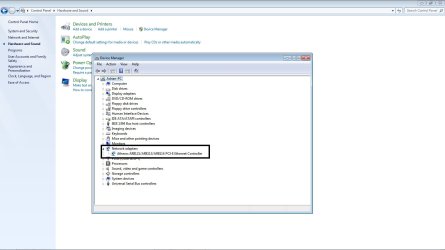
I think this is an easy fix, how ever we need to know which NIC card you have on board.
Attached is an image of my nic card. For you I suggest that you use device manager and go to hard ware so you can identify it for us. Since you had previously a better connection OS 7 installed its own driver. 1 way to change this is to go to your nic card and roll back the driver to a previous version. If you need help we are standing by.


Adrian
 

Attachments

  • nic_card.jpg
    nic_card.jpg
    81 KB · Views: 174

My Computer My Computer

Computer Manufacturer/Model Number
Custom Build
OS
Windows 7 7600 1 X64
CPU
AMD PHENOM II X 550 PROCESSOR 3.1 ghz
Motherboard
ASUS M4A78-TE
Memory
Corsair 4 gig ddr 3
Graphics Card(s)
ati radeon 3300
Sound Card
ati hd
Monitor(s) Displays
syncmaster 2033sw
Screen Resolution
1600X900 60 hz refresh
Hard Drives
twin_seagates SATA's 1 TB & 500 Gig, hitachi_slimline 160 gig
PSU
antec_550 watt
Case
cooler master GLite
Cooling
stock_heat sink
Internet Speed
20mbs up/ 1.5mbs down
Other Info
favorite child "stewie"
favorite dog "brian"
Router

Reset your router to factory default.
Shut down your system and then your router.
After 10 seconds turn on your router, wait about 20 seconds and then power up your system. Sometimes if your router gets hit with power flux it tends to lock up.


Adrian
 

My Computer My Computer

Computer Manufacturer/Model Number
Custom Build
OS
Windows 7 7600 1 X64
CPU
AMD PHENOM II X 550 PROCESSOR 3.1 ghz
Motherboard
ASUS M4A78-TE
Memory
Corsair 4 gig ddr 3
Graphics Card(s)
ati radeon 3300
Sound Card
ati hd
Monitor(s) Displays
syncmaster 2033sw
Screen Resolution
1600X900 60 hz refresh
Hard Drives
twin_seagates SATA's 1 TB & 500 Gig, hitachi_slimline 160 gig
PSU
antec_550 watt
Case
cooler master GLite
Cooling
stock_heat sink
Internet Speed
20mbs up/ 1.5mbs down
Other Info
favorite child "stewie"
favorite dog "brian"
Microsoft virtual wifi miniport adaptor
broadcom 802.11g network adaptor
Intel(R) 82562V-2 10/100 network connection

These are the 3 items under network adaptors in device manager.

Even though the connection was good, I've just rebooted and it's still ok. I'll keep trying tonight and post an update later.
One thing that does keep reoccurring is that my internet icon and volume icon keep disappearing from the bottom right of the taskbar. It seems kind of random whether it appears on each reboot.
Not sure if it's linked to my other problems but thought I'd mention it.

further update a few hrs later.
still ok. could it be solved? doubtful as only thing i've done is the cmd thing and I rebooted after it without it working. not tried anything else though so it could be.
 
Last edited:

My Computer My Computer

Computer Manufacturer/Model Number
Dell Inspiron 530s
OS
Windows 7
CPU
Intel(R) Core(TM)2 Duo CPU E6550 @ 2.33GHz, 2331 Mhz, 2 Core
Memory
3.0 GB
Graphics Card(s)
ATI Radeon HD 2400 XT
Sound Card
Realtek High Definition Audio
Monitor(s) Displays
Generic PNP Monitor
Screen Resolution
1680*1050
Hard Drives
External F and G
Mouse
Dell
Internet Speed
up to 50mb
Other Info
Router - Linksys WRT54GS
Are you comfortable making a screen shot of your device manager?
Also I need to know what make, bios version of your mother board?

Adrian
 

My Computer My Computer

Computer Manufacturer/Model Number
Custom Build
OS
Windows 7 7600 1 X64
CPU
AMD PHENOM II X 550 PROCESSOR 3.1 ghz
Motherboard
ASUS M4A78-TE
Memory
Corsair 4 gig ddr 3
Graphics Card(s)
ati radeon 3300
Sound Card
ati hd
Monitor(s) Displays
syncmaster 2033sw
Screen Resolution
1600X900 60 hz refresh
Hard Drives
twin_seagates SATA's 1 TB & 500 Gig, hitachi_slimline 160 gig
PSU
antec_550 watt
Case
cooler master GLite
Cooling
stock_heat sink
Internet Speed
20mbs up/ 1.5mbs down
Other Info
favorite child "stewie"
favorite dog "brian"
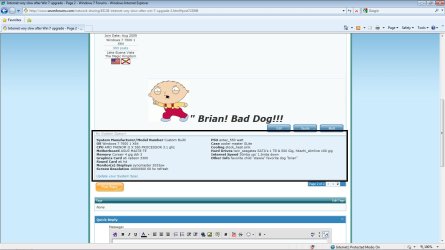
My System Specs

Would you be able to go to your profile and fill out your system specs for us?
 

Attachments

  • sysinfo.jpg
    sysinfo.jpg
    109.7 KB · Views: 14

My Computer My Computer

Computer Manufacturer/Model Number
Custom Build
OS
Windows 7 7600 1 X64
CPU
AMD PHENOM II X 550 PROCESSOR 3.1 ghz
Motherboard
ASUS M4A78-TE
Memory
Corsair 4 gig ddr 3
Graphics Card(s)
ati radeon 3300
Sound Card
ati hd
Monitor(s) Displays
syncmaster 2033sw
Screen Resolution
1600X900 60 hz refresh
Hard Drives
twin_seagates SATA's 1 TB & 500 Gig, hitachi_slimline 160 gig
PSU
antec_550 watt
Case
cooler master GLite
Cooling
stock_heat sink
Internet Speed
20mbs up/ 1.5mbs down
Other Info
favorite child "stewie"
favorite dog "brian"
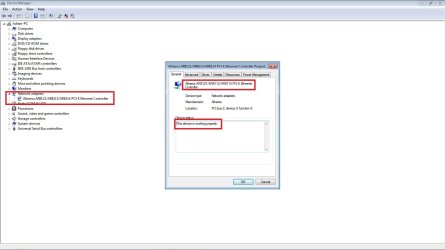
NIC

What we are looking for is to see if your nic card is working properly.
 

Attachments

  • nic_card.jpg
    nic_card.jpg
    75 KB · Views: 49

My Computer My Computer

Computer Manufacturer/Model Number
Custom Build
OS
Windows 7 7600 1 X64
CPU
AMD PHENOM II X 550 PROCESSOR 3.1 ghz
Motherboard
ASUS M4A78-TE
Memory
Corsair 4 gig ddr 3
Graphics Card(s)
ati radeon 3300
Sound Card
ati hd
Monitor(s) Displays
syncmaster 2033sw
Screen Resolution
1600X900 60 hz refresh
Hard Drives
twin_seagates SATA's 1 TB & 500 Gig, hitachi_slimline 160 gig
PSU
antec_550 watt
Case
cooler master GLite
Cooling
stock_heat sink
Internet Speed
20mbs up/ 1.5mbs down
Other Info
favorite child "stewie"
favorite dog "brian"
Router

ANother trouble shooting method is to disconnect your router and detach it completely from your pc and connect directly into your nic card.
We will attempt this as a last resort.

Adrian
 

My Computer My Computer

Computer Manufacturer/Model Number
Custom Build
OS
Windows 7 7600 1 X64
CPU
AMD PHENOM II X 550 PROCESSOR 3.1 ghz
Motherboard
ASUS M4A78-TE
Memory
Corsair 4 gig ddr 3
Graphics Card(s)
ati radeon 3300
Sound Card
ati hd
Monitor(s) Displays
syncmaster 2033sw
Screen Resolution
1600X900 60 hz refresh
Hard Drives
twin_seagates SATA's 1 TB & 500 Gig, hitachi_slimline 160 gig
PSU
antec_550 watt
Case
cooler master GLite
Cooling
stock_heat sink
Internet Speed
20mbs up/ 1.5mbs down
Other Info
favorite child "stewie"
favorite dog "brian"
I'll post a screengrab when I get home later.

Since my last post it has run fine apart from late last night, but it was running ok again in the morning.

Still losing the volume and connection icons on the taskbar though.
 

My Computer My Computer

Computer Manufacturer/Model Number
Dell Inspiron 530s
OS
Windows 7
CPU
Intel(R) Core(TM)2 Duo CPU E6550 @ 2.33GHz, 2331 Mhz, 2 Core
Memory
3.0 GB
Graphics Card(s)
ATI Radeon HD 2400 XT
Sound Card
Realtek High Definition Audio
Monitor(s) Displays
Generic PNP Monitor
Screen Resolution
1680*1050
Hard Drives
External F and G
Mouse
Dell
Internet Speed
up to 50mb
Other Info
Router - Linksys WRT54GS
Microsoft virtual wifi miniport adaptor
broadcom 802.11g network adaptor
Intel(R) 82562V-2 10/100 network connection

These are the 3 items under network adaptors in device manager.

Even though the connection was good, I've just rebooted and it's still ok. I'll keep trying tonight and post an update later.
One thing that does keep reoccurring is that my internet icon and volume icon keep disappearing from the bottom right of the taskbar. It seems kind of random whether it appears on each reboot.
Not sure if it's linked to my other problems but thought I'd mention it.

further update a few hrs later.
still ok. could it be solved? doubtful as only thing i've done is the cmd thing and I rebooted after it without it working. not tried anything else though so it could be.

Hmmm sounds like you are now able to go online with your browsers again? Sure seems like resetting winsock did something because before that you couldn't even get to a website before.

Try running sfc /scannow into the command prompt and see if it finds any file problems.
 

My Computer My Computer

Computer type
PC/Desktop
Computer Manufacturer/Model Number
Home built
OS
Windows 7 Ult, Windows 8.1 Pro,
CPU
Q9650-4.275GHz, E8600 4.5GHz, E6750-3.8GHz
Motherboard
Evga 780i FTW
Memory
G.Skill PC2 9600 1200Mhz 5 5 5 15 2T
Graphics Card(s)
GTX480
Sound Card
Asus Xonar D2
Monitor(s) Displays
HannsG
Screen Resolution
1680X1050
Hard Drives
GSkill Phoenix Pro 120GB SSD
PSU
ThermalTake Toughpower 1000Watt modular
Case
ThermalTake XaserV
Cooling
Xigmatek S1283
Keyboard
Logitech G15
Mouse
Logitech G9
Internet Speed
T1
the connection seems to come and go. it is currently not working, i can't get speedtest starting at all, and large files seem to freeze when downloading.

i'll sort that screengrab out shortly.
 

My Computer My Computer

Computer Manufacturer/Model Number
Dell Inspiron 530s
OS
Windows 7
CPU
Intel(R) Core(TM)2 Duo CPU E6550 @ 2.33GHz, 2331 Mhz, 2 Core
Memory
3.0 GB
Graphics Card(s)
ATI Radeon HD 2400 XT
Sound Card
Realtek High Definition Audio
Monitor(s) Displays
Generic PNP Monitor
Screen Resolution
1680*1050
Hard Drives
External F and G
Mouse
Dell
Internet Speed
up to 50mb
Other Info
Router - Linksys WRT54GS
I've attached the device manager screengrab.

Could you advise where to find my motherboard info?
 

Attachments

My Computer My Computer

Computer Manufacturer/Model Number
Dell Inspiron 530s
OS
Windows 7
CPU
Intel(R) Core(TM)2 Duo CPU E6550 @ 2.33GHz, 2331 Mhz, 2 Core
Memory
3.0 GB
Graphics Card(s)
ATI Radeon HD 2400 XT
Sound Card
Realtek High Definition Audio
Monitor(s) Displays
Generic PNP Monitor
Screen Resolution
1680*1050
Hard Drives
External F and G
Mouse
Dell
Internet Speed
up to 50mb
Other Info
Router - Linksys WRT54GS
Most likely a driver problem or a file integrity problem at this point, hard to say for sure. A clean install may be the best way to fix this
 

My Computer My Computer

Computer type
PC/Desktop
Computer Manufacturer/Model Number
Home built
OS
Windows 7 Ult, Windows 8.1 Pro,
CPU
Q9650-4.275GHz, E8600 4.5GHz, E6750-3.8GHz
Motherboard
Evga 780i FTW
Memory
G.Skill PC2 9600 1200Mhz 5 5 5 15 2T
Graphics Card(s)
GTX480
Sound Card
Asus Xonar D2
Monitor(s) Displays
HannsG
Screen Resolution
1680X1050
Hard Drives
GSkill Phoenix Pro 120GB SSD
PSU
ThermalTake Toughpower 1000Watt modular
Case
ThermalTake XaserV
Cooling
Xigmatek S1283
Keyboard
Logitech G15
Mouse
Logitech G9
Internet Speed
T1
the connection seems to come and go. it is currently not working, i can't get speedtest starting at all, and large files seem to freeze when downloading.

i'll sort that screengrab out shortly.
Is this a desktop connected to a LAN?
As I said eliminate the router and connect your pc directly into the cable modem.
 

My Computer My Computer

Computer Manufacturer/Model Number
Custom Build
OS
Windows 7 7600 1 X64
CPU
AMD PHENOM II X 550 PROCESSOR 3.1 ghz
Motherboard
ASUS M4A78-TE
Memory
Corsair 4 gig ddr 3
Graphics Card(s)
ati radeon 3300
Sound Card
ati hd
Monitor(s) Displays
syncmaster 2033sw
Screen Resolution
1600X900 60 hz refresh
Hard Drives
twin_seagates SATA's 1 TB & 500 Gig, hitachi_slimline 160 gig
PSU
antec_550 watt
Case
cooler master GLite
Cooling
stock_heat sink
Internet Speed
20mbs up/ 1.5mbs down
Other Info
favorite child "stewie"
favorite dog "brian"
Back
Top