LAN between two laptops with win xp and win7

Chirola

New member
Local time
10:55 AM
Messages
13
Hello

I'm having a problem when i try to do LAN between my father's laptop ( Windows XP) and my laptop ( Windows 7 ).

I've plugged both of them in my router (Draytek Vigor 2100G) that is not connected to any modem. There is no connection to the internet. The only thing i want to do is a local network, to share some files and play some games .

I've done this kind of lan's sometimes before, and i've never had any problems.Just plugging the cable into the router, go to "my network places" and i was already seeing the files shared by the other computer users.

The firewalls of both laptops are turned off.

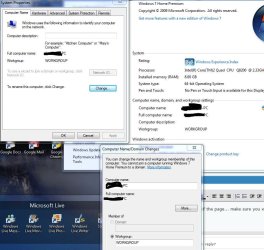
I've the current configurations in my windows 7 in a image attachment(two image).

That config seems correct, so the problem must be in the windows xp laptop.

Tell me the info you need , so that you can make a more precise diagnostic.

If you can help me, i would be grateful!
 

Attachments
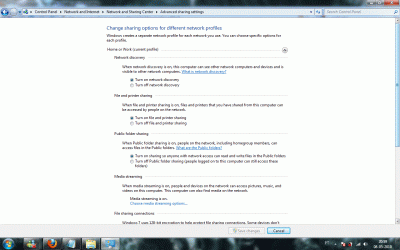
  • windows7_lan_conf_1.gif
    windows7_lan_conf_1.gif
    102.5 KB · Views: 509
  • windows7_lan_conf_2.gif
    windows7_lan_conf_2.gif
    95.8 KB · Views: 315

My Computer

OS
Windows 7
Can you do a Static IP to both computers...

May I have the address to your Router...

can you run a ipconfig /all from your windows 7

since that is the one that is working.

what we are going to do here is try to ping one another's computer using static ips
 

My Computer

Computer Manufacturer/Model Number
HP Pavilion Elite HPE-410f
OS
Windows 7 Ultimate x64
CPU
AMD Phenom x6 1045t
Motherboard
N/A
Memory
8 GB
Graphics Card(s)
ATI Radeon HD 5570
Sound Card
Realtek Highdefinition Audio / 5.1 Dolby Setup
Monitor(s) Displays
HP w2207h Widescreen
Screen Resolution
1680*1050
Hard Drives
1 TB (fixed), 320 Portable maxtor, Server Hard drives
PSU
350 Watt
Case
HP CASE
Cooling
Bass
Keyboard
Logitech MX 5500
Mouse
Logitech MX 5500
Internet Speed
ROAD RUNNER 16MB D/512 U
Hello

I'm having a problem when i try to do LAN between my father's laptop ( Windows XP) and my laptop ( Windows 7 ).

I've plugged both of them in my router (Draytek Vigor 2100G) that is not connected to any modem. There is no connection to the internet. The only thing i want to do is a local network, to share some files and play some games .

I've done this kind of lan's sometimes before, and i've never had any problems.Just plugging the cable into the router, go to "my network places" and i was already seeing the files shared by the other computer users.

The firewalls of both laptops are turned off.

I've the current configurations in my windows 7 in a image attachment(two image).

That config seems correct, so the problem must be in the windows xp laptop.

Tell me the info you need , so that you can make a more precise diagnostic.

If you can help me, i would be grateful!

Since you are using a win 7 machine and an XP machine you need to set up a workgroup, not homegroup.


Let us know if you need help with that

Ken
 

My Computer

Computer Manufacturer/Model Number
HP Pavillion dv-7 1005 Tx
OS
Win 8 Release candidate 8400
CPU
[email protected]
Memory
4 gigs
Graphics Card(s)
Nvidia 9600M
Sound Card
HD built-in
Monitor(s) Displays
17" Wxga
Screen Resolution
1440x900
Cooling
none
Internet Speed
45Mb down 5Mb up
Can you do a Static IP to both computers...

May I have the address to your Router...

can you run a ipconfig /all from your windows 7

since that is the one that is working.

what we are going to do here is try to ping one another's computer using static ips

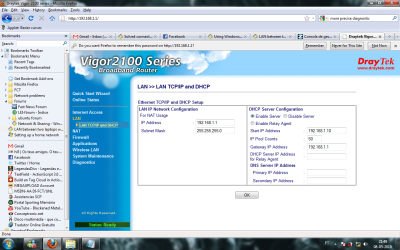
I've sent you an image with the ip address of my router.

windows xp(static):

ip address: 192.168.100.2
subnetmask: 255.255.255.0
default gateway:(let with empty values)

windows 7(static):

ip address: 192.168.100.1
subnetmask: 255.255.255.0
default gateway:(let with empty values)

I did the ping with both computers to both ip-addresses with 0% packet loss.


I've read the post of "zigzag3143" .

So, it seems it's necessary to create a workgroup. I think i can do that, but if you can give me some links with orientations, it would be nice;)

Thanks for the help!
 

Attachments

  • router_address.png
    router_address.png
    101.7 KB · Views: 246

My Computer

OS
Windows 7
I would change the IPs:

Computer 1:
IP: 192.168.1.100
Subnet: 255.255.255.0
Gateway: 192.168.1.1

Computer 2:
IP: 192.168.1.101
Subnet: 255.255.255.0
Gateway: 192.168.1.1

check this out:

Index of /network

this is how i have my network set up
 

My Computer

Computer Manufacturer/Model Number
HP Pavilion Elite HPE-410f
OS
Windows 7 Ultimate x64
CPU
AMD Phenom x6 1045t
Motherboard
N/A
Memory
8 GB
Graphics Card(s)
ATI Radeon HD 5570
Sound Card
Realtek Highdefinition Audio / 5.1 Dolby Setup
Monitor(s) Displays
HP w2207h Widescreen
Screen Resolution
1680*1050
Hard Drives
1 TB (fixed), 320 Portable maxtor, Server Hard drives
PSU
350 Watt
Case
HP CASE
Cooling
Bass
Keyboard
Logitech MX 5500
Mouse
Logitech MX 5500
Internet Speed
ROAD RUNNER 16MB D/512 U
I would change the IPs:

Computer 1:
IP: 192.168.1.100
Subnet: 255.255.255.0
Gateway: 192.168.1.1

Computer 2:
IP: 192.168.1.101
Subnet: 255.255.255.0
Gateway: 192.168.1.1

check this out:

Index of /network

this is how i have my network set up

But it is not necessary to have static ip-address right?

If i can ping the ip's of the two computers it means they are connected right?
 

My Computer

OS
Windows 7
It is not...but it makes it easier to ping the address and to find them when you try to play network games becuase you know what computers are which and since you are using a router. it is good to add a gateway to your ipv4 settings.

did you check the settings and do you have the computers seeing in the network neighborhood (older windows)

network (newer windows)

and are you using HOME network and not a public network
 

My Computer

Computer Manufacturer/Model Number
HP Pavilion Elite HPE-410f
OS
Windows 7 Ultimate x64
CPU
AMD Phenom x6 1045t
Motherboard
N/A
Memory
8 GB
Graphics Card(s)
ATI Radeon HD 5570
Sound Card
Realtek Highdefinition Audio / 5.1 Dolby Setup
Monitor(s) Displays
HP w2207h Widescreen
Screen Resolution
1680*1050
Hard Drives
1 TB (fixed), 320 Portable maxtor, Server Hard drives
PSU
350 Watt
Case
HP CASE
Cooling
Bass
Keyboard
Logitech MX 5500
Mouse
Logitech MX 5500
Internet Speed
ROAD RUNNER 16MB D/512 U
Hello

I'm having a problem when i try to do LAN between my father's laptop ( Windows XP) and my laptop ( Windows 7 ).

I've plugged both of them in my router (Draytek Vigor 2100G) that is not connected to any modem. There is no connection to the internet. The only thing i want to do is a local network, to share some files and play some games .

I've done this kind of lan's sometimes before, and i've never had any problems.Just plugging the cable into the router, go to "my network places" and i was already seeing the files shared by the other computer users.

The firewalls of both laptops are turned off.

I've the current configurations in my windows 7 in a image attachment(two image).

That config seems correct, so the problem must be in the windows xp laptop.

Tell me the info you need , so that you can make a more precise diagnostic.

If you can help me, i would be grateful!

Since you are using a win 7 machine and an XP machine you need to set up a workgroup, not homegroup.


Let us know if you need help with that

Ken

Yes , i need help to create a workgroup. Can you help me with that?


At this time, i can ping both computer ip addresses but i can't see none of them in "my network places".
 

My Computer

OS
Windows 7

Attachments

  • workgroup.JPG
    workgroup.JPG
    94.9 KB · Views: 557

My Computer

Computer Manufacturer/Model Number
HP Pavilion Elite HPE-410f
OS
Windows 7 Ultimate x64
CPU
AMD Phenom x6 1045t
Motherboard
N/A
Memory
8 GB
Graphics Card(s)
ATI Radeon HD 5570
Sound Card
Realtek Highdefinition Audio / 5.1 Dolby Setup
Monitor(s) Displays
HP w2207h Widescreen
Screen Resolution
1680*1050
Hard Drives
1 TB (fixed), 320 Portable maxtor, Server Hard drives
PSU
350 Watt
Case
HP CASE
Cooling
Bass
Keyboard
Logitech MX 5500
Mouse
Logitech MX 5500
Internet Speed
ROAD RUNNER 16MB D/512 U
http://www.acurasd.com/network/Advance%20Sharing%20Settings.JPG

at the bottom of the page... make sure you want to use Workgroup is checked like in the picture on both computers.

make sure that both computers have the same workgroup name too

so they can see one another.

Thank you!

I've this almost solved up:D
Right now i have the two computers in the same network,and i can see the two computers in the network. I can access the files that i've shared in the windows xp computer but i can't access the files that i share in the windows 7 due to problems of permissions.

The folder that i am sharing in windows 7 pc, i gave full permissions to be accessed, and still,when try to access it in the windows xp pc, it is says to me:

" //my-laptop/folder is not accessible. You might not have permission to use this network resource.Contact the administrator of this server to find out if you have access permissions "

I've sent an image that shows how i give permissions.
 

Attachments

  • permissions.png
    permissions.png
    99.5 KB · Views: 338

My Computer

OS
Windows 7
Can I see a photo of your Windows 7 Advance Properties? The whole sheet....

(wait you have that already)
but change it to use a password to access folders
then just add him as a user to the windows 7 computer
then add him to the sharing properties
that should clear up the problem

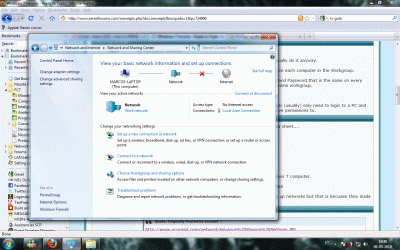
I also need a screen shot of your network and sharing center

create a user that you are using from the Windows XP on the Windows 7 computer.

Same user and same password. then add him to the sharing properties

Windows 7 is sad to say a pain the in butt when it comes to setting up networks but that is becuase they made it more secured.
 

My Computer

Computer Manufacturer/Model Number
HP Pavilion Elite HPE-410f
OS
Windows 7 Ultimate x64
CPU
AMD Phenom x6 1045t
Motherboard
N/A
Memory
8 GB
Graphics Card(s)
ATI Radeon HD 5570
Sound Card
Realtek Highdefinition Audio / 5.1 Dolby Setup
Monitor(s) Displays
HP w2207h Widescreen
Screen Resolution
1680*1050
Hard Drives
1 TB (fixed), 320 Portable maxtor, Server Hard drives
PSU
350 Watt
Case
HP CASE
Cooling
Bass
Keyboard
Logitech MX 5500
Mouse
Logitech MX 5500
Internet Speed
ROAD RUNNER 16MB D/512 U
As mentioned already....

when working with workgroups,, it is not always necessary, but I usually do it anyway.

Identical User Names with Passwords should be setup for each user on each computer in the Workgroup.

So if you have 3 users... each of them should have a unique userID and Password that is the same on every computer in the Workgroup. Plus, make sure that all PC's are in the same workgroup.

Then give them rights as necessary on each PC and/or folder share.

This makes it much easier to work with users and shares as each user (usually) only need to login to a PC and are not prompted again for login when accessing the shares they have permissions to.
 

My Computer

Computer Manufacturer/Model Number
Self Built
OS
Win 7 Ultimate 32bit
CPU
C2D E6600 2.4Ghz
Motherboard
Intel D965WH
Memory
4G Kingston KHX5400D2
Graphics Card(s)
EVGA GTX 570 HD SC (012-P3-1573-KR)
Sound Card
On-Board
Monitor(s) Displays
Samsung 226BW
Screen Resolution
1680 x 1050
Hard Drives
2 x 250 Seagate Barracuda
2 x 500 Seagate Barracuda (Raid1)
PSU
Corsair TX750W
Case
In-Win C589
Cooling
Stock Intel Cooling
As mentioned already....

when working with workgroups,, it is not always necessary, but I usually do it anyway.

Identical User Names with Passwords should be setup for each user on each computer in the Workgroup.

So if you have 3 users... each of them should have a unique userID and Password that is the same on every computer in the Workgroup. Plus, make sure that all PC's are in the same workgroup.

Then give them rights as necessary on each PC and/or folder share.

This makes it much easier to work with users and shares as each user (usually) only need to login to a PC and are not prompted again for login when accessing the shares they have permissions to.

There is a another easier way to avoid those password prompts when sharing with XP. Just do the following steps on the XP machine.

Goto... Control Panel > Administrative Tools > Local Security Policy > Local Policies > Security Options

Scroll down to... Network Access: Sharing and security model for local accounts

Select... Guest only and not Classic. I checked on XP machine and Guest seems to be the default.
 

My Computer

Computer type
PC/Desktop
Computer Manufacturer/Model Number
Home built
OS
Windows 7 Ult, Windows 8.1 Pro,
CPU
Q9650-4.275GHz, E8600 4.5GHz, E6750-3.8GHz
Motherboard
Evga 780i FTW
Memory
G.Skill PC2 9600 1200Mhz 5 5 5 15 2T
Graphics Card(s)
GTX480
Sound Card
Asus Xonar D2
Monitor(s) Displays
HannsG
Screen Resolution
1680X1050
Hard Drives
GSkill Phoenix Pro 120GB SSD
PSU
ThermalTake Toughpower 1000Watt modular
Case
ThermalTake XaserV
Cooling
Xigmatek S1283
Keyboard
Logitech G15
Mouse
Logitech G9
Internet Speed
T1
Can I see a photo of your Windows 7 Advance Properties? The whole sheet....

(wait you have that already)
but change it to use a password to access folders

1)then just add him as a user to the windows 7 computer

2)then add him to the sharing properties

that should clear up the problem

3)I also need a screen shot of your network and sharing center

create a user that you are using from the Windows XP on the Windows 7 computer.

Same user and same password. then add him to the sharing properties

Windows 7 is sad to say a pain the in butt when it comes to setting up networks but that is becuase they made it more secured.

I don't know how to do the steps 1) and 2) . Can you help me with that?

In the step 3), when you say "shot of your network" you mean the network map?

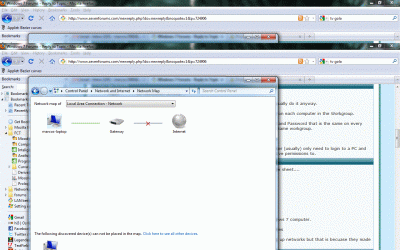
I've sent two images. One with the sharing center and the other with the network map.

In the network map, it is suppose to appear the windows xp machine right?

Once again, thank you very much for your help!
 

Attachments

  • sharing_center.gif
    sharing_center.gif
    280.1 KB · Views: 47
  • network_map.gif
    network_map.gif
    232.7 KB · Views: 29
Last edited:

My Computer

OS
Windows 7
As mentioned already....

when working with workgroups,, it is not always necessary, but I usually do it anyway.

Identical User Names with Passwords should be setup for each user on each computer in the Workgroup.

So if you have 3 users... each of them should have a unique userID and Password that is the same on every computer in the Workgroup. Plus, make sure that all PC's are in the same workgroup.

Then give them rights as necessary on each PC and/or folder share.

This makes it much easier to work with users and shares as each user (usually) only need to login to a PC and are not prompted again for login when accessing the shares they have permissions to.

There is a another easier way to avoid those password prompts when sharing with XP. Just do the following steps on the XP machine.

Goto... Control Panel > Administrative Tools > Local Security Policy > Local Policies > Security Options

Scroll down to... Network Access: Sharing and security model for local accounts

Select... Guest only and not Classic. I checked on XP machine and Guest seems to be the default.

I've tried what you said. It didn't work :confused: .

I cannot access the data on de windows 7 machie.

You are saying to do these steps on the XP machine, that means that i have no permissions to access the windows 7 computer, due to windows xp configurations?

Thanks for the help!
 

My Computer

OS
Windows 7
There is a another easier way to avoid those password prompts when sharing with XP. Just do the following steps on the XP machine.

Goto... Control Panel > Administrative Tools > Local Security Policy > Local Policies > Security Options

Scroll down to... Network Access: Sharing and security model for local accounts

Select... Guest only and not Classic. I checked on XP machine and Guest seems to be the default.


Bad Idea

With the Guest only model, any user who can access your computer over the network (including anonymous Internet users) can access your shared resources. You must use the Internet Connection Firewall (ICF), Windows Firewall, or other similar device to protect your computer from unauthorized access. Similarly, with the Classic model, local accounts must be password protected; otherwise, those user accounts can be used by anyone to access shared system resources.
Network access: Sharing and security model for local accounts

Creates a huge security issue.

Anything that is done with using Guest account for any and all reasons, should only be used under very certain circumstances. It should never be used on a regular basis or daily use
 

My Computer

Computer Manufacturer/Model Number
Self Built
OS
Win 7 Ultimate 32bit
CPU
C2D E6600 2.4Ghz
Motherboard
Intel D965WH
Memory
4G Kingston KHX5400D2
Graphics Card(s)
EVGA GTX 570 HD SC (012-P3-1573-KR)
Sound Card
On-Board
Monitor(s) Displays
Samsung 226BW
Screen Resolution
1680 x 1050
Hard Drives
2 x 250 Seagate Barracuda
2 x 500 Seagate Barracuda (Raid1)
PSU
Corsair TX750W
Case
In-Win C589
Cooling
Stock Intel Cooling
Back
Top