
Friends,
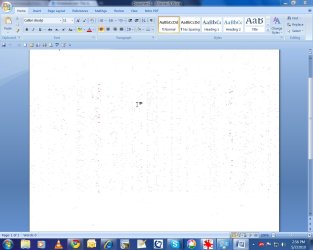
I installed Gigabyte HD 4550 PCI-e graphics card on my Dell 530 desktop running Windows 7 64 bits. it worked well for couple of days, then suddenly it started having problem. Whenever i scroll screen in any app (browser, word, excel) up and down , i see weird color pixels all over the screen. Problem goes away when i switch to windows 7 basic theme. The problem is hard to describe, so i am attaching a picture; as they say a picture is worth a thousand words. Even from Windows 7 theme, problem goes away if i clear the field "Enable Desktop Composition" from "Adjust Visual Effect" menu in Control Panel -> Performance Tools
Thanks in advance for your help.
I installed Gigabyte HD 4550 PCI-e graphics card on my Dell 530 desktop running Windows 7 64 bits. it worked well for couple of days, then suddenly it started having problem. Whenever i scroll screen in any app (browser, word, excel) up and down , i see weird color pixels all over the screen. Problem goes away when i switch to windows 7 basic theme. The problem is hard to describe, so i am attaching a picture; as they say a picture is worth a thousand words. Even from Windows 7 theme, problem goes away if i clear the field "Enable Desktop Composition" from "Adjust Visual Effect" menu in Control Panel -> Performance Tools
Thanks in advance for your help.
Attachments
My Computer
- Computer Manufacturer/Model Number
- Dell 530
- OS
- Windows 7 home premium
- Memory
- 3GB
- Graphics Card(s)
- ATI HD 4550
- Monitor(s) Displays
- Acer AL1912

