
You are using an out of date browser. It may not display this or other websites correctly.
You should upgrade or use an alternative browser.
You should upgrade or use an alternative browser.
does the firewall download the rules set via update
- Thread starter drugo
- Start date

- Local time
- 11:08 AM
- Messages
- 233
Hi drugo - I am not exactly clear on what you are asking here. But, here is a resource with some FAQs about firewalls in Windows 7 Firewall: frequently asked questions.
Please let me know if this helps at all. What do you mean by "Does it download rules set (made by microsoft to be more fase) via update module?"
Cheers,
Cassandra
Microsoft Windows Outreach
Please let me know if this helps at all. What do you mean by "Does it download rules set (made by microsoft to be more fase) via update module?"
Cheers,
Cassandra
Microsoft Windows Outreach
My Computer
- Computer Manufacturer/Model Number
- HP/p6207c
- OS
- Windows 7 Professional 64-bit
- CPU
- Pentium(R) Dual-Core CPU E5300 @260GHz
- Sound Card
- RealTek High Def Audio
- Monitor(s) Displays
- HP 2159m
- Screen Resolution
- 1920 x 1080 x 60
- Mouse
- HP M/N: M-U0009-HP1
- Internet Speed
- Broadband

I think that drugo was wondering where Windows Firewall gets is Rules from (similar to Norton Internet Security using LiveUpdate).
As I understand it, Windows Firewall is essentially hard-coded with fixed rules, configurable only by the user allowing/not allowing programs to access the Internet.
As I understand it, Windows Firewall is essentially hard-coded with fixed rules, configurable only by the user allowing/not allowing programs to access the Internet.
My Computer
- Computer type
- PC/Desktop
- Computer Manufacturer/Model Number
- Scan 3XS P55 liteDAW
- OS
- Windows Home Premium (64)
- CPU
- Intel Core i7 860
- Motherboard
- Gigabyte GA-P55A-UD4
- Memory
- 8GB (4x2GB) Corsair TwinX XMS3
- Graphics Card(s)
- 1GB Gainward 9500 GT
- Sound Card
- M-Audio Delta 66
- Monitor(s) Displays
- Acer v223wBBd
- Screen Resolution
- 1680 x 1050
- Hard Drives
- 1 x 500 GB WD Barracuda (OS+Docs)
2 x 1TB Samsung Spinpoint F3 (Data)
- PSU
- Enermax EMD625AWT II - 625W Enermax Modu82+ II
- Case
- Fractal Design Define R2 Black
- Cooling
- Prolima Megahalems Super 6 Heatpipe Tower Cooler
- Keyboard
- Microsoft Digital Media Pro
- Mouse
- Belkin Optical Ergo
- Internet Speed
- 8 Mbps nominal (14.9 achieved !)
- Other Info
- Digital Audio Workstation

- Local time
- 11:08 AM
- Messages
- 5,053
The windows firewall does not patch or update regularly like antivirus apps do or 3rd party firewalls like Mcaffee etc. do. The reason has to do with the difference in the way windows firewall operates. Windows firewall is only meant to keep things OUT. It protects your computer by refusing incoming data packets that have not been requested. There is no outbound filtering or any additional features such as virus protection. For most people who maintain their system in other ways, this is MORE than sufficient.
OTOH, if you want to know when one of your applications is trying to obtain access to the outside world so you can stop it, then you will have to install a third-party firewall and configure/maintain it. In addition many 3rd party firewalls have application integrity monitoring, some have advanced features such as spyware protection and virus protection. Because of such features, such firewalls need to update regularly.
OTOH, if you want to know when one of your applications is trying to obtain access to the outside world so you can stop it, then you will have to install a third-party firewall and configure/maintain it. In addition many 3rd party firewalls have application integrity monitoring, some have advanced features such as spyware protection and virus protection. Because of such features, such firewalls need to update regularly.
My Computer
- Computer Manufacturer/Model Number
- Too many to describe...
- OS
- Windows 7 x64 pro/ Windows 7 x86 Pro/ XP SP3 x86
- Local time
- 11:08 AM
- Messages
- 1,957
Agreed. Windows firewall does not update its set of rules -- implementation of which is at the discretion of the user if I understand correctly. In other words, it's configurable but by the user and not from/by Windows Update.
My Computer
- OS
- Windows XP - Now Windows 7 Home Premium (64-bit).

- Local time
- 6:08 PM
- Messages
- 476
The windows firewall does not patch or update regularly like antivirus apps do or 3rd party firewalls like Mcaffee etc. do. The reason has to do with the difference in the way windows firewall operates. Windows firewall is only meant to keep things OUT. It protects your computer by refusing incoming data packets that have not been requested. There is no outbound filtering or any additional features such as virus protection. For most people who maintain their system in other ways, this is MORE than sufficient.
OTOH, if you want to know when one of your applications is trying to obtain access to the outside world so you can stop it, then you will have to install a third-party firewall and configure/maintain it. In addition many 3rd party firewalls have application integrity monitoring, some have advanced features such as spyware protection and virus protection. Because of such features, such firewalls need to update regularly.
Agreed. Windows firewall does not update its set of rules -- implementation of which is at the discretion of the user if I understand correctly. In other words, it's configurable but by the user and not from/by Windows Update.
thanks!
i thouhgt w7 could download ruleset for the firewall
My Computer
- Computer type
- PC/Desktop
- OS
- windows 7 ultimate 64bit
- Local time
- 11:08 AM
- Messages
- 1,957
^I am pretty sure that's not the case drugo.
This is quite a nice read about the new features in W7 Firewall.
What's new in the Windows 7 Firewall?
This is quite a nice read about the new features in W7 Firewall.
What's new in the Windows 7 Firewall?
My Computer
- OS
- Windows XP - Now Windows 7 Home Premium (64-bit).

- Local time
- 6:08 PM
- Messages
- 340
Hi
i have w7 32bit
i would love to ask a question about the firewall
does it download rules set (made by microsoft to be more fase) via update module?
thanks
I doubt in that since Windows built-in firewall creates rules with a very broad range - in case to avoid any conflicts by user side.
For example, you have installed torrent software (uTorrent), in uTorrent settings you have set "port used for incoming connections" eg. 43210 port (or other random port). But Windows Firewall rule looks like this (screen shot)
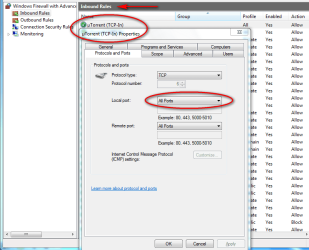
- it opens All Ports. :shock:
So Windows Firewall opens full port range for applications even if in using is only one port for security reasons.
Of course you can (you should) manually edit this settings, but you should do this for all application (if you know what port each application using).. it's a lot of work because by default Windows Firewall set up that and don't ask you about it.
For instance in case of other software firewall Look 'n' Stop it will be in that order:
1. You installing uTorrent
2. You starting uTorrent application [FW ask you about Internet connection by this application, you can allow/block this event with "remember my decision" box)
3. Now you configure uTorrent (set up port 43210 for incoming connections in uTorrent)
4. You try to download a file using uTorrent - uTorrent shows you yellow flag
5. You look at Firewall (Look 'n' Stop) logs tab and you see that connection on port 43210 are blocked by firewall
6. So... you have to create rule where your computer act as server and where you allow for incoming/outgoing connections on port 43210 on your machine (screen - please note that in this case port used was 64392: http://www.wilderssecurity.com/attachment.php?attachmentid=217155&stc=1&d=1271255989 ).
7. For security reasons you can also select application for this rule - so when uTorrent will be disabled this rule will be also disabled, but when you start uTorrent application rule will be enabled until you close uTorrent.
As you can see the 3rd party software firewall rule based like Look 'n' Stop gives you much more control and security. Of course there are other software firewalls on the market, called "application based firewalls" (they are much more easier for novice users or users they are not much know about networking) and all steps above are done automatically by 'inteligent' firewall, so this is up to you what kind of firewall you will chose.
HTH,
Creer
Last edited:
My Computer
- Computer type
- PC/Desktop
- Computer Manufacturer/Model Number
- Self Built
- OS
- Windows 7 Home Premium x32 SP1
- CPU
- x2 2.6 GHz
- Motherboard
- Asus
- Memory
- A-Data 2GB DDR2-800
- Graphics Card(s)
- ATI X1250
- Sound Card
- SB 5.1 Live!
- Hard Drives
- WD and Seagate FAP
- PSU
- Tagan TG-480-U01
- Keyboard
- BTC 6300
- Mouse
- Logitech VX Nano
- Antivirus
- None
That's good to know, Creer.
One question though - why not set the (local?) port number in the Window Firewall window?
One question though - why not set the (local?) port number in the Window Firewall window?
My Computer
- Computer type
- PC/Desktop
- Computer Manufacturer/Model Number
- Scan 3XS P55 liteDAW
- OS
- Windows Home Premium (64)
- CPU
- Intel Core i7 860
- Motherboard
- Gigabyte GA-P55A-UD4
- Memory
- 8GB (4x2GB) Corsair TwinX XMS3
- Graphics Card(s)
- 1GB Gainward 9500 GT
- Sound Card
- M-Audio Delta 66
- Monitor(s) Displays
- Acer v223wBBd
- Screen Resolution
- 1680 x 1050
- Hard Drives
- 1 x 500 GB WD Barracuda (OS+Docs)
2 x 1TB Samsung Spinpoint F3 (Data)
- PSU
- Enermax EMD625AWT II - 625W Enermax Modu82+ II
- Case
- Fractal Design Define R2 Black
- Cooling
- Prolima Megahalems Super 6 Heatpipe Tower Cooler
- Keyboard
- Microsoft Digital Media Pro
- Mouse
- Belkin Optical Ergo
- Internet Speed
- 8 Mbps nominal (14.9 achieved !)
- Other Info
- Digital Audio Workstation
- Local time
- 6:08 PM
- Messages
- 340
That's good to know, Creer.
One question though - why not set the (local?) port number in the Window Firewall window?
Yes, you should do that, but since you install and first run eg. uTorrent, you get only one simple notification from Windows 7 FW:
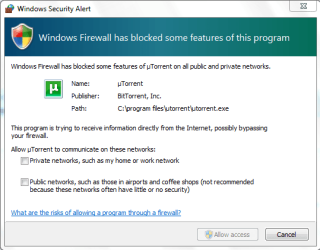
When you ticked Private networks or/and Public networks and clik Allow access button then automatically Windows create two separate rules for TCP and UDP connections:
http://www.sevenforums.com/attachme...ll-download-rules-set-via-update-win_fw_7.png

If you don't edit these rules it will be as it is - for All Ports.
Please keep in mind that these rules are only active when uTorrent is started:
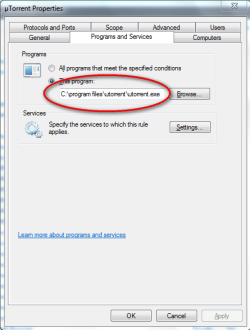
So it's not fully secure since you don't need to have open all full range of ports for incoming connections during uTorrent activity.
BTW. check if you have rules in Windows 7 firewall for your browsers like Firefox, Opera or IE in Outbound tab.
My Computer
- Computer type
- PC/Desktop
- Computer Manufacturer/Model Number
- Self Built
- OS
- Windows 7 Home Premium x32 SP1
- CPU
- x2 2.6 GHz
- Motherboard
- Asus
- Memory
- A-Data 2GB DDR2-800
- Graphics Card(s)
- ATI X1250
- Sound Card
- SB 5.1 Live!
- Hard Drives
- WD and Seagate FAP
- PSU
- Tagan TG-480-U01
- Keyboard
- BTC 6300
- Mouse
- Logitech VX Nano
- Antivirus
- None
Understood.
Initially,all ports are open for the app, but you can restrict it to specific ports by editing in the port number(s). So there is a small risk while you do this edit, but at least you only have to do it once.
Initially,all ports are open for the app, but you can restrict it to specific ports by editing in the port number(s). So there is a small risk while you do this edit, but at least you only have to do it once.
My Computer
- Computer type
- PC/Desktop
- Computer Manufacturer/Model Number
- Scan 3XS P55 liteDAW
- OS
- Windows Home Premium (64)
- CPU
- Intel Core i7 860
- Motherboard
- Gigabyte GA-P55A-UD4
- Memory
- 8GB (4x2GB) Corsair TwinX XMS3
- Graphics Card(s)
- 1GB Gainward 9500 GT
- Sound Card
- M-Audio Delta 66
- Monitor(s) Displays
- Acer v223wBBd
- Screen Resolution
- 1680 x 1050
- Hard Drives
- 1 x 500 GB WD Barracuda (OS+Docs)
2 x 1TB Samsung Spinpoint F3 (Data)
- PSU
- Enermax EMD625AWT II - 625W Enermax Modu82+ II
- Case
- Fractal Design Define R2 Black
- Cooling
- Prolima Megahalems Super 6 Heatpipe Tower Cooler
- Keyboard
- Microsoft Digital Media Pro
- Mouse
- Belkin Optical Ergo
- Internet Speed
- 8 Mbps nominal (14.9 achieved !)
- Other Info
- Digital Audio Workstation
- Local time
- 6:08 PM
- Messages
- 340
Understood.
Initially,all ports are open for the app, but you can restrict it to specific ports by editing in the port number(s). So there is a small risk while you do this edit, but at least you only have to do it once.
Right, but in case built-in Windows Vista/7 firewall it's a little bit tricky because you have to remember to do this by self (strict a port/s number range) and when you don't do this then anyway your application (uTorrent) still will be working well (since there is rule for All Ports) without any signs of possible security weakness on ports of TCP and UDP protocol.
My Computer
- Computer type
- PC/Desktop
- Computer Manufacturer/Model Number
- Self Built
- OS
- Windows 7 Home Premium x32 SP1
- CPU
- x2 2.6 GHz
- Motherboard
- Asus
- Memory
- A-Data 2GB DDR2-800
- Graphics Card(s)
- ATI X1250
- Sound Card
- SB 5.1 Live!
- Hard Drives
- WD and Seagate FAP
- PSU
- Tagan TG-480-U01
- Keyboard
- BTC 6300
- Mouse
- Logitech VX Nano
- Antivirus
- None
This is simply not true, windows firewall in Vista and Windows 7 has a two-way filtering control.There is no outbound filtering
This is, again, simply not true, for the above mentioned reason, in fact Vista/Win7 firewall's filtering is much better than most 3rd party firewalls have and not to mention that needs less resources to operate. You can create very strict rules for applications.OTOH, if you want to know when one of your applications is trying to obtain access to the outside world so you can stop it, then you will have to install a third-party firewall and configure/maintain it.
My Computer
- OS
- Windows 7 Ultimate x64
Similar threads
- Replies
- 3
- Views
- 2K

- Replies
- 11
- Views
- 2K
- Replies
- 6
- Views
- 6K