WIN very slow, CPU close to 100% all of the time.

Windows7inMiami

New member
Member
VIP
Local time
3:36 PM
Messages
120
I have had many issues with my WIN 7 Computer which I clean installed a few months back. I have a Gateway NV52 and ANYTHING that has to do with streaming video just kills the computer. It is just very slow now and it just keeps my computer working on the edge all times. I cannot watch videos in HD on any streaming site as it won't work properly it is just too much. The computer is less then a year old and I don't think that this is right. What I really want to do is scale down on non-essential services, any help?

Thank you


Here is a picture of my task manager.


SlowassComputer.png
 

My Computer My Computer

At a glance

Windows 7ATI
Computer Manufacturer/Model Number
Gateway NV52
OS
Windows 7
Graphics Card(s)
ATI
I have had many issues with my WIN 7 Computer which I clean installed a few months back. I have a Gateway NV52 and ANYTHING that has to do with streaming video just kills the computer. It is just very slow now and it just keeps my computer working on the edge all times. I cannot watch videos in HD on any streaming site as it won't work properly it is just too much. The computer is less then a year old and I don't think that this is right. What I really want to do is scale down on non-essential services, any help?

Thank you


Here is a picture of my task manager.


SlowassComputer.png

Can you fill out your system specs please.
Edit: Did you install the latest drivers for your graphics card?
 

My Computer My Computer

At a glance

Windows 7 Ultimate x64INTEL CORE I5 750 180x20 all powersaving 1.168vOCZ 4GB DDR3 PC3-10666 (7-7-7-20-2t) @1.651vASUS 9800GT GLACIATOR FANSINK
Computer Manufacturer/Model Number
Custom Built/ Built by me, CR-48
OS
Windows 7 Ultimate x64
CPU
INTEL CORE I5 750 180x20 all powersaving 1.168v
Motherboard
MSI P55-GD55
Memory
OCZ 4GB DDR3 PC3-10666 (7-7-7-20-2t) @1.651v
Graphics Card(s)
ASUS 9800GT GLACIATOR FANSINK
Sound Card
ONBOARD REALTEK ALC889
Monitor(s) Displays
VIEWSONIC VX924, VIZIO VS420LF1A
Screen Resolution
VX924: 1280x1024 75hz, VS420LF1A: 1920x1080 60hz(1080p)
Hard Drives
HITACHI Deskstar HD31000 IDK/7K 1TB 7200RPM 32MB CACHE SATA II
PSU
OCZ MODXSTREAM PRO 700 WATT SEMI-MODULAR
Case
ANTEC 900
Cooling
CoolerMaster Hyper 212+
Keyboard
Logitech K520
Mouse
LOGITECH M310
Internet Speed
CHARTER PIPELINE 15MB DOWN/ 3MB UP
Other Info
ROUTER: DLINK DIR-655, Netgear WNR3500L (SamKnows)
MODEM: MOTOROLA SB6120
HTPC: AMD Athlon II x2 255 C3, Pegatron M2N78-LA (Violet 3.02) , Galaxy NVidia Geforce 210, HP OEM 300WATT PSU, Zalman Z7 Plus, SAMSUNG 3GB PC2-5300, SEAGATE 80GB SATA, Hauppauge WinTV-HVR-1800
Hi there, 51 processes at a time seems to be a bit high.
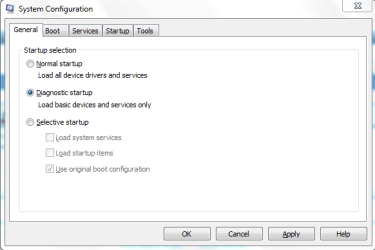
In the Start Search button, type msconfig and press enter.
Select Diagnostic Startup>Apply>OK>Restart Computer.

Capture.PNG
 

My Computer My Computer

At a glance

Windows® 8 Pro (64-bit)Intel® Core™ i5 Processor 2467M (1.60GHz, 3MB...6GB DDR3 System Memory at 1,333MHz (on BD 4GB...AMD Radeon™ HD7550M 1GB DDR3 (Ext. Graphic)
Computer Manufacturer/Model Number
Samsung NP530U4B-S02IN
OS
Windows® 8 Pro (64-bit)
CPU
Intel® Core™ i5 Processor 2467M (1.60GHz, 3MB L3 Cache)
Motherboard
Samsung Electronics
Memory
6GB DDR3 System Memory at 1,333MHz (on BD 4GB + 2GB x 1)
Graphics Card(s)
AMD Radeon™ HD7550M 1GB DDR3 (Ext. Graphic)
Sound Card
Realtek High Definition Audio
Monitor(s) Displays
35.56cm (14.0) SuperBright 300nit HD LED Display
Screen Resolution
1366x768
Hard Drives
1TB S-ATA II Hard Drive (5400RPM) with ExpressCache 16GB SSD
Internet Speed
sucks
Antivirus
Microsoft Security Essentials
Browser
Google Chrome (Sync enabled)
should i do it too?
i just restarted my computer and it seems that i have 102 processes (from everything in total)

and these days i am always getting a weaker and slower windows.
video streaming may have something to do with it, but it's at 100% double core usage at random times
 

My Computer My Computer

At a glance

Win7 Pro 64i7-3610QM8GB DDR3GTX 660M
Computer type
Laptop
Computer Manufacturer/Model Number
Y580
OS
Win7 Pro 64
CPU
i7-3610QM
Memory
8GB DDR3
Graphics Card(s)
GTX 660M
Screen Resolution
1920x1080
Mouse
G500s
Browser
Chrome
should i do it too?
i just restarted my computer and it seems that i have 102 processes (from everything in total)

and these days i am always getting a weaker and slower windows.
video streaming may have something to do with it, but it's at 100% double core usage at random times
Yes try diagnostics startup and see the difference. All unwanted apps wont open and the speed of your computer will increase.
 

My Computer My Computer

At a glance

Windows® 8 Pro (64-bit)Intel® Core™ i5 Processor 2467M (1.60GHz, 3MB...6GB DDR3 System Memory at 1,333MHz (on BD 4GB...AMD Radeon™ HD7550M 1GB DDR3 (Ext. Graphic)
Computer Manufacturer/Model Number
Samsung NP530U4B-S02IN
OS
Windows® 8 Pro (64-bit)
CPU
Intel® Core™ i5 Processor 2467M (1.60GHz, 3MB L3 Cache)
Motherboard
Samsung Electronics
Memory
6GB DDR3 System Memory at 1,333MHz (on BD 4GB + 2GB x 1)
Graphics Card(s)
AMD Radeon™ HD7550M 1GB DDR3 (Ext. Graphic)
Sound Card
Realtek High Definition Audio
Monitor(s) Displays
35.56cm (14.0) SuperBright 300nit HD LED Display
Screen Resolution
1366x768
Hard Drives
1TB S-ATA II Hard Drive (5400RPM) with ExpressCache 16GB SSD
Internet Speed
sucks
Antivirus
Microsoft Security Essentials
Browser
Google Chrome (Sync enabled)
should i do it too?
i just restarted my computer and it seems that i have 102 processes (from everything in total)

and these days i am always getting a weaker and slower windows.
video streaming may have something to do with it, but it's at 100% double core usage at random times
Yes try diagnostics startup and see the difference. All unwanted apps wont open and the speed of your computer will increase.

if i set it to diagnostic startup, will it stay default?
So nothing from the Startup tab will be executed, correct?
Thanks
 

My Computer My Computer

At a glance

Win7 Pro 64i7-3610QM8GB DDR3GTX 660M
Computer type
Laptop
Computer Manufacturer/Model Number
Y580
OS
Win7 Pro 64
CPU
i7-3610QM
Memory
8GB DDR3
Graphics Card(s)
GTX 660M
Screen Resolution
1920x1080
Mouse
G500s
Browser
Chrome
Hi there, 51 processes at a time seems to be a bit high.
In the Start Search button, type msconfig and press enter.
Select Diagnostic Startup>Apply>OK>Restart Computer.

View attachment 72363


I just did this and nothing worked on my computer. No sound no internet, nothing worked. I had to change back.
 

My Computer My Computer

At a glance

Windows 7ATI
Computer Manufacturer/Model Number
Gateway NV52
OS
Windows 7
Graphics Card(s)
ATI
should i do it too?
i just restarted my computer and it seems that i have 102 processes (from everything in total)

and these days i am always getting a weaker and slower windows.
video streaming may have something to do with it, but it's at 100% double core usage at random times
Yes try diagnostics startup and see the difference. All unwanted apps wont open and the speed of your computer will increase.

if i set it to diagnostic startup, will it stay default?
So nothing from the Startup tab will be executed, correct?
Thanks
Yes you are right. and if you find that your system is running faster, you can manually click on the Startup and Services tab and disable unwanted apps. Remember, if you plan to disable services, tick Hide All Microsoft Services. Also, if the service is disabled, that particular program wont start. So I'd rather suggest you to disable just all the startup items.
 

My Computer My Computer

At a glance

Windows® 8 Pro (64-bit)Intel® Core™ i5 Processor 2467M (1.60GHz, 3MB...6GB DDR3 System Memory at 1,333MHz (on BD 4GB...AMD Radeon™ HD7550M 1GB DDR3 (Ext. Graphic)
Computer Manufacturer/Model Number
Samsung NP530U4B-S02IN
OS
Windows® 8 Pro (64-bit)
CPU
Intel® Core™ i5 Processor 2467M (1.60GHz, 3MB L3 Cache)
Motherboard
Samsung Electronics
Memory
6GB DDR3 System Memory at 1,333MHz (on BD 4GB + 2GB x 1)
Graphics Card(s)
AMD Radeon™ HD7550M 1GB DDR3 (Ext. Graphic)
Sound Card
Realtek High Definition Audio
Monitor(s) Displays
35.56cm (14.0) SuperBright 300nit HD LED Display
Screen Resolution
1366x768
Hard Drives
1TB S-ATA II Hard Drive (5400RPM) with ExpressCache 16GB SSD
Internet Speed
sucks
Antivirus
Microsoft Security Essentials
Browser
Google Chrome (Sync enabled)
I disabled a lot of stuff on start up I seem to be running better. Maybe I just have a cheap laptop?

Gateway NV52

  1. AMD Athlon 64 X2 QL-64
  2. 15.6" 16:9 HD LED LCD
  3. 320 GB HDD
  4. 4 GB Memory (NOT UPGRADABLE!!!!!)
  5. DVD-SUPER MULTI DL DRIVE
  6. WEBCAM
  7. MULTI-in-1 card reader
Those are my specs, Win 7 clean install.

I have my top three service hogs as Firefox constantly well over 130K and then Windows Host process for windows services which hovers at 76K and finally AntiMalware from Windows at 65K.


Everything else is 20K and lower.
 

My Computer My Computer

At a glance

Windows 7ATI
Computer Manufacturer/Model Number
Gateway NV52
OS
Windows 7
Graphics Card(s)
ATI
Hey guys I am back with the same issue. All of a sudden my computer got VERY slow. Fan is on full blast all the time. Youtube is unusable, vidoes just glitch out similar to a poor cable connection. Even when I type these words in this box teh computer struggles to keep up. IDK why. I really don't wana have to reboot and clean install but will do if I have to.

P.S. If I have to clean install again, how to I make my Win 7 disk, this computer did not come with one.

I mean My computer is so slow now that if I move my mouse, the curser can't even keep up.

Thank you.
 

My Computer My Computer

At a glance

Windows 7ATI
Computer Manufacturer/Model Number
Gateway NV52
OS
Windows 7
Graphics Card(s)
ATI
Safe Mode?

Laptops seem to run at least 50% more services, than Desktops. :(

I wouldn't worry about the RAM usage you mentioned (at this point anyway).

For example, FF with 23 tabs open (on my PC):

  • "Private Bytes" = 400 MB
  • "Working Set" = 425 MB
  • "Virtual Size" = 700 MB.


  1. Is it still unusable, when you have nothing running except Windows services (no programs)?
  2. Does it play DVDs properly, using your optical drive?
  3. Is your HDD running constantly/excessively?
  4. Do you have the same problems, if you run your laptop in "Safe Mode"?
 

My Computer My Computer

At a glance

W7 Ultimate SP1, LM19.2 MATE, W10 Home 1703, ...AMD Phenom II x6 1100T, 3.3 GHz12GB DDR3 1333 G-Skill (4GB x 2), G-Skill (2G...NVIDIA GeForce GTX 660
Computer type
PC/Desktop
Computer Manufacturer/Model Number
n/a
OS
W7 Ultimate SP1, LM19.2 MATE, W10 Home 1703, W10 Pro 1703 VM, #All 64 bit
CPU
AMD Phenom II x6 1100T, 3.3 GHz
Motherboard
ASUS M4A88T-M/USB3 (AM3)
Memory
12GB DDR3 1333 G-Skill (4GB x 2), G-Skill (2GB x 2)
Graphics Card(s)
NVIDIA GeForce GTX 660
Sound Card
Realtek?
Monitor(s) Displays
Samsung S23B350
Screen Resolution
1920x1080
Hard Drives
WD Green 2TB (SATA), WD Green 3TB (SATA), WD Blue 4TB (SATA), WD Blue 6TB (SATA)
PSU
Cooler Master
Case
Antec GX300 Tower
Cooling
3x Antec TRICOOL 120mm Fans
Mouse
Wired Optical
Internet Speed
DSL
Antivirus
Avast
Browser
Pale Moon (64 bit)
Other Info
2018-12-27 Upgraded HDDs
2015-12-10 Upgraded case, graphics card, storage
2015-08-15 Upgraded motherboard & RAM
2015-07-15 Upgraded LM17.1 to LM17.2
I think the issue was a virus. I did a lot of house cleaning. System Registry cleaning, and ran Malware. Right now it seems to work good again. I think these issues only arise after the computer sleeps and then you wake it up.
 

My Computer My Computer

At a glance

Windows 7ATI
Computer Manufacturer/Model Number
Gateway NV52
OS
Windows 7
Graphics Card(s)
ATI
Might pay to check your cooling as well.

Doesn't take much of a build-up of muck to overheat a laptop.

Had similar issues with my AS5735 a while back, a good clean
of the fan and vents fixed it.
 

My Computer My Computer

At a glance

Windows 7 Home Premium 64-biti7-2670QM @ 2.2/3.2 Ghz8 Gb DDR3Ge-Force GT555M 2 Gb
Computer Manufacturer/Model Number
Acer Aspire Ethos 8951G
OS
Windows 7 Home Premium 64-bit
CPU
i7-2670QM @ 2.2/3.2 Ghz
Motherboard
Acer
Memory
8 Gb DDR3
Graphics Card(s)
Ge-Force GT555M 2 Gb
Sound Card
Onboard w/Dolby 5/1
Hard Drives
2x750GB onboard. 640GB pocket drive, 1x2TB Seagate external, 1x500GB Seagate external.
Yeah I would definitely check cooling (a pain on a laptop), as this was happening to my laptop. The fan was fried but before that it was always running. Got it cleaned and now all is right again. CPU usage is back to normal.
The other thing that might happen is a scan that was missed while sleeping might run upon waking. If there is more than one...well secunia PSI and an anti virus scan can pretty much swamp any system. When you are hitting 100% what is using most of that?
 

My Computer My Computer

At a glance

Windows 7 home premium 32 bit
OS
Windows 7 home premium 32 bit
1. Press "Ctrl," "Alt" and "Delete" at the same time to display the Windows Task Manager.

2. Go to the Process tab to see a list of currently running processes on your computer.

3. Look in the CPU column and locate programs that are using many CPU cycles. High CPU cycles can cause the CPU usage of a program to increase.

4. Right-click on the program and highlight "Set Priority" from the context menu. Select the "low" or "below normal" option to change the priority of the program.

5. Repeat Steps 3 and 4 to change the priority of other programs with high CPU usage.
 

My Computer My Computer

At a glance

Windows 7 Ultimate x64
OS
Windows 7 Ultimate x64
OK OK I found the issue. Malware has helped me identify the issue.

It's a Trojan.Clicker.CT. It is located in C:|Windows\SysWOW64\adbcnsl.exe.


How do I get rid of it?

Thanks again guys
 

My Computer My Computer

At a glance

Windows 7ATI
Computer Manufacturer/Model Number
Gateway NV52
OS
Windows 7
Graphics Card(s)
ATI
A recently updated version of malwarebytes should deal with that. I know you ran it recently but make sure it's up to date and run a full scan.
 

My Computer My Computer

At a glance

Windows 7 home premium x64AMD FX-4100 AM3+ 3.6GHz 12MB Black EditionCrsair vengeance 12Gb DDR3 1600MHz CL9Asus GTX 560 1GB
Computer Manufacturer/Model Number
DIY
OS
Windows 7 home premium x64
CPU
AMD FX-4100 AM3+ 3.6GHz 12MB Black Edition
Motherboard
Asus M5A97 Pro
Memory
Crsair vengeance 12Gb DDR3 1600MHz CL9
Graphics Card(s)
Asus GTX 560 1GB
Sound Card
Realtek onboard
Monitor(s) Displays
Hanns G 1680x1050 native
Hard Drives
OCZ 128Gb Petrol ssd
2x500 Gb Samsung
PSU
OCZ StealthXstream II 500W
Internet Speed
8Mb or better
It found it and quarantined it and then deleted it.
 

My Computer My Computer

At a glance

Windows 7ATI
Computer Manufacturer/Model Number
Gateway NV52
OS
Windows 7
Graphics Card(s)
ATI
Back
Top