Not being discovered by other computers on network!

CraXJaX

New member
Member
Local time
12:37 AM
Messages
29
Hi,

I am connected to a wireless home network via an Aztech router.
I can find other computers on the network by typing in their address in the address bar (\\...), but in the same way my computer is not discovered by any of the other PCs.

What could be the problem? I tried changing my workgroup to match that of the other computer, but it made no difference.

Thanks,
JaX
 

My Computer My Computer

Computer Manufacturer/Model Number
Dell XPS M1330
OS
Windows 7 Ultimate x86
CPU
Intel Core 2 Duo T7250 @2GHz
Memory
2 GB
Graphics Card(s)
nVidia 8400M GS
Screen Resolution
1280x800
Hard Drives
250GB SATA
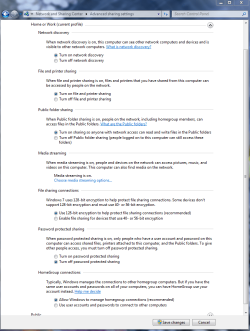
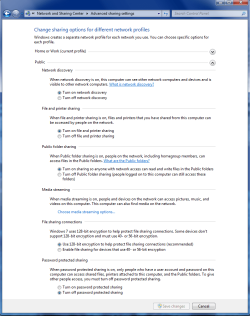
You should go into the Advanced Sharing settings and make sure that Network Discovery is turned on. The pictures below shows the which settings need to be enabled. You may need to enable the settings in the public file sharing windows also.

Don't miss this part>>> A/V software's and third party firewalls can also cause this problem. Often times you need to uninstall them completely to fix this sort of problem.
 

Attachments

  • Home or work homegroup enable.PNG
    Home or work homegroup enable.PNG
    45 KB · Views: 90
  • public sharing enabled all.PNG
    public sharing enabled all.PNG
    39.7 KB · Views: 62
Last edited:

My Computer My Computer

Computer type
PC/Desktop
Computer Manufacturer/Model Number
Home built
OS
Windows 7 Ult, Windows 8.1 Pro,
CPU
Q9650-4.275GHz, E8600 4.5GHz, E6750-3.8GHz
Motherboard
Evga 780i FTW
Memory
G.Skill PC2 9600 1200Mhz 5 5 5 15 2T
Graphics Card(s)
GTX480
Sound Card
Asus Xonar D2
Monitor(s) Displays
HannsG
Screen Resolution
1680X1050
Hard Drives
GSkill Phoenix Pro 120GB SSD
PSU
ThermalTake Toughpower 1000Watt modular
Case
ThermalTake XaserV
Cooling
Xigmatek S1283
Keyboard
Logitech G15
Mouse
Logitech G9
Internet Speed
T1
Thank you chev65, but I have already kept this enabled. It still doesn't work.
 

My Computer My Computer

Computer Manufacturer/Model Number
Dell XPS M1330
OS
Windows 7 Ultimate x86
CPU
Intel Core 2 Duo T7250 @2GHz
Memory
2 GB
Graphics Card(s)
nVidia 8400M GS
Screen Resolution
1280x800
Hard Drives
250GB SATA
Under the homegroup management....

"Use user accounds and passwords" don't use the recommended option
 

My Computer My Computer

Computer Manufacturer/Model Number
HP Pavilion Elite HPE-410f
OS
Windows 7 Ultimate x64
CPU
AMD Phenom x6 1045t
Motherboard
N/A
Memory
8 GB
Graphics Card(s)
ATI Radeon HD 5570
Sound Card
Realtek Highdefinition Audio / 5.1 Dolby Setup
Monitor(s) Displays
HP w2207h Widescreen
Screen Resolution
1680*1050
Hard Drives
1 TB (fixed), 320 Portable maxtor, Server Hard drives
PSU
350 Watt
Case
HP CASE
Cooling
Bass
Keyboard
Logitech MX 5500
Mouse
Logitech MX 5500
Internet Speed
ROAD RUNNER 16MB D/512 U
Hi,

I am connected to a wireless home network via an Aztech router.
I can find other computers on the network by typing in their address in the address bar (\\...), but in the same way my computer is not discovered by any of the other PCs.

What could be the problem? I tried changing my workgroup to match that of the other computer, but it made no difference.

Thanks,
JaX

Are you trying to set up a Homegroup "all windows 7 machines" or a Workgroup "mixed Op systems" type of network. The set up procedure is different for both.

The Homegroup walkthough problem solver is in the link below. Pay attention to the time/date settings and the registry adjustment.
http://helpdeskgeek.com/windows-7/windows-7-cannot-connect-to-homegroup/

For setting up a mixed Op system network use the link below.
http://windows.microsoft.com/en-us/...d-printers-with-different-versions-of-windows
 
Last edited:

My Computer My Computer

Computer type
PC/Desktop
Computer Manufacturer/Model Number
Home built
OS
Windows 7 Ult, Windows 8.1 Pro,
CPU
Q9650-4.275GHz, E8600 4.5GHz, E6750-3.8GHz
Motherboard
Evga 780i FTW
Memory
G.Skill PC2 9600 1200Mhz 5 5 5 15 2T
Graphics Card(s)
GTX480
Sound Card
Asus Xonar D2
Monitor(s) Displays
HannsG
Screen Resolution
1680X1050
Hard Drives
GSkill Phoenix Pro 120GB SSD
PSU
ThermalTake Toughpower 1000Watt modular
Case
ThermalTake XaserV
Cooling
Xigmatek S1283
Keyboard
Logitech G15
Mouse
Logitech G9
Internet Speed
T1
Hi,

I am connected to a wireless home network via an Aztech router.
I can find other computers on the network by typing in their address in the address bar (\\...), but in the same way my computer is not discovered by any of the other PCs.

What could be the problem? I tried changing my workgroup to match that of the other computer, but it made no difference.

Thanks,
JaX
Hello, Have you looked at some of these tips from Microsoft?
Networking home computers running different versions of Windows
Good luck to you with your problem :D
 

My Computer My Computer

Computer Manufacturer/Model Number
Gateway GT5692
OS
Windows 7 Ulti. x64
CPU
AMD Phenom 8450 triple-core 2.10 ghz
Memory
4GB
Graphics Card(s)
ATI Radion HD 3200
Monitor(s) Displays
Gateway FPD1775W
Screen Resolution
1280x720
Hard Drives
465.6613 Gibibytes
CraXJaX, check your firewall...

zzz2496
 

My Computer My Computer

Computer Manufacturer/Model Number
Self Built
OS
Windows7 Ultimate 64bit
CPU
Intel Core 2 Quad Q6600
Motherboard
Abit IN9-32X-MMAX
Memory
DDR2 Adata 4GB
Graphics Card(s)
Nvidia GeForce GTX 285 1024 and Nvidia GeForce 8800GT 512
Sound Card
Asus Xonar HDAV 1.3
Monitor(s) Displays
Dell 2407WFP and BenQ 2400v and Philips 150v3
Screen Resolution
3840x1200 and 1024x768
Hard Drives
2 WDC 1TB
1 WDC 1.5TB
1 WDC 640GB
1 WDC 320GB
1 Seagate 200GB
PSU
Corsair TX 850W
Case
Cooler Master HAF932
Cooling
Arctic Cooling Freezer Extreme and plenty of fans...
Keyboard
MicrosoftNaturalKeyboard 4000/Apple Alu keyboard/Dinovo mini
Mouse
Logitech G5/MarbleMouseTrackball/PerformanceMX/SpacePilotPRO
Internet Speed
1.5Mbps down/384Kbps up
Other Info
APC SURT 1000XL
Logitech Z-560
Wiimote
Mikrotik Router
Linksys (now Cisco) SD2008 8 port Gigabit switch
Linksys WRT54G (acting as AP)
Apple wireless Aluminium keyboard
Apple Magic Mouse
Xbox360 wired controller
Thanks all, I didn't get an opportunity to go and try to resolve the issue, was very busy this week.
I'll try out the suggestions.

Thanks,
JaX
 

My Computer My Computer

Computer Manufacturer/Model Number
Dell XPS M1330
OS
Windows 7 Ultimate x86
CPU
Intel Core 2 Duo T7250 @2GHz
Memory
2 GB
Graphics Card(s)
nVidia 8400M GS
Screen Resolution
1280x800
Hard Drives
250GB SATA
Thank you so much, zzz2496, as it turned out it was my firewall.
I'm using BitDefender, and it's a pain to configure.

I am having another problem with networking, although I'll search here first and post it in another thread if I don't get a solution.

Also thanks to all those who replied.

JaX
 

My Computer My Computer

Computer Manufacturer/Model Number
Dell XPS M1330
OS
Windows 7 Ultimate x86
CPU
Intel Core 2 Duo T7250 @2GHz
Memory
2 GB
Graphics Card(s)
nVidia 8400M GS
Screen Resolution
1280x800
Hard Drives
250GB SATA
Thanks Jax for reporting back your resolution. Good day to you! :D
 

My Computer My Computer

Computer Manufacturer/Model Number
Gateway GT5692
OS
Windows 7 Ulti. x64
CPU
AMD Phenom 8450 triple-core 2.10 ghz
Memory
4GB
Graphics Card(s)
ATI Radion HD 3200
Monitor(s) Displays
Gateway FPD1775W
Screen Resolution
1280x720
Hard Drives
465.6613 Gibibytes
Nice :), and you're welcome. Post back if you need anything :)

zzz2496
 

My Computer My Computer

Computer Manufacturer/Model Number
Self Built
OS
Windows7 Ultimate 64bit
CPU
Intel Core 2 Quad Q6600
Motherboard
Abit IN9-32X-MMAX
Memory
DDR2 Adata 4GB
Graphics Card(s)
Nvidia GeForce GTX 285 1024 and Nvidia GeForce 8800GT 512
Sound Card
Asus Xonar HDAV 1.3
Monitor(s) Displays
Dell 2407WFP and BenQ 2400v and Philips 150v3
Screen Resolution
3840x1200 and 1024x768
Hard Drives
2 WDC 1TB
1 WDC 1.5TB
1 WDC 640GB
1 WDC 320GB
1 Seagate 200GB
PSU
Corsair TX 850W
Case
Cooler Master HAF932
Cooling
Arctic Cooling Freezer Extreme and plenty of fans...
Keyboard
MicrosoftNaturalKeyboard 4000/Apple Alu keyboard/Dinovo mini
Mouse
Logitech G5/MarbleMouseTrackball/PerformanceMX/SpacePilotPRO
Internet Speed
1.5Mbps down/384Kbps up
Other Info
APC SURT 1000XL
Logitech Z-560
Wiimote
Mikrotik Router
Linksys (now Cisco) SD2008 8 port Gigabit switch
Linksys WRT54G (acting as AP)
Apple wireless Aluminium keyboard
Apple Magic Mouse
Xbox360 wired controller
Back
Top