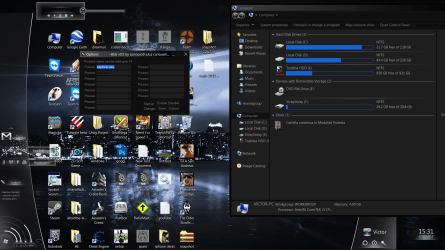
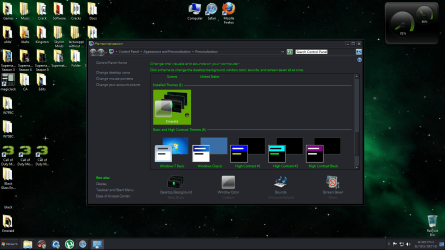
Black Glass Enhanced

Ahha, I an article in my AutoHotKey documentation about arrays. I see what you mean now.

It would be possible, and yea... probably practical, but it would take a bit to get it to work in this particular script.

Just on a side note about the power of Auto It and AutoHotKey (derivative of AutoIt), if you are a more experienced coder, it is more powerful than most people know. While it's mainly used for automating system tasks, it can access Windows core files and get information from them, and then use this for whatever purposes the script is for. So it is pretty damn powerful, you just need a very experienced coder to work it. :p
 

My Computer My Computer

Computer type
PC/Desktop
Computer Manufacturer/Model Number
Custom built
OS
Windows 8 Pro 64-bit
CPU
Intel Core i7 950 @4.4GHz
Motherboard
EVGA 131-GT-E767
Memory
12GB DDR3 1333MHz @1400 (9-9-9-24)
Graphics Card(s)
2x AMD Radeon HD 6770
Sound Card
Sound Blaster Audigy
Monitor(s) Displays
Acer S231HL + Acer E19T5W
Screen Resolution
1920x1080 + 1440x900
Hard Drives
128GB Samsung 840 Pro
1TB Seagate Barracuda 7200RPM 64mb
500GB Seagate Barracuda 7200RPM 16mb
PSU
Corsair GS800
Case
Custom-made
Cooling
CM Hyper212+, lots of fans
Keyboard
NMB RT8255C+
Mouse
Func MS-3
Internet Speed
30/1.5
Antivirus
Microsoft Security Essentials/Spybot SD/Malwarebytes
Browser
Google Chrome
Other Info
Onkyo TX-27 receiver & two Realistic Optimus T100s.
this doesnt work for me, neither does Full Glass, this is what happens when i try to use it...help?

11rbz80.jpg
 

My Computer My Computer

OS
Windows 7
CPU
2.3hz
Memory
3GB
Monitor(s) Displays
SAMSUNG
Screen Resolution
1280x1024
Hard Drives
250GB
Case
Compaq
Mouse
Compaq
this doesnt work for me, neither does Full Glass, this is what happens when i try to use it...help?

11rbz80.jpg

You have to use a black theme in order for it to work for you. :p
 

My Computer My Computer

Computer type
PC/Desktop
Computer Manufacturer/Model Number
Custom built
OS
Windows 8 Pro 64-bit
CPU
Intel Core i7 950 @4.4GHz
Motherboard
EVGA 131-GT-E767
Memory
12GB DDR3 1333MHz @1400 (9-9-9-24)
Graphics Card(s)
2x AMD Radeon HD 6770
Sound Card
Sound Blaster Audigy
Monitor(s) Displays
Acer S231HL + Acer E19T5W
Screen Resolution
1920x1080 + 1440x900
Hard Drives
128GB Samsung 840 Pro
1TB Seagate Barracuda 7200RPM 64mb
500GB Seagate Barracuda 7200RPM 16mb
PSU
Corsair GS800
Case
Custom-made
Cooling
CM Hyper212+, lots of fans
Keyboard
NMB RT8255C+
Mouse
Func MS-3
Internet Speed
30/1.5
Antivirus
Microsoft Security Essentials/Spybot SD/Malwarebytes
Browser
Google Chrome
Other Info
Onkyo TX-27 receiver & two Realistic Optimus T100s.

My Computer My Computer

OS
Windows 7
CPU
2.3hz
Memory
3GB
Monitor(s) Displays
SAMSUNG
Screen Resolution
1280x1024
Hard Drives
250GB
Case
Compaq
Mouse
Compaq

My Computer My Computer

Computer type
PC/Desktop
Computer Manufacturer/Model Number
Custom built
OS
Windows 8 Pro 64-bit
CPU
Intel Core i7 950 @4.4GHz
Motherboard
EVGA 131-GT-E767
Memory
12GB DDR3 1333MHz @1400 (9-9-9-24)
Graphics Card(s)
2x AMD Radeon HD 6770
Sound Card
Sound Blaster Audigy
Monitor(s) Displays
Acer S231HL + Acer E19T5W
Screen Resolution
1920x1080 + 1440x900
Hard Drives
128GB Samsung 840 Pro
1TB Seagate Barracuda 7200RPM 64mb
500GB Seagate Barracuda 7200RPM 16mb
PSU
Corsair GS800
Case
Custom-made
Cooling
CM Hyper212+, lots of fans
Keyboard
NMB RT8255C+
Mouse
Func MS-3
Internet Speed
30/1.5
Antivirus
Microsoft Security Essentials/Spybot SD/Malwarebytes
Browser
Google Chrome
Other Info
Onkyo TX-27 receiver & two Realistic Optimus T100s.

My Computer My Computer

Computer type
PC/Desktop
Computer Manufacturer/Model Number
Self Assembled
OS
Microsoft Windows 10 Pro Insider Preview 64-bit
CPU
Intel(R) Core(TM) i3-4130 CPU @ 3.40GHz
Motherboard
Gigabyte Technology Co., Ltd. B85M-D3H
Memory
Corsair Vengence 4GB x2 (8.00GB Dual-Channel DDR3 @ 798MHz)
Graphics Card(s)
2047MB GeForce GTS 450 (ZOTAC International)
Sound Card
Onboard (Realtek High Definition Audio)
Monitor(s) Displays
LG Flatron E2040T
Screen Resolution
1600x900
Hard Drives
Western Digital 1 TB
Seagate 500 GB
PSU
Corsair VS550
Case
Cooler Master K380
Cooling
Cooler Master Seidon 120V Plus
Keyboard
Logitech MK260r
Mouse
Logitech MK260r
Internet Speed
PMPL Broadband
Antivirus
Windows Defender + MBAM
Browser
Firefox
Other Info
Dell Studio 15" Laptop
I took a look at what you're using and that is not a full glass theme. Black Glass and Full Glass will only work on themes designed with blacked out windows. Go here to find full glass themes:

Windows 7 Themes - CreativX
 

My Computer My Computer

OS
windows 7 64 bit

My Computer My Computer

Computer type
PC/Desktop
Computer Manufacturer/Model Number
Self Assembled
OS
Microsoft Windows 10 Pro Insider Preview 64-bit
CPU
Intel(R) Core(TM) i3-4130 CPU @ 3.40GHz
Motherboard
Gigabyte Technology Co., Ltd. B85M-D3H
Memory
Corsair Vengence 4GB x2 (8.00GB Dual-Channel DDR3 @ 798MHz)
Graphics Card(s)
2047MB GeForce GTS 450 (ZOTAC International)
Sound Card
Onboard (Realtek High Definition Audio)
Monitor(s) Displays
LG Flatron E2040T
Screen Resolution
1600x900
Hard Drives
Western Digital 1 TB
Seagate 500 GB
PSU
Corsair VS550
Case
Cooler Master K380
Cooling
Cooler Master Seidon 120V Plus
Keyboard
Logitech MK260r
Mouse
Logitech MK260r
Internet Speed
PMPL Broadband
Antivirus
Windows Defender + MBAM
Browser
Firefox
Other Info
Dell Studio 15" Laptop
curiouso9 i have a suggestion if at all possible. When using this with a custom theme it sometimes doesn't work in particular windows for example 'save as'. What you get is a window with black background and not transparent. Would it be possible to have transparency on white backgrounds instead so that even if transparency does not work for that particular window you have a standard white windows background?
 

My Computer My Computer

OS
win7 64
hey all
got a little problem with my FullGlassEnhancer

well if u know how , can u tell me how i can fix this ?


well , its annoying if u had all blackglass without the startmenu and the system menu

Ps ,sry for my bad english but i hope u guys can help me
http://imageshack.us
 

My Computer My Computer

OS
Windows7 Ultimate 64 bit

My Computer My Computer

Computer type
PC/Desktop
Computer Manufacturer/Model Number
Self Assembled
OS
Microsoft Windows 10 Pro Insider Preview 64-bit
CPU
Intel(R) Core(TM) i3-4130 CPU @ 3.40GHz
Motherboard
Gigabyte Technology Co., Ltd. B85M-D3H
Memory
Corsair Vengence 4GB x2 (8.00GB Dual-Channel DDR3 @ 798MHz)
Graphics Card(s)
2047MB GeForce GTS 450 (ZOTAC International)
Sound Card
Onboard (Realtek High Definition Audio)
Monitor(s) Displays
LG Flatron E2040T
Screen Resolution
1600x900
Hard Drives
Western Digital 1 TB
Seagate 500 GB
PSU
Corsair VS550
Case
Cooler Master K380
Cooling
Cooler Master Seidon 120V Plus
Keyboard
Logitech MK260r
Mouse
Logitech MK260r
Internet Speed
PMPL Broadband
Antivirus
Windows Defender + MBAM
Browser
Firefox
Other Info
Dell Studio 15" Laptop
ty ^^
the startmenu is fixed ..but the syst,menu is still the same ..
well, how it seems , i need to wait on the update .

btw. can anyone me invite to creativx.net ?
would be awsome :3


My Computer My Computer

OS
Windows7 Ultimate 64 bit
Hey guys. I'm not using glass effect themes (well rarely) but I heard that after installing SP1 it doesn't work. Is that because of the app itself or something else? Thanks!
 

My Computer My Computer

OS
Windows 7 Ultimate edition x64
CPU
AMD Athlon 64 x2 Dual Core 4600+ 2.39GHz
Memory
4GB
Graphics Card(s)
Nvidia Gforce 9600 GT 512
Sound Card
Realtek HD
Monitor(s) Displays
LG 19`
Screen Resolution
1280X1024
Hard Drives
two HDs 300GB
Internet Speed
1Mb
Really i have sp1. maybe it changes the functions of it.
 

My Computer My Computer

Computer type
Laptop
Computer Manufacturer/Model Number
Dell Latitude XT2 Tablet PC
OS
Windows 7 Professional 32-bit SP1
CPU
Intel Mobile Core 2 Duo SU9600 @ 1.60GHz
Motherboard
Dell Inc. 0M374P (Microprocessor)
Memory
3.00GB Dual-Channel DDR3 @ 398MHz (6-6-6-15)
Graphics Card(s)
Intel Mobile Intel 4 Series Express Chipset Family (Dell)
Sound Card
High Definition Audio Device
Monitor(s) Displays
Generic PnP Monitor (1280x800@60Hz)
Screen Resolution
1280 x 800
Hard Drives
232GB TOSHIBA MK2529GSGF (SATA)
Keyboard
HID Keyboard Device; Standard PS/2 Keyboard
Mouse
HID-compliant mouse; PS/2 Compatible Mouse
Antivirus
Norton 360
Browser
Google Chrome, Mozilla Firefox
Other Info
From Piriform Speccy!
This is a great how you can add individual processes outside of explorer, (of course so long as the theme makes your programs background black initially)
Here is a before & after of Free download manager
 
Last edited:

My Computer My Computer

Computer Manufacturer/Model Number
Hewlett Packard Compaq Presario CQ60-305au
OS
Windows Seven Home Premium 32bit SP1
CPU
AMD Athlon QI46 2.1Ghz
Motherboard
Wistron 303c
Memory
2048 Mb DDR2 SD RAM
Graphics Card(s)
NVidea GE GoForce 8200M G/256mb dedicated graphics memory
Sound Card
MCP78S NVidea high definition
Monitor(s) Displays
15.6" High definition Brightview Widescreen
Screen Resolution
1336x768
Hard Drives
Toshiba MK2555GSX ATA
Hi, i am not a begginer in programing or designing, but this program gave me a headache :cry:. I have a recomended black theme, and I have the latest version of bge ( v0.5 ). I wrote in processes " explorer.exe " and " cmd.exe " , i hit Enable StartUp, then Save , and it is still not transparent. Any ideeas? Thanx and sorry for my bad language:o
 

Attachments

  • Problem.png
    Problem.png
    483.3 KB · Views: 47

My Computer My Computer

OS
Windows 7 Ultimate 32bit
Doesnt seem to work for me!

This is what happens when I use glass themes!:( Im using windows 7 professional 32 bit? Is that the problem? Because Aero themes seem to work!
 

Attachments

  • printscreen.png
    printscreen.png
    393.9 KB · Views: 22

My Computer My Computer

OS
Windows 7 Professional x32
This is what happens when I use glass themes!:( Im using windows 7 professional 32 bit? Is that the problem? Because Aero themes seem to work!

sKREEEm I assume the default Aero glass theme is working if you select it or you ensure Aero is working by testing your WEI score first.

Then make sure your DPI settings are set below 124% as some themes will not work properly above 124% (I have a couple of themes that always do this) or sometimes you may just have downloaded a corrupt or faulty theme.

Also Black Glass Enhanced can be placed in the startup folder in the start menu for automatic startup and once BGE is running Right click the BGE icon in the notification area and ensure explorer.exe is entered in one of the application fields then enabled and settings saved.

An alternative to Black Glass Enhanced is "FullGlass.exe" which can be pinned to the taskbar and manually started, placed on the desktop & manuallly started or placed in the startup folder in the start menu for automatic startup.
 

My Computer My Computer

Computer type
PC/Desktop
Computer Manufacturer/Model Number
My own abomination, I call it the Money Pit
OS
Windows 10 Pro x 2/Windows 11 Home
CPU
Intel i7 2600K @ 3.40 GHz
Motherboard
ASUS Sabertooth P67
Memory
Corsair Vengeance 16GB DDR3 1600MHz CL8 Dual Channel Kit
Graphics Card(s)
EVGA GeForce RTX 3080 XC3 ULTRA GAMING 10GB GDDR6X
Sound Card
Onboard Realtek or Nvidia High Definition Audio (HDMI)
Monitor(s) Displays
Samsung JS7000 50" SUHD TV or Samsung 27" FHD 60Hz 8ms GTG V
Screen Resolution
1920 x 1080
Hard Drives
1 x Samsung 870 EVO 250 GB SSD (Windows 10 Pro), 1 x Samsung 850 EVO 250 GB SSD (Windows 10 Pro)
PSU
Corsair AX860 - 860W Modular Power Supply
Case
Phanteks Enthoo Luxe Full Tower Case - Black
Cooling
CORSAIR Hydro Series H150i PRO RGB 360mm Liquid CPU Cooler
Keyboard
Logitech K830 Illuminated Living-Room Keyboard
Mouse
Logitech MX Anywhere 2S Wireless Mouse
Internet Speed
100 Mbps
Antivirus
ESET Internet Security
Browser
Latest Version Of Firefox & Microsoft Edge Chromium Stable
Other Info
LG Super Multi Blue Internal Blu-ray Disk Rewriter - BH10LS30
6x2 HDMI Switcher (6 inputs, 2 outputs) so I can send the output of my Cable Box, Roku, or any my 4 computers to either my TV or Monitor separately or simultaneously.
Hey,
Yup! Works when i select default aero themes and I can mess around with them a bit, my DPI is 100%! My WEI score is 5.2, but i think that runs Aero without a problem!(Not sure though)
I think the themes are okay because i tried it with the orange cult theme too and none of them seem to work,
The theme in the screenshot is Emerald( Windows 7 Themes: Emerald Dark by TheBull)
And its an auto install theme, when it does install the window colour goes default to high contrast!
Im kinda new to this so i might have left something out, but thats about it? Any solutions?

P.S - It also wont let me change my start orb while the theme is in effect, giving it the classic windows look for some reason!

P.P.S - Also tried BGE, explorer.exe is in place and BGE is in the startup folder and its startup is enabled, also tried full glass but no change?!:S
 

My Computer My Computer

OS
Windows 7 Professional x32
Back
Top