[Major Problem] installing a fresh new windows 7

duongducminh

New member
Local time
8:52 AM
Messages
100
hi,

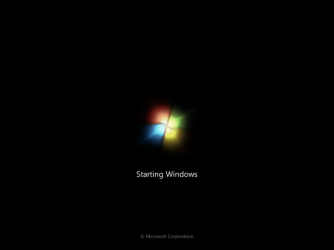
my sisters have done something to my computer. i turned it on again and when it says "starting windows" my screen turned "blue" with words on it. i couldn't see what it says because it was only shown for about 1 second and restarted. the process kept on repeating itself. i then had no choice but to reinstall windows 7 again. i put the DVD in and boot it up. it says "windows loading files" and then it says "starting windows" and after that, it displays a "light blue windows 7 wallpaper" but no box saying "install windows". i thought it was just loading but i waited for 30 minutes but nothing came up.

my problem is the reinstalling part when i couldn't see the box to click and install. is this because of my hard drive or one of my devices?
 

My Computer My Computer

Computer Manufacturer/Model Number
Dell Dimension E520 Desktop/PC
OS
Windows 7 Ultimate 64-Bit
CPU
Intel(R) Pentinum(R) D CPU 2.80 GHz - Dual Core
Motherboard
Dell Inc. 0WG864
Memory
3.5 GB
Graphics Card(s)
Asus Geforce 8500GT
Monitor(s) Displays
Asus PG191
Screen Resolution
1280 x 1024
Hard Drives
320GB
Internet Speed
26.78 Mbps

My Computer My Computer

Computer type
PC/Desktop
Computer Manufacturer/Model Number
LENOVO K450 @3.0GHZ
OS
64-bit Windows 8.1 Pro
CPU
Core(TM) i5 CPU 4330 Haswell @ 3.20GHz
Motherboard
LENOVO
Memory
12.00 GB
Graphics Card(s)
Intel(R) HD Graphics
Sound Card
Intel HD integtrated
Monitor(s) Displays
HP 25' ISP Monitor
Screen Resolution
1900/1020
Hard Drives
(1) ST1000DM003-1CH162 (2) Generic STORAGE DEVICE USB Device (3) Generic STORAGE DEVICE USB Device
Internet Speed
100mb down/10mb up

My Computer My Computer

Computer Manufacturer/Model Number
Dell Dimension E520 Desktop/PC
OS
Windows 7 Ultimate 64-Bit
CPU
Intel(R) Pentinum(R) D CPU 2.80 GHz - Dual Core
Motherboard
Dell Inc. 0WG864
Memory
3.5 GB
Graphics Card(s)
Asus Geforce 8500GT
Monitor(s) Displays
Asus PG191
Screen Resolution
1280 x 1024
Hard Drives
320GB
Internet Speed
26.78 Mbps

My Computer My Computer

Computer type
PC/Desktop
Computer Manufacturer/Model Number
Dwarf Dwf/11/2012 r09/2013
OS
Windows 8.1 Pro RTM x64
CPU
Intel Core-i5-3570K 4-core @ 3.4GHz (Ivy Bridge) (OC 4.4GHz)
Motherboard
ASRock Z77 Extreme4-M
Memory
4 x 4GB DDR3-1600 Corsair Vengeance CMZ8GX3M2A1600C9B (16GB)
Graphics Card(s)
MSI GeForce GTX770 Gaming OC 2GB
Sound Card
Realtek High Definition on board solution (ALC 898)
Monitor(s) Displays
ViewSonic VA1912w Widescreen (VGA)
Screen Resolution
1440x900
Hard Drives
OCZ Agility 3 SSD 120GB SATA III x2 (RAID 0)
Samsung HD501LJ 500GB SATA II x2
Hitachi HDS721010CLA332 1TB SATA II
Iomega 1.5TB Ext USB 2.0
WD 2.0TB Ext USB 3.0
PSU
XFX Pro Series 850W Semi-Modular
Case
Gigabyte IF233
Cooling
1 x 120mm Front Inlet 1 x 120mm Rear Exhaust
Keyboard
Microsoft Comfort Curve Keyboard 3000 (USB)
Mouse
Microsoft Comfort Mouse 3000 for Business (USB)
Internet Speed
NetGear DG834Gv3 ADSL Modem/Router (Ethernet) ~4.0 Mb/s (O2)
Antivirus
Avast! 8.0.1497
Browser
IE 11
Other Info
Optical Drive: HL-DT-ST BD-RE BH10LS30 SATA Bluray
Lexmark S305 Printer/Scanner/Copier (USB)
WEI Score: 8.1/8.1/8.5/8.5/8.25
Asus Eee PC 1011PX Netbook (Windows 7 x86 Starter)
Have you tried booting in Safe mode?
 

My Computer My Computer

Computer type
PC/Desktop
Computer Manufacturer/Model Number
Bruce ... somewhere in his 40's
OS
Windows 7 Ultimate 32bit SP1
CPU
Intel(R) Core(TM)2 Quad CPU @ 2.40GHz, 2400 MHz
Motherboard
INTEL/D975XBX2
Memory
4 GB
Graphics Card(s)
ATI Radeon HD 2600 Pro
Monitor(s) Displays
Samsung SyncMaster 914v
Screen Resolution
1280 x 1024
Hard Drives
2/500GB each ... ST3500630AS ATA Device.
One is not connected
PSU
Rocketfish 700 W
Case
G.Skill Gigabyte Chassis
Keyboard
Standard PS/2 Keyboard
Mouse
Microsoft PS/2 Mouse
Internet Speed
DSL
Antivirus
Avira Internet Security
Browser
IE 11
Other Info
ATI HDMI Audio
oh and i forgot to mention that, i was using windows XP. and it was stuffed so i wanted to install windows 7 on it. but i can't get the windows 7 install setup :( window to come up.
 

My Computer My Computer

Computer Manufacturer/Model Number
Dell Dimension E520 Desktop/PC
OS
Windows 7 Ultimate 64-Bit
CPU
Intel(R) Pentinum(R) D CPU 2.80 GHz - Dual Core
Motherboard
Dell Inc. 0WG864
Memory
3.5 GB
Graphics Card(s)
Asus Geforce 8500GT
Monitor(s) Displays
Asus PG191
Screen Resolution
1280 x 1024
Hard Drives
320GB
Internet Speed
26.78 Mbps
Can you post your specs.
http://www.sevenforums.com/general-discussion/22550-filling-out-system-specs.html

Have you Check with the Upgrade Advisor:
Download details: Windows 7 Upgrade Advisor

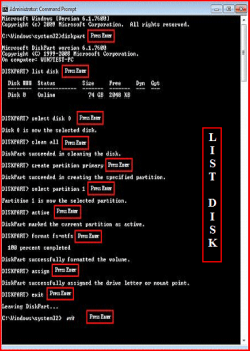
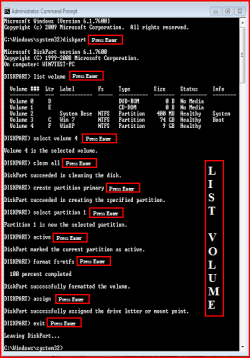
Try a full clean & full format.
http://www.sevenforums.com/tutorials/52129-disk-clean-clean-all-diskpart-command.html

1) Boot DVD.
2) Press Shift+F10 (for command prompt)

Type in command line
DISKPART
LIST DISK OR List Volume (If you have partitions)
SELECT DISK # (win HD)
CLEAN ALL
CREATE PARTITION PRIMARY
SELECT PARTITION 1
ACTIVE
FORMAT=NTFS
ASSIGN
EXIT
EXIT
 

Attachments

  • List Disk.PNG
    List Disk.PNG
    58.8 KB · Views: 17
  • List Volume.PNG
    List Volume.PNG
    24.6 KB · Views: 12

My Computer My Computer

OS
ME/XP/Vista/Win7
i cannot go onto computer, after when it says windows Xp and the loading bar at the bottom. theres a blue screen after that and it just restarts and repeats itself.
 

My Computer My Computer

Computer Manufacturer/Model Number
Dell Dimension E520 Desktop/PC
OS
Windows 7 Ultimate 64-Bit
CPU
Intel(R) Pentinum(R) D CPU 2.80 GHz - Dual Core
Motherboard
Dell Inc. 0WG864
Memory
3.5 GB
Graphics Card(s)
Asus Geforce 8500GT
Monitor(s) Displays
Asus PG191
Screen Resolution
1280 x 1024
Hard Drives
320GB
Internet Speed
26.78 Mbps
Boot the Win7 DVD Repair console or Repair CD, accept any offered repair and see if it starts.

If not, boot back into Repair console, click through to Recovery Tools list to run Startup Repair up to 3 separate times with reboots.

In your first post, you say that you are trying to repair Win7, but later you say you have XP but are attempting to install Win7. Which is it?
 
ok lets make this clear, this is my problem : i have a stuffed up windows XP and wanting to install a fresh new WIndows 7. i tried to boot it up at the startup, not in desktop. but the windows 7 installationg window is not coming up.

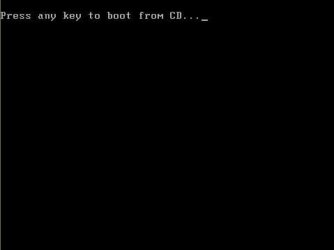
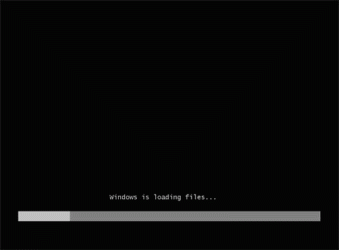
i have some images so you guys can see my problem in order...

1.http://www.microsoft.com/library/me...g/setup/winxp/xp-setup-0-press-any-key-to.jpg

2.http://www.livecd.com/screens/windows_loading.gif

3.http://www.15seconds.com/graphics/issue/090109_02.jpg

4.http://www.jens-schaller.de/files/Windows_7_logon_0.jpg

as you can see on 'No.4', when i get to the installation wallpaper, no installation window is coming up.

can anyone help me to get the installation window up?
 

Attachments

  • pressanykey.jpg
    pressanykey.jpg
    3 KB · Views: 3
  • windows_loading.gif
    windows_loading.gif
    4.9 KB · Views: 3
  • windows-7-install-starting-windows.png
    windows-7-install-starting-windows.png
    6 KB · Views: 3
  • Windows_7_logon_0.jpg
    Windows_7_logon_0.jpg
    12.7 KB · Views: 3

My Computer My Computer

Computer Manufacturer/Model Number
Dell Dimension E520 Desktop/PC
OS
Windows 7 Ultimate 64-Bit
CPU
Intel(R) Pentinum(R) D CPU 2.80 GHz - Dual Core
Motherboard
Dell Inc. 0WG864
Memory
3.5 GB
Graphics Card(s)
Asus Geforce 8500GT
Monitor(s) Displays
Asus PG191
Screen Resolution
1280 x 1024
Hard Drives
320GB
Internet Speed
26.78 Mbps
Where did you get Win7 installer? Has it worked before? It may need to be burned at slower 4 x speed, or try installation using USB stick: http://www.sevenforums.com/tutorials/31541-windows-7-usb-dvd-download-tool.html?filter[2]=General%20Tips

Test your HD using maker's full diag/repair CD scan: Hard Drive Diagnostics Tools and Utilities (Storage) - TACKtech Corp.

Test your memory for 5-6 passes using memtest86 CD.

Make sure you have latest BIOS update, set SATA controller in BIOS to AHCI first, then IDE if fail.

Try cleaning the HD to prepare for install. Boot DVD>Repair console>Recovery tools, open Command Line, type:
DISKPART
LIST DISK
SELECT DISK # (for Windows 7 disk)
clean
create partition primary
select partition 1
assign letter=c:
active
format
exit
 
Where did you get Win7 installer? Has it worked before? It may need to be burned at slower 4 x speed, or try installation using USB stick: http://www.sevenforums.com/tutorials/31541-windows-7-usb-dvd-download-tool.html?filter[2]=General%20Tips

Test your HD using maker's full diag/repair CD scan: Hard Drive Diagnostics Tools and Utilities (Storage) - TACKtech Corp.

Test your memory for 5-6 passes using memtest86 CD.

Make sure you have latest BIOS update, set SATA controller in BIOS to AHCI first, then IDE if fail.

Try cleaning the HD to prepare for install. Boot DVD>Repair console>Recovery tools, open Command Line, type:
DISKPART
LIST DISK
SELECT DISK # (for Windows 7 disk)
clean
create partition primary
select partition 1
assign letter=c:
active
format
exit

i got the DVD from my friend. Yes it works, i've done it on my sisters and my dads computer. but mine doesn't come up. o.O

how do i full diag/repair my computer when i can't get into my desktop? is there a way?
 

My Computer My Computer

Computer Manufacturer/Model Number
Dell Dimension E520 Desktop/PC
OS
Windows 7 Ultimate 64-Bit
CPU
Intel(R) Pentinum(R) D CPU 2.80 GHz - Dual Core
Motherboard
Dell Inc. 0WG864
Memory
3.5 GB
Graphics Card(s)
Asus Geforce 8500GT
Monitor(s) Displays
Asus PG191
Screen Resolution
1280 x 1024
Hard Drives
320GB
Internet Speed
26.78 Mbps
I had a similar issue with Win7 no wanting to load... i used an xp boot cd to boot system, i then formatted the drive i was going to install it on using the xp disc.. switched off and inserted win7 boot cd, this then seemed to cure the issue and allowed me to load win7... may or may not work for you... but hope it helps
 

My Computer My Computer

Computer Manufacturer/Model Number
na
OS
win 7 ultimate
CPU
AMD quad
Motherboard
gf8200
Memory
2gb
Graphics Card(s)
nvidia
Sound Card
on board
Test your HD using maker's full diag/repair CD scan: Hard Drive Diagnostics Tools and Utilities (Storage) - TACKtech Corp.

Test your memory for 5-6 passes using memtest86 CD.


how do i full diag/repair my computer when i can't get into my desktop? is there a way?

Both hardware diagnostics given above are burned to bootable CD's, so it isn't necessary to run from desktop. Dont' forget to swap out your memory sticks, trying install with one at a time too.

i used an xp boot cd to boot system, i then formatted the drive i was going to install it on using the xp disc.. switched off and inserted win7 boot cd, this then seemed to cure the issue and allowed me to load win7... may or may not work for you... but hope it helps

Win7 uses slightly different partition table than XP so it is best to format using the installer. The DISKPART commands also clean the HD before formatting so you have the cleanest possible slate.
 
I had a similar issue with Win7 no wanting to load... i used an xp boot cd to boot system, i then formatted the drive i was going to install it on using the xp disc.. switched off and inserted win7 boot cd, this then seemed to cure the issue and allowed me to load win7... may or may not work for you... but hope it helps

i will try that. :)
 

My Computer My Computer

Computer Manufacturer/Model Number
Dell Dimension E520 Desktop/PC
OS
Windows 7 Ultimate 64-Bit
CPU
Intel(R) Pentinum(R) D CPU 2.80 GHz - Dual Core
Motherboard
Dell Inc. 0WG864
Memory
3.5 GB
Graphics Card(s)
Asus Geforce 8500GT
Monitor(s) Displays
Asus PG191
Screen Resolution
1280 x 1024
Hard Drives
320GB
Internet Speed
26.78 Mbps
nope it doesn't work. doesn't let me install windows Xp again either.

is there a way to format my hard drive during boot up? i can't go on desktop. :L
 

My Computer My Computer

Computer Manufacturer/Model Number
Dell Dimension E520 Desktop/PC
OS
Windows 7 Ultimate 64-Bit
CPU
Intel(R) Pentinum(R) D CPU 2.80 GHz - Dual Core
Motherboard
Dell Inc. 0WG864
Memory
3.5 GB
Graphics Card(s)
Asus Geforce 8500GT
Monitor(s) Displays
Asus PG191
Screen Resolution
1280 x 1024
Hard Drives
320GB
Internet Speed
26.78 Mbps
It would be good to reply to the steps we give you to diagnose and repair so we know that you have exhausted those possiblities.

Now you are asking again for steps to format your HD using DVD even though they were given twice earlier.

Boot your Win7 DVD, press Shift F10, opening a Command Line, type:

DISKPART
LIST DISK
SELECT DISK # (for Windows 7 disk)
clean
create partition primary
select partition 1
assign letter=c:
active
format
exit

Now the DVD should autostart to install Win7.

http://www.sevenforums.com/tutorials/1649-clean-install-windows-7-a.html
 
It would be good to reply to the steps we give you to diagnose and repair so we know that you have exhausted those possiblities.

Now you are asking again for steps to format your HD using DVD even though they were given twice earlier.

Boot your Win7 DVD, press Shift F10, opening a Command Line, type:

DISKPART
LIST DISK
SELECT DISK # (for Windows 7 disk)
clean
create partition primary
select partition 1
assign letter=c:
active
format
exit

Now the DVD should autostart to install Win7.

http://www.sevenforums.com/tutorials/1649-clean-install-windows-7-a.html

ok, i will try this.
 

My Computer My Computer

Computer Manufacturer/Model Number
Dell Dimension E520 Desktop/PC
OS
Windows 7 Ultimate 64-Bit
CPU
Intel(R) Pentinum(R) D CPU 2.80 GHz - Dual Core
Motherboard
Dell Inc. 0WG864
Memory
3.5 GB
Graphics Card(s)
Asus Geforce 8500GT
Monitor(s) Displays
Asus PG191
Screen Resolution
1280 x 1024
Hard Drives
320GB
Internet Speed
26.78 Mbps
thank you very much gregrocker. !
the formatting in command prompt took a very long time to format, but i have successfully installed my windows seven. :)
 

My Computer My Computer

Computer Manufacturer/Model Number
Dell Dimension E520 Desktop/PC
OS
Windows 7 Ultimate 64-Bit
CPU
Intel(R) Pentinum(R) D CPU 2.80 GHz - Dual Core
Motherboard
Dell Inc. 0WG864
Memory
3.5 GB
Graphics Card(s)
Asus Geforce 8500GT
Monitor(s) Displays
Asus PG191
Screen Resolution
1280 x 1024
Hard Drives
320GB
Internet Speed
26.78 Mbps
Glad it worked out for you.

The DISKPART commands also cleaned your HD to make it more of a blank slate for format and install.

clean [all]

Use the clean command to remove partition or volume formatting from the current in-focus disk by zeroing sectors. By default, only the MBR or GPT partitioning information and any hidden sector information on MBR disks is overwritten. If you specify the all parameter, each and every sector can be zeroed, and all data that is contained on the drive can be deleted.
 
Back
Top