IE8 doesn't let me to open new tab and go to tools

cyletech

New member
Local time
1:38 AM
Messages
54
Location
Islamic Republic of Iran
Hi guys,

I've searched before posting this topic but i couldn't find helpful articles to resolve this problem.

First, i let you know some informations then i will describe the problem.

Operating system: Windows 7 (64-bit)
Browser and version: Internet explorer 8
Installed/enabled toolbars and extensions: XML DOM Document, XSL Template, Windows Media Player, XML DOM Document 6.0, Windows Live ID Sign-in Control, XML DOM Document 3.0, XML HTTP 3.0, Free Threaded XML DOM Document, Windows Live ID Sign-in Helper
Search Providers: Bing

The ways i've went but didn't solve the problem: Clearing everything by CCleaner 2.3.1, OnyXxL, Shalini S, Steven - Support Engineer and others tips

after installing and uninstalling a freeware i can not open new tab correctly. new tab will open but not very fast, i have to wait 3 minutes for every tabs. Please recommend me new tips to resolve that.

Thanks,
Alireza
 
Last edited:

My Computer My Computer

At a glance

Windows 7 Ultimate (64-bit)AMD athlon(tm) 64 X2 Dual Core Processor 5000+NVIDIA GeForce 8800 GTX
Computer Manufacturer/Model Number
Microsoft Corporation
OS
Windows 7 Ultimate (64-bit)
CPU
AMD athlon(tm) 64 X2 Dual Core Processor 5000+
Graphics Card(s)
NVIDIA GeForce 8800 GTX
Reset your IE8 and run AV and malware full scan .
 

My Computer My Computer

At a glance

win7 ultimate 32 , 64 ,XP3.404 GBGeForce GTX 480
Computer Manufacturer/Model Number
Mesh
OS
win7 ultimate 32 , 64 ,XP
CPU
3.40
Memory
4 GB
Graphics Card(s)
GeForce GTX 480
Sound Card
Realtek
Monitor(s) Displays
LG 28" LCD
Screen Resolution
1600X1024
Hard Drives
2X500GB HDD sata
Western Digital Usb 2TB
PSU
650w
Keyboard
Wireless Logitech
Mouse
Wireless Logitech
Internet Speed
50 MB

My Computer My Computer

At a glance

Windows 7 Ultimate (64-bit)AMD athlon(tm) 64 X2 Dual Core Processor 5000+NVIDIA GeForce 8800 GTX
Computer Manufacturer/Model Number
Microsoft Corporation
OS
Windows 7 Ultimate (64-bit)
CPU
AMD athlon(tm) 64 X2 Dual Core Processor 5000+
Graphics Card(s)
NVIDIA GeForce 8800 GTX
Hi,
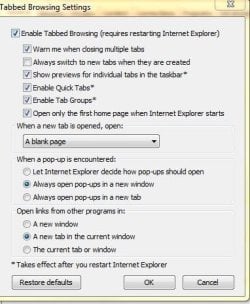
Try this and let us know, Tools-> Internet Options-> Tabs and click settings. Tick "Always switch to new tabs when they are created", might work. HTH.
 

My Computer My Computer

At a glance

Windows 7 Home Premium 64bitIntel Core i3-2310M8GBIntel HD3000
Computer Manufacturer/Model Number
Acer Aspire 5750
OS
Windows 7 Home Premium 64bit
CPU
Intel Core i3-2310M
Motherboard
Acer OEM
Memory
8GB
Graphics Card(s)
Intel HD3000
Screen Resolution
1366x768
Hard Drives
320GB Toshiba
Hi,
Try this and let us know, Tools-> Internet Options-> Tabs and click settings. Tick "Always switch to new tabs when they are created", might work. HTH.
I tried that but it couldn't fix that problem. :cry:
 

My Computer My Computer

At a glance

Windows 7 Ultimate (64-bit)AMD athlon(tm) 64 X2 Dual Core Processor 5000+NVIDIA GeForce 8800 GTX
Computer Manufacturer/Model Number
Microsoft Corporation
OS
Windows 7 Ultimate (64-bit)
CPU
AMD athlon(tm) 64 X2 Dual Core Processor 5000+
Graphics Card(s)
NVIDIA GeForce 8800 GTX
Remove IE8 and reinstall it again .. have you tried that before ??
 

My Computer My Computer

At a glance

win7 ultimate 32 , 64 ,XP3.404 GBGeForce GTX 480
Computer Manufacturer/Model Number
Mesh
OS
win7 ultimate 32 , 64 ,XP
CPU
3.40
Memory
4 GB
Graphics Card(s)
GeForce GTX 480
Sound Card
Realtek
Monitor(s) Displays
LG 28" LCD
Screen Resolution
1600X1024
Hard Drives
2X500GB HDD sata
Western Digital Usb 2TB
PSU
650w
Keyboard
Wireless Logitech
Mouse
Wireless Logitech
Internet Speed
50 MB
I tried these ways today: Restoring point - Disabling add-ons - Checking with IE8 64-bit - Checking with IE8 (no add-ons) - Reinstalling IE by turn windows features on or off

Those couldn't help me :cry:
 
Last edited:

My Computer My Computer

At a glance

Windows 7 Ultimate (64-bit)AMD athlon(tm) 64 X2 Dual Core Processor 5000+NVIDIA GeForce 8800 GTX
Computer Manufacturer/Model Number
Microsoft Corporation
OS
Windows 7 Ultimate (64-bit)
CPU
AMD athlon(tm) 64 X2 Dual Core Processor 5000+
Graphics Card(s)
NVIDIA GeForce 8800 GTX
at "Internet Options", in "Tabs" section after clicking on Settings, if we change "The new tab page" in "When a new tab is opened, open:" section, by "A blank page" the problem will solve. but what can i do to resolving "The new tab page"?
 

My Computer My Computer

At a glance

Windows 7 Ultimate (64-bit)AMD athlon(tm) 64 X2 Dual Core Processor 5000+NVIDIA GeForce 8800 GTX
Computer Manufacturer/Model Number
Microsoft Corporation
OS
Windows 7 Ultimate (64-bit)
CPU
AMD athlon(tm) 64 X2 Dual Core Processor 5000+
Graphics Card(s)
NVIDIA GeForce 8800 GTX
I dont have this problem so I have sent my setting it might be of a help
 

Attachments

  • Tabs.JPG
    Tabs.JPG
    39.7 KB · Views: 11

My Computer My Computer

At a glance

win7 ultimate 32 , 64 ,XP3.404 GBGeForce GTX 480
Computer Manufacturer/Model Number
Mesh
OS
win7 ultimate 32 , 64 ,XP
CPU
3.40
Memory
4 GB
Graphics Card(s)
GeForce GTX 480
Sound Card
Realtek
Monitor(s) Displays
LG 28" LCD
Screen Resolution
1600X1024
Hard Drives
2X500GB HDD sata
Western Digital Usb 2TB
PSU
650w
Keyboard
Wireless Logitech
Mouse
Wireless Logitech
Internet Speed
50 MB
Thank you, madmansam. you know, i hadn't this problem afew days ago by default settings (Click on Restore defaults to seeing what i'm saying). but now i have. thanks anyway
 

My Computer My Computer

At a glance

Windows 7 Ultimate (64-bit)AMD athlon(tm) 64 X2 Dual Core Processor 5000+NVIDIA GeForce 8800 GTX
Computer Manufacturer/Model Number
Microsoft Corporation
OS
Windows 7 Ultimate (64-bit)
CPU
AMD athlon(tm) 64 X2 Dual Core Processor 5000+
Graphics Card(s)
NVIDIA GeForce 8800 GTX
Back
Top