Monitor cries: "OUT OF FREQUENCY RANGE" at login

Signum

New member
Local time
11:47 PM
Messages
7
Good day all,

I just had the oppurtunity to move on to Windows 7, after installing everything was good(As far as I can see).

Now, my system has a GeForce 210 Graphics Card, so naturally I would want to install the NVIDIA drivers. Here is when sith happens:

After the mandatory restart, Win7 loads(good so far), then my Monitor (a Likom 556S... something 15" CRT monitor) would whine at me about "Frequency out of range". I could hear the startup sound, but see nothing except the "Frequency out of range" message.

The manual for my Monitor says that the maximum resolution for the Monitor is 1024 x 768 @ 70 Hz.

I tried changing to different modes(Via Safe Mode) to no avail, I even plugged my PC to a different monitor(It worked fine) and set the resolution to a very low 640x480 @ 60 Hz, but when I plugged it back it still is "Out of Range".

Anyone can assist me with troubleshooting this?

Cheers!~
 
Last edited:

My Computer My Computer

At a glance

Windows 7 32bitPentium D 805 2.66GhzSparkle NVIDIA GeForce 210
OS
Windows 7 32bit
CPU
Pentium D 805 2.66Ghz
Motherboard
Foxconn 945g7mc
Graphics Card(s)
Sparkle NVIDIA GeForce 210
Sound Card
Realtek Onboard Sound
Monitor(s) Displays
Likom 556S 15" CRT Monitor
Hard Drives
Hitatchi 7200RPM 80GB SATA-II
Try this.

1. Boot in safe mode.
2. Un-install the nvidia display driver.
3. Set the display settings to some supported value.
4. Restart, install nvidia display driver and set the appropriate settings which your monitor supports.
5. Restart.


My Computer My Computer

At a glance

Windows 7 x64 pro/ Windows 7 x86 Pro/ XP SP3 x86
Computer Manufacturer/Model Number
Too many to describe...
OS
Windows 7 x64 pro/ Windows 7 x86 Pro/ XP SP3 x86
Try this.


1. Boot in safe mode.
2. Un-install the nvidia display driver.
3. Set the display settings to some supported value.
4. Restart, install nvidia display driver and set the appropriate settings which your monitor supports.
5. Restart.

Still the same message "Out of Frequency range"...
 

My Computer My Computer

At a glance

Windows 7 32bitPentium D 805 2.66GhzSparkle NVIDIA GeForce 210
OS
Windows 7 32bit
CPU
Pentium D 805 2.66Ghz
Motherboard
Foxconn 945g7mc
Graphics Card(s)
Sparkle NVIDIA GeForce 210
Sound Card
Realtek Onboard Sound
Monitor(s) Displays
Likom 556S 15" CRT Monitor
Hard Drives
Hitatchi 7200RPM 80GB SATA-II
What is the resolution you have set? Does the resolution supported by your 15" monitor??
 

My Computer My Computer

At a glance

Lioni54GBIntel
Computer Manufacturer/Model Number
MacBook Pro
OS
Lion
CPU
i5
Memory
4GB
Graphics Card(s)
Intel
Screen Resolution
1200x800
Hard Drives
Seagate FreeAgent GO 250GB Ext. HDD
OK, try the same thing again but this time boot into VGA mode.
 

My Computer My Computer

At a glance

Windows 7 x64 pro/ Windows 7 x86 Pro/ XP SP3 x86
Computer Manufacturer/Model Number
Too many to describe...
OS
Windows 7 x64 pro/ Windows 7 x86 Pro/ XP SP3 x86
@ dre@ms:
Through safemode, I have tried setting the resolutions to the lowest settings 640 x 480 60Hz 16bit Color Depth and even went as far as using 16 colors but after rebooting, monitor is still out of range :cry:.

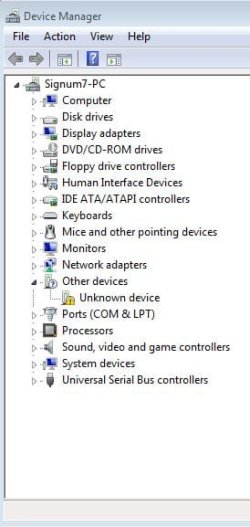
Something that I noticed though, there seems to be no driver installed for my Monitor, it showed as an unknown device in Device Manager and even if I update drivers for it, W7 doesnt even try to use the Generic PNP Monitor Driver...

I have also read somewhere in the internet that W7 "forces" 85Hz refresh rate, my monitor cant handle that (as stated in first post, my max resolution is 1024x768 @ 72Hz)...
 

My Computer My Computer

At a glance

Windows 7 32bitPentium D 805 2.66GhzSparkle NVIDIA GeForce 210
OS
Windows 7 32bit
CPU
Pentium D 805 2.66Ghz
Motherboard
Foxconn 945g7mc
Graphics Card(s)
Sparkle NVIDIA GeForce 210
Sound Card
Realtek Onboard Sound
Monitor(s) Displays
Likom 556S 15" CRT Monitor
Hard Drives
Hitatchi 7200RPM 80GB SATA-II
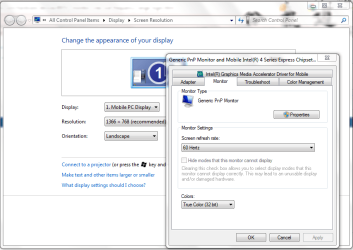
Ok. Right click on Desktop. Choose Screen resolution. Advanced settings. This should open your drivers property window. There should be a Monitor tab. Choose the right Screen refresh rate. Attached is the snip.
 

Attachments

  • Monitor.PNG
    Monitor.PNG
    39.9 KB · Views: 234

My Computer My Computer

At a glance

Lioni54GBIntel
Computer Manufacturer/Model Number
MacBook Pro
OS
Lion
CPU
i5
Memory
4GB
Graphics Card(s)
Intel
Screen Resolution
1200x800
Hard Drives
Seagate FreeAgent GO 250GB Ext. HDD
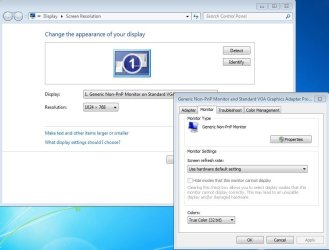
As I've said, W7 seems to not properly recognize my Monitor, which I think may be part of the cause of this problem.
The only choice for me there is Use Hardware Default Setting.

Ive tried installing the NVIDIA drivers from Windows Update and also by downloading from NVIDIA's site but are met with the same results (Out of Frequency Range).
 

Attachments

  • capture.JPG
    capture.JPG
    62.1 KB · Views: 75
  • Capture2.JPG
    Capture2.JPG
    30.9 KB · Views: 50

My Computer My Computer

At a glance

Windows 7 32bitPentium D 805 2.66GhzSparkle NVIDIA GeForce 210
OS
Windows 7 32bit
CPU
Pentium D 805 2.66Ghz
Motherboard
Foxconn 945g7mc
Graphics Card(s)
Sparkle NVIDIA GeForce 210
Sound Card
Realtek Onboard Sound
Monitor(s) Displays
Likom 556S 15" CRT Monitor
Hard Drives
Hitatchi 7200RPM 80GB SATA-II
The issue is with your VGA drivers. You can see in my snip, the property window is of Intel. The same way, your should be of Nvidia. But it isnt. I would suggest uninstalling all nvidia drivers and install afresh. Do download the latest. Also while installing, install it has an admin.
 

My Computer My Computer

At a glance

Lioni54GBIntel
Computer Manufacturer/Model Number
MacBook Pro
OS
Lion
CPU
i5
Memory
4GB
Graphics Card(s)
Intel
Screen Resolution
1200x800
Hard Drives
Seagate FreeAgent GO 250GB Ext. HDD

My Computer My Computer

At a glance

Lioni54GBIntel
Computer Manufacturer/Model Number
MacBook Pro
OS
Lion
CPU
i5
Memory
4GB
Graphics Card(s)
Intel
Screen Resolution
1200x800
Hard Drives
Seagate FreeAgent GO 250GB Ext. HDD
@ dre@ms:
Well, the snip I gave was of a freshly installed W7, stupid me forgetting to put the Driver installer to a different drive.

The drivers on the site you posted are 196.21 whilst the ones I've tried are 197.45, but will try now, after I reboot again after installing NVIDIA drivers... for the nth time today :sleepy:.

Let me clarify though,
its ok that my monitor doesent have drivers as long as the NVIDIA are installed properly?
 

My Computer My Computer

At a glance

Windows 7 32bitPentium D 805 2.66GhzSparkle NVIDIA GeForce 210
OS
Windows 7 32bit
CPU
Pentium D 805 2.66Ghz
Motherboard
Foxconn 945g7mc
Graphics Card(s)
Sparkle NVIDIA GeForce 210
Sound Card
Realtek Onboard Sound
Monitor(s) Displays
Likom 556S 15" CRT Monitor
Hard Drives
Hitatchi 7200RPM 80GB SATA-II
As I've said, W7 seems to not properly recognize my Monitor, which I think may be part of the cause of this problem.
The only choice for me there is Use Hardware Default Setting.

Ive tried installing the NVIDIA drivers from Windows Update and also by downloading from NVIDIA's site but are met with the same results (Out of Frequency Range).

You may have to experiment with the Nvidia drivers to get the one that works with your system.

Download the four most recent drivers, including any beta driver, from the Ndvidia website to your desktop.

Uninstall the driver you have currently installed.

Install the latest driver.

If that does not work, uninstall it and install the next driver. Keep this up until you find the one that works. I know this procedure is a PITA; but that is how I got my Nvidia graphics card to funtion properly. And it was not the latest driver nor the beta driver that I ended up using.
 

My Computer My Computer

At a glance

Windows 7 Ultimate 32 bitIntel(R) Pentium(R) 4 CPU 3.00GHz2.50 GB RAMNVIDIA GeForce 7600 GS
Computer Manufacturer/Model Number
Home built
OS
Windows 7 Ultimate 32 bit
CPU
Intel(R) Pentium(R) 4 CPU 3.00GHz
Motherboard
ASUS P4P800-VM Motherboard Chipset: Intel 865G + ICH5
Memory
2.50 GB RAM
Graphics Card(s)
NVIDIA GeForce 7600 GS
Sound Card
SoundMax Integrated Digital Audio (Chip)
Monitor(s) Displays
ViewSonic VX 1962 wm
Screen Resolution
1680 X 1050
Hard Drives
Seagate Barracuda 7200.10 80 GB
ST380215A ATA Device 18.6 GB
Western Digital "My Book" external hard drive 750 GB
Cooling
Fan based
Keyboard
Microsoft Comfort Curve Keyboard 2000 v10 USB
Mouse
Logitec optic USB
Internet Speed
3.01 Mb/s download 0.64 Mb/s upload
AFAIK, Monitor doesnt carry any drivers with it. The VGA drivers u install will identify the monitor and proceed. So, you should concentrate on your VGA drivers rather than Monitor drivers.
 

My Computer My Computer

At a glance

Lioni54GBIntel
Computer Manufacturer/Model Number
MacBook Pro
OS
Lion
CPU
i5
Memory
4GB
Graphics Card(s)
Intel
Screen Resolution
1200x800
Hard Drives
Seagate FreeAgent GO 250GB Ext. HDD
Download the four most recent drivers, including any beta driver, from the Ndvidia website to your desktop.
Done, but with the same results...

AFAIK, Monitor doesnt carry any drivers with it. The VGA drivers u install will identify the monitor and proceed. So, you should concentrate on your VGA drivers rather than Monitor drivers.
I see, thanks for clarifying.

Anyways, doing another fresh installation, if this still produces the same results, I guess I'll stick to XP SP3 until I get a new Monitor...
Will post aftermath in a few minutes....
 

My Computer My Computer

At a glance

Windows 7 32bitPentium D 805 2.66GhzSparkle NVIDIA GeForce 210
OS
Windows 7 32bit
CPU
Pentium D 805 2.66Ghz
Motherboard
Foxconn 945g7mc
Graphics Card(s)
Sparkle NVIDIA GeForce 210
Sound Card
Realtek Onboard Sound
Monitor(s) Displays
Likom 556S 15" CRT Monitor
Hard Drives
Hitatchi 7200RPM 80GB SATA-II
I am sorry that did not work for you. You gave it a good try. Thanks for reporting back.
 

My Computer My Computer

At a glance

Windows 7 Ultimate 32 bitIntel(R) Pentium(R) 4 CPU 3.00GHz2.50 GB RAMNVIDIA GeForce 7600 GS
Computer Manufacturer/Model Number
Home built
OS
Windows 7 Ultimate 32 bit
CPU
Intel(R) Pentium(R) 4 CPU 3.00GHz
Motherboard
ASUS P4P800-VM Motherboard Chipset: Intel 865G + ICH5
Memory
2.50 GB RAM
Graphics Card(s)
NVIDIA GeForce 7600 GS
Sound Card
SoundMax Integrated Digital Audio (Chip)
Monitor(s) Displays
ViewSonic VX 1962 wm
Screen Resolution
1680 X 1050
Hard Drives
Seagate Barracuda 7200.10 80 GB
ST380215A ATA Device 18.6 GB
Western Digital "My Book" external hard drive 750 GB
Cooling
Fan based
Keyboard
Microsoft Comfort Curve Keyboard 2000 v10 USB
Mouse
Logitec optic USB
Internet Speed
3.01 Mb/s download 0.64 Mb/s upload
somehow [SOLVED]

@CarlTR6: Yeah well, I just really wanted to try Windows 7 that much that I will use all means just to get into the current OS "bandwagon".

Anyways, did another install of W7, now this time after installing all updates + NVIDIA drivers (197.45) then rebooting, pressed F8 during startup, then chose 640x480 video resolution. Now, during the last 6 or so times I've done this in the past, it would result to "Out of Range" in my face by the monitor, this time however, the mouse cursor suddenly appeared on the screen! Then I entered Screen Resolution and set the appropriate settings (1024x768 @70Hz) then finally W7 worked like it should have in the first place :D

Thanks for the help y'all!
 

My Computer My Computer

At a glance

Windows 7 32bitPentium D 805 2.66GhzSparkle NVIDIA GeForce 210
OS
Windows 7 32bit
CPU
Pentium D 805 2.66Ghz
Motherboard
Foxconn 945g7mc
Graphics Card(s)
Sparkle NVIDIA GeForce 210
Sound Card
Realtek Onboard Sound
Monitor(s) Displays
Likom 556S 15" CRT Monitor
Hard Drives
Hitatchi 7200RPM 80GB SATA-II
new graphics card...did you set the slot its in to default in BIOS or is it still set to onboard?
 

My Computer My Computer

At a glance

Ubuntu
OS
Ubuntu
@CarlTR6: Yeah well, I just really wanted to try Windows 7 that much that I will use all means just to get into the current OS "bandwagon".

Anyways, did another install of W7, now this time after installing all updates + NVIDIA drivers (197.45) then rebooting, pressed F8 during startup, then chose 640x480 video resolution. Now, during the last 6 or so times I've done this in the past, it would result to "Out of Range" in my face by the monitor, this time however, the mouse cursor suddenly appeared on the screen! Then I entered Screen Resolution and set the appropriate settings (1024x768 @70Hz) then finally W7 worked like it should have in the first place :D

Thanks for the help y'all!

Very, very good! Thanks for letting us know. I am glad you are up and running.
 

My Computer My Computer

At a glance

Windows 7 Ultimate 32 bitIntel(R) Pentium(R) 4 CPU 3.00GHz2.50 GB RAMNVIDIA GeForce 7600 GS
Computer Manufacturer/Model Number
Home built
OS
Windows 7 Ultimate 32 bit
CPU
Intel(R) Pentium(R) 4 CPU 3.00GHz
Motherboard
ASUS P4P800-VM Motherboard Chipset: Intel 865G + ICH5
Memory
2.50 GB RAM
Graphics Card(s)
NVIDIA GeForce 7600 GS
Sound Card
SoundMax Integrated Digital Audio (Chip)
Monitor(s) Displays
ViewSonic VX 1962 wm
Screen Resolution
1680 X 1050
Hard Drives
Seagate Barracuda 7200.10 80 GB
ST380215A ATA Device 18.6 GB
Western Digital "My Book" external hard drive 750 GB
Cooling
Fan based
Keyboard
Microsoft Comfort Curve Keyboard 2000 v10 USB
Mouse
Logitec optic USB
Internet Speed
3.01 Mb/s download 0.64 Mb/s upload
Back
Top