Can't install x64 after upgrading to quad core?

chris3g

New member
Local time
9:05 AM
Messages
6
Here's a strange problem. I've previously run various win 7 x64 builds on my system, which had an intel e6600 core 2 duo, with no problems. I recently swapped out the e6600 for a q9400 and i suddenly cannot install any build of win7 x64. I get the following bluescreen error immediately upon booting from the dvd - MULTIPROCESSOR_CONFIGURATION_NOT_SUPPORTED (stop 0x0000003e) Apparently this error generally relates to trying to run or install windows on a multiprocessor system where the processors are not matched, but all i have here is a single quad core :confused:

Just for the hell of it i then tried a 32bit install dvd and it installed and ran just fine.

Anyone have any ideas?
 

My Computer My Computer

At a glance

osx86 10.5.6
OS
osx86 10.5.6
Hi & Welcome to our Forums!

That is odd...I think it sounds like something in the BIOS needs to be changed. Since it went from 2 to 4 cores there may be something needing a change in the BIOS to make the system see the extra cores as a single processor unit.

Can you post your MB version, BIOS version please?

Thanx
 

My Computer My Computer

At a glance

Vista Ult 64bit - Windows 7 Ult 7264 64bitIntel Core 2 Duo E67504 G's Crucial Ballistix TracerBFG Nvidia 8800 GTS 340
Computer Manufacturer/Model Number
Personal Build
OS
Vista Ult 64bit - Windows 7 Ult 7264 64bit
CPU
Intel Core 2 Duo E6750
Motherboard
Asus Commando
Memory
4 G's Crucial Ballistix Tracer
Graphics Card(s)
BFG Nvidia 8800 GTS 340
Sound Card
Creative Sound Blaster X-FI Platinum FATAL1TY
Monitor(s) Displays
2-22" HP W2207 LCD
Screen Resolution
1920 x 1080
Hard Drives
3 x 500G WD Caviar SATA II
PSU
Enermax Noise Taker II 600W
Case
NZXT Lexa Classic (dual doored & windowed)
Cooling
Zalman 9700 CPU cooler - 4 x 120mm, 1 x 90mm fans
Keyboard
Logitech MX 5500
Mouse
Logitech MX Revolution
Internet Speed
Blazing...
Sure, i have an ASUS P5W-DH Deluxe with the latest bios, 2801.

My primary OS is osx86 10.5.6 and i have not had any issues with that after the processor change.
 

My Computer My Computer

At a glance

osx86 10.5.6
OS
osx86 10.5.6
Windows 7 x64 and x86 does support multi-core. It is operating fine with mine. You are dual booting with OSX is that right?
 

My Computer My Computer

At a glance

Windows 7 Ulti x64QX67006G Corsair DDR2 6400Nvidia GTX 470
Computer Manufacturer/Model Number
Intel
OS
Windows 7 Ulti x64
CPU
QX6700
Motherboard
975XBX2
Memory
6G Corsair DDR2 6400
Graphics Card(s)
Nvidia GTX 470
Monitor(s) Displays
BenQ 24/Princeton 19
Screen Resolution
1920X1200/1280X1024
Hard Drives
4X500G 4X1TB 2x2TB Esata
PSU
Rosewill 950W
Case
Thermaltake
Cooling
Koolance Exos 2.5
Keyboard
MS Natural 4000
Mouse
Kensington Expert Ball
Internet Speed
DSL
My primary OS is osx86 10.5.6
???

I can see it's x86 so 32bit, but just what does 10.5.6 mean? I assume that it's a W7 build since you're here @ W7 forums but there's no 10.5.6.

I take it that since it's an Asus board, you have an Award BIOS, version 2801
That version fully supports the quad core so that shouldn't be the prob...lemme check on that error code.
 

My Computer My Computer

At a glance

Vista Ult 64bit - Windows 7 Ult 7264 64bitIntel Core 2 Duo E67504 G's Crucial Ballistix TracerBFG Nvidia 8800 GTS 340
Computer Manufacturer/Model Number
Personal Build
OS
Vista Ult 64bit - Windows 7 Ult 7264 64bit
CPU
Intel Core 2 Duo E6750
Motherboard
Asus Commando
Memory
4 G's Crucial Ballistix Tracer
Graphics Card(s)
BFG Nvidia 8800 GTS 340
Sound Card
Creative Sound Blaster X-FI Platinum FATAL1TY
Monitor(s) Displays
2-22" HP W2207 LCD
Screen Resolution
1920 x 1080
Hard Drives
3 x 500G WD Caviar SATA II
PSU
Enermax Noise Taker II 600W
Case
NZXT Lexa Classic (dual doored & windowed)
Cooling
Zalman 9700 CPU cooler - 4 x 120mm, 1 x 90mm fans
Keyboard
Logitech MX 5500
Mouse
Logitech MX Revolution
Internet Speed
Blazing...
Ok, I need to know what version of W7 you're trying to install.

Apparently, some builds that were not Officially released may have broken Multi-Core support and it may be just the build version you're trying to install. If you have some previous versions try those, like try build 7000 or 7022.
 

My Computer My Computer

At a glance

Vista Ult 64bit - Windows 7 Ult 7264 64bitIntel Core 2 Duo E67504 G's Crucial Ballistix TracerBFG Nvidia 8800 GTS 340
Computer Manufacturer/Model Number
Personal Build
OS
Vista Ult 64bit - Windows 7 Ult 7264 64bit
CPU
Intel Core 2 Duo E6750
Motherboard
Asus Commando
Memory
4 G's Crucial Ballistix Tracer
Graphics Card(s)
BFG Nvidia 8800 GTS 340
Sound Card
Creative Sound Blaster X-FI Platinum FATAL1TY
Monitor(s) Displays
2-22" HP W2207 LCD
Screen Resolution
1920 x 1080
Hard Drives
3 x 500G WD Caviar SATA II
PSU
Enermax Noise Taker II 600W
Case
NZXT Lexa Classic (dual doored & windowed)
Cooling
Zalman 9700 CPU cooler - 4 x 120mm, 1 x 90mm fans
Keyboard
Logitech MX 5500
Mouse
Logitech MX Revolution
Internet Speed
Blazing...
???

I can see it's x86 so 32bit, but just what does 10.5.6 mean? I assume that it's a W7 build since you're here @ W7 forums but there's no 10.5.6.

I take it that since it's an Asus board, you have an Award BIOS, version 2801
That version fully supports the quad core so that shouldn't be the prob...lemme check on that error code.

Hackintosh -- folks who run bootleg Apple software on their PCs. Bit of an identity crisis if you ask me ;)

What BIOS hack are you using to load OSuX? It's prolly hosed your whole system...

Either way, load BIOS failsafe defaults and reload Windows 7.
 

My Computer My Computer

At a glance

El Capitan / Windows 10i7-4980HQ16GBIris 5200
Computer type
Laptop
Computer Manufacturer/Model Number
Apple
OS
El Capitan / Windows 10
CPU
i7-4980HQ
Memory
16GB
Graphics Card(s)
Iris 5200
Ahhh, Thx Baarod old bud!
That also may explain things here too..whaddya think?

Since this stop code usually means that multiple processors are asymmetric to each other, which doesn't really apply to singular processor/multiple core setups, something seems like this is being seen as a muli-processor system during setup, again taking me back to a BIOS issue.
 

My Computer My Computer

At a glance

Vista Ult 64bit - Windows 7 Ult 7264 64bitIntel Core 2 Duo E67504 G's Crucial Ballistix TracerBFG Nvidia 8800 GTS 340
Computer Manufacturer/Model Number
Personal Build
OS
Vista Ult 64bit - Windows 7 Ult 7264 64bit
CPU
Intel Core 2 Duo E6750
Motherboard
Asus Commando
Memory
4 G's Crucial Ballistix Tracer
Graphics Card(s)
BFG Nvidia 8800 GTS 340
Sound Card
Creative Sound Blaster X-FI Platinum FATAL1TY
Monitor(s) Displays
2-22" HP W2207 LCD
Screen Resolution
1920 x 1080
Hard Drives
3 x 500G WD Caviar SATA II
PSU
Enermax Noise Taker II 600W
Case
NZXT Lexa Classic (dual doored & windowed)
Cooling
Zalman 9700 CPU cooler - 4 x 120mm, 1 x 90mm fans
Keyboard
Logitech MX 5500
Mouse
Logitech MX Revolution
Internet Speed
Blazing...
Ahhh, Thx Baarod old bud!
That also may explain things here too..whaddya think?

Apple hardware is EFI or Extensible Firmware Interface -based rather than our old crusty BIOS. What's funny is that Windows 7 runs natively on a Mac but MacOS needs egregiously hacked BIOS and loader code get loaded since we're "lacking" that EFI.
 

My Computer My Computer

At a glance

El Capitan / Windows 10i7-4980HQ16GBIris 5200
Computer type
Laptop
Computer Manufacturer/Model Number
Apple
OS
El Capitan / Windows 10
CPU
i7-4980HQ
Memory
16GB
Graphics Card(s)
Iris 5200
The only variable here is the switch from the dual core e6600 to the quad core Q9400. I've been running osx along with various versions of windows inclulding xp, vista, and win7 7000 x64, 7057 x64, and 7068 x64. They are on separate hard drives, and osx loads using pc-efi v9 which is only installed on the osx drive. No changes or hacks are made to the bios. I don't use any 3rd party boot managers, i simply choose which os to boot by selecting the primary drive from the BIOS boot selection screen. I can and have removed the os x drive from the system and it is then exactly the same as any other pc.

I only mention the fact that i have os x installed because because it is also a 64-bit OS and is running as usual after switching processors, which would seem to rule out an actual problem with one of the CPU cores. (possibly leading to the OS thinking there was some sort of multiprocessor mismatch going on...)

edit: i did reset my bios to defaults when i upgraded the processor, so it's possible there is a setting that i have adjusted differently than before when everything was working...
 

My Computer My Computer

At a glance

osx86 10.5.6
OS
osx86 10.5.6
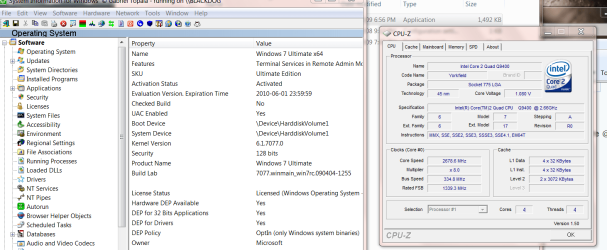
Sorry for the multitude of posts, but i've found the solution.

There appears to be an incompatibility with the latest BIOS for my board. I had updated to this BIOS in anticipation of swapping CPU's but had not attempted to boot windows 7 until after the new CPU was in, so i don't know if the problem would have also shown itself with the dual-core CPU.

Rolling back to previously released BIOS version fixes the problem. Unfortunately for me, that previous BIOS also does not properly recognize the Q9400, it just shows up as "intel cpu". I'll have to see if that causes any issues...
 

My Computer My Computer

At a glance

osx86 10.5.6
OS
osx86 10.5.6

Attachments

  • quad.png
    quad.png
    70.1 KB · Views: 39

My Computer My Computer

At a glance

Linux CENTOS 7 / various Windows OS'es and se...Intel i7 Intel i58GB, 16GBOn Motherboard
Computer type
PC/Desktop
Computer Manufacturer/Model Number
Custom built, several laptops HP/ASUS
OS
Linux CENTOS 7 / various Windows OS'es and servers
CPU
Intel i7 Intel i5
Memory
8GB, 16GB
Graphics Card(s)
On Motherboard
Sound Card
Realtek HD audio
Monitor(s) Displays
Apple Cinema display, Samsung LCD
Screen Resolution
1920 X 1080
Hard Drives
4 X 1TB SATA
Mouse
Toshiba wireless laser
Internet Speed
> 20MB up
Sorry for the multitude of posts, but i've found the solution.

There appears to be an incompatibility with the latest BIOS for my board. I had updated to this BIOS in anticipation of swapping CPU's but had not attempted to boot windows 7 until after the new CPU was in, so i don't know if the problem would have also shown itself with the dual-core CPU.

Rolling back to previously released BIOS version fixes the problem. Unfortunately for me, that previous BIOS also does not properly recognize the Q9400, it just shows up as "intel cpu". I'll have to see if that causes any issues...

Change the Limit CPUID value in the BIOS. That'll do it.
 

My Computer My Computer

At a glance

El Capitan / Windows 10i7-4980HQ16GBIris 5200
Computer type
Laptop
Computer Manufacturer/Model Number
Apple
OS
El Capitan / Windows 10
CPU
i7-4980HQ
Memory
16GB
Graphics Card(s)
Iris 5200
Please provide the output of "reg query HKEY_LOCAL_MACHINE\HARDWARE\DESCRIPTION\System\CentralProcessor\ /s" from the affected system.

Thanks,
JohnE [MS]
 

My Computer My Computer

At a glance

Win7 7133
OS
Win7 7133
What is really needed is the output of CPUID 0x1 for each processor. Tools like CPU-Z can dump this from the 'About' tab by clicking 'Register Dump'. I don't know what would be comparable on osx86 ;)
 

My Computer My Computer

At a glance

Win7 7133
OS
Win7 7133
Back
Top