PC's see each other, but cannot connect

clarck

New member
Member
Local time
7:35 AM
Messages
36
Location
Greece
Hi all...

i have 2 pc's running win7 64
both running eset smart security
both connected to a level one WBR-6600 modem router.

Problem is that once a working network is no longer work.
I now have the pc's see each other but when i try to access either one, i get a "Windows cannot access blah blah blah" message.

I have tried to leave the homegroup and create a new one. Same results.
I have unistall & reinstall eset. Same results
I have reset the modem router. Same results.

Very frustrating.

I have read similar threads here and tried the solutions there, but no result.


Any new ideas?
 
Last edited:

My Computer My Computer

Computer Manufacturer/Model Number
...me
OS
win 7 64
CPU
Intel Core2Quad Q9550
Motherboard
Asus P5Q DELUXE
Memory
8GB Corsair XMS2
Graphics Card(s)
ATI Radeon 4890 1GB
Sound Card
built-in
Monitor(s) Displays
Samsung SyncMaster 226bw
Screen Resolution
1680 X 1050
Hard Drives
3 X 500, 3 X 1000, 1 X 1.5
PSU
Corsair TX750
Case
Coolermaster Stacker 830 Black
Cooling
Zalman 9700 LED
Keyboard
Microsoft Wired
Mouse
Microsoft Laser 8000
Internet Speed
24kbps (in theory) usually up to 8kbps
Have you enabled sharing???
 

My Computer My Computer

Computer Manufacturer/Model Number
Mesh
OS
win7 ultimate 32 , 64 ,XP
CPU
3.40
Memory
4 GB
Graphics Card(s)
GeForce GTX 480
Sound Card
Realtek
Monitor(s) Displays
LG 28" LCD
Screen Resolution
1600X1024
Hard Drives
2X500GB HDD sata
Western Digital Usb 2TB
PSU
650w
Keyboard
Wireless Logitech
Mouse
Wireless Logitech
Internet Speed
50 MB
yes, triple checked everything that "looks" obvious. nothing seems to work, sadly...
 

My Computer My Computer

Computer Manufacturer/Model Number
...me
OS
win 7 64
CPU
Intel Core2Quad Q9550
Motherboard
Asus P5Q DELUXE
Memory
8GB Corsair XMS2
Graphics Card(s)
ATI Radeon 4890 1GB
Sound Card
built-in
Monitor(s) Displays
Samsung SyncMaster 226bw
Screen Resolution
1680 X 1050
Hard Drives
3 X 500, 3 X 1000, 1 X 1.5
PSU
Corsair TX750
Case
Coolermaster Stacker 830 Black
Cooling
Zalman 9700 LED
Keyboard
Microsoft Wired
Mouse
Microsoft Laser 8000
Internet Speed
24kbps (in theory) usually up to 8kbps
I did a complete removal of eset on both pc's and a hard reset on the modem/router.
Now at least one of the pc has access on the files of the second, but not vice versa...
 

My Computer My Computer

Computer Manufacturer/Model Number
...me
OS
win 7 64
CPU
Intel Core2Quad Q9550
Motherboard
Asus P5Q DELUXE
Memory
8GB Corsair XMS2
Graphics Card(s)
ATI Radeon 4890 1GB
Sound Card
built-in
Monitor(s) Displays
Samsung SyncMaster 226bw
Screen Resolution
1680 X 1050
Hard Drives
3 X 500, 3 X 1000, 1 X 1.5
PSU
Corsair TX750
Case
Coolermaster Stacker 830 Black
Cooling
Zalman 9700 LED
Keyboard
Microsoft Wired
Mouse
Microsoft Laser 8000
Internet Speed
24kbps (in theory) usually up to 8kbps
what antivirus/firewall are you using? If Norton then uninstall it and re-setup yr hhome group
 

My Computer My Computer

Computer type
PC/Desktop
Computer Manufacturer/Model Number
self build
OS
XP Pro - Vista - windows 7 ultimate/64 - 8.1 - 10
CPU
q8400
Motherboard
ga-ep35c-ds3r
Memory
4gb
Graphics Card(s)
nvidia 7300
Sound Card
integrated
Monitor(s) Displays
LG 206
Hard Drives
Samsung evo 500ssd
samsung 320gb sata
wd 160gb pata
PSU
hiper 580
I am using ESET SMART SECURITY 4

I just did:
a complete removal of the eset firewall from both machines
left the homegroup
hard reset the model/router
created a new homegroup in one machine
joined the homegroup from the other machine

i now can access the files of #2 machine from machine #1
but not the opposite.
 

My Computer My Computer

Computer Manufacturer/Model Number
...me
OS
win 7 64
CPU
Intel Core2Quad Q9550
Motherboard
Asus P5Q DELUXE
Memory
8GB Corsair XMS2
Graphics Card(s)
ATI Radeon 4890 1GB
Sound Card
built-in
Monitor(s) Displays
Samsung SyncMaster 226bw
Screen Resolution
1680 X 1050
Hard Drives
3 X 500, 3 X 1000, 1 X 1.5
PSU
Corsair TX750
Case
Coolermaster Stacker 830 Black
Cooling
Zalman 9700 LED
Keyboard
Microsoft Wired
Mouse
Microsoft Laser 8000
Internet Speed
24kbps (in theory) usually up to 8kbps
I'm having the same issue. A once working homegroup connection on my Windows 7 x64 is now not working.

- PC #2 can access my files
- My PC cannot access PC #2's files.

I use Kaspersky Internet Security. I don't think KIS is the problem as the homegroup was working fine just two weeks ago. My friend and I have been trying to figure out this problem but to no avail.

What's odd is I tried making my own homegroup, and I was able to, but when my friend tried to join it he got an error message saying he couldn't join. So we went back to him making the homegroup, me joining it, but with the same problems at the end of the line.

We're thinking it's just that Windows 7 has file transfer problems and maybe an alternative program would work...
 

My Computer My Computer

Computer type
PC/Desktop
Computer Manufacturer/Model Number
Custom build
OS
Windows 7 Home Premium x64
CPU
Intel Core i5-4690k
Motherboard
Gigabyte H97 SATA Express M.2 SSD UEFI DualBIOS DDR3 1600 LG
Memory
8GB
Graphics Card(s)
EVGA GeForce GTX 970
Monitor(s) Displays
2
Hard Drives
2:
- Samsung 850 EVO 250GB 2.5-Inch SATA III Internal SSD (MZ-75E250B/AM)
- Crucial MX300 275GB SATA 2.5 Inch Internal Solid State Drive - CT275MX300SSD1
PSU
Corsair 650x
Case
C70
Cooling
4 Fans
Internet Speed
Comcast Cable 22mbs
Antivirus
Microsoft Security Essentials
Browser
Chrome
Well, as far as I know we've done everything right.

The only thing I can think of is it being my Kaspersky. I had to re-install it a couple weeks ago. I don't know when I had to re-install or when the homegroup stopped working. As far as I know it was not around the same time.

To be honest, I'm afraid to re-install KIS. I don't want anything more to happen to my PC. I've been through a lot with it, :D

PS: In that guide you linked to us, it says:

In the right pane, right-click on DisabledComponents and select Modify. Make sure the value is set to 0. If it’s set to anything else like FF, IPv6 was turned off.

I went to that path and the DisabledComponets is not there.
 

My Computer My Computer

Computer type
PC/Desktop
Computer Manufacturer/Model Number
Custom build
OS
Windows 7 Home Premium x64
CPU
Intel Core i5-4690k
Motherboard
Gigabyte H97 SATA Express M.2 SSD UEFI DualBIOS DDR3 1600 LG
Memory
8GB
Graphics Card(s)
EVGA GeForce GTX 970
Monitor(s) Displays
2
Hard Drives
2:
- Samsung 850 EVO 250GB 2.5-Inch SATA III Internal SSD (MZ-75E250B/AM)
- Crucial MX300 275GB SATA 2.5 Inch Internal Solid State Drive - CT275MX300SSD1
PSU
Corsair 650x
Case
C70
Cooling
4 Fans
Internet Speed
Comcast Cable 22mbs
Antivirus
Microsoft Security Essentials
Browser
Chrome
Hi guys just new here!!!
Past couple of days i was breaking my head with network & sharing on windows 7, i have 2 computers, 1 laptop and the other desktop, both have 32 bit operating system. one has 7 ultimate(desktop) and the other has 7 home premium (laptop). However just now have fixed the issue with sharing.

Here is what you can do, If you have windows 7, just chuck the Homegroup out of the window, cuz that shitty thing never works or requires a format reinstall of windows 7 to make it work again.

1> First of all you do not need to un-install your security software. Just disable firewall in it. most of them have option to disable firewall for couple of minutes or untill next restart, just avg secuirty software does cant be un-installed and requires restart.

Since firewall's disable now try accessing the computers. 70% firewall's the reason for this kind of issues. however, if you are able to access, then uninstall 3rd party firewall and start using windows default firewall, or add "file and printer sharing" to exceptions in your 3rd party firewall.

2> try pinging both the computers form both the end. (sometimes pining gets the connection alive between 2 endpoints)

3> Also this steps helps alot for the errors such as "cant access the //computer/folder since you do not have the permission blah blah blah" (Windows 7 & maybe windows vista). Follow step 1 and 2. Then Un-install TCP-IP v6 & 4, File and printer sharing, Link layer topology discovery responder and mapper from network and sharing center. using right click on local or wireless internet connection (depending on type of connection you are using). Once all these things are un-installed, then install them one by one. Once done. Right click on folder you want to share, click on properties, click on sharing, click on advance sharing, check share this folder, Click permissions, make sure in here group or usernames is "Everyone", Check full control allow, once all the 3 boxes are checked, click apply, click apply again, once back on properties windows Click on security tab, click edit, click add, click advance, Click find now, select "Everyone" from the list below, click ok, click on again, on this window make sure "Everyone" is selected & check full control allow, once all the check boxes are automatically selected, click apply, apply again, now try accessing the folder or the drive from the other windows 7 computer and let me know if this step works, cuz it worked for me after huge RND. :D
 

My Computer My Computer

Computer Manufacturer/Model Number
Asus
OS
Windows 7 32 bit
CPU
E 7200
Motherboard
Asus
Memory
4 GB
Graphics Card(s)
512 MB NVIDIA (rocks)
Sound Card
Realtek High definetion audio (on board)
Monitor(s) Displays
17 Inch stupid (HP)
Screen Resolution
1280 x 1024 (60Hz)
Hard Drives
500 GB Seagate, 140 GB Samsung.
PSU
Dont know but its the best/expensive one i could find.
Case
Local
Cooling
Air Cooling Fans
Keyboard
iball multimedia keyboard
Mouse
iball optical mouse
Internet Speed
512 kbs
Hi all...

i have 2 pc's running win7 64
both running eset smart security
both connected to a level one WBR-6600 modem router.

Problem is that once a working network is no longer work.
I now have the pc's see each other but when i try to access either one, i get a "Windows cannot access blah blah blah" message.

I have tried to leave the homegroup and create a new one. Same results.
I have unistall & reinstall eset. Same results
I have reset the modem router. Same results.

Very frustrating.

I have read similar threads here and tried the solutions there, but no result.


Any new ideas?

I assume you can see each computer by typing "\\Computer_Name" into Explorer. If you can't see the shares, then either ports are getting blocked, or the Services are not running.
 

My Computer My Computer

OS
Windows 7
What a headache... Personally i haven't revolved it yet.

All i want from my network is to share music within the 2 pc's and move a file every now and then...

Many thanks to all for the responses until now!!!
 

My Computer My Computer

Computer Manufacturer/Model Number
...me
OS
win 7 64
CPU
Intel Core2Quad Q9550
Motherboard
Asus P5Q DELUXE
Memory
8GB Corsair XMS2
Graphics Card(s)
ATI Radeon 4890 1GB
Sound Card
built-in
Monitor(s) Displays
Samsung SyncMaster 226bw
Screen Resolution
1680 X 1050
Hard Drives
3 X 500, 3 X 1000, 1 X 1.5
PSU
Corsair TX750
Case
Coolermaster Stacker 830 Black
Cooling
Zalman 9700 LED
Keyboard
Microsoft Wired
Mouse
Microsoft Laser 8000
Internet Speed
24kbps (in theory) usually up to 8kbps
if you woudl like.. I can Teamview your computer and fix it from here if you like.

just a question. is your computer in greek or somewhat english.... i may have to chat my way to fix it
 

My Computer My Computer

Computer Manufacturer/Model Number
HP Pavilion Elite HPE-410f
OS
Windows 7 Ultimate x64
CPU
AMD Phenom x6 1045t
Motherboard
N/A
Memory
8 GB
Graphics Card(s)
ATI Radeon HD 5570
Sound Card
Realtek Highdefinition Audio / 5.1 Dolby Setup
Monitor(s) Displays
HP w2207h Widescreen
Screen Resolution
1680*1050
Hard Drives
1 TB (fixed), 320 Portable maxtor, Server Hard drives
PSU
350 Watt
Case
HP CASE
Cooling
Bass
Keyboard
Logitech MX 5500
Mouse
Logitech MX 5500
Internet Speed
ROAD RUNNER 16MB D/512 U
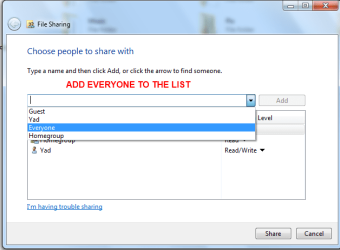
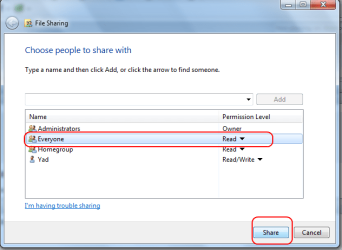
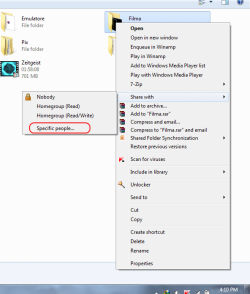
Actually i had same problems and i followed what streetglow saind on point 3 and now everything is ok.

I took some screens,hope it solves your problem as well.

Good luck.

Edit : On Laptop i could see shared folders of my pc which has Avira Premium Security Suite.
From Pc i couldn't see the laptop shared files which has Kaspersky.
I went to kaspersky firewall settings,and changed my internet connection from public one to trusted one and now i can access from both sides.
Phewww
 

Attachments

  • Untitled.png
    Untitled.png
    18 KB · Views: 30
  • Untitled1.png
    Untitled1.png
    17.9 KB · Views: 20
  • Untitled2.png
    Untitled2.png
    20.3 KB · Views: 18

My Computer My Computer

Computer Manufacturer/Model Number
Yad / Teh Kitty
OS
Windows 7
CPU
Core2Duo 2.2 Ghz E4500
Motherboard
Gigabyte
Memory
2 GB 800 mhz
Graphics Card(s)
Asus En 8600gt 512 mb ddr2
Hard Drives
250 Gb Exelstore
Thanks Yardo, i have made these changes multiple times with no effect. I really cannot understand why something so easy becoming so frustrating...

acurasd, my pc in in English, before i put you in troubleshooting mode, i'm waiting a friend who may be able to figure something out....
THANK you for offering, i will gladly let you have a go if he could not find anything. If it still ok with you of course.


ESET Smart Security creates this in the Local Connection Properties Is it something that i have to set there?

124623169.jpg
 

My Computer My Computer

Computer Manufacturer/Model Number
...me
OS
win 7 64
CPU
Intel Core2Quad Q9550
Motherboard
Asus P5Q DELUXE
Memory
8GB Corsair XMS2
Graphics Card(s)
ATI Radeon 4890 1GB
Sound Card
built-in
Monitor(s) Displays
Samsung SyncMaster 226bw
Screen Resolution
1680 X 1050
Hard Drives
3 X 500, 3 X 1000, 1 X 1.5
PSU
Corsair TX750
Case
Coolermaster Stacker 830 Black
Cooling
Zalman 9700 LED
Keyboard
Microsoft Wired
Mouse
Microsoft Laser 8000
Internet Speed
24kbps (in theory) usually up to 8kbps
sometimes it could be your firewall...

I would definitly delete the firewall out of your computer becuase just disabling the firewall doesn't work.

sometimes when you delete teh firewall out of the computer, it will give you the options to keep your settings. Just do that for the time being until we can get this fix and if that doesn't fix the problem then you can always reinstall the same Firewall if you like.

This is always and test and run proceedure.
 

My Computer My Computer

Computer Manufacturer/Model Number
HP Pavilion Elite HPE-410f
OS
Windows 7 Ultimate x64
CPU
AMD Phenom x6 1045t
Motherboard
N/A
Memory
8 GB
Graphics Card(s)
ATI Radeon HD 5570
Sound Card
Realtek Highdefinition Audio / 5.1 Dolby Setup
Monitor(s) Displays
HP w2207h Widescreen
Screen Resolution
1680*1050
Hard Drives
1 TB (fixed), 320 Portable maxtor, Server Hard drives
PSU
350 Watt
Case
HP CASE
Cooling
Bass
Keyboard
Logitech MX 5500
Mouse
Logitech MX 5500
Internet Speed
ROAD RUNNER 16MB D/512 U
I've already tried that. In fact i erased the settings of the firewall and the rules when i un installed Eset Smart Security to start fresh.

After that and with no firewall installed, Network was acting exactly like before. No changes.

:confused:
 

My Computer My Computer

Computer Manufacturer/Model Number
...me
OS
win 7 64
CPU
Intel Core2Quad Q9550
Motherboard
Asus P5Q DELUXE
Memory
8GB Corsair XMS2
Graphics Card(s)
ATI Radeon 4890 1GB
Sound Card
built-in
Monitor(s) Displays
Samsung SyncMaster 226bw
Screen Resolution
1680 X 1050
Hard Drives
3 X 500, 3 X 1000, 1 X 1.5
PSU
Corsair TX750
Case
Coolermaster Stacker 830 Black
Cooling
Zalman 9700 LED
Keyboard
Microsoft Wired
Mouse
Microsoft Laser 8000
Internet Speed
24kbps (in theory) usually up to 8kbps
Well, as far as I know we've done everything right.

The only thing I can think of is it being my Kaspersky. I had to re-install it a couple weeks ago. I don't know when I had to re-install or when the homegroup stopped working. As far as I know it was not around the same time.

To be honest, I'm afraid to re-install KIS. I don't want anything more to happen to my PC. I've been through a lot with it, :D

PS: In that guide you linked to us, it says:

In the right pane, right-click on DisabledComponents and select Modify. Make sure the value is set to 0. If it’s set to anything else like FF, IPv6 was turned off.
I went to that path and the DisabledComponets is not there.

Just a Note here Create a DWORD -> DisabledComponents
"# Note If the DisabledComponents entry is unavailable, you must create it. To do this, follow these steps:

1. In the Edit menu, point to New, and then click DWORD (32-bit) Value.
2. Type DisabledComponents, and then press ENTER.
3. Double-click DisabledComponents.

# Type any one of the following values to configure the IPv6 protocol, and then click OK:

4. Type 0 to enable all IPv6 components. "

If that doesn't fix the problem try delating the following file to fix the problem.

Delete the file idstore.sst under C:\windows\serviceProfiles\LocalService\AppData\Roaming\PeerNetworking

I followed your steps for both of those possible solutions and it did not fix my problem. What's odd is my two siblings can access my files and their files just fine. It's me who can't access their files.

Also, when I created a homegroup they were not able to join it. There was an error message saying something along the lines of "It can't connect", etc, sorry I'm being vague here.

Another odd thing is I can access their music as well as their pictures/videos that came from the camera via Windows Media Player. But when I go to the actual homegroup location and click on a folder it gives me some bullcrap line that I can't connect.

Here's what I've done so far:

1.) I completely uninstalled KIS.
2.) Removed my password. (Just in case something weird was going on with that)
3.) Deleted idstore.sst.
4.) Added a DisabledComponents.reg to registry.
5.) Tried to create my own homegroup but the other siblings could not connect to it.

Thank you for the possible solutions provided thus far and I wish I wasn't still bugging you guys. But it seems I shall be forever haunted with PC issues. :p

I'm desperate for help.

Edit: I was able to watch one clip from my brother's computer but when I tried other clips and music it wouldn't let me do so. I got a message saying, "Windows Media Player encounter a problem when downloading the playlist."

Edit #2: Suddenly it all stopped working. Then a couple of minutes later my sibling could access me again. I still cannot access them though.
 
Last edited:

My Computer My Computer

Computer type
PC/Desktop
Computer Manufacturer/Model Number
Custom build
OS
Windows 7 Home Premium x64
CPU
Intel Core i5-4690k
Motherboard
Gigabyte H97 SATA Express M.2 SSD UEFI DualBIOS DDR3 1600 LG
Memory
8GB
Graphics Card(s)
EVGA GeForce GTX 970
Monitor(s) Displays
2
Hard Drives
2:
- Samsung 850 EVO 250GB 2.5-Inch SATA III Internal SSD (MZ-75E250B/AM)
- Crucial MX300 275GB SATA 2.5 Inch Internal Solid State Drive - CT275MX300SSD1
PSU
Corsair 650x
Case
C70
Cooling
4 Fans
Internet Speed
Comcast Cable 22mbs
Antivirus
Microsoft Security Essentials
Browser
Chrome
Just wanted to say that I did a format and homegroup is now working.

Also, I tried practically everything in this thread before formatting. There was one or two things I didn't do because it was too dangerous.
 

My Computer My Computer

Computer type
PC/Desktop
Computer Manufacturer/Model Number
Custom build
OS
Windows 7 Home Premium x64
CPU
Intel Core i5-4690k
Motherboard
Gigabyte H97 SATA Express M.2 SSD UEFI DualBIOS DDR3 1600 LG
Memory
8GB
Graphics Card(s)
EVGA GeForce GTX 970
Monitor(s) Displays
2
Hard Drives
2:
- Samsung 850 EVO 250GB 2.5-Inch SATA III Internal SSD (MZ-75E250B/AM)
- Crucial MX300 275GB SATA 2.5 Inch Internal Solid State Drive - CT275MX300SSD1
PSU
Corsair 650x
Case
C70
Cooling
4 Fans
Internet Speed
Comcast Cable 22mbs
Antivirus
Microsoft Security Essentials
Browser
Chrome
Just wanted to say that I did a format and homegroup is now working.

Also, I tried practically everything in this thread before formatting. There was one or two things I didn't do because it was too dangerous.

When things get that messed up sometimes a reinstallation is the best way to fix the problem. Networking with Windows 7 works perfectly I can assure you, but third party programs, A/V's and third party firewalls ruin the entire deal all the time.

In your case I believe that delating the following file may have fixed the problem.
The fix for this problem seems to be Deleting the file idstore.sst under C:\windows\serviceProfiles\LocalService\AppData\Roaming\PeerNetworking

People really need to consider first setting up the network using the GUI and make sure all sharing options work before installing any type of A/V or third party firewalls. That way you will know exactly what is causing the network problems and can fix them accordingly. Thanks for reporting back in. :)
 

My Computer My Computer

Computer type
PC/Desktop
Computer Manufacturer/Model Number
Home built
OS
Windows 7 Ult, Windows 8.1 Pro,
CPU
Q9650-4.275GHz, E8600 4.5GHz, E6750-3.8GHz
Motherboard
Evga 780i FTW
Memory
G.Skill PC2 9600 1200Mhz 5 5 5 15 2T
Graphics Card(s)
GTX480
Sound Card
Asus Xonar D2
Monitor(s) Displays
HannsG
Screen Resolution
1680X1050
Hard Drives
GSkill Phoenix Pro 120GB SSD
PSU
ThermalTake Toughpower 1000Watt modular
Case
ThermalTake XaserV
Cooling
Xigmatek S1283
Keyboard
Logitech G15
Mouse
Logitech G9
Internet Speed
T1
Just wanted to say that I did a format and homegroup is now working.

Also, I tried practically everything in this thread before formatting. There was one or two things I didn't do because it was too dangerous.

When things get that messed up sometimes a reinstallation is the best way to fix the problem. Networking with Windows 7 works perfectly I can assure you, but third party programs, A/V's and third party firewalls ruin the entire deal all the time.

In your case I believe that delating the following file may have fixed the problem.
The fix for this problem seems to be Deleting the file idstore.sst under C:\windows\serviceProfiles\LocalService\AppData\Roaming\PeerNetworking

People really need to consider first setting up the network using the GUI and make sure all sharing options work before installing any type of A/V or third party firewalls. That way you will know exactly what is causing the network problems and can fix them accordingly. Thanks for reporting back in. :)

You're welcome. I hope that maybe someone with the same problem might stumble across this for a fix.

Anyways, I want you to know that I actually did delete that file, idstore.sst.

My brother deleted his as well. And it still did not work. I even uninstalled Kaspersky using the Kasperky Removal Tool and that didn't fix it either.

I have no idea what was causing the problem. But as you said, when things get that messed up a reinstallation is the best thing to do.
 

My Computer My Computer

Computer type
PC/Desktop
Computer Manufacturer/Model Number
Custom build
OS
Windows 7 Home Premium x64
CPU
Intel Core i5-4690k
Motherboard
Gigabyte H97 SATA Express M.2 SSD UEFI DualBIOS DDR3 1600 LG
Memory
8GB
Graphics Card(s)
EVGA GeForce GTX 970
Monitor(s) Displays
2
Hard Drives
2:
- Samsung 850 EVO 250GB 2.5-Inch SATA III Internal SSD (MZ-75E250B/AM)
- Crucial MX300 275GB SATA 2.5 Inch Internal Solid State Drive - CT275MX300SSD1
PSU
Corsair 650x
Case
C70
Cooling
4 Fans
Internet Speed
Comcast Cable 22mbs
Antivirus
Microsoft Security Essentials
Browser
Chrome
Back
Top