Duel Boot..Won't let me boot into XP

acurasd

New member
Guru
Local time
5:27 PM
Messages
972
Location
North Carolina
I have a Laptop with two partions...

These partitions are actually on two seperate hard drives built into the laptop

Not sure if it is necessary information but the more the marryier right...

*note* spelling sucks!

C:\ Windows 7 Home Premium (Default Boot) Which Works...

D:\ Windows XP Pro (Shows up in the list in the boot loader)

At first it was missing the file NTLDR so I found it in a Service pack folder
and placed it where the bootloader was looking. Which was the root
directory of the D:\ (placed the file in hidden attrabute)

When I tried to reboot the computer and force it to boot back into Windows XP
this time; all it did was restart the computer over again.

Therefore my theory is that the MBR of the D:\ needs to be recovered.
I looked around and it saids that I need to use the Windows XP setup CD
boot into the CD and use the recovery option and recover the MBR.

Well, I tried that but for some unknown and of course my "luck" the recovery option does not show up.

So can anyone shine some light on this problem that I am having? Also, is the NTLDR file the only file it looks for when it boots into Windows XP Pro?
 

My Computer My Computer

Computer Manufacturer/Model Number
HP Pavilion Elite HPE-410f
OS
Windows 7 Ultimate x64
CPU
AMD Phenom x6 1045t
Motherboard
N/A
Memory
8 GB
Graphics Card(s)
ATI Radeon HD 5570
Sound Card
Realtek Highdefinition Audio / 5.1 Dolby Setup
Monitor(s) Displays
HP w2207h Widescreen
Screen Resolution
1680*1050
Hard Drives
1 TB (fixed), 320 Portable maxtor, Server Hard drives
PSU
350 Watt
Case
HP CASE
Cooling
Bass
Keyboard
Logitech MX 5500
Mouse
Logitech MX 5500
Internet Speed
ROAD RUNNER 16MB D/512 U
In an XP system, in addition to the boot loader (boot.ini) you need NTLDR and Ntdetect.com.

I'm not exactly sure what you mean by force XP to boot but you can create an XP boot disc and once booted work from there. MS has a recipe for the boot disc here.

Monk
 

My Computer My Computer

Computer Manufacturer/Model Number
Custom
OS
Dual boot XP Pro SP3x86 and Win7 Pro x64
CPU
AMD Phenom II x3 720 BE OCed to 3.3 GHz
Motherboard
Asus M3A79T Deluxe
Memory
2x2GB OCZ OCZ2RPR10664GK PC2-8500 DDR2
Graphics Card(s)
Sapphire ATi Radeon 4830 HD x2 (XFire)
Sound Card
Integrated (SoundMax)
Monitor(s) Displays
Dual: LG L227WTG/LG M237WD
Screen Resolution
1680 x 1050; 1920 x1280
Hard Drives
3 WDC WD7501AALS-00J7B0
PSU
Zalman 750HD Modular
Case
Antec 900
Cooling
4 120mm, 1 200mm fans
Keyboard
Black with lots of keys
Mouse
Razer Lachesis, Logitech RumbePad2, Logitech Marble
Internet Speed
Who counts
Other Info
7:1 SS
I have a Laptop with two partions...

These partitions are actually on two seperate hard drives built into the laptop

Not sure if it is necessary information but the more the marryier right...

*note* spelling sucks!

C:\ Windows 7 Home Premium (Default Boot) Which Works...

D:\ Windows XP Pro (Shows up in the list in the boot loader)

At first it was missing the file NTLDR so I found it in a Service pack folder
and placed it where the bootloader was looking. Which was the root
directory of the D:\ (placed the file in hidden attrabute)

When I tried to reboot the computer and force it to boot back into Windows XP
this time; all it did was restart the computer over again.

Therefore my theory is that the MBR of the D:\ needs to be recovered.
I looked around and it saids that I need to use the Windows XP setup CD
boot into the CD and use the recovery option and recover the MBR.

Well, I tried that but for some unknown and of course my "luck" the recovery option does not show up.

So can anyone shine some light on this problem that I am having? Also, is the NTLDR file the only file it looks for when it boots into Windows XP Pro?

Hi,can you tell me if you've had the 7 installed first and then you installed the xp over the 7 for the duallboot,or was first the xp and then 7?
 

My Computer My Computer

Computer Manufacturer/Model Number
HP
OS
WIN,XP,7,VISTA,SERVER
CPU
DualCore Intel Pentium D 925, 3000 MHz
Motherboard
Asus P5LP-LE (Leonite)
Memory
3072 MB (DDR2 SDRAM)
Graphics Card(s)
NVIDIA GeForce 7500 LE (256 MB)
Sound Card
Creative SB X-Fi Xtreme Audio
Monitor(s) Displays
19", 1024x768
Screen Resolution
1024x768
Hard Drives
WDC WD2500AAKS-00L9A0
SAMSUNG HD250HJ (250
Internet Speed
100.0 mbps
Please post back a screenshot of your full Disk Mgmt drive map and listings, using Snipping Tool in Start Menu, attach file using paper clip in reply box.

We need to see your current config to advise you with certainty.

There are two ways to dual boot when you have separate HD's. The cleanest is to boot via BIOS: set preferred HD to boot first, then trigger the other HD when you want to boot it by tapping F-key given on first bootup screen for Boot Menu. This leaves the HD's independent to come and go as you please.

A Windows-managed Dual Boot makes the HD's interlinked and harder to remove one later. If you want to use this method, install EasyBCD 2.0 beta in Win7 after doing quick forum registration to use beta. Add XP on Add/Remove tab, accept offered boot files, let it autocomplete, Save, Restart.

However if there is any anomaly with your Disk Mgmt configuration, it may require further changes so post up the screenshot.
 
Windows XP Pro was installed first and then Windows 7 was installed second.
 

Attachments

  • Disk management.JPG
    Disk management.JPG
    83.8 KB · Views: 31
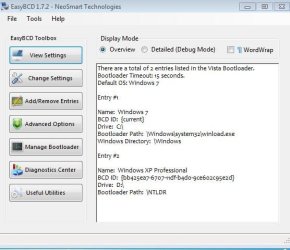
  • BCDmanagement.JPG
    BCDmanagement.JPG
    41.9 KB · Views: 12

My Computer My Computer

Computer Manufacturer/Model Number
HP Pavilion Elite HPE-410f
OS
Windows 7 Ultimate x64
CPU
AMD Phenom x6 1045t
Motherboard
N/A
Memory
8 GB
Graphics Card(s)
ATI Radeon HD 5570
Sound Card
Realtek Highdefinition Audio / 5.1 Dolby Setup
Monitor(s) Displays
HP w2207h Widescreen
Screen Resolution
1680*1050
Hard Drives
1 TB (fixed), 320 Portable maxtor, Server Hard drives
PSU
350 Watt
Case
HP CASE
Cooling
Bass
Keyboard
Logitech MX 5500
Mouse
Logitech MX 5500
Internet Speed
ROAD RUNNER 16MB D/512 U
If you want to maintain the Windows-managed dual boot, use the more advanced EasyBCD 2.0 beta (after doing quick forum registration) to remove and then Add back XP.

If you want to boot via BIOS as I described earlier, then unplug Win7 HD which already is System Active, set XP HD as first to boot in BIOS, and run a Repair Install of XP by booting CD, continuing as if to install until it discovers the installation, then choosing "R" to repair the highlighted XP installation.

This will reassert the XP bootloader onto its partition and make it fully independent of Win7 HD when you plug it back in.

Set the preferred HD to boot first in BIOS setup, then to boot the other use the Fkey given on first boot screen for one-time Boot Menu to choose it. This keeps both HD's independent so they can come and go as you please.
 
For Recovery Partition to work, it needs to be Disk0. (not disk1)
 

My Computer My Computer

OS
ME/XP/Vista/Win7
You may want to move your HD"s so that Win7 HD is DISK0, then XP is DISK1, etc.

Just be aware of which is set to boot frist in BIOS setup at all times.
 
Hi,i see you've one disk0 with 513mb,i think that partition is from factory recovery system,normaly if you've 2 different hdd's:
DISK 0:WINDOWS XP {the first}
DISK 1:WINDOWS 7 {the second installed}
like this you should get an duallboot without problems,what i can suggest you is open the commandprompt on 7,start,run,type CMD,ok and type this 4 command lines one by one hitting enter each time:

1.
BCDEDIT /CREATE {NTLDR} /D “WINDOWS XP” {hit enter}
2.
BCDEDIT /SET {NTLDR} DEVICE PARTITION =D: {hit enter}
3.
BCDEDIT /SET {NTLDR} PATH \NTLDR {hit enter}
4.
BCDEDIT /DISPLAYORDER {NTLDR} /ADDLAST {hit enter}

Reboot and see what happens.
 

My Computer My Computer

Computer Manufacturer/Model Number
HP
OS
WIN,XP,7,VISTA,SERVER
CPU
DualCore Intel Pentium D 925, 3000 MHz
Motherboard
Asus P5LP-LE (Leonite)
Memory
3072 MB (DDR2 SDRAM)
Graphics Card(s)
NVIDIA GeForce 7500 LE (256 MB)
Sound Card
Creative SB X-Fi Xtreme Audio
Monitor(s) Displays
19", 1024x768
Screen Resolution
1024x768
Hard Drives
WDC WD2500AAKS-00L9A0
SAMSUNG HD250HJ (250
Internet Speed
100.0 mbps
Hi,i see you've one disk0 with 513mb,i think that partition is from factory recovery system,normaly if you've 2 different hdd's:.

Factory Recovery is on Disk1.
 

My Computer My Computer

OS
ME/XP/Vista/Win7
Hi,i see you've one disk0 with 513mb,i think that partition is from factory recovery system,normaly if you've 2 different hdd's:.

Factory Recovery is on Disk1.

in this case the factory recovery partition should be on disk 2,because he said,the win 7 was installed in second place and xp was already installed or not?but dont know wich version came first on his laptop!!!
 

My Computer My Computer

Computer Manufacturer/Model Number
HP
OS
WIN,XP,7,VISTA,SERVER
CPU
DualCore Intel Pentium D 925, 3000 MHz
Motherboard
Asus P5LP-LE (Leonite)
Memory
3072 MB (DDR2 SDRAM)
Graphics Card(s)
NVIDIA GeForce 7500 LE (256 MB)
Sound Card
Creative SB X-Fi Xtreme Audio
Monitor(s) Displays
19", 1024x768
Screen Resolution
1024x768
Hard Drives
WDC WD2500AAKS-00L9A0
SAMSUNG HD250HJ (250
Internet Speed
100.0 mbps
The disk0 looks be a IDE from the days of DOS/win3.11.
To any unknowns.
 

My Computer My Computer

OS
ME/XP/Vista/Win7
Hi,i see you've one disk0 with 513mb,i think that partition is from factory recovery system,normaly if you've 2 different hdd's:
DISK 0:WINDOWS XP {the first}
DISK 1:WINDOWS 7 {the second installed}
like this you should get an duallboot without problems,what i can suggest you is open the commandprompt on 7,start,run,type CMD,ok and type this 4 command lines one by one hitting enter each time:

1.
BCDEDIT /CREATE {NTLDR} /D “WINDOWS XP” {hit enter}
2.
BCDEDIT /SET {NTLDR} DEVICE PARTITION =D: {hit enter}
3.
BCDEDIT /SET {NTLDR} PATH \NTLDR {hit enter}
4.
BCDEDIT /DISPLAYORDER {NTLDR} /ADDLAST {hit enter}

Reboot and see what happens.


I think that did something. I think that it is just missing the main files...
all the files that are required to boot windows xp. Which I am trying to locate now to drop into the directory.
 

My Computer My Computer

Computer Manufacturer/Model Number
HP Pavilion Elite HPE-410f
OS
Windows 7 Ultimate x64
CPU
AMD Phenom x6 1045t
Motherboard
N/A
Memory
8 GB
Graphics Card(s)
ATI Radeon HD 5570
Sound Card
Realtek Highdefinition Audio / 5.1 Dolby Setup
Monitor(s) Displays
HP w2207h Widescreen
Screen Resolution
1680*1050
Hard Drives
1 TB (fixed), 320 Portable maxtor, Server Hard drives
PSU
350 Watt
Case
HP CASE
Cooling
Bass
Keyboard
Logitech MX 5500
Mouse
Logitech MX 5500
Internet Speed
ROAD RUNNER 16MB D/512 U
Toshiba Satilite X205-S9349
Technical Details

  • Portable multimedia powerhouse for HD video enthusiasts and PC gamers; includes HD DVD-ROM drive
  • 4 GHz, Pentium 4, 240 GB hard drive capacity (dual drives)
  • Pre-installed with Windows Vista Home Premium (with Media Center capabilities)
The First drive was preinstalled with Windows Vista with a little recovery section. I have no idea what it was used for because this compute came with two DVD's for this computer to be recovered with.

The Second hard drive on the computer had been formatted empty.


The way I formatted this drive:
First Drive:
Windows 7 and the little Recovery

Second Drive:
90 gigs for Windows XP Pro
20-22 Left over that has not been formatted to anything yet.
Planning on using that for Ubuntu

1. Vista Came first...
2. Vista was destroyed because it sucked.
3. Decided to duel boot so Windows XP went on first....
4. Booted up fine to Windows XP
5. Then installed Windows 7 HP (Clean) and it will boot into 7
but whiped out the option to boot back into XP
 

My Computer My Computer

Computer Manufacturer/Model Number
HP Pavilion Elite HPE-410f
OS
Windows 7 Ultimate x64
CPU
AMD Phenom x6 1045t
Motherboard
N/A
Memory
8 GB
Graphics Card(s)
ATI Radeon HD 5570
Sound Card
Realtek Highdefinition Audio / 5.1 Dolby Setup
Monitor(s) Displays
HP w2207h Widescreen
Screen Resolution
1680*1050
Hard Drives
1 TB (fixed), 320 Portable maxtor, Server Hard drives
PSU
350 Watt
Case
HP CASE
Cooling
Bass
Keyboard
Logitech MX 5500
Mouse
Logitech MX 5500
Internet Speed
ROAD RUNNER 16MB D/512 U
The files will be offered by EasyBCD 2.0 beta when you Add XP from Win7.

This was in my post from 11 hours ago.
 
The files will be offered by EasyBCD 2.0 beta when you Add XP from Win7.

This was in my post from 11 hours ago.


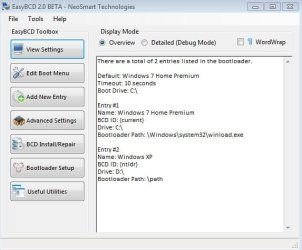
I actually downloaded the EasyBCD 2.0

I think the thing you were talking about was in the Tools >>> Auto-config Boot.ini

Then it will ask you if it will place the two files needed to boot Windows XP.

I actually have tried that but it still won't do that...

Would it be possible that I may have to take out the primary drive or just disable it from the BIOS just to let the Windows XP setup find that installtion directiory and just do a simple repair on it??

If i am not mistaken... before I disable it. I am going to have to use Windows 7 disk management to make the partition active for the setup to reconize it right?
 

Attachments

  • easybcd2.0.JPG
    easybcd2.0.JPG
    39.8 KB · Views: 3

My Computer My Computer

Computer Manufacturer/Model Number
HP Pavilion Elite HPE-410f
OS
Windows 7 Ultimate x64
CPU
AMD Phenom x6 1045t
Motherboard
N/A
Memory
8 GB
Graphics Card(s)
ATI Radeon HD 5570
Sound Card
Realtek Highdefinition Audio / 5.1 Dolby Setup
Monitor(s) Displays
HP w2207h Widescreen
Screen Resolution
1680*1050
Hard Drives
1 TB (fixed), 320 Portable maxtor, Server Hard drives
PSU
350 Watt
Case
HP CASE
Cooling
Bass
Keyboard
Logitech MX 5500
Mouse
Logitech MX 5500
Internet Speed
ROAD RUNNER 16MB D/512 U
Toshiba Satilite X205-S9349
Technical Details

  • Portable multimedia powerhouse for HD video enthusiasts and PC gamers; includes HD DVD-ROM drive
  • 4 GHz, Pentium 4, 240 GB hard drive capacity (dual drives)
  • Pre-installed with Windows Vista Home Premium (with Media Center capabilities)
The First drive was preinstalled with Windows Vista with a little recovery section. I have no idea what it was used for because this compute came with two DVD's for this computer to be recovered with.

The Second hard drive on the computer had been formatted empty.


The way I formatted this drive:
First Drive:
Windows 7 and the little Recovery

Second Drive:
90 gigs for Windows XP Pro
20-22 Left over that has not been formatted to anything yet.
Planning on using that for Ubuntu

1. Vista Came first...
2. Vista was destroyed because it sucked.
3. Decided to duel boot so Windows XP went on first....
4. Booted up fine to Windows XP
5. Then installed Windows 7 HP (Clean) and it will boot into 7
but whiped out the option to boot back into XP

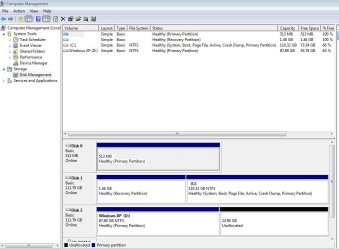
Your screenshot of Disk Management in Post5 shows 3 HD's.

Disk0 = First drive = unknown OS.
Disk1 = second drive = Windows 7.
Disk2 = thrid drive = Windows XP.

If Disk0 was installed before installing Xp, the boot files will must likely have been installed to it.
 

My Computer My Computer

OS
ME/XP/Vista/Win7
Unplug all other HD's besides XP, set XP HD first to boot in BIOS Setup (after CD drive), boot XP CD, proceed as if to install until it finds the installation and asks where you want to install XP. See if it gives you an "R" for repair choice, choose this and let XP recover it's own bootloader into its partition.

After XP starts up, shutdown to plug back in Win7 HD. Set your preferred HD to boot first in BIOS setup, trigger the other HD when you want to boot it by tapping the Fkey given on first bootup screen for one-time Boot Menu. This keeps the HD's independent to come and go as you please.

After you have this up and running correctly, add back in the former DISK0 to see if it interferes with the Dual Boot in any way. It shouldn't as it isn't marked a System drive, however if it does move the data off of it, wipe the HD and reformat to Logical data partition before moving data back on.
 
Funny thing about that 1/2 gig of 3rd hard drive is that; it is created by a program or driver that is used by this computer.

This computer uses Turbo memory controller driver by intel. Even though there are physically two drives in the computer. It makes a 3rd one. Something to deal with the RAM. Speed it up I guess.... I guess you can say its, its own readyboost built into the computer without the need of a flash drive.

Once I come back from class tonight I will take out the primary drive that is holding Windows 7 and get that XP recovered. No offense but can Microsoft make this anymore of a P I T A!!!!!!!

If I am "good" with computers; I hate the term "expert" so I won't say it. I hate to see the normal average user on this same issue i am having.
 

My Computer My Computer

Computer Manufacturer/Model Number
HP Pavilion Elite HPE-410f
OS
Windows 7 Ultimate x64
CPU
AMD Phenom x6 1045t
Motherboard
N/A
Memory
8 GB
Graphics Card(s)
ATI Radeon HD 5570
Sound Card
Realtek Highdefinition Audio / 5.1 Dolby Setup
Monitor(s) Displays
HP w2207h Widescreen
Screen Resolution
1680*1050
Hard Drives
1 TB (fixed), 320 Portable maxtor, Server Hard drives
PSU
350 Watt
Case
HP CASE
Cooling
Bass
Keyboard
Logitech MX 5500
Mouse
Logitech MX 5500
Internet Speed
ROAD RUNNER 16MB D/512 U
So what you have is this? Yes / No

Disk0 = First drive = Turbo memory.

Disk1 = second drive = Windows 7.

Disk2 = third drive = A removable HD drive with Windows XP install on.
 
Last edited:

My Computer My Computer

OS
ME/XP/Vista/Win7
Back
Top