Start Menu Search Gone - W7

dmiddleton2

New member
Local time
11:22 AM
Messages
8
This right?

There is no search menu item on the start menu - am I missing something? Search is NOT disabled in services.msc, andI have NOT removed search voa c.panel/add-remove windows components.

It was there in Vista - can I get it back in W7?

Thanks!
 

My Computer

OS
W7

My Computer

OS
window's 7
CPU
core 2 quad
Motherboard
gigabyte
Memory
2gb corsair
Graphics Card(s)
ati hd4850
Monitor(s) Displays
lg
Screen Resolution
1600 X 900
Case
power logic
Other Info
none of the spec above is accurate
Thank you for the reply.

That thread does't really tell me anything.

Plus, I did a google image search of "windows 7 start menu search" and I actually do not see that anyone has the search in their stat menu - so maybe it's just not me.

Does anyone know if MS left out this feature, and/or is there any way, via a reg key or some other way - to get it there?

Thanks!
 

My Computer

OS
W7
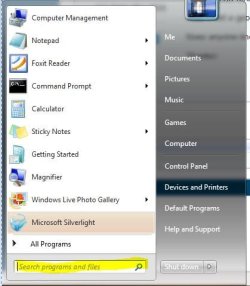
It should be there unless it has been removed in Windows features which is pointed out in that thread that Kucing pointed to.
Here is what it looks like,
 

Attachments

  • search.JPG
    search.JPG
    34 KB · Views: 7

My Computer

Computer type
PC/Desktop
Computer Manufacturer/Model Number
Self Built
OS
Win 10 Pro x64
CPU
Intel I5-2500K @3.3GHz
Motherboard
Asrock P67 Extreme4
Memory
16GB G.Skill Ripjaws X (4x4GB)
Graphics Card(s)
EVGA GeForce 750 Ti SC 2GB
Sound Card
ASUS Xonar DG 5.1 Channels 24-bit 96KHz PCI Interface Sound
Monitor(s) Displays
auria eq2367
Screen Resolution
1920 x 1080
Hard Drives
250GB Samsung 850 EVO SSD
1TB WD Blue
1TB Hitachi
PSU
SeaSonic X 650W 80 Plus Gold
Case
Corsair Obsidian 750D
Cooling
Corsair H60, Three 140mm case fans
Keyboard
Logitech Wireless Keyboard K520
Mouse
Logitech Wireless Mouse M310
Internet Speed
Wave Broadband ~ 100 dn 5 up
Antivirus
Windows Defender, Malwarebytes Premium
Browser
Edge, IE11, Chrome
Other Info
Laptop specs: HP g7-1365dx /
CPU: AMD A6-3420M APU with Radeon(tm) HD Graphics /
RAM: Crucial 8Gb (2x4Gb) /
SSD: Crucial M4-CT128M4SSD2 ATA Device/ FW 000F /
GFX: AMD Radeon HD 6520G /
OS: Windows 10 Pro x64
See - it isn't there on yours either.

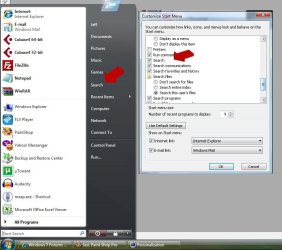
Apologies if I was not clear, but I am not talking about the Instant Search on the bottom of the start menu, I am talking about the search menu item:

search.jpg picture by dmiddletonla - Photobucket

Those are two shots of Vista. See the search menu item? Can't get that to be there, because - and look to the right - that "search" option checkbox is not there anymore in W7.

Hopefully this is clear.

I guess what I am hoping for is a hack of somesort, or reg modification that will get that search menu item back.

Thanks again.
 

My Computer

OS
W7
You're Welcome,
I see now, there has been quite a few that were missing the start menu search that I was pointing out so that's where our mis-understanding comes from.

The search you want is gone, I hope you find something to fit your needs.

I'll attach your screenshot to hopefully make it easier for someone to help you.
 

Attachments

  • start.jpg
    start.jpg
    68.9 KB · Views: 111

My Computer

Computer type
PC/Desktop
Computer Manufacturer/Model Number
Self Built
OS
Win 10 Pro x64
CPU
Intel I5-2500K @3.3GHz
Motherboard
Asrock P67 Extreme4
Memory
16GB G.Skill Ripjaws X (4x4GB)
Graphics Card(s)
EVGA GeForce 750 Ti SC 2GB
Sound Card
ASUS Xonar DG 5.1 Channels 24-bit 96KHz PCI Interface Sound
Monitor(s) Displays
auria eq2367
Screen Resolution
1920 x 1080
Hard Drives
250GB Samsung 850 EVO SSD
1TB WD Blue
1TB Hitachi
PSU
SeaSonic X 650W 80 Plus Gold
Case
Corsair Obsidian 750D
Cooling
Corsair H60, Three 140mm case fans
Keyboard
Logitech Wireless Keyboard K520
Mouse
Logitech Wireless Mouse M310
Internet Speed
Wave Broadband ~ 100 dn 5 up
Antivirus
Windows Defender, Malwarebytes Premium
Browser
Edge, IE11, Chrome
Other Info
Laptop specs: HP g7-1365dx /
CPU: AMD A6-3420M APU with Radeon(tm) HD Graphics /
RAM: Crucial 8Gb (2x4Gb) /
SSD: Crucial M4-CT128M4SSD2 ATA Device/ FW 000F /
GFX: AMD Radeon HD 6520G /
OS: Windows 10 Pro x64
I thought that function has gone in seven,and this is to restore missing search panel in start menu but I can't confirm if this is what you want

Go to Control Panel>Programs and Features>Turn Windows features on or off, and enable Indexing service and Windows search
 

My Computer

OS
window's 7
CPU
core 2 quad
Motherboard
gigabyte
Memory
2gb corsair
Graphics Card(s)
ati hd4850
Monitor(s) Displays
lg
Screen Resolution
1600 X 900
Case
power logic
Other Info
none of the spec above is accurate
Go to Control Panel>Programs and Features>Turn Windows features on or off, and enable Indexing service and Windows search

Nope - didn't do it.

Did they really leave this out of W7? How is that possible?
 

My Computer

OS
W7
They are many missing things in 7 for example you can play animated gif in windows photo viewer,you have to live with it I suppose
 

My Computer

OS
window's 7
CPU
core 2 quad
Motherboard
gigabyte
Memory
2gb corsair
Graphics Card(s)
ati hd4850
Monitor(s) Displays
lg
Screen Resolution
1600 X 900
Case
power logic
Other Info
none of the spec above is accurate
See - it isn't there on yours either.

Apologies if I was not clear, but I am not talking about the Instant Search on the bottom of the start menu, I am talking about the search menu item:

search.jpg picture by dmiddletonla - Photobucket

Those are two shots of Vista. See the search menu item? Can't get that to be there, because - and look to the right - that "search" option checkbox is not there anymore in W7.

Hopefully this is clear.

I guess what I am hoping for is a hack of somesort, or reg modification that will get that search menu item back.

Thanks again.


Hello D. Middleton,

Ah, you mean the Search button in the Start Menu. That has been removed since Vista SP1, but this will help show you how to add it back.

http://www.sevenforums.com/tutorials/89800-start-menu-add-remove-search-button.html

Hope this helps,
Shawn
 
Last edited:

My Computer

Computer type
PC/Desktop
Computer Manufacturer/Model Number
Self built custom
OS
64-bit Windows 11 Pro for Workstations
CPU
Intel i7-8700K OC'd to 5 GHz
Motherboard
ASUS ROG Maximus XI Formula Z390
Memory
64 GB (4x16GB) G.SKILL TridentZ RGB DDR4 3600 MHz
Graphics Card(s)
ASUS ROG-STRIX-GTX1080TI-O11G-GAMING
Sound Card
Integrated
Monitor(s) Displays
2 x Samsung Odyssey G7 27"
Screen Resolution
2560x1440
Hard Drives
1TB Samsung 990 PRO M.2,
4TB Samsung 990 PRO PRO M.2,
TerraMaster F8 SSD Plus NAS
PSU
Seasonic Prime Titanium 850W
Case
Thermaltake Core P3
Cooling
Corsair Hydro H115i
Keyboard
Logitech wireless K800
Mouse
Logitech MX Master 4
Internet Speed
2 Gb/s Download and 100 Mb/s Upload
Antivirus
Malwarebyte Anti-Malware Premium
Browser
Google Chrome
Other Info
Logitech Z625 speaker system,
Logitech BRIO 4K Pro webcam,
HP Color LaserJet Pro MFP M477fdn,
APC SMART-UPS RT 1000 XL - SURT1000XLI,
Galaxy S23 Plus phone
Hello D. Middleton,

Ah, you mean the Search button in the Start Menu. That has been removed since Vista SP1, but this will help show you how to add it back.

http://www.sevenforums.com/tutorials/89800-start-menu-add-remove-search-button.htmlhttp://www.vistax64.com/tutorials/145787-search-start-menu-button-restore-after-sp1.html

Hope this helps,
Shawn

AHA!, ok - getting there. Thanks for your post!

So, I have a bit of an issue - I am halfway there; maybe you can think of a way to get me completely there. After running the "Replace Help and Support with Search" .reg, I get a "not all data was successfully written to the reg. Some keys are open by the system of other processes." Now, there are no apps running; and I do this immediately after booting. But it works halfway; my Start > Prop > Start Menu > Cust > List, does actually have "Search" whereas it used to be "Help and Support". So that part worked. And I can add/remove the Help and Support item from the start menu if I check/uncheck that "Search" box. But the thing is, there is still a reg key that tells the start menu to display "Help and Support" instead of "Search" - I did a reg search, but there are way too many keys foe me to know which is which - if I knew, I would just edit the reg. Any ideas?

So close....Thanks!
 
Last edited by a moderator:

My Computer

OS
W7
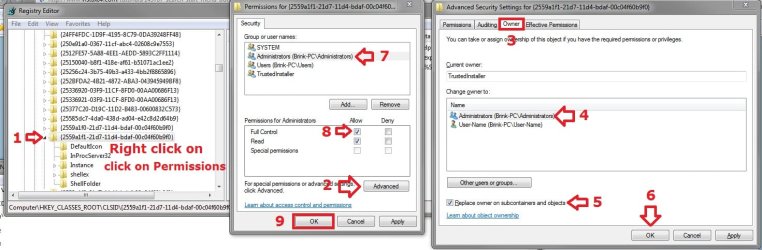
Ah, it's a permission issue with the registry GUID key. Windows 7 doesn't allow access by default like Vista did with these GUID keys in the registry.

http://www.sevenforums.com/tutorials/89800-start-menu-add-remove-search-button.html

You will need to take ownership (Option Two step 2 at link) and give your user account "Full Control" of the registry key below. The screenshot below has the steps numbered in order to help make it easier to follow. Afterwards use the REG file again, and log off and log on to apply.

HKEY_CLASSES_ROOT\CLSID\{2559a1f1-21d7-11d4-bdaf-00c04f60b9f0}


Permission.jpg
 
Last edited:

My Computer

Computer type
PC/Desktop
Computer Manufacturer/Model Number
Self built custom
OS
64-bit Windows 11 Pro for Workstations
CPU
Intel i7-8700K OC'd to 5 GHz
Motherboard
ASUS ROG Maximus XI Formula Z390
Memory
64 GB (4x16GB) G.SKILL TridentZ RGB DDR4 3600 MHz
Graphics Card(s)
ASUS ROG-STRIX-GTX1080TI-O11G-GAMING
Sound Card
Integrated
Monitor(s) Displays
2 x Samsung Odyssey G7 27"
Screen Resolution
2560x1440
Hard Drives
1TB Samsung 990 PRO M.2,
4TB Samsung 990 PRO PRO M.2,
TerraMaster F8 SSD Plus NAS
PSU
Seasonic Prime Titanium 850W
Case
Thermaltake Core P3
Cooling
Corsair Hydro H115i
Keyboard
Logitech wireless K800
Mouse
Logitech MX Master 4
Internet Speed
2 Gb/s Download and 100 Mb/s Upload
Antivirus
Malwarebyte Anti-Malware Premium
Browser
Google Chrome
Other Info
Logitech Z625 speaker system,
Logitech BRIO 4K Pro webcam,
HP Color LaserJet Pro MFP M477fdn,
APC SMART-UPS RT 1000 XL - SURT1000XLI,
Galaxy S23 Plus phone

My Computer

Computer type
PC/Desktop
Computer Manufacturer/Model Number
Self built custom
OS
64-bit Windows 11 Pro for Workstations
CPU
Intel i7-8700K OC'd to 5 GHz
Motherboard
ASUS ROG Maximus XI Formula Z390
Memory
64 GB (4x16GB) G.SKILL TridentZ RGB DDR4 3600 MHz
Graphics Card(s)
ASUS ROG-STRIX-GTX1080TI-O11G-GAMING
Sound Card
Integrated
Monitor(s) Displays
2 x Samsung Odyssey G7 27"
Screen Resolution
2560x1440
Hard Drives
1TB Samsung 990 PRO M.2,
4TB Samsung 990 PRO PRO M.2,
TerraMaster F8 SSD Plus NAS
PSU
Seasonic Prime Titanium 850W
Case
Thermaltake Core P3
Cooling
Corsair Hydro H115i
Keyboard
Logitech wireless K800
Mouse
Logitech MX Master 4
Internet Speed
2 Gb/s Download and 100 Mb/s Upload
Antivirus
Malwarebyte Anti-Malware Premium
Browser
Google Chrome
Other Info
Logitech Z625 speaker system,
Logitech BRIO 4K Pro webcam,
HP Color LaserJet Pro MFP M477fdn,
APC SMART-UPS RT 1000 XL - SURT1000XLI,
Galaxy S23 Plus phone
Back
Top