5.1 chanel windows 7 NOW WORKING WITH MY SOLUTION

dantley

New member
Local time
4:32 AM
Messages
5
hey guys, i'm currently using altec lansing VS3251 5.1 channel speakers. we had the same problems with windows 7, no sounds specially the subwoofer. guess what? after how many days, i figured it out by myself! all of my speakers now works great with windows 7.

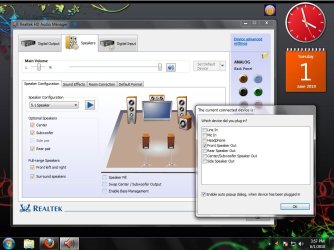
Here it goes, just put all the jack cables of your 5.1 channel speakers to its respective colors in your CPU. then after that in the REALTEK SOUND MANGER, Choose 5.1 channel in the menu and also click those jacks and then ASSIGN ALL OF THEM AS FRONT SPEAKERS! that's very easy and booooom! your 5.1 channel speakers works great already just like in Windows XP!

Now I can play Music with WINAMP and movies with VLC while enjoying my 5.1 surround speakers FULL BLAST! all speakers were already working. I hope this solution would also work for you guys! And i hope this would be of great help to all of you.!:cool:
 

My Computer My Computer

At a glance

windows 7 ultimate 32bits
OS
windows 7 ultimate 32bits
hey guys, i'm currently using altec lansing VS3251 5.1 channel speakers. we had the same problems with windows 7, no sounds specially the subwoofer. guess what? after how many days, i figured it out by myself! all of my speakers now works great with windows 7.

Here it goes, just put all the jack cables of your 5.1 channel speakers to its respective colors in your CPU. then after that in the REALTEK SOUND MANGER, Choose 5.1 channel in the menu and also click those jacks and then ASSIGN ALL OF THEM AS FRONT SPEAKERS! that's very easy and booooom! your 5.1 channel speakers works great already just like in Windows XP!

Now I can play Music with WINAMP and movies with VLC while enjoying my 5.1 surround speakers FULL BLAST! all speakers were already working. I hope this solution would also work for you guys! And i hope this would be of great help to all of you.!:cool:


Try this solution and you will hear what is blasting sound :p
http://www.sevenforums.com/sound-audio/84890-realtek-x-fi-software-1-a.html
 

My Computer My Computer

At a glance

Windows 7 Ultimate x64
OS
Windows 7 Ultimate x64
hey guys, i'm currently using altec lansing VS3251 5.1 channel speakers. we had the same problems with windows 7, no sounds specially the subwoofer. guess what? after how many days, i figured it out by myself! all of my speakers now works great with windows 7.

Here it goes, just put all the jack cables of your 5.1 channel speakers to its respective colors in your CPU. then after that in the REALTEK SOUND MANGER, Choose 5.1 channel in the menu and also click those jacks and then ASSIGN ALL OF THEM AS FRONT SPEAKERS! that's very easy and booooom! your 5.1 channel speakers works great already just like in Windows XP!

Now I can play Music with WINAMP and movies with VLC while enjoying my 5.1 surround speakers FULL BLAST! all speakers were already working. I hope this solution would also work for you guys! And i hope this would be of great help to all of you.!:cool:
Hey, was just wondering how do you click the jacks?
i tried clicking and nothing opens up, and when i right click it Audio Device Settings show up and when i click it nothing happens.
Really wish i had my 5.1 back. My medias just not the same now.
 

My Computer My Computer

At a glance

Windows 7
OS
Windows 7
sanzone

when you plug those jacks into your CPU, a pop-up window automatically pops out and just check the box of FRONT SPEAKER OUT.. all of those jacks.. then off you go.. :)
 

My Computer My Computer

At a glance

windows 7 ultimate 32bits
OS
windows 7 ultimate 32bits
sanzone

when you plug those jacks into your CPU, a pop-up window automatically pops out and just check the box of FRONT SPEAKER OUT.. all of those jacks.. then off you go.. :)

Do you mean this?
98ewle.png

Tried clicking it but nothing happens.
Any extra help/pointers?
 

My Computer My Computer

At a glance

Windows 7
OS
Windows 7
not that one. like this:
 

Attachments

  • realtek.jpg
    realtek.jpg
    88.6 KB · Views: 431

My Computer My Computer

At a glance

windows 7 ultimate 32bits
OS
windows 7 ultimate 32bits
That doesn't pop up for me when I unplug and re-plug my speaker jacks.
Is there any other way to get that menu to open up?
Or perhaps to change the settings manually?
 

My Computer My Computer

At a glance

Windows 7
OS
Windows 7
try to download latest version of realtek. because i had downloaded this one in one of the driver updates of my motherboard for windows 7.
 

My Computer My Computer

At a glance

windows 7 ultimate 32bits
OS
windows 7 ultimate 32bits
Hi, this is an old and well known trick. The problem is, who has the nerves to constantly have to SWITCH the assignment around when you want to listen to music and actually play new games that support real 5.1 audio?
If only the retarded Realtek drivers had some sort of preset or remembered that if you set stereo, all speakers would be front, and if you set 5.1 then they would be front/csub/rear - that would make life a whole lot easier.
 

My Computer My Computer

At a glance

What do you think?
OS
What do you think?
Thanks man works for me :party::party:
 

My Computer My Computer

At a glance

windwos 7 32 bit
OS
windwos 7 32 bit
Back
Top