SATA Drivers - Slipstream into Windows XP CD

How to slipstream SATA drivers into Windows XP setup CD, on your dual boot PC with Windows 7 or Vista

When you install Win XP, setup can not find your Hard Drive.

1.PNG

2.PNG


1) Download & Install nLite
nLite - Deployment Tool for the bootable Unattended Windows installation

2) Make a new folder for your Windows XP image.
Note: for this example, I am using the name Win XP Sata.

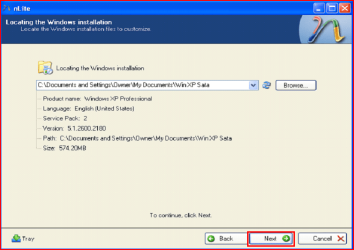
3) Insert XP CD & start nLite

4) Click Next.
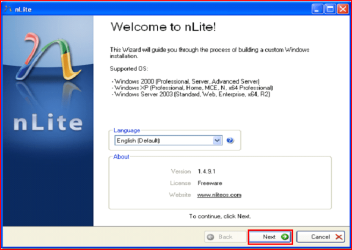
3.PNG
5) Choose your Windows XP image folder, & Click Next, than OK.
Note: nLite will put the image into your folder.
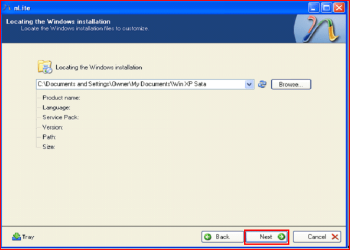
4.PNG

5.PNG
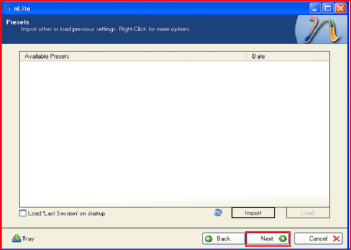
6) Click Next.
6.PNG
7) Click Next.
7.PNG
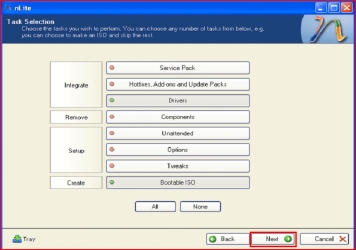
8) Choose Integrate Drivers & Create Bootable ISO
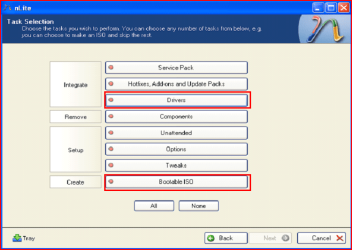
8.PNG
9) Click Next.
9.PNG
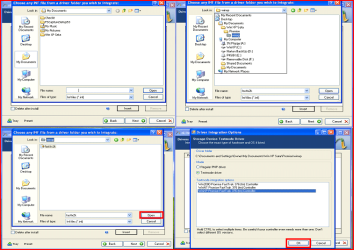
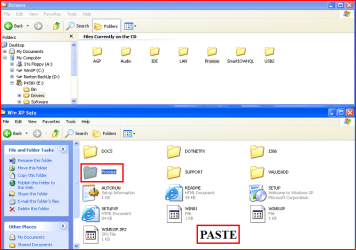
10) Copy & Paste your Sata Driver to your image folder.
Note: for this example, I am using Promise Fastrak 376.
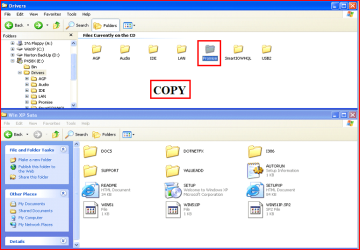
10.PNG

11.PNG
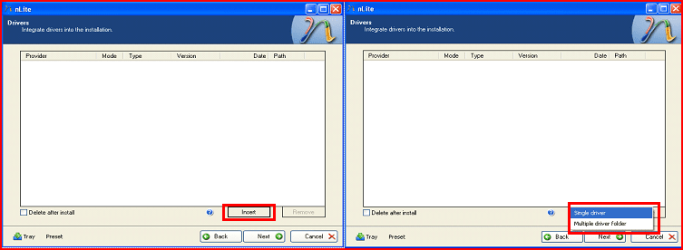
11) Click Insect, than Single Driver.
12.PNG
12) Locate your Sata Setup Inf file.
Click Open, than OK.
Note: for this example the file is called fasttx2k.
Note: for this example, I am using Promise Fastrak 376.
13.PNG
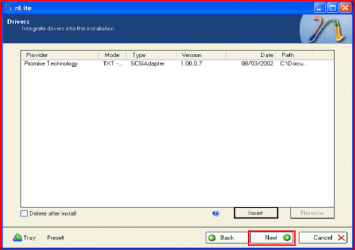
13) Click Next.
14.PNG
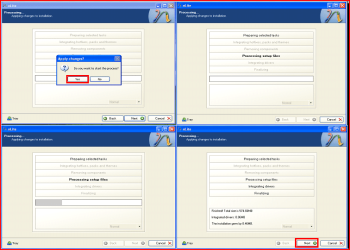
14) Click Yes, than Next.
15.PNG
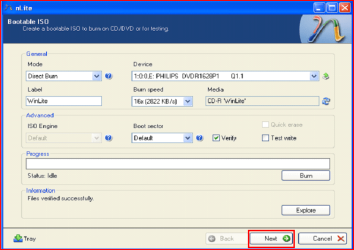
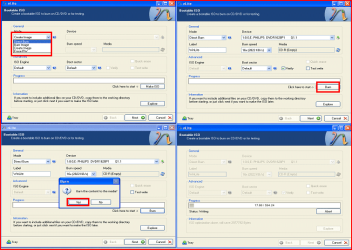
15) Choose Direct Burn.
Click Burn, than Yes.
Note: nLite will now burn your new CD.
16.PNG
16) Click Next.
17.PNG
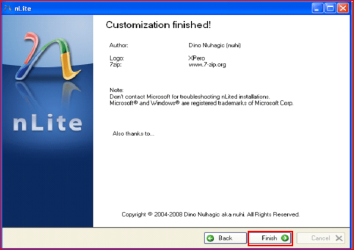
17) Click Finish.
18.PNG
Your Sata drive will now show up in setup.
19.PNG

 
Last edited by a moderator:
Hello can someone please help me

here is my laptop

Compaq Presario CQ61-330SA Notebook PC - HP technical support (United Kingdom - English)

and i am confused in what drivers shall i download ,

when i go to the drivers and download page it says chose operating sytem , windows 7 or xp which do i do

i have windows 7 pre installed and i want to dual boot xp
my laptop does not have a floopy disk so i came here please can you help me find the correct driver and give me the link and give me the instuctions on what to do thanks
 

My Computer My Computer

At a glance

windows 7
OS
windows 7
i dont understand what do i do on the link you gave me and how do i find that SATA controller thanks
 

My Computer My Computer

At a glance

windows 7
OS
windows 7
i dont understand what do i do on the link you gave me and how do i find that SATA controller thanks
The link will help you find the Sata controller on your PC.
 

My Computer My Computer

At a glance

ME/XP/Vista/Win7
OS
ME/XP/Vista/Win7
Many thanks Theog !!

your link to the correct SATA driver files was just what I needed. I had been loading the wrong drivers (from Toshiba netbook support) for hours, and trying to slip them into an XP Nlite dvd. Found your thread for the correct drivers for the NM10 chipset and it worked first time around.

thanks so much !!

this is what I did to get the XP pro install to work:

1 - ran nlite and slipped SP3 into my XP CD's i386 directory. saved it to folder.
2 - still running nlite, i slipped in the Intel NM10 chipset (for Atom Processor N270 on toshiba n305/410) raid/storage drivers found at the link Theog provided. I selected TEXTMODE, and highlighted ALL drivers listed.
3 - Nlite slipped it all into the new CD build and saved to ISO.
4 - burned ISO to bootable DVD, booted Netbook with this DVD (made sure boot menu set to CD/DVD 1st), and XP install found the new SATA drive !!

http://downloadcenter.intel.com/Sear...ntel%c2%ae+RST
 

My Computer My Computer

At a glance

w7
OS
w7
your link to the correct SATA driver files was just what I needed. I had been loading the wrong drivers (from Toshiba netbook support) for hours, and trying to slip them into an XP Nlite dvd. Found your thread for the correct drivers for the NM10 chipset and it worked first time around.

thanks so much !!

this is what I did to get the XP pro install to work:

1 - ran nlite and slipped SP3 into my XP CD's i386 directory. saved it to folder.
2 - still running nlite, i slipped in the Intel NM10 chipset (for Atom Processor N270 on toshiba n305/410) raid/storage drivers found at the link Theog provided. I selected TEXTMODE, and highlighted ALL drivers listed.
3 - Nlite slipped it all into the new CD build and saved to ISO.
4 - burned ISO to bootable DVD, booted Netbook with this DVD (made sure boot menu set to CD/DVD 1st), and XP install found the new SATA drive !!

http://downloadcenter.intel.com/Sear...ntel®+RST

You are welcome.
 

My Computer My Computer

At a glance

ME/XP/Vista/Win7
OS
ME/XP/Vista/Win7
Slipstream SATA to XP install CD

Hi theog and friends

Excuse a total newbee's first posting.

I have studied several SevenForum tutorials and chains on setting up a dualboot Win7/XP (W7 64bit is installed. XP is to be added).

My problem is I don't know which (SATA driver) inf-file (or other files) to inlude in the new XP setup-CD.

Motherboard is ASUS P5Q SE2. (Socket 775) The relevant drive package is, I think, Intel_ChipsetInf_V9111014_XPVistaWin7 available from
ASUSTeK Computer Inc.-Support-
(similar, but older files are on my ASUS support DVD)

It feels silly, but I can't figure out which files contain the SATA driver that I should paste into nLite (Step 10-12 in the tutorial)

Thanks in advance

Seeved:confused:
 

My Computer My Computer

At a glance

windows 7 (and hopefully dualboot xp)Intel Core 2 Quad Q8200Slot 1+2: Corsair 2048 MB, slot 3+4 openonboard ATI Radeon HD 4670
Computer Manufacturer/Model Number
Asus P5C SE2 motherboard
OS
windows 7 (and hopefully dualboot xp)
CPU
Intel Core 2 Quad Q8200
Motherboard
Asus P5C SE2 motherboard
Memory
Slot 1+2: Corsair 2048 MB, slot 3+4 open
Graphics Card(s)
onboard ATI Radeon HD 4670
Sound Card
none
Monitor(s) Displays
Samsung Syncmaster 2343BW
Hard Drives
2X Samsung HD103UJ 1GB
PSU
what's PSU?
Case
Coolmaster Elite 330
Cooling
Standard fans
In your spec's you have list Asus P5C SE2?

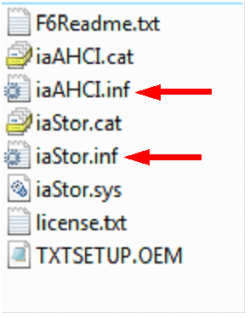
As the Asus P5Q SE2 the Intel chip, you download drivers from here: Intel Sata Controller Drivers

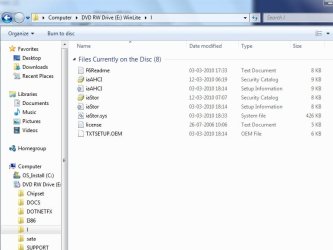
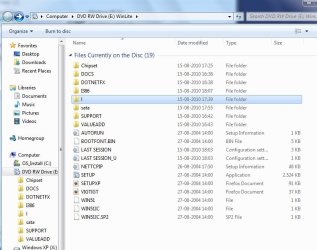
The two inf are arrowed.

Capture3-1.PNG
 

My Computer My Computer

At a glance

ME/XP/Vista/Win7
OS
ME/XP/Vista/Win7
Thanks theog

I changed to starting from an old retail Win XP CD and used the Intel SATA drivers you indicated. It worked fine, thanks to tutorials 8057, 72185 and other tips from sevenforums!
Seved
 

My Computer My Computer

At a glance

windows 7 (and hopefully dualboot xp)Intel Core 2 Quad Q8200Slot 1+2: Corsair 2048 MB, slot 3+4 openonboard ATI Radeon HD 4670
Computer Manufacturer/Model Number
Asus P5C SE2 motherboard
OS
windows 7 (and hopefully dualboot xp)
CPU
Intel Core 2 Quad Q8200
Motherboard
Asus P5C SE2 motherboard
Memory
Slot 1+2: Corsair 2048 MB, slot 3+4 open
Graphics Card(s)
onboard ATI Radeon HD 4670
Sound Card
none
Monitor(s) Displays
Samsung Syncmaster 2343BW
Hard Drives
2X Samsung HD103UJ 1GB
PSU
what's PSU?
Case
Coolmaster Elite 330
Cooling
Standard fans
I changed to starting from an old retail Win XP CD and used the Intel SATA drivers you indicated. It worked fine, thanks to tutorials 8057, 72185 and other tips from sevenforums!
Seved

You are welcome, we are here 24/7 to help.
 

My Computer My Computer

At a glance

ME/XP/Vista/Win7
OS
ME/XP/Vista/Win7
multiple options

When I download SATA drivers to insert I get multiple folders and inf files

I have an Asus P5K pro motherboard

and after I pick one of the drivers I have to choose between text modus and standard

downloaded the drivers from
ASUSTeK Computer Inc.-Support-

which driver do I have to pick and what option to select?:huh:
 

My Computer My Computer

At a glance

Windows 7
OS
Windows 7
When I download SATA drivers to insert I get multiple folders and inf files

I have an Asus P5K pro motherboard

and after I pick one of the drivers I have to choose between text modus and standard

downloaded the drivers from
ASUSTeK Computer Inc.-Support-

which driver do I have to pick and what option to select?:huh:

1) If you have the Intel Sata Controller, download from here:
Intel Sata Controller Drivers

2) Choose text mode.
 

My Computer My Computer

At a glance

ME/XP/Vista/Win7
OS
ME/XP/Vista/Win7
You're welcome KmD. Pleae let us know how it went. :)

Well i figured out how to make a fourth primary drive - through the partition wizard.

Now i'm stuck here: http://www.sevenforums.com/tutorials/72185-sata-drivers-slipstream-into-windows-xp-cd.html

I really can't figure out what to do around step 10...

Where on earth do i find out what to copy paste?

Could you write really really clearly what i have to do?

I've downloaded both the drivers theog suggests plus some drivers from MSI's homepage. Is it the cipset folder or what..?

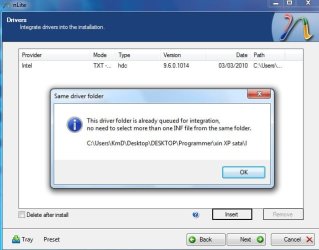
And when i pick the .inf file, i'm only allowed to pick ONE. Even though theog says that you have to pick both files. It says that i don't need to pick more inf files from the same folder...

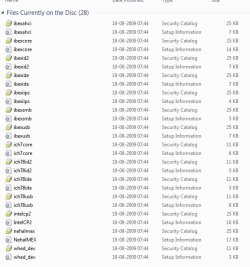
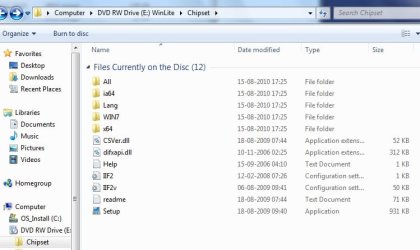
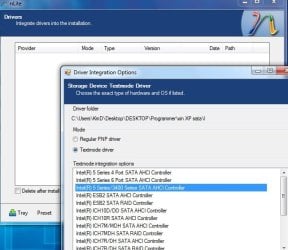
I pick the iACHI first. Anyways, you can see it all on the screenshots below

Anyways, when i try the CD i get blue screen. What am i doing wrong?

Please write very clearly which files i should copy paste to the cd-folder and what inf file i have to pick from where in the "insert"-step

I have an MSI gx 723 laptop

Edit: The thing you posted "intel download center" is that the drivers or what? Do you just need to make a new random folder, unzip the files and copy it to the win xp sata folder? or??!
 

Attachments

  • 5.jpg
    5.jpg
    52 KB · Views: 1,212
  • 4.jpg
    4.jpg
    40.6 KB · Views: 494
  • 3.jpg
    3.jpg
    101.3 KB · Views: 370
  • 2.jpg
    2.jpg
    40.8 KB · Views: 339
  • 1.jpg
    1.jpg
    61.5 KB · Views: 332
  • 6.jpg
    6.jpg
    48.6 KB · Views: 1,415
  • 7.jpg
    7.jpg
    35 KB · Views: 1,235
Last edited:

My Computer My Computer

At a glance

Windows 7
OS
Windows 7
thanks for this!
 

My Computer My Computer

At a glance

Dual Boot Windows 7 & XPQ6600 G0 Setpping Core 2 Quad4x1GB Corsair 800mhzXFX nVidia 8800GT Alpha Dog Edition
Computer Manufacturer/Model Number
Custom
OS
Dual Boot Windows 7 & XP
CPU
Q6600 G0 Setpping Core 2 Quad
Motherboard
XFX 780i 3-way SLI
Memory
4x1GB Corsair 800mhz
Graphics Card(s)
XFX nVidia 8800GT Alpha Dog Edition
Sound Card
onboard 7.1
Monitor(s) Displays
Westinghouse 24" widescreen Monitor
Hard Drives
1x Samsung 400GB
1x Western Digital 80GB
1x Western Digital 800GB
1x Western Digital My Book 500GB
1x 350GB NAS
PSU
RocketFish 550W Power Supply SLI Ready RF-550WPS
Case
Zalman Z7+
Cooling
Corsair H50
Hi. Like many others i seem to be lost finding the right files to slip in i.e. sata drivers at the mo. I have a gigabyte p55-ud5 with core i5 750 an win 7 64bit on top. Should i be able to find the drivers on my system somewhere or on the mobo cd or is it easier to dl from their mystical place of origin ?

Any help much appreiciated, thx.

Cpt Carrot
 

My Computer My Computer

At a glance

Win 7 64 bitcore i5 750 @ 2.66ghz4gigATI Club 5700
OS
Win 7 64 bit
CPU
core i5 750 @ 2.66ghz
Motherboard
gigabyte p55-ud5
Memory
4gig
Graphics Card(s)
ATI Club 5700
Sound Card
realtek on board
Monitor(s) Displays
x1 22" lg
Hard Drives
300gb velociraptor
2tb hitachi
1tb wd green
PSU
650w
Case
alien looka like
Cooling
water cooled
Hi. Like many others i seem to be lost finding the right files to slip in i.e. sata drivers at the mo. I have a gigabyte p55-ud5 with core i5 750 an win 7 64bit on top. Should i be able to find the drivers on my system somewhere or on the mobo cd or is it easier to dl from their mystical place of origin ?

Any help much appreiciated, thx.

Cpt Carrot

Hi

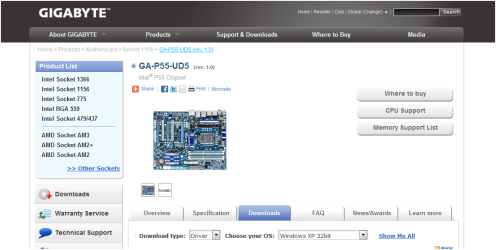
You download Sata Controller drivers from here:
GA-P55-UD5 (rev. 1.0) - GIGABYTE=
GA-P55-UD5 (rev. 1.0) - GIGABYTE

Capture1.PNG
Capture2.PNG

OR

Intel Sata Controller Drivers
 

My Computer My Computer

At a glance

ME/XP/Vista/Win7
OS
ME/XP/Vista/Win7
You're welcome KmD. Pleae let us know how it went. :)

Well i figured out how to make a fourth primary drive - through the partition wizard.

Now i'm stuck here: http://www.sevenforums.com/tutorials/72185-sata-drivers-slipstream-into-windows-xp-cd.html

I really can't figure out what to do around step 10...

Where on earth do i find out what to copy paste?

Could you write really really clearly what i have to do?

I've downloaded both the drivers theog suggests plus some drivers from MSI's homepage. Is it the cipset folder or what..?

And when i pick the .inf file, i'm only allowed to pick ONE. Even though theog says that you have to pick both files. It says that i don't need to pick more inf files from the same folder...

I pick the iACHI first. Anyways, you can see it all on the screenshots below

Anyways, when i try the CD i get blue screen. What am i doing wrong?

Please write very clearly which files i should copy paste to the cd-folder and what inf file i have to pick from where in the "insert"-step

I have an MSI gx 723 laptop

Edit: The thing you posted "intel download center" is that the drivers or what? Do you just need to make a new random folder, unzip the files and copy it to the win xp sata folder? or??!

Hi

Pick the INF file for your Sata Controller.
 

My Computer My Computer

At a glance

ME/XP/Vista/Win7
OS
ME/XP/Vista/Win7
Hi.

I seem to find the correct sata driver for my laptop to slipstream.
Laptop model Asus 42jV.
currently using windows home premium 64bit.

Motherboard
ASUSTeK Computer Inc. K42Jv (Socket 989)

Hard Drives
488GB Seagate ST9500325AS (SATA)

Is xp not supporter for my laptop??
ASUSTeK Computer Inc.-Support-

Pls advise. :cry: Thanks in advance.
 

My Computer My Computer

At a glance

Windows 7 Home Premium 64bit
OS
Windows 7 Home Premium 64bit
Hi.

I seem to find the correct sata driver for my laptop to slipstream.
Laptop model Asus 42jV.
currently using windows home premium 64bit.

Motherboard
ASUSTeK Computer Inc. K42Jv (Socket 989)

Hard Drives
488GB Seagate ST9500325AS (SATA)

Is xp not supporter for my laptop??
ASUSTeK Computer Inc.-Support-

Pls advise. :cry: Thanks in advance.

First check for all the Win XP drivers for your hardware.
If your Win XP CD, does not support your Sata Controller, you will need to load drivers to uses at F6.
Load Sata Controller drivers with a floppy disk is the best way.

http://www.sevenforums.com/tutorials/66010-sata-drivers-load-windows-xp-setup-dual-boot.html
or
http://www.sevenforums.com/tutorials/72185-sata-drivers-slipstream-into-windows-xp-cd.html

You can download your F6 Sata Controller drivers from here:

Intel Sata Controller Drivers
 

My Computer My Computer

At a glance

ME/XP/Vista/Win7
OS
ME/XP/Vista/Win7
Back
Top