Windows Media Player 12, mp4 files and my video card...

kyuball

New member
Local time
2:42 PM
Messages
3
I have a problem opening .mp4 files with WMP 12. Every time I try playing an HD mp4 file, I get this error message:

http://img19.imageshack.us/i/capturehn.jpg/

Uploaded with ImageShack.us

It seems inexplicable to me that it would be the case that my video card cannot somehow handle this file considering that it plays on VLC just fine. However, I wanted to consolidate all video files to WMP12 so that I can embed it into an MS Access form for organized video viewing.

I don't know if there is any relevant info that I can give regarding my video card but I found that my computer came with an ATI Radeon HD 3300 Graphics card and the file I am tring to play's specs beyond file type are below:

Frame width: 1280
Frame height: 720
Data rate: 3597kbps
Total bitrate: 3693kbps
Frame rate: 29 frames/second

I also downloaded and installed Shark's codec pack from this forum and am still getting that same error message.

Can anyone offer me some insight into how I can get my WMP12 to stop acting weird and play the files that it is supposed to be able to play?
 
Last edited:

My Computer My Computer

At a glance

Windows 7
OS
Windows 7
Welcome to the forum,

So what happens if you click on web help?

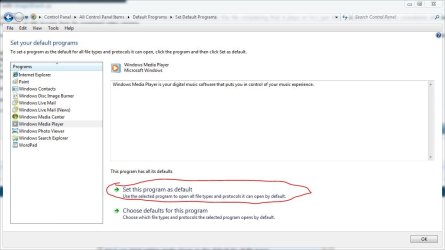
Have you tried setting media player as the default for all file types, vlc player may be the default right now.

Just a couple suggestions for you to try, post back to let us know your results.
 

Attachments

  • media.JPG
    media.JPG
    66.9 KB · Views: 564

My Computer My Computer

At a glance

Win 10 Pro x64Intel I5-2500K @3.3GHz16GB G.Skill Ripjaws X (4x4GB)EVGA GeForce 750 Ti SC 2GB
Computer type
PC/Desktop
Computer Manufacturer/Model Number
Self Built
OS
Win 10 Pro x64
CPU
Intel I5-2500K @3.3GHz
Motherboard
Asrock P67 Extreme4
Memory
16GB G.Skill Ripjaws X (4x4GB)
Graphics Card(s)
EVGA GeForce 750 Ti SC 2GB
Sound Card
ASUS Xonar DG 5.1 Channels 24-bit 96KHz PCI Interface Sound
Monitor(s) Displays
auria eq2367
Screen Resolution
1920 x 1080
Hard Drives
250GB Samsung 850 EVO SSD
1TB WD Blue
1TB Hitachi
PSU
SeaSonic X 650W 80 Plus Gold
Case
Corsair Obsidian 750D
Cooling
Corsair H60, Three 140mm case fans
Keyboard
Logitech Wireless Keyboard K520
Mouse
Logitech Wireless Mouse M310
Internet Speed
Wave Broadband ~ 100 dn 5 up
Antivirus
Windows Defender, Malwarebytes Premium
Browser
Edge, IE11, Chrome
Other Info
Laptop specs: HP g7-1365dx /
CPU: AMD A6-3420M APU with Radeon(tm) HD Graphics /
RAM: Crucial 8Gb (2x4Gb) /
SSD: Crucial M4-CT128M4SSD2 ATA Device/ FW 000F /
GFX: AMD Radeon HD 6520G /
OS: Windows 10 Pro x64
At the bottom of the settings application, use the SUGGESTED settings
Then, On the SWAP TAB, choose to disable the Microsoft Video decoder

If AVI's are being troublesome, choose to disable the DMO video codecs also.
 

My Computer My Computer

At a glance

Windows 7 Ultimate 64biti7 2600k16GB (4x4) corsair vengeanceIntel HD3000 iGPU / AMD HD6870 1024MB
Computer Manufacturer/Model Number
Selfbuilt
OS
Windows 7 Ultimate 64bit
CPU
i7 2600k
Motherboard
asus P8Z68-V LE
Memory
16GB (4x4) corsair vengeance
Graphics Card(s)
Intel HD3000 iGPU / AMD HD6870 1024MB
Sound Card
bitstreamed to an Onkyo 609
Monitor(s) Displays
Asus VE278 27" LED / Bravia EX7 60" LED
Screen Resolution
native 1080p x2
Hard Drives
4x 2TB int. + 2x 2TB external and a SSD for the boot drive.
PSU
650w Antec
Case
NZXT tempest evo
Cooling
air/stock
Keyboard
Dell
Mouse
logitech m505
Internet Speed
dual: cable/blackberry tether for travel use
Other Info
BD re-writer //
asus notebook G73Jw
Welcome to the forum,

So what happens if you click on web help?

Have you tried setting media player as the default for all file types, vlc player may be the default right now.

Just a couple suggestions for you to try, post back to let us know your results.

Hey Derekimo,

The default player settings are right and when I click on web help, it says:

"You've encountered an error message while using Windows Media Player. Additional information is not currently available for this error."

I am baffled.

I will try Shark's suggestion above and post back the results...
 

My Computer My Computer

At a glance

Windows 7
OS
Windows 7
Alright, hopefully that helps.
 

My Computer My Computer

At a glance

Win 10 Pro x64Intel I5-2500K @3.3GHz16GB G.Skill Ripjaws X (4x4GB)EVGA GeForce 750 Ti SC 2GB
Computer type
PC/Desktop
Computer Manufacturer/Model Number
Self Built
OS
Win 10 Pro x64
CPU
Intel I5-2500K @3.3GHz
Motherboard
Asrock P67 Extreme4
Memory
16GB G.Skill Ripjaws X (4x4GB)
Graphics Card(s)
EVGA GeForce 750 Ti SC 2GB
Sound Card
ASUS Xonar DG 5.1 Channels 24-bit 96KHz PCI Interface Sound
Monitor(s) Displays
auria eq2367
Screen Resolution
1920 x 1080
Hard Drives
250GB Samsung 850 EVO SSD
1TB WD Blue
1TB Hitachi
PSU
SeaSonic X 650W 80 Plus Gold
Case
Corsair Obsidian 750D
Cooling
Corsair H60, Three 140mm case fans
Keyboard
Logitech Wireless Keyboard K520
Mouse
Logitech Wireless Mouse M310
Internet Speed
Wave Broadband ~ 100 dn 5 up
Antivirus
Windows Defender, Malwarebytes Premium
Browser
Edge, IE11, Chrome
Other Info
Laptop specs: HP g7-1365dx /
CPU: AMD A6-3420M APU with Radeon(tm) HD Graphics /
RAM: Crucial 8Gb (2x4Gb) /
SSD: Crucial M4-CT128M4SSD2 ATA Device/ FW 000F /
GFX: AMD Radeon HD 6520G /
OS: Windows 10 Pro x64
At the bottom of the settings application, use the SUGGESTED settings
Then, On the SWAP TAB, choose to disable the Microsoft Video decoder

If AVI's are being troublesome, choose to disable the DMO video codecs also.

May I just say, "Bravo on this codec pack!!"

Followed your instructions and it all worked like a charm! Thank you, thank you, thank you!!

And thanks to both Derekimo and Shark for taking the time and helping a brother out!
 

My Computer My Computer

At a glance

Windows 7
OS
Windows 7
You're Welcome,

Great! Glad to hear you got it fixed. Excellent help Shark!
 

My Computer My Computer

At a glance

Win 10 Pro x64Intel I5-2500K @3.3GHz16GB G.Skill Ripjaws X (4x4GB)EVGA GeForce 750 Ti SC 2GB
Computer type
PC/Desktop
Computer Manufacturer/Model Number
Self Built
OS
Win 10 Pro x64
CPU
Intel I5-2500K @3.3GHz
Motherboard
Asrock P67 Extreme4
Memory
16GB G.Skill Ripjaws X (4x4GB)
Graphics Card(s)
EVGA GeForce 750 Ti SC 2GB
Sound Card
ASUS Xonar DG 5.1 Channels 24-bit 96KHz PCI Interface Sound
Monitor(s) Displays
auria eq2367
Screen Resolution
1920 x 1080
Hard Drives
250GB Samsung 850 EVO SSD
1TB WD Blue
1TB Hitachi
PSU
SeaSonic X 650W 80 Plus Gold
Case
Corsair Obsidian 750D
Cooling
Corsair H60, Three 140mm case fans
Keyboard
Logitech Wireless Keyboard K520
Mouse
Logitech Wireless Mouse M310
Internet Speed
Wave Broadband ~ 100 dn 5 up
Antivirus
Windows Defender, Malwarebytes Premium
Browser
Edge, IE11, Chrome
Other Info
Laptop specs: HP g7-1365dx /
CPU: AMD A6-3420M APU with Radeon(tm) HD Graphics /
RAM: Crucial 8Gb (2x4Gb) /
SSD: Crucial M4-CT128M4SSD2 ATA Device/ FW 000F /
GFX: AMD Radeon HD 6520G /
OS: Windows 10 Pro x64
Back
Top