Show Us Your Rig

Status
Not open for further replies.
The noise off my case fans was making too much noise and driving me nuts, especially the 200mm one on top of the case so I decided to alter the pins by using a mod I found on the link below.
What a difference in the noise of the system, which is now almost silent and it has not affected the temps of the system at all.

techPowerUp! :: Easy 7V Mod for Fans
 

My Computer

Computer Manufacturer/Model Number
Samsung R519 Notebook
OS
Windows 7 Home Premium with Service Pack 1
CPU
Intel Dual Core 2.2 GHZ
Memory
2 Gig
Graphics Card(s)
Intel
Sound Card
On board
Monitor(s) Displays
Built in
Screen Resolution
1366x768
Hard Drives
250 Gig Sata2
Mouse
Microsoft Arc Mouse
Internet Speed
15 meg down
It is REALLY hard to see because of the lights, but here are some I took:
View attachment 76616
View attachment 76617
View attachment 76618

In order from left to right: Fan controller knob, Fan LED (will be removed), Cathode Switch (on and off), Key Switch.

~Lordbob
Nice work mate! looks pretty damn awesome, I'll bet the funcionality is pretty good too :P
Thanks. I just ordered my new potentiometers and knobs yesterday, and today I am heading to school to CNC my plate.
:p

The noise off my case fans was making too much noise and driving me nuts, especially the 200mm one on top of the case so I decided to alter the pins by using a mod I found on the link below.
What a difference in the noise of the system, which is now almost silent and it has not affected the temps of the system at all.

techPowerUp! :: Easy 7V Mod for Fans
If you want to know more about fan mods, I am currently adding variable resistors to my fans so that I can control the fan speed at the turn of a knob. The idea is to vary them from 12V down to about 5V. For me, the noise is nothing, but this might be helpful to you.
Here is the basic tutorial for now:
http://www.sevenforums.com/tutorials/87295-fan-speed-controller-build-your-own.html

~Lordbob
 

My Computer

Computer Manufacturer/Model Number
Hera
OS
Windows 7 Ultimate x64, Mint 9
CPU
Intel i5-2500k
Motherboard
ASUS P8P67 Pro
Memory
2x 4Gb Corsair VENGEANCE DDR3-1600
Graphics Card(s)
NVidia GeForce N260GTX Twin Frozr
Sound Card
Realtek HD OnBoard Audio
Monitor(s) Displays
ASUS 24" Monitor
Screen Resolution
1920x1080
Hard Drives
G.SKILL Phoenix Series 60GB SATA II MLC Internal Solid State Drive (SSD)
SAMSUNG Spinpoint F3R 1TB 7200 RPM 32MB Cache SATA II
PSU
Cooler Master Real Power Pro 750W
Case
Cooler Master Haf 932
Cooling
Fans
Keyboard
Razer Tarantula
Mouse
Razer Lachesis
Internet Speed
not fast enough
It is REALLY hard to see because of the lights, but here are some I took:
View attachment 76616
View attachment 76617
View attachment 76618

In order from left to right: Fan controller knob, Fan LED (will be removed), Cathode Switch (on and off), Key Switch.

~Lordbob
Nice work mate! looks pretty damn awesome, I'll bet the funcionality is pretty good too :P
Thanks. I just ordered my new potentiometers and knobs yesterday, and today I am heading to school to CNC my plate.
:p

The noise off my case fans was making too much noise and driving me nuts, especially the 200mm one on top of the case so I decided to alter the pins by using a mod I found on the link below.
What a difference in the noise of the system, which is now almost silent and it has not affected the temps of the system at all.

techPowerUp! :: Easy 7V Mod for Fans
If you want to know more about fan mods, I am currently adding variable resistors to my fans so that I can control the fan speed at the turn of a knob. The idea is to vary them from 12V down to about 5V. For me, the noise is nothing, but this might be helpful to you.
Here is the basic tutorial for now:
http://www.sevenforums.com/tutorials/87295-fan-speed-controller-build-your-own.html

~Lordbob

Interesting read thanks I have bookmarked it for later.
 

My Computer

Computer Manufacturer/Model Number
Samsung R519 Notebook
OS
Windows 7 Home Premium with Service Pack 1
CPU
Intel Dual Core 2.2 GHZ
Memory
2 Gig
Graphics Card(s)
Intel
Sound Card
On board
Monitor(s) Displays
Built in
Screen Resolution
1366x768
Hard Drives
250 Gig Sata2
Mouse
Microsoft Arc Mouse
Internet Speed
15 meg down
Interesting read thanks I have bookmarked it for later.
No problem. If you want anymore information on it, let me know. When I actually start putting my fans into the new potentiometers, I will have it documented on here in more detail than now.

I can also show you how to add an LED (which doesn't dim unfortunately), or even a switch to turn it on or off.

~Lordbob
 

My Computer

Computer Manufacturer/Model Number
Hera
OS
Windows 7 Ultimate x64, Mint 9
CPU
Intel i5-2500k
Motherboard
ASUS P8P67 Pro
Memory
2x 4Gb Corsair VENGEANCE DDR3-1600
Graphics Card(s)
NVidia GeForce N260GTX Twin Frozr
Sound Card
Realtek HD OnBoard Audio
Monitor(s) Displays
ASUS 24" Monitor
Screen Resolution
1920x1080
Hard Drives
G.SKILL Phoenix Series 60GB SATA II MLC Internal Solid State Drive (SSD)
SAMSUNG Spinpoint F3R 1TB 7200 RPM 32MB Cache SATA II
PSU
Cooler Master Real Power Pro 750W
Case
Cooler Master Haf 932
Cooling
Fans
Keyboard
Razer Tarantula
Mouse
Razer Lachesis
Internet Speed
not fast enough
If you want to know more about fan mods, I am currently adding variable resistors to my fans so that I can control the fan speed at the turn of a knob. The idea is to vary them from 12V down to about 5V. For me, the noise is nothing, but this might be helpful to you.
Here is the basic tutorial for now:
http://www.sevenforums.com/tutorials/87295-fan-speed-controller-build-your-own.html

~Lordbob
Awesome tutorial, thanks! I check the tuts from time to time, but I missed this one the other day when I was browsing through them.. I was actually thinking of trying to either mod my existing fan controller, or making a new one from scratch.. Either way, the info there will be very helpful.

Anyway, I logged on tonight to share the first few pictures of my case mod project.. I was working on the side panel today, turned out pretty well actually. :D

First things first, the original side panel (used to be a blue LED 80mm fan in the middle):
picture.php


Next I cut the new perspex panel to size, and laid it on the side panel with the fans to see how it should look when I was finished, nothing was fixed on as yet:
picture.php


Then I mounted the perspex (8 small screws around the edged of the side panel), and mounted the fans (decided to go with the standard silver self-tapping fan screws):
picture.php

picture.php


Thereafter, I needed to cut out air holes for the fans, so everything needed to be taken off yet again. My narrow jigsaw blades made easy work of getting a smooth curve here:
picture.php


With everything in place and the holes cut, it was time to remove the protective covering from the perspex panel:
picture.php


Here we have the panel back on my case... As you can guess, cable management is next on my list of things to do, I'm just waiting for my MNPCtech cable sleeving kit to arrive:
picture.php

picture.php


And here we have the semi-finished product, I really hate my phone camera, I just couldn't get a clear photo here... This was about the best of the 4 I took:
picture.php


I want to either try make my own fan speed controller, or mod my existing one to also have green LEDs and small enough to fit in the 2.5" drive bay below my DVD-RW drive... I don't use or need the LCD display for fan speed and temps (the temperature sensors are crappy on this controller anyway), but I'll have to do that later.

When my sleeving kit arrives, two 12x12" mesh panels will be in the same package, so at that point I'm going to do three things: replace the smoked-perspex cover for the front fan, make protective covers for the side fans, and make a complete mesh side panel as well. That way, if i feel like having a mesh panel instead of perspex, i just need to switch panels and move the fans. I'll put up some pics when I finish that part too..

The awesome part of this whole thing, with the fans at half speed (about 1400 to 1500 rpm), my GPU and CPU are running about 5 to 10 degrees cooler under load than they were. :) I think it's working as intended hey... Hehe...

 

My Computer

Computer type
PC/Desktop
OS
Win 10 x64 Pro x64 / Ubuntu 15.10 x64
CPU
Intel i7-4960X
Motherboard
Asus Rampage IV Black Edition
Memory
4x8GB Corsair Dominator Platinum @2400MHz 10-12-12-31
Graphics Card(s)
2x MSI GTX780Ti 3GB (SLI)
Sound Card
Onboard SupremeFX (Cirrus Logic CS4398)
Monitor(s) Displays
3x LG Cinema 27" IPS LED (27MP65)
Screen Resolution
[1920x1080]x3
Hard Drives
Crucial M500 120GB, Crucial M500 480GB, Toshiba DT01ACA200 2TB
PSU
CoolerMaster V1000
Case
Corsair Obsidian 750D
Cooling
ThermalTake Water 3.0 Extreme, 4xSP120, 3xAF120
Keyboard
Moshi Luna
Mouse
Logitech G700s / Roccat Tyon
Internet Speed
4Mb uncapped ADSL (Afrihost)
Antivirus
MS Security Essentials
Browser
Chrome... Duh. (:
Hello ZaLiTH, looks good mate.


When I added a fan to the side panel I got the same results.
 

My Computer

Computer Manufacturer/Model Number
* BFK Customs *
OS
W 7 64-bit Ultimate
CPU
Intel Q9550 Yorkfield
Motherboard
ASUS P5Q Pro
Memory
8GB Dominator 8500C5D
Graphics Card(s)
ATI : XFX 5870
Sound Card
Realtek HD Audio 7-1
Monitor(s) Displays
1x 47" LCD HDMI & 3x 26" LCD HDMI
Screen Resolution
1920x1080P & 1920x1200
Hard Drives
1x 80GB Intel X25-M G2 SSD : 1x 500GB & 1x 640GB WD Caviar Black(s)
PSU
Corsair 620HX
Case
Cooler Master RC-690
Cooling
Tuniq Tower 120, 2x 140mm and 3x 120mm case fans
Keyboard
Microsoft 500
Mouse
Razer Diamondback 3G
Internet Speed
14 Mb/s
Other Info
1x Koutech 3Gb/s SATA HDD Hot Swap Rack
Excellent job ZaLiTH, looks really nice.

Waiting to see the mesh side panel and, ahum, the wiring sleeving kit installed ;)
 

My Computer

Computer type
PC/Desktop
Computer Manufacturer/Model Number
76~2.0
OS
Windows 7 Ult x64 - SP1/ Windows 8 Pro x64
CPU
Intel Core i5-3570K 4.6GHz
Motherboard
Gigabyte GA-Z77X UD3H, f18
Memory
8GB (2X4GB) DDR3 1600 Corsair Vengeance CL8 1.5v
Graphics Card(s)
Sapphire HD 7770 Vapor-X OC 1GB DDR5
Sound Card
Onboard VIA VT2021
Monitor(s) Displays
22" LCD Dell
Screen Resolution
1680x1050
Hard Drives
Samsung 840Pro 128GB SSD,
Seagate Barracuda 500GB SATA2 7200rpm 32MB cache, Seagate Barracuda 1TB SATA2 7200rpm 32MB cache,
PSU
Corsair HX650W
Case
Cooler Master Storm Scout
Cooling
Corsair H80 2x12cm Noctua NF P12 , 2x14cm case fans
Keyboard
Logitech Wave
Mouse
CM Sentinel
Internet Speed
Dismal
Antivirus
Avast
Browser
Opera Next
Other Info
Haswell laptop: HP Envy 17t-j, i7-4700MQ, GeForce 740M 2GB DDR3, 17.3" Full HD 1920x1080, 16GB RAM, Samsung 840 Pro 128GB, 1TB Hitachi 7200 HDD,
Desktop: eSATA ports,
External eSATA Seagate 500GB SATA2 7200rpm,
External WD USB 500GB
Great project. Exceptional jigsaw work.
 

My Computer

Computer Manufacturer/Model Number
Homemade
OS
Win 7 64 bit professional
CPU
CPU: 3930K @ 4.8 MHz Stable as a rock
Motherboard
ASUS Rampage IV Extreme LGA 2011
Memory
CORSAIR DOMINATOR GT 16GB (4 x 4GB) 240-Pin DDR3
Graphics Card(s)
EVGA SuperClocked+ GeForce GTX 680
Monitor(s) Displays
Dell 3007WFP
Screen Resolution
2560 x 1600
Hard Drives
Vector(256gb) x 2
RevoDrive 3 X2 space (240 GB)
Crucial C300 256 GB SSD
PSU
CORSAIR AX1200i 1200W Digital ATX12V v2.31 and EPS 2.92 SLI
Cooling
Water cooling EK Supremacy ELITE
Mouse
ratZ-7
Other Info
WEI-7.8
Nice work there Zalith.
 

My Computer

Computer type
PC/Desktop
Computer Manufacturer/Model Number
Systems by SmartEyeball
OS
8 Pro x64
CPU
i7 3770K 4.6GHz
Motherboard
ASUS P8Z77 WS
Memory
16GB G.Skill Trident X 2666mhz
Graphics Card(s)
x2 EVGA 780 Ti Superclocked SLI
Sound Card
SB X-FI Surround 5.1 PRO USB / ATH-AD900 Headphones
Monitor(s) Displays
x3 Dell U2410 / 58" Samsung
Screen Resolution
5760*1200/ 1920*1200
Hard Drives
2x Intel 520 240GB (RAID 0) * 2x WD Caviar Blacks 2TB (RAID 0) * 2TB WD Caviar Black * Sony Optirac DVD
PSU
Silverstone Strider Evolution 1200W
Case
Thermaltake Level 10 GT Snow Edition
Cooling
Noctua NH-D14
Keyboard
Topre Realforce // Ducky Shine MX Black // Filco Ninja TKL
Mouse
Thermaltake Theron (Highly Recommended) + Razer Imperator
Antivirus
MSE
Browser
IE, FF, WaterFox
Other Info
GT Extreme V2 Sim Racing Cockpit + 40" LCD and K/B Mouse stand ▼
Fanatec CSR Elite Wheel + Clubsport V1 Pedals + CSR shifter/7G-H ▼Saitek X52 Pro ▼ TrackIR 5 Pro
Buttkicker v2 Seat Rumbler with Dedicated 5.1 and Sub Woofer attached to frame ▼
=
Bloody Big Grin
If you want to know more about fan mods, I am currently adding variable resistors to my fans so that I can control the fan speed at the turn of a knob. The idea is to vary them from 12V down to about 5V. For me, the noise is nothing, but this might be helpful to you.
Here is the basic tutorial for now:
http://www.sevenforums.com/tutorials/87295-fan-speed-controller-build-your-own.html

~Lordbob
Awesome tutorial, thanks! I check the tuts from time to time, but I missed this one the other day when I was browsing through them.. I was actually thinking of trying to either mod my existing fan controller, or making a new one from scratch.. Either way, the info there will be very helpful.

Anyway, I logged on tonight to share the first few pictures of my case mod project.. I was working on the side panel today, turned out pretty well actually. :D

First things first, the original side panel (used to be a blue LED 80mm fan in the middle):
picture.php


Next I cut the new perspex panel to size, and laid it on the side panel with the fans to see how it should look when I was finished, nothing was fixed on as yet:
picture.php


Then I mounted the perspex (8 small screws around the edged of the side panel), and mounted the fans (decided to go with the standard silver self-tapping fan screws):
picture.php

picture.php


Thereafter, I needed to cut out air holes for the fans, so everything needed to be taken off yet again. My narrow jigsaw blades made easy work of getting a smooth curve here:
picture.php


With everything in place and the holes cut, it was time to remove the protective covering from the perspex panel:
picture.php


Here we have the panel back on my case... As you can guess, cable management is next on my list of things to do, I'm just waiting for my MNPCtech cable sleeving kit to arrive:
picture.php

picture.php


And here we have the semi-finished product, I really hate my phone camera, I just couldn't get a clear photo here... This was about the best of the 4 I took:
picture.php


I want to either try make my own fan speed controller, or mod my existing one to also have green LEDs and small enough to fit in the 2.5" drive bay below my DVD-RW drive... I don't use or need the LCD display for fan speed and temps (the temperature sensors are crappy on this controller anyway), but I'll have to do that later.

When my sleeving kit arrives, two 12x12" mesh panels will be in the same package, so at that point I'm going to do three things: replace the smoked-perspex cover for the front fan, make protective covers for the side fans, and make a complete mesh side panel as well. That way, if i feel like having a mesh panel instead of perspex, i just need to switch panels and move the fans. I'll put up some pics when I finish that part too..

The awesome part of this whole thing, with the fans at half speed (about 1400 to 1500 rpm), my GPU and CPU are running about 5 to 10 degrees cooler under load than they were. :) I think it's working as intended hey... Hehe...
Very nice work.
 

My Computer

Computer Manufacturer/Model Number
Home built
OS
Windows 7 Ultimate 32 bit
CPU
Intel(R) Pentium(R) 4 CPU 3.00GHz
Motherboard
ASUS P4P800-VM Motherboard Chipset: Intel 865G + ICH5
Memory
2.50 GB RAM
Graphics Card(s)
NVIDIA GeForce 7600 GS
Sound Card
SoundMax Integrated Digital Audio (Chip)
Monitor(s) Displays
ViewSonic VX 1962 wm
Screen Resolution
1680 X 1050
Hard Drives
Seagate Barracuda 7200.10 80 GB
ST380215A ATA Device 18.6 GB
Western Digital "My Book" external hard drive 750 GB
Cooling
Fan based
Keyboard
Microsoft Comfort Curve Keyboard 2000 v10 USB
Mouse
Logitec optic USB
Internet Speed
3.01 Mb/s download 0.64 Mb/s upload
Looks good Zalith!

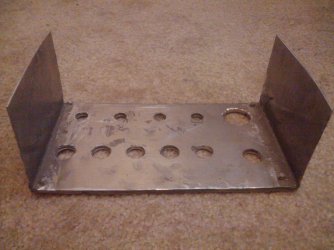
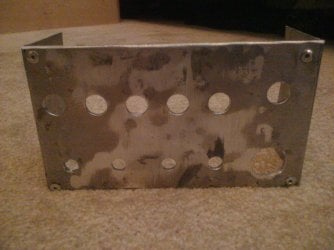
Here is my update:
Front plate Back.jpg
Front plate.jpg

I just need to drill the mounting holes and paint it, and it should be good to go!

~Lordbob
 

My Computer

Computer Manufacturer/Model Number
Hera
OS
Windows 7 Ultimate x64, Mint 9
CPU
Intel i5-2500k
Motherboard
ASUS P8P67 Pro
Memory
2x 4Gb Corsair VENGEANCE DDR3-1600
Graphics Card(s)
NVidia GeForce N260GTX Twin Frozr
Sound Card
Realtek HD OnBoard Audio
Monitor(s) Displays
ASUS 24" Monitor
Screen Resolution
1920x1080
Hard Drives
G.SKILL Phoenix Series 60GB SATA II MLC Internal Solid State Drive (SSD)
SAMSUNG Spinpoint F3R 1TB 7200 RPM 32MB Cache SATA II
PSU
Cooler Master Real Power Pro 750W
Case
Cooler Master Haf 932
Cooling
Fans
Keyboard
Razer Tarantula
Mouse
Razer Lachesis
Internet Speed
not fast enough

My Computer

Computer Manufacturer/Model Number
* BFK Customs *
OS
W 7 64-bit Ultimate
CPU
Intel Q9550 Yorkfield
Motherboard
ASUS P5Q Pro
Memory
8GB Dominator 8500C5D
Graphics Card(s)
ATI : XFX 5870
Sound Card
Realtek HD Audio 7-1
Monitor(s) Displays
1x 47" LCD HDMI & 3x 26" LCD HDMI
Screen Resolution
1920x1080P & 1920x1200
Hard Drives
1x 80GB Intel X25-M G2 SSD : 1x 500GB & 1x 640GB WD Caviar Black(s)
PSU
Corsair 620HX
Case
Cooler Master RC-690
Cooling
Tuniq Tower 120, 2x 140mm and 3x 120mm case fans
Keyboard
Microsoft 500
Mouse
Razer Diamondback 3G
Internet Speed
14 Mb/s
Other Info
1x Koutech 3Gb/s SATA HDD Hot Swap Rack

My Computer

Computer Manufacturer/Model Number
Hera
OS
Windows 7 Ultimate x64, Mint 9
CPU
Intel i5-2500k
Motherboard
ASUS P8P67 Pro
Memory
2x 4Gb Corsair VENGEANCE DDR3-1600
Graphics Card(s)
NVidia GeForce N260GTX Twin Frozr
Sound Card
Realtek HD OnBoard Audio
Monitor(s) Displays
ASUS 24" Monitor
Screen Resolution
1920x1080
Hard Drives
G.SKILL Phoenix Series 60GB SATA II MLC Internal Solid State Drive (SSD)
SAMSUNG Spinpoint F3R 1TB 7200 RPM 32MB Cache SATA II
PSU
Cooler Master Real Power Pro 750W
Case
Cooler Master Haf 932
Cooling
Fans
Keyboard
Razer Tarantula
Mouse
Razer Lachesis
Internet Speed
not fast enough
Thanks for the comments guys...
picture.php
Can't wait for the rest of the parts to arrive, it's going slowly, but at least it's getting there..

Oh, by the way, everything I have done and will do to this case (hopefully the sleeving as well, but we'll see) is being modded 'single-handed'; as in only using my right hand... Lol. It's an interesting challenge, but since I can't actually use my left arm (anybody that read my post in the 'show us your ride' thread will remember my bike accident), I set myself a personal challenge to see if I can still do it. So far, so good.
picture.php


Well... not so much.

Turns out it is less than 5mm too large..... I don't think I can fix that, so I will have to..... I don't know.

~Lordbob
Hmmm... Were the 5mm holes for the mounting holes by any chance? If so, couldn't you use a washer to work around it..?
 

My Computer

Computer type
PC/Desktop
OS
Win 10 x64 Pro x64 / Ubuntu 15.10 x64
CPU
Intel i7-4960X
Motherboard
Asus Rampage IV Black Edition
Memory
4x8GB Corsair Dominator Platinum @2400MHz 10-12-12-31
Graphics Card(s)
2x MSI GTX780Ti 3GB (SLI)
Sound Card
Onboard SupremeFX (Cirrus Logic CS4398)
Monitor(s) Displays
3x LG Cinema 27" IPS LED (27MP65)
Screen Resolution
[1920x1080]x3
Hard Drives
Crucial M500 120GB, Crucial M500 480GB, Toshiba DT01ACA200 2TB
PSU
CoolerMaster V1000
Case
Corsair Obsidian 750D
Cooling
ThermalTake Water 3.0 Extreme, 4xSP120, 3xAF120
Keyboard
Moshi Luna
Mouse
Logitech G700s / Roccat Tyon
Internet Speed
4Mb uncapped ADSL (Afrihost)
Antivirus
MS Security Essentials
Browser
Chrome... Duh. (:
Hmmm... Were the 5mm holes for the mounting holes by any chance? If so, couldn't you use a washer to work around it..?
No, I mean that the plate is 154mm wide, and the bays are 150mm wide.

So.... I don't think I can fix it, I will have to make a new plate. My 4th one.
I am sick of that...

Any ideas?

~Lordbob
 

My Computer

Computer Manufacturer/Model Number
Hera
OS
Windows 7 Ultimate x64, Mint 9
CPU
Intel i5-2500k
Motherboard
ASUS P8P67 Pro
Memory
2x 4Gb Corsair VENGEANCE DDR3-1600
Graphics Card(s)
NVidia GeForce N260GTX Twin Frozr
Sound Card
Realtek HD OnBoard Audio
Monitor(s) Displays
ASUS 24" Monitor
Screen Resolution
1920x1080
Hard Drives
G.SKILL Phoenix Series 60GB SATA II MLC Internal Solid State Drive (SSD)
SAMSUNG Spinpoint F3R 1TB 7200 RPM 32MB Cache SATA II
PSU
Cooler Master Real Power Pro 750W
Case
Cooler Master Haf 932
Cooling
Fans
Keyboard
Razer Tarantula
Mouse
Razer Lachesis
Internet Speed
not fast enough
Hmmm... Were the 5mm holes for the mounting holes by any chance? If so, couldn't you use a washer to work around it..?
No, I mean that the plate is 154mm wide, and the bays are 150mm wide.

So.... I don't think I can fix it, I will have to make a new plate. My 4th one.
I am sick of that...

Any ideas?

~Lordbob
Oh, sorry... I completely misread your post there.
picture.php
It is a Monday after all... Lol.

Depending on whether or not the pop-rivets are just for show or if they're holding the sides in place, I do have one suggestion. Instead of remaking the whole plate again, looking at this pic here as a base:
77059d1275845684-show-us-your-rig-front-plate.jpg

Drill out the rivets on the right hand side (since that has a marginally larger area of metal next to the holes) and remove that side first. However, if the pop-rivets aren't the only thing holding this on, you may need to cut it off.

After that, I'd suggest to mark off a 5mm to 6mm section on the right hand side of the face plate and grind it back a bit. If you aim to make the panel about 148mm wide, it allows for some extra space and it should fit quite nicely in the 150mm space.. This is exspecially important if you plan to spot-weld the panels together; spot welding tends to build up the surface, making it at least 1mm to 2mm thinker.

This way you only end up replacing one side, not the whole thing.
picture.php
 

My Computer

Computer type
PC/Desktop
OS
Win 10 x64 Pro x64 / Ubuntu 15.10 x64
CPU
Intel i7-4960X
Motherboard
Asus Rampage IV Black Edition
Memory
4x8GB Corsair Dominator Platinum @2400MHz 10-12-12-31
Graphics Card(s)
2x MSI GTX780Ti 3GB (SLI)
Sound Card
Onboard SupremeFX (Cirrus Logic CS4398)
Monitor(s) Displays
3x LG Cinema 27" IPS LED (27MP65)
Screen Resolution
[1920x1080]x3
Hard Drives
Crucial M500 120GB, Crucial M500 480GB, Toshiba DT01ACA200 2TB
PSU
CoolerMaster V1000
Case
Corsair Obsidian 750D
Cooling
ThermalTake Water 3.0 Extreme, 4xSP120, 3xAF120
Keyboard
Moshi Luna
Mouse
Logitech G700s / Roccat Tyon
Internet Speed
4Mb uncapped ADSL (Afrihost)
Antivirus
MS Security Essentials
Browser
Chrome... Duh. (:
Here:
 

Attachments

  • _G200662.jpg
    _G200662.jpg
    183.8 KB · Views: 33

My Computer

Computer type
PC/Desktop
Computer Manufacturer/Model Number
Home Built
OS
Windows 7 Ultimate SP1 64- bit
CPU
Intel Core i7-3770K @3.50ghz
Motherboard
EVGA Z77 FTW
Memory
Kingston Technology 16GB (2x 8GB) 2133MHz DDR3 Non-ECC
Graphics Card(s)
EVGA GTX 670 4gb SC
Sound Card
Nil
Monitor(s) Displays
Samsung 22"
Screen Resolution
1920 x 1080 60hz
Hard Drives
OCZ Vertex 4 SSD 128GB
SAMSUNG Spinpoint F3 HD502HJ 500GB 7200 RPM
PSU
Enermax Platinax EPM1000EWT Special OC Edition
Case
Cooler Master HAF Full Tower nVIDIA Edition
Cooling
CoolerMaster Hyper 212 Plus
Keyboard
HP Wireless Keyboard
Mouse
Corsair Vengeance M90
Internet Speed
20 Mb
Other Info
ASUS DRW-24B1ST/BLK/B/AS Black SATA 24X DVD Burner

My Computer

Computer type
PC/Desktop
Computer Manufacturer/Model Number
Self Built
OS
Win 10 Pro x64
CPU
Intel I5-2500K @3.3GHz
Motherboard
Asrock P67 Extreme4
Memory
16GB G.Skill Ripjaws X (4x4GB)
Graphics Card(s)
EVGA GeForce 750 Ti SC 2GB
Sound Card
ASUS Xonar DG 5.1 Channels 24-bit 96KHz PCI Interface Sound
Monitor(s) Displays
auria eq2367
Screen Resolution
1920 x 1080
Hard Drives
250GB Samsung 850 EVO SSD
1TB WD Blue
1TB Hitachi
PSU
SeaSonic X 650W 80 Plus Gold
Case
Corsair Obsidian 750D
Cooling
Corsair H60, Three 140mm case fans
Keyboard
Logitech Wireless Keyboard K520
Mouse
Logitech Wireless Mouse M310
Internet Speed
Wave Broadband ~ 100 dn 5 up
Antivirus
Windows Defender, Malwarebytes Premium
Browser
Edge, IE11, Chrome
Other Info
Laptop specs: HP g7-1365dx /
CPU: AMD A6-3420M APU with Radeon(tm) HD Graphics /
RAM: Crucial 8Gb (2x4Gb) /
SSD: Crucial M4-CT128M4SSD2 ATA Device/ FW 000F /
GFX: AMD Radeon HD 6520G /
OS: Windows 10 Pro x64

My Computer

Computer Manufacturer/Model Number
Home built
OS
Windows 7 Ultimate 32 bit
CPU
Intel(R) Pentium(R) 4 CPU 3.00GHz
Motherboard
ASUS P4P800-VM Motherboard Chipset: Intel 865G + ICH5
Memory
2.50 GB RAM
Graphics Card(s)
NVIDIA GeForce 7600 GS
Sound Card
SoundMax Integrated Digital Audio (Chip)
Monitor(s) Displays
ViewSonic VX 1962 wm
Screen Resolution
1680 X 1050
Hard Drives
Seagate Barracuda 7200.10 80 GB
ST380215A ATA Device 18.6 GB
Western Digital "My Book" external hard drive 750 GB
Cooling
Fan based
Keyboard
Microsoft Comfort Curve Keyboard 2000 v10 USB
Mouse
Logitec optic USB
Internet Speed
3.01 Mb/s download 0.64 Mb/s upload
Really some nice work & pics here recently. You all keep up the good work :D
 

My Computer

Computer type
PC/Desktop
Computer Manufacturer/Model Number
Built them myself, Science Experiments !
OS
Win7 Enterprise, Win7 x86 (Ult 7600), Win7 x64 Ult 7600, TechNet RTM on AMD x64 (2.8Ghz)
CPU
AMD fx8350 4ghz, AMD-32 2400mhz, AMD-64 3200mhz, AMDx64 2.8G
Motherboard
SIS 755, ECS-K8M890M-M (Ult 7600), GigaByte & others
Memory
2gb, 4gb on the Ult 7600, 4gb on Technet RTM, 32gb on FX8350
Graphics Card(s)
Draw my own Graphics, several nVidia cards
Sound Card
on motherboard
Monitor(s) Displays
19" flat scr, 28" I-Inc widescr,22" Emprex Widescr, 23" Acer
Screen Resolution
1280 x 1024, 1440 x 900, 1920 x 1080
Hard Drives
6 pata Ide HD's & 2 Sata HD's
added 80gb external on Ult 7600 computer,
numerous extra 1tb, 2TB, 3Tb SATA HD's
A collection of ext HD Docks w/ HDs
PSU
430w, 550w, 600w, 700, 800, etc
Case
All Generic Full Towers
Cooling
Open Air & a few fans, some w/ colored LEDs
Keyboard
Compaq & Dell recycled from GoodWill
Mouse
Made in China Optical Wired Mouse
Internet Speed
Fast Cable InterNet
Antivirus
AVG Free on 24 different Desktops, NO Problems!
Browser
IE 8 is preferred, but use FireFox sometimes
Other Info
Linksys Routers, switches, & Hubs
Too Many USB Flash Drives to count, Biggest is 64GB !
Eight computers in my home network.
Sixteen computers at my business network.
Linked via TeamViewer !
Lots of old used spare computer parts everywhere!
Status
Not open for further replies.
Back
Top