New Hard Drive - I did something a little wrong

NewToit

New member
VIP
Local time
4:34 PM
Messages
50
I bought me a new hard drive. I loaded Windows 7 onto my new HD. It loaded perfectly. The hard drive was recognized right away. I used the Windows 7 Home Premium Upgrade CD. I could not find my Vista CD so I used this one.

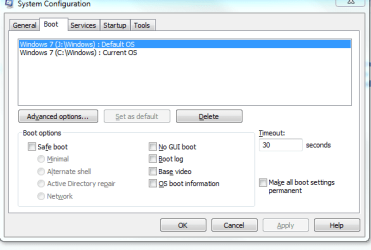
Right now when I boot my hard drive my computer is dual booting. It is asking me which operating system I want to use:

Windows 7

or

Windows 7

Obviously I have a bootable version on both hard drives. So, my computer is a little confused. While I do not think this could cause harm I would like to address it. Do I just go into my bios and select the single drive I want to boot from? How do I set this up so just boot from the one drive?

Or have I done something more serious? I am not sure if this is an HD or operating system 'error'. So, I placed it in general. Any help would be awesome!
 

My Computer My Computer

At a glance

Win 7Phen 965 AMD4gig ddr kingstonNvidia 9800 something or other - good card
OS
Win 7
CPU
Phen 965 AMD
Motherboard
Asus m3n72-d
Memory
4gig ddr kingston
Graphics Card(s)
Nvidia 9800 something or other - good card
Sound Card
On MoBo
Monitor(s) Displays
Acer standard 19 ' / Sony Bravia 42'
Screen Resolution
I change it sometimes
Hard Drives
500gb
500gb

Western Digital
Go into msconfig > Boot tab and delete the one you do not want.
 

My Computer My Computer

At a glance

Vista, Windows7, Mint Mate, Zorin, Windows 8from 1.6GHz Duo to i7
Computer Manufacturer/Model Number
HP, Dell, Gateway, Toshiba - 4 laptops and 2 desktops
OS
Vista, Windows7, Mint Mate, Zorin, Windows 8
CPU
from 1.6GHz Duo to i7
Monitor(s) Displays
2x HP w2207
Hard Drives
5x HDD, 7x SSD, 12x Externals
Keyboard
with trackball - no mices
Mouse
Trackball mice
Internet Speed
DSL 6000
Go into msconfig > Boot tab and delete the one you do not want.

Thank you. I posted this message 5 minutes ago and got a reply 2 minutes ago! Very cool thanks! So, I did not do any harm. Thanks thanks!
 

My Computer My Computer

At a glance

Win 7Phen 965 AMD4gig ddr kingstonNvidia 9800 something or other - good card
OS
Win 7
CPU
Phen 965 AMD
Motherboard
Asus m3n72-d
Memory
4gig ddr kingston
Graphics Card(s)
Nvidia 9800 something or other - good card
Sound Card
On MoBo
Monitor(s) Displays
Acer standard 19 ' / Sony Bravia 42'
Screen Resolution
I change it sometimes
Hard Drives
500gb
500gb

Western Digital
Go into msconfig > Boot tab and delete the one you do not want.

Thank you. I posted this message 5 minutes ago and got a reply 2 minutes ago! Very cool thanks! So, I did not do any harm. Thanks thanks!

Hey!

I have one last question. Are you still here :)

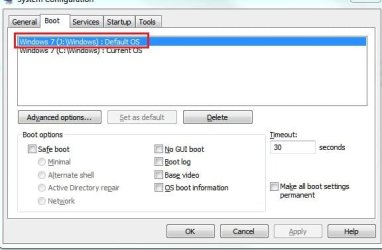
Drive J my new drive is listed as the Default OS

Drive C me old drive is listed as the current OS.

So, all I am going to do is delete drive C: from the boot menu? THANKS for the help :party:
 

My Computer My Computer

At a glance

Win 7Phen 965 AMD4gig ddr kingstonNvidia 9800 something or other - good card
OS
Win 7
CPU
Phen 965 AMD
Motherboard
Asus m3n72-d
Memory
4gig ddr kingston
Graphics Card(s)
Nvidia 9800 something or other - good card
Sound Card
On MoBo
Monitor(s) Displays
Acer standard 19 ' / Sony Bravia 42'
Screen Resolution
I change it sometimes
Hard Drives
500gb
500gb

Western Digital
Hello NewToit.


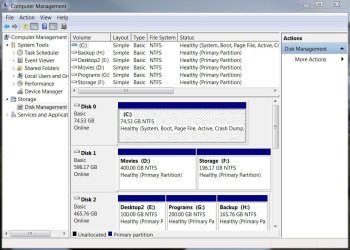
Before you delete anything, post a snip of disk management for us to see as you don't want to delete the one with the boot files on it; have a look at the tutorial at the link below to see how to post a snip; you can find disk management at, right click computer in the Windows start menu and select manage, at the left pane select disk management and post a snip.
C: probably has the boot files.


Uploading/Posting Screen Shots
 

Attachments

  • disk.JPG
    disk.JPG
    107.7 KB · Views: 9
Last edited:

My Computer My Computer

At a glance

W 7 64-bit UltimateIntel Q9550 Yorkfield8GB Dominator 8500C5DATI : XFX 5870
Computer Manufacturer/Model Number
* BFK Customs *
OS
W 7 64-bit Ultimate
CPU
Intel Q9550 Yorkfield
Motherboard
ASUS P5Q Pro
Memory
8GB Dominator 8500C5D
Graphics Card(s)
ATI : XFX 5870
Sound Card
Realtek HD Audio 7-1
Monitor(s) Displays
1x 47" LCD HDMI & 3x 26" LCD HDMI
Screen Resolution
1920x1080P & 1920x1200
Hard Drives
1x 80GB Intel X25-M G2 SSD : 1x 500GB & 1x 640GB WD Caviar Black(s)
PSU
Corsair 620HX
Case
Cooler Master RC-690
Cooling
Tuniq Tower 120, 2x 140mm and 3x 120mm case fans
Keyboard
Microsoft 500
Mouse
Razer Diamondback 3G
Internet Speed
14 Mb/s
Other Info
1x Koutech 3Gb/s SATA HDD Hot Swap Rack
Ya

That would stink if I deleted the wrong thing. I do not want to remove any data. I just want my computer to recognize drive J: as the only one to boot from. I almost rushed in and deleted. But, I figured better take it slower and posted that info here.

So, here is the 'snip'. Do I make drive J the current OS then delete drive C:?

Thanks!

(I once learned the hard way. Doing something wrong in system config/system files can be a real bummer).
 

Attachments

  • Capture.PNG
    Capture.PNG
    12.3 KB · Views: 20

My Computer My Computer

At a glance

Win 7Phen 965 AMD4gig ddr kingstonNvidia 9800 something or other - good card
OS
Win 7
CPU
Phen 965 AMD
Motherboard
Asus m3n72-d
Memory
4gig ddr kingston
Graphics Card(s)
Nvidia 9800 something or other - good card
Sound Card
On MoBo
Monitor(s) Displays
Acer standard 19 ' / Sony Bravia 42'
Screen Resolution
I change it sometimes
Hard Drives
500gb
500gb

Western Digital
Hello NewToit.


Before you delete anything, post a snip of disk management for us to see as you don't want to delete the one with the boot files on it; have a look at the tutorial at the link below to see how to post a snip; you can find disk management at, right click computer in the Windows start menu and select manage, at the left pane select disk management and post a snip.
C: probably has the boot files.


Uploading/Posting Screen Shots

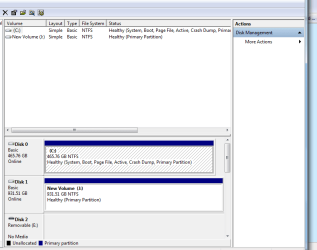
We need to see disk management not that so we can see the system partition, like my snip below, see in my snip C: says system?

click the image to enlarge
disk.JPG
 

My Computer My Computer

At a glance

W 7 64-bit UltimateIntel Q9550 Yorkfield8GB Dominator 8500C5DATI : XFX 5870
Computer Manufacturer/Model Number
* BFK Customs *
OS
W 7 64-bit Ultimate
CPU
Intel Q9550 Yorkfield
Motherboard
ASUS P5Q Pro
Memory
8GB Dominator 8500C5D
Graphics Card(s)
ATI : XFX 5870
Sound Card
Realtek HD Audio 7-1
Monitor(s) Displays
1x 47" LCD HDMI & 3x 26" LCD HDMI
Screen Resolution
1920x1080P & 1920x1200
Hard Drives
1x 80GB Intel X25-M G2 SSD : 1x 500GB & 1x 640GB WD Caviar Black(s)
PSU
Corsair 620HX
Case
Cooler Master RC-690
Cooling
Tuniq Tower 120, 2x 140mm and 3x 120mm case fans
Keyboard
Microsoft 500
Mouse
Razer Diamondback 3G
Internet Speed
14 Mb/s
Other Info
1x Koutech 3Gb/s SATA HDD Hot Swap Rack
crap! I was sort of close :\
 

Attachments

  • Capture.PNG
    Capture.PNG
    14 KB · Views: 22

My Computer My Computer

At a glance

Win 7Phen 965 AMD4gig ddr kingstonNvidia 9800 something or other - good card
OS
Win 7
CPU
Phen 965 AMD
Motherboard
Asus m3n72-d
Memory
4gig ddr kingston
Graphics Card(s)
Nvidia 9800 something or other - good card
Sound Card
On MoBo
Monitor(s) Displays
Acer standard 19 ' / Sony Bravia 42'
Screen Resolution
I change it sometimes
Hard Drives
500gb
500gb

Western Digital
OK see how your C: is system/active?


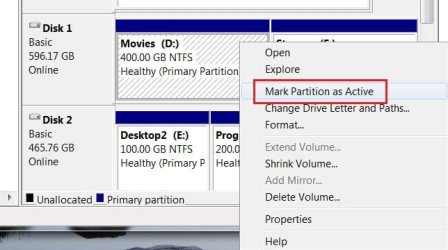
Here's what you need to do, in disk management, as you want to keep the J: right click J: and select "mark as active" do that and then we'll go on from there.
click this to enlarge
Active.JPG
 

My Computer My Computer

At a glance

W 7 64-bit UltimateIntel Q9550 Yorkfield8GB Dominator 8500C5DATI : XFX 5870
Computer Manufacturer/Model Number
* BFK Customs *
OS
W 7 64-bit Ultimate
CPU
Intel Q9550 Yorkfield
Motherboard
ASUS P5Q Pro
Memory
8GB Dominator 8500C5D
Graphics Card(s)
ATI : XFX 5870
Sound Card
Realtek HD Audio 7-1
Monitor(s) Displays
1x 47" LCD HDMI & 3x 26" LCD HDMI
Screen Resolution
1920x1080P & 1920x1200
Hard Drives
1x 80GB Intel X25-M G2 SSD : 1x 500GB & 1x 640GB WD Caviar Black(s)
PSU
Corsair 620HX
Case
Cooler Master RC-690
Cooling
Tuniq Tower 120, 2x 140mm and 3x 120mm case fans
Keyboard
Microsoft 500
Mouse
Razer Diamondback 3G
Internet Speed
14 Mb/s
Other Info
1x Koutech 3Gb/s SATA HDD Hot Swap Rack
Marked Active

I want to keep C: as well. I just want it to boot from J. When I reboot it gives me a dual boot option. Win7/Win7

Drive J has been marked as active.

That changed Drive C: to system, boot, pagefile, blah.....
 

Attachments

  • Capture.PNG
    Capture.PNG
    1.3 KB · Views: 3

My Computer My Computer

At a glance

Win 7Phen 965 AMD4gig ddr kingstonNvidia 9800 something or other - good card
OS
Win 7
CPU
Phen 965 AMD
Motherboard
Asus m3n72-d
Memory
4gig ddr kingston
Graphics Card(s)
Nvidia 9800 something or other - good card
Sound Card
On MoBo
Monitor(s) Displays
Acer standard 19 ' / Sony Bravia 42'
Screen Resolution
I change it sometimes
Hard Drives
500gb
500gb

Western Digital
I thought you wanted to remove one of them completely?
 

My Computer My Computer

At a glance

W 7 64-bit UltimateIntel Q9550 Yorkfield8GB Dominator 8500C5DATI : XFX 5870
Computer Manufacturer/Model Number
* BFK Customs *
OS
W 7 64-bit Ultimate
CPU
Intel Q9550 Yorkfield
Motherboard
ASUS P5Q Pro
Memory
8GB Dominator 8500C5D
Graphics Card(s)
ATI : XFX 5870
Sound Card
Realtek HD Audio 7-1
Monitor(s) Displays
1x 47" LCD HDMI & 3x 26" LCD HDMI
Screen Resolution
1920x1080P & 1920x1200
Hard Drives
1x 80GB Intel X25-M G2 SSD : 1x 500GB & 1x 640GB WD Caviar Black(s)
PSU
Corsair 620HX
Case
Cooler Master RC-690
Cooling
Tuniq Tower 120, 2x 140mm and 3x 120mm case fans
Keyboard
Microsoft 500
Mouse
Razer Diamondback 3G
Internet Speed
14 Mb/s
Other Info
1x Koutech 3Gb/s SATA HDD Hot Swap Rack
J: is already default, sorry for the misunderstanding I thought from the way your OP was worded you wanted to remove one of the OSs altogether; before you do anything else back in disk management mark C: as active again , after you have done that re-boot.
 

My Computer My Computer

At a glance

W 7 64-bit UltimateIntel Q9550 Yorkfield8GB Dominator 8500C5DATI : XFX 5870
Computer Manufacturer/Model Number
* BFK Customs *
OS
W 7 64-bit Ultimate
CPU
Intel Q9550 Yorkfield
Motherboard
ASUS P5Q Pro
Memory
8GB Dominator 8500C5D
Graphics Card(s)
ATI : XFX 5870
Sound Card
Realtek HD Audio 7-1
Monitor(s) Displays
1x 47" LCD HDMI & 3x 26" LCD HDMI
Screen Resolution
1920x1080P & 1920x1200
Hard Drives
1x 80GB Intel X25-M G2 SSD : 1x 500GB & 1x 640GB WD Caviar Black(s)
PSU
Corsair 620HX
Case
Cooler Master RC-690
Cooling
Tuniq Tower 120, 2x 140mm and 3x 120mm case fans
Keyboard
Microsoft 500
Mouse
Razer Diamondback 3G
Internet Speed
14 Mb/s
Other Info
1x Koutech 3Gb/s SATA HDD Hot Swap Rack
I thought you wanted to remove one of them completely?
GASP! LOL - no.....


I just want the computer to boot from drive J.

When I reboot my computer it loads a dual boot menu.

It asks me which OS I want to boot

Windows 7

OR

Windows 7

As I mentioned in the initial post I do not believe this is harmful. I simply select windows 7. I have the same OS on both hard drives. However, the dual boot screen is just an annoying screen. My computer is a little confused and thinks it has 2 OS's, well it does. But most people only dual boot when they have unique OSs.

So, for me there is no reason to dual boot. I want my computer to only boot from drive J: and no longer present me with a dual boot option. In no way do I desire to remove or delete any information on drive C:.

Well, eventually I want to copy about 300 gig from drive C: to drive J ( Drive J is the new drive) and reformat drive C:. Drive C has been acting funky. If formatting does not fix it I am just going to throw it in the trash. Or perhaps I will format it and mail it to you for helping me :)
 

My Computer My Computer

At a glance

Win 7Phen 965 AMD4gig ddr kingstonNvidia 9800 something or other - good card
OS
Win 7
CPU
Phen 965 AMD
Motherboard
Asus m3n72-d
Memory
4gig ddr kingston
Graphics Card(s)
Nvidia 9800 something or other - good card
Sound Card
On MoBo
Monitor(s) Displays
Acer standard 19 ' / Sony Bravia 42'
Screen Resolution
I change it sometimes
Hard Drives
500gb
500gb

Western Digital
J: is already default, sorry for the misunderstanding I thought from the way your OP was worded you wanted to remove one of the OSs altogether; before you do anything else back in disk management mark C: as active again , after you have done that re-boot.


What a pain, set C: as active again J: is already at default see your snip below.

In the boot tab click to highlight C: and select the delete button and restart.

jj.JPG
 

My Computer My Computer

At a glance

W 7 64-bit UltimateIntel Q9550 Yorkfield8GB Dominator 8500C5DATI : XFX 5870
Computer Manufacturer/Model Number
* BFK Customs *
OS
W 7 64-bit Ultimate
CPU
Intel Q9550 Yorkfield
Motherboard
ASUS P5Q Pro
Memory
8GB Dominator 8500C5D
Graphics Card(s)
ATI : XFX 5870
Sound Card
Realtek HD Audio 7-1
Monitor(s) Displays
1x 47" LCD HDMI & 3x 26" LCD HDMI
Screen Resolution
1920x1080P & 1920x1200
Hard Drives
1x 80GB Intel X25-M G2 SSD : 1x 500GB & 1x 640GB WD Caviar Black(s)
PSU
Corsair 620HX
Case
Cooler Master RC-690
Cooling
Tuniq Tower 120, 2x 140mm and 3x 120mm case fans
Keyboard
Microsoft 500
Mouse
Razer Diamondback 3G
Internet Speed
14 Mb/s
Other Info
1x Koutech 3Gb/s SATA HDD Hot Swap Rack
The proper way to do this is to set J: as active then run at least 3 (three) startup repairs to set J: as the system partiton and do re-starts between each of the repairs.


That way the boot files will be moved to J: and you will be able to retrieve the files and data from C: at a later time.


This will have to be run at least 3 times to completely move the boot files to J:

How to Run a Startup Repair in Windows 7
 

My Computer My Computer

At a glance

W 7 64-bit UltimateIntel Q9550 Yorkfield8GB Dominator 8500C5DATI : XFX 5870
Computer Manufacturer/Model Number
* BFK Customs *
OS
W 7 64-bit Ultimate
CPU
Intel Q9550 Yorkfield
Motherboard
ASUS P5Q Pro
Memory
8GB Dominator 8500C5D
Graphics Card(s)
ATI : XFX 5870
Sound Card
Realtek HD Audio 7-1
Monitor(s) Displays
1x 47" LCD HDMI & 3x 26" LCD HDMI
Screen Resolution
1920x1080P & 1920x1200
Hard Drives
1x 80GB Intel X25-M G2 SSD : 1x 500GB & 1x 640GB WD Caviar Black(s)
PSU
Corsair 620HX
Case
Cooler Master RC-690
Cooling
Tuniq Tower 120, 2x 140mm and 3x 120mm case fans
Keyboard
Microsoft 500
Mouse
Razer Diamondback 3G
Internet Speed
14 Mb/s
Other Info
1x Koutech 3Gb/s SATA HDD Hot Swap Rack
Now I am unable to set either drive as active. Although I am presented with the option it is simply 'greyed out'. It is not selectable(Highlightable).

On drive C, The old drive All I can select:
Mark Partition as active
Format
Extend Volume and
Delete Volume are not selectable.

All I can select on drive C:
Open
Explore
Change
Shrink Partition
Properties
Help

Can I just leave drive J as active? Or do I need to somehow address this and make C: active again?
 

My Computer My Computer

At a glance

Win 7Phen 965 AMD4gig ddr kingstonNvidia 9800 something or other - good card
OS
Win 7
CPU
Phen 965 AMD
Motherboard
Asus m3n72-d
Memory
4gig ddr kingston
Graphics Card(s)
Nvidia 9800 something or other - good card
Sound Card
On MoBo
Monitor(s) Displays
Acer standard 19 ' / Sony Bravia 42'
Screen Resolution
I change it sometimes
Hard Drives
500gb
500gb

Western Digital
Is J: marked as active now?
 

My Computer My Computer

At a glance

W 7 64-bit UltimateIntel Q9550 Yorkfield8GB Dominator 8500C5DATI : XFX 5870
Computer Manufacturer/Model Number
* BFK Customs *
OS
W 7 64-bit Ultimate
CPU
Intel Q9550 Yorkfield
Motherboard
ASUS P5Q Pro
Memory
8GB Dominator 8500C5D
Graphics Card(s)
ATI : XFX 5870
Sound Card
Realtek HD Audio 7-1
Monitor(s) Displays
1x 47" LCD HDMI & 3x 26" LCD HDMI
Screen Resolution
1920x1080P & 1920x1200
Hard Drives
1x 80GB Intel X25-M G2 SSD : 1x 500GB & 1x 640GB WD Caviar Black(s)
PSU
Corsair 620HX
Case
Cooler Master RC-690
Cooling
Tuniq Tower 120, 2x 140mm and 3x 120mm case fans
Keyboard
Microsoft 500
Mouse
Razer Diamondback 3G
Internet Speed
14 Mb/s
Other Info
1x Koutech 3Gb/s SATA HDD Hot Swap Rack
LOL... Yes, I do not mean to have problems :) Sorry :(

But that is correct.

Drive J is active. Drive J is the active primary partition thing now.
 
Last edited:

My Computer My Computer

At a glance

Win 7Phen 965 AMD4gig ddr kingstonNvidia 9800 something or other - good card
OS
Win 7
CPU
Phen 965 AMD
Motherboard
Asus m3n72-d
Memory
4gig ddr kingston
Graphics Card(s)
Nvidia 9800 something or other - good card
Sound Card
On MoBo
Monitor(s) Displays
Acer standard 19 ' / Sony Bravia 42'
Screen Resolution
I change it sometimes
Hard Drives
500gb
500gb

Western Digital
The proper way to do this is to set J: as active then run at least 3 (three) startup repairs to set J: as the system partiton and do re-starts between each of the repairs.


That way the boot files will be moved to J: and you will be able to retrieve the files and data from C: at a later time.


This will have to be run at least 3 times to completely move the boot files to J:

How to Run a Startup Repair in Windows 7


OK have a look at this, it is the correct way to do this; set the optical drive to boot first in the BIOS and boot from the Windows DVD and do 3 (three) repairs to J: to move the boot files and you will be good.

You are not a problem, it was my miss-understanding and I'm sorry for the confusion.
 

My Computer My Computer

At a glance

W 7 64-bit UltimateIntel Q9550 Yorkfield8GB Dominator 8500C5DATI : XFX 5870
Computer Manufacturer/Model Number
* BFK Customs *
OS
W 7 64-bit Ultimate
CPU
Intel Q9550 Yorkfield
Motherboard
ASUS P5Q Pro
Memory
8GB Dominator 8500C5D
Graphics Card(s)
ATI : XFX 5870
Sound Card
Realtek HD Audio 7-1
Monitor(s) Displays
1x 47" LCD HDMI & 3x 26" LCD HDMI
Screen Resolution
1920x1080P & 1920x1200
Hard Drives
1x 80GB Intel X25-M G2 SSD : 1x 500GB & 1x 640GB WD Caviar Black(s)
PSU
Corsair 620HX
Case
Cooler Master RC-690
Cooling
Tuniq Tower 120, 2x 140mm and 3x 120mm case fans
Keyboard
Microsoft 500
Mouse
Razer Diamondback 3G
Internet Speed
14 Mb/s
Other Info
1x Koutech 3Gb/s SATA HDD Hot Swap Rack
Here is my plan of attack:

Drive J(which is my new hard drive) is active per miss_communication. So, I am going to set the bios to boot from my Optical CD. So, rather than look at either HD it only looks at the CD. Then I am going to do whatever that link you supplied me with tells me to do. For some reason I am going to do it 3 times - because that is what you told me. :)

This should make drive J happy, leave the data on drive c? Also this will make the computer boot only from drive J rather than both(give me the dual boot option).

I think I can, I know I can - I will!
 

My Computer My Computer

At a glance

Win 7Phen 965 AMD4gig ddr kingstonNvidia 9800 something or other - good card
OS
Win 7
CPU
Phen 965 AMD
Motherboard
Asus m3n72-d
Memory
4gig ddr kingston
Graphics Card(s)
Nvidia 9800 something or other - good card
Sound Card
On MoBo
Monitor(s) Displays
Acer standard 19 ' / Sony Bravia 42'
Screen Resolution
I change it sometimes
Hard Drives
500gb
500gb

Western Digital
Back
Top