Windows 7 wireless problems after I moved from the states

AlcapOWNED

New member
Local time
2:48 PM
Messages
5
OK, so here is my problem. I bought a laptop when I went back to California for vacation. When I was there I had no problems with wireless connection or LAN connection. Turned my computer on and i can immediately surf. I moved back to the Philippines and it will not connect to any wireless network here. I tried hooking up LAN and it works just fine. I can see the wireless networks and It will ask me for key if i try and connect. But after that it does nothing. I tried trouble shooting and it says that is can't find any problem. I have tried at my home, and both my offices at work and nothing. The IT here seem to have no clue what is going on. Anyone have any idea?
 

My Computer My Computer

OS
Windows 7 Home Basic x64
OK, so here is my problem. I bought a laptop when I went back to California for vacation. When I was there I had no problems with wireless connection or LAN connection. Turned my computer on and i can immediately surf. I moved back to the Philippines and it will not connect to any wireless network here. I tried hooking up LAN and it works just fine. I can see the wireless networks and It will ask me for key if i try and connect. But after that it does nothing. I tried trouble shooting and it says that is can't find any problem. I have tried at my home, and both my offices at work and nothing. The IT here seem to have no clue what is going on. Anyone have any idea?

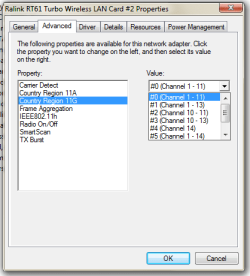
Your WiFi NIC is channel restricted to the American radio spectrum -- channels 1-11. You'll need 1,6,11 or higher as supported. Please write back for more info if needed.
 

My Computer My Computer

Computer type
Laptop
Computer Manufacturer/Model Number
Apple
OS
El Capitan / Windows 10
CPU
i7-4980HQ
Memory
16GB
Graphics Card(s)
Iris 5200
So Changing the router channel to 6 or 1 will allow my computer to connect? Its default was set at 8 and i move it to 11. There was nothing higher in the router setting. Is there anything i can do on my laptop? Or is it restricted to that spectrum as far as the laptop goes.
 

My Computer My Computer

OS
Windows 7 Home Basic x64
So Changing the router channel to 6 or 1 will allow my computer to connect? Its default was set at 8 and i move it to 11. There was nothing higher in the router setting. Is there anything i can do on my laptop? Or is it restricted to that spectrum as far as the laptop goes.

Go to device manager, get properties on your wireless device and look for something like this: Untitled.png
 

My Computer My Computer

Computer type
Laptop
Computer Manufacturer/Model Number
Apple
OS
El Capitan / Windows 10
CPU
i7-4980HQ
Memory
16GB
Graphics Card(s)
Iris 5200
My wireless device doesn't have the option to change the channels. It doesn't have numerical options. It only has two, 'long and short' and 'long'. I'm not too computer savvy but is it an option to change my wireless device? Currently it is ATHEROS AR9287 Wireless network Adapter.

Thanks for all your help so far. I didn't realize I haven't thanked you until after I hit reply on the last post I sent.
 

My Computer My Computer

OS
Windows 7 Home Basic x64

My Computer My Computer

Computer type
Laptop
Computer Manufacturer/Model Number
Apple
OS
El Capitan / Windows 10
CPU
i7-4980HQ
Memory
16GB
Graphics Card(s)
Iris 5200
Ok I opened it. So what am i suppose to do with those files. Extract them and put them where?
 

My Computer My Computer

OS
Windows 7 Home Basic x64
Ok I opened it. So what am i suppose to do with those files. Extract them and put them where?

I'm sorry. I forgot that manual driver installation isn't a core skill for most people. That's entirely my fault. Open device manager by right clicking computer in the start menu and select manage. Click device manager and find your Atheros device. Right click and select update driver software. Select the second option, browse ...

Select the location where you expanded the file I gave you.

Again sorry for the confusion. If this driver doesn't work initially or does not have international spectrum options try channel 1,6,11 as previously stated.

Do you know why this is an issue? Many Asian cell phone bands live in the gaps between 1-6-11. Japan extended the spectrum to 14 and that's the best way to fix this in Asia
 

My Computer My Computer

Computer type
Laptop
Computer Manufacturer/Model Number
Apple
OS
El Capitan / Windows 10
CPU
i7-4980HQ
Memory
16GB
Graphics Card(s)
Iris 5200
It worked. I reset the router and then changed the channel to 6 and it worked. Thanks so much for your help.
 

My Computer My Computer

OS
Windows 7 Home Basic x64

My Computer My Computer

Computer type
Laptop
Computer Manufacturer/Model Number
Apple
OS
El Capitan / Windows 10
CPU
i7-4980HQ
Memory
16GB
Graphics Card(s)
Iris 5200
It worked. I reset the router and then changed the channel to 6 and it worked. Thanks so much for your help.

Isn't channel 6 the typical default channel for most wireless routers? I get a better signal using a different channel around here. I can't tell if it was the new driver that fixed this problem or not. I can't help but to think that simply resetting the router is what fixed this problem.
 
Last edited:

My Computer My Computer

Computer type
PC/Desktop
Computer Manufacturer/Model Number
Home built
OS
Windows 7 Ult, Windows 8.1 Pro,
CPU
Q9650-4.275GHz, E8600 4.5GHz, E6750-3.8GHz
Motherboard
Evga 780i FTW
Memory
G.Skill PC2 9600 1200Mhz 5 5 5 15 2T
Graphics Card(s)
GTX480
Sound Card
Asus Xonar D2
Monitor(s) Displays
HannsG
Screen Resolution
1680X1050
Hard Drives
GSkill Phoenix Pro 120GB SSD
PSU
ThermalTake Toughpower 1000Watt modular
Case
ThermalTake XaserV
Cooling
Xigmatek S1283
Keyboard
Logitech G15
Mouse
Logitech G9
Internet Speed
T1
It worked. I reset the router and then changed the channel to 6 and it worked. Thanks so much for your help.

Isn't channel 6 the typical default channel for most wireless routers? I get a better signal using a different channel around here. I can't tell if it was the new driver that fixed this problem or not. I can't help but to think that simply resetting the router is what fixed this problem.

Default channel varies by locale. Some channels only exist in some countries. Channels 12-14 only exist in Japan and some other parts of spectrum crowded SE Asia.
 

My Computer My Computer

Computer type
Laptop
Computer Manufacturer/Model Number
Apple
OS
El Capitan / Windows 10
CPU
i7-4980HQ
Memory
16GB
Graphics Card(s)
Iris 5200
I'm sure that is true but I don't think it has anything to do with the problem because he was using the default standard channel 6. Resetting the router is most likely what fixed the problem. When in doubt I just push the little button on the router. Always works for me. ;)
 

My Computer My Computer

Computer type
PC/Desktop
Computer Manufacturer/Model Number
Home built
OS
Windows 7 Ult, Windows 8.1 Pro,
CPU
Q9650-4.275GHz, E8600 4.5GHz, E6750-3.8GHz
Motherboard
Evga 780i FTW
Memory
G.Skill PC2 9600 1200Mhz 5 5 5 15 2T
Graphics Card(s)
GTX480
Sound Card
Asus Xonar D2
Monitor(s) Displays
HannsG
Screen Resolution
1680X1050
Hard Drives
GSkill Phoenix Pro 120GB SSD
PSU
ThermalTake Toughpower 1000Watt modular
Case
ThermalTake XaserV
Cooling
Xigmatek S1283
Keyboard
Logitech G15
Mouse
Logitech G9
Internet Speed
T1
I'm sure that is true but I don't think it has anything to do with the problem. Resetting the router is most likely what fixed the problem. When in doubt I just push the little button. Always works for me. ;)

Read the OP. Sounds like he reset the router more than once...
 

My Computer My Computer

Computer type
Laptop
Computer Manufacturer/Model Number
Apple
OS
El Capitan / Windows 10
CPU
i7-4980HQ
Memory
16GB
Graphics Card(s)
Iris 5200
Maybe the channel gap required the use of channel 6 but usually the router makes those choices for you.
 

My Computer My Computer

Computer type
PC/Desktop
Computer Manufacturer/Model Number
Home built
OS
Windows 7 Ult, Windows 8.1 Pro,
CPU
Q9650-4.275GHz, E8600 4.5GHz, E6750-3.8GHz
Motherboard
Evga 780i FTW
Memory
G.Skill PC2 9600 1200Mhz 5 5 5 15 2T
Graphics Card(s)
GTX480
Sound Card
Asus Xonar D2
Monitor(s) Displays
HannsG
Screen Resolution
1680X1050
Hard Drives
GSkill Phoenix Pro 120GB SSD
PSU
ThermalTake Toughpower 1000Watt modular
Case
ThermalTake XaserV
Cooling
Xigmatek S1283
Keyboard
Logitech G15
Mouse
Logitech G9
Internet Speed
T1
Maybe the channel gap required the use of channel 6 but usually the router makes those choices for you.

from the sounds of the post the OP had his channel set manually, possibly doing a factory reset of the router caused it to go back to "auto" and it auto selected channel 6? to be fair it might not even be on channel 6... both my routers are set to "auto" and they both say they are broadcasting on channel 6, in fact they are not. because they would interfere with each other it just says 6 as a default and changes the channel when it needs to
 

My Computer My Computer

Computer type
PC/Desktop
Computer Manufacturer/Model Number
Medion Erazer (note to self: insert model number) - with custom additions
OS
Windows 10 Pro x64
CPU
Intel Core i5 7400 @ 3.00GHz
Motherboard
OEM supllied with PC
Memory
8GB 2133Mhz DDR4 (OEM supplied)
Graphics Card(s)
Gygabyte Windforce GTX 1050Ti (Factory Overclocked)
Sound Card
Realtek
Monitor(s) Displays
Acer Al1980 + HKC
Screen Resolution
1360*768(HKC) / 1280*1024(Acer)
Hard Drives
1TB Toshiba
1TB WD Caviar Green
120GB Samsung Evo 840
PSU
OEM supplied (no power rating on case)
Case
OEM Supplied
Cooling
Stock
Keyboard
Logitech Wireless
Mouse
Logitect Wireless
Internet Speed
40Mb/s Down 10Mb/s Up
Antivirus
Defender
Browser
Firefox
He didn't say anything about resetting the router until after he reinstalled the drivers. Maybe the drivers helped? Hard to say. Thanks for the info on the channel problems, I can imagine that in a country as crowded as Japan the channels are saturated pretty well and the need to have more frequencies was required.
 

My Computer My Computer

Computer type
PC/Desktop
Computer Manufacturer/Model Number
Home built
OS
Windows 7 Ult, Windows 8.1 Pro,
CPU
Q9650-4.275GHz, E8600 4.5GHz, E6750-3.8GHz
Motherboard
Evga 780i FTW
Memory
G.Skill PC2 9600 1200Mhz 5 5 5 15 2T
Graphics Card(s)
GTX480
Sound Card
Asus Xonar D2
Monitor(s) Displays
HannsG
Screen Resolution
1680X1050
Hard Drives
GSkill Phoenix Pro 120GB SSD
PSU
ThermalTake Toughpower 1000Watt modular
Case
ThermalTake XaserV
Cooling
Xigmatek S1283
Keyboard
Logitech G15
Mouse
Logitech G9
Internet Speed
T1
Back
Top