
You are using an out of date browser. It may not display this or other websites correctly.
You should upgrade or use an alternative browser.
You should upgrade or use an alternative browser.
Anyone know if "Print Preview" be set as a default
- Thread starter lesshirl
- Start date

Hi Does anybody know if you can set print preview as the default instead of "Quick Print" Would be appreciated.. Thanks Les...
Can you please post a screen shot illustrating your issue?
My Computer
- Computer type
- Laptop
- Computer Manufacturer/Model Number
- Apple
- OS
- El Capitan / Windows 10
- CPU
- i7-4980HQ
- Memory
- 16GB
- Graphics Card(s)
- Iris 5200
My Computer
- OS
- Windows 7 Ultimate
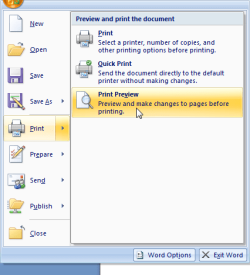
What I'm after is that when you go into Print option the default is "Quick Print" I would like this to be changed to "Print Preview"
Many Thanks for your interest
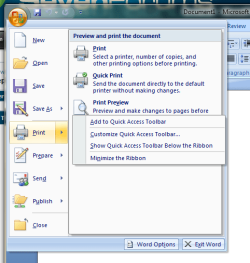
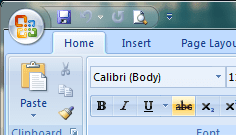
Specifically within Office 2007+ there's an easier way to quickly access print preview with a single click from the main window regardless of the ribbon tab. Try this: go to print preview as you normally would but right click it and select Add to Quick Access Toolbar.
Now you can access print preview with a single click here:
My Computer
- Computer type
- Laptop
- Computer Manufacturer/Model Number
- Apple
- OS
- El Capitan / Windows 10
- CPU
- i7-4980HQ
- Memory
- 16GB
- Graphics Card(s)
- Iris 5200