Sound mutes and unmutes itself

blackroseMD1

(nothing can stop me now)
Guru
Gold Member
VIP
Local time
11:59 PM
Messages
1,658
Location
San Diego, CA
OK, so I've been having this problem for about a week now, and it's getting worse.

Randomly, my sound will mute/unmute itself, sometimes several times in a row. I'm using my onboard Realtek HD Audio with the newest drivers. . I was thinking it may have something to do with my Microsoft multimedia keyboard/mouse combo, so I uninstalled Intellitype 7.0, but the problem still persists.

Also, I've noticed that when I test the sound on my 5.1 speakers, the sounds come out of the wrong speakers (Subwoofer sound comes out of center speaker etc.).

Any ideas?
 

My Computer My Computer

At a glance

Windows 10 Tech Preview 9926 x64AMD FX-835016GB DDR3 1333Asus R9 290 DirectCU II OC, Gigabyte Windforc...
Computer type
PC/Desktop
Computer Manufacturer/Model Number
SuperBeast
OS
Windows 10 Tech Preview 9926 x64
CPU
AMD FX-8350
Motherboard
Gigabyte GA-990FXA-UD3
Memory
16GB DDR3 1333
Graphics Card(s)
Asus R9 290 DirectCU II OC, Gigabyte Windforce R9 290 OC
Sound Card
Integrated w/ Creative A250 2.1 speakers
Monitor(s) Displays
Main: Asus VN289H 28" Secondary: Acer G246HL 24"
Screen Resolution
1920x1080
Hard Drives
128 GB SanDisk Ultra Plus (Windows drive)

240 GB Crucial M500 SSD (Games drive)

1 TB WDC WD10EACS 7200RPM HDD (Data drive)

2 TB Seagate Expansion Desktop external HDD (Backup drive)
PSU
900w Antec HCG-900
Case
Raidmax Agusta Full ATX
Cooling
Corsair H80
Keyboard
Cooler Master Devastator MB24
Mouse
Cooler Master Devastator MS2K 1000/1600/2000 DPI
Internet Speed
100Mbps cable
Antivirus
Avast!
Browser
Chrome
This may sound stupid, but if your sub-woofer sound is coming out of your central speaker, are you certain you have all of the 3.5mm plugs in the correct slots?
 

My Computer My Computer

At a glance

W7 Ult. x64 | OS XIntel Mobile Core 2 Duo 2.93Ghz [T9800 Penryn]4096MB Samsung DDR3 Dual Channel [PC3-8500F 1...NVIDIA GeForce 9600M GT 512MB [G96M Rev. C1]
Computer Manufacturer/Model Number
Apple Macbook Pro (April 2009)
OS
W7 Ult. x64 | OS X
CPU
Intel Mobile Core 2 Duo 2.93Ghz [T9800 Penryn]
Motherboard
NVIDIA nForce 730i Rev. B1 [Mac-F2268EC8 (U2E1)]
Memory
4096MB Samsung DDR3 Dual Channel [PC3-8500F 1066Mhz]
Graphics Card(s)
NVIDIA GeForce 9600M GT 512MB [G96M Rev. C1]
Sound Card
SB X-Fi Surround 5.1 USB | Onboard Realtek (Disabled)
Monitor(s) Displays
Acer x223wbd 22" | Apple Anti-Glare 17" (Disabled)
Screen Resolution
{Current} 1440x900 {Acer} 1680x1050 {Apple} 1920x1200
Hard Drives
{Internal}
Seagate Momentus 320GB 2.5" 7200RPM [ST9320421AS]

{Externals}
LaCie 320GB USB 2.0 HDD [301284UR]
LaCie 750GB USB 2.0 FW400 eSATA HDD [301314U]
LaCie 1TB USB 2.0 HDD [301304UR]
PSU
Magsafe
Case
Aluminum/Unibody (MBP52)
Cooling
2 x 6000 RPM Fans
Keyboard
Logitech G-15v2 [PN 920-000379]
Mouse
Logitech G-9 [PN 910-000338]
Internet Speed
12Mbps/2.5Mbps w/ 24Mbps Speed Boost [Comcast]
Other Info
Logitech X-540 Speakers [PN 970223-0122]
Sennheiser PC-151 Headset
This may sound stupid, but if your sub-woofer sound is coming out of your central speaker, are you certain you have all of the 3.5mm plugs in the correct slots?

Yeah, that was actually the first thing I checked...all the plugs are plugged in correctly on the back side of the subwoofer as well.
 

My Computer My Computer

At a glance

Windows 10 Tech Preview 9926 x64AMD FX-835016GB DDR3 1333Asus R9 290 DirectCU II OC, Gigabyte Windforc...
Computer type
PC/Desktop
Computer Manufacturer/Model Number
SuperBeast
OS
Windows 10 Tech Preview 9926 x64
CPU
AMD FX-8350
Motherboard
Gigabyte GA-990FXA-UD3
Memory
16GB DDR3 1333
Graphics Card(s)
Asus R9 290 DirectCU II OC, Gigabyte Windforce R9 290 OC
Sound Card
Integrated w/ Creative A250 2.1 speakers
Monitor(s) Displays
Main: Asus VN289H 28" Secondary: Acer G246HL 24"
Screen Resolution
1920x1080
Hard Drives
128 GB SanDisk Ultra Plus (Windows drive)

240 GB Crucial M500 SSD (Games drive)

1 TB WDC WD10EACS 7200RPM HDD (Data drive)

2 TB Seagate Expansion Desktop external HDD (Backup drive)
PSU
900w Antec HCG-900
Case
Raidmax Agusta Full ATX
Cooling
Corsair H80
Keyboard
Cooler Master Devastator MB24
Mouse
Cooler Master Devastator MS2K 1000/1600/2000 DPI
Internet Speed
100Mbps cable
Antivirus
Avast!
Browser
Chrome
Did you resolve your issue? My issue is similar but started out slowly and only today has made the system unusable. Actually, it started out only being the mute 1x a day, then more frequently, and now some .dll file is attempting to open itself every 5 seconds or so. It started out opening Windows Media Player (my default player) so I disabled the player and now I get the "Caution, You are attempting to open a file of type 'Application extension' (.dll)..."

I have run several virus and spyware checks and my system has been clean. I have no idea where to go from there. I have read several forums and tried many suggestions aside from reflashing the hard drive and reinstalling windows.

Has anyone has any luck solving this??
 

My Computer My Computer

At a glance

Windows 7 Home PremiumAMD Phenom II x4 945 3.01 GHz4.00 GB
OS
Windows 7 Home Premium
CPU
AMD Phenom II x4 945 3.01 GHz
Motherboard
MSI 785GM-E65
Memory
4.00 GB
Sound Card
None
Monitor(s) Displays
Television Output
Hard Drives
WDC WD3200AAKS-00L9A0 ATA
Keyboard
Logitech DiNovo Edge
For me, it turned out to be my wireless keyboard going haywire. Have you tried using MalwareBytes to do a boot scan?
 

My Computer My Computer

At a glance

Windows 10 Tech Preview 9926 x64AMD FX-835016GB DDR3 1333Asus R9 290 DirectCU II OC, Gigabyte Windforc...
Computer type
PC/Desktop
Computer Manufacturer/Model Number
SuperBeast
OS
Windows 10 Tech Preview 9926 x64
CPU
AMD FX-8350
Motherboard
Gigabyte GA-990FXA-UD3
Memory
16GB DDR3 1333
Graphics Card(s)
Asus R9 290 DirectCU II OC, Gigabyte Windforce R9 290 OC
Sound Card
Integrated w/ Creative A250 2.1 speakers
Monitor(s) Displays
Main: Asus VN289H 28" Secondary: Acer G246HL 24"
Screen Resolution
1920x1080
Hard Drives
128 GB SanDisk Ultra Plus (Windows drive)

240 GB Crucial M500 SSD (Games drive)

1 TB WDC WD10EACS 7200RPM HDD (Data drive)

2 TB Seagate Expansion Desktop external HDD (Backup drive)
PSU
900w Antec HCG-900
Case
Raidmax Agusta Full ATX
Cooling
Corsair H80
Keyboard
Cooler Master Devastator MB24
Mouse
Cooler Master Devastator MS2K 1000/1600/2000 DPI
Internet Speed
100Mbps cable
Antivirus
Avast!
Browser
Chrome
Did you resolve your issue? My issue is similar but started out slowly and only today has made the system unusable. Actually, it started out only being the mute 1x a day, then more frequently, and now some .dll file is attempting to open itself every 5 seconds or so. It started out opening Windows Media Player (my default player) so I disabled the player and now I get the "Caution, You are attempting to open a file of type 'Application extension' (.dll)..."

I have run several virus and spyware checks and my system has been clean. I have no idea where to go from there. I have read several forums and tried many suggestions aside from reflashing the hard drive and reinstalling windows.

Has anyone has any luck solving this??

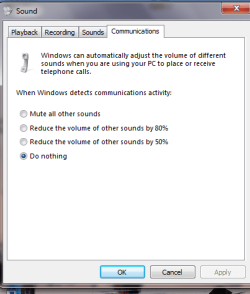
CONTROL PANEL | SOUND | COMMUNICATIONS tab | Do Nothing button

See attached png.
 

Attachments

  • SoundDoNothing.png
    SoundDoNothing.png
    12.1 KB · Views: 121

My Computer My Computer

At a glance

MS Windows 7 Ultimate SP1 64-bitAMD A10-4600M6.00 GB Dual-Channel DDR3 @ 798MHz (11-11-12-28)AMD Radeon HD 7660G
Computer Manufacturer/Model Number
Toshiba Satellite S875D-S7239 laptop
OS
MS Windows 7 Ultimate SP1 64-bit
CPU
AMD A10-4600M
Motherboard
AMD Pumori (Socket FT1)
Memory
6.00 GB Dual-Channel DDR3 @ 798MHz (11-11-12-28)
Graphics Card(s)
AMD Radeon HD 7660G
Sound Card
High Definition Audio Device
Monitor(s) Displays
Generic PnP Monitor (1600x900@60Hz)
Screen Resolution
1600x900@60Hz
Hard Drives
SSD 119GB Corsair CSSD-V128GB2 ATA Device
Keyboard
Standard PS/2 Keyboard
Mouse
HP Wireless Optical Mobile Mouse Model FHA-3410
Internet Speed
What the local pub, local coffee shop offers.
Other Info
Optical Drive:MATSHITA BD-CMB UJ160B ATA Device


Also have an Asus ha1002xp netbook with Win 7 Ultimate installed.
Back
Top