How to delete old version of Windows?

bbinnard

New member
Pro User
Local time
6:46 AM
Messages
238
I thought it would be easy, but nooooooooooo!

My system boots Win7-64 from a C: SSD drive. I have an old copy of Vista-64 on what is now my F: drive but which used to be the Vista-64 C: drive before I added the SSD and upgraded to Win7-64.

When I installed the SSD and Win7-64 I physically disconnected the old C: so I would be able to go back to Vista if I ever needed to. In the 5 months or so since then I have not rebooted Vista one time. So I figured it's time to delete the old Windows folder on F: and reclaim the space it takes.

I renamed it to Windows-xx and verified that I can reboot OK. (Pointless I know...but what can I say?) After rebooting I tried to delete F:\Windows-xx. Not a chance - got messages like "You need permission to perform this action. You need permission from SYSTEM to make changes to this folder."

I tried changing permissions but couldn't do this either. And yes, my Win7-64 system has only one user account (me) with full Admin privileges. Also note that since the old Vista-64 disk was offline when I did a clean install of Win7-64 it did not get renamed to Windows-Old or anything like that. The posts here about removing Windows-Old don't seem to fit my situation.

Now this is not a show-stopper at all; I've got plenty of free space on the F: drive. But I'd just like to get that old Windows off there. Is there some sort of trick to do this?
 

My Computer My Computer

At a glance

Win7-64Intel i7-3770S16GBnVidia GT630
Computer type
PC/Desktop
Computer Manufacturer/Model Number
Custom built
OS
Win7-64
CPU
Intel i7-3770S
Motherboard
ASUS P8Z77-M
Memory
16GB
Graphics Card(s)
nVidia GT630
Sound Card
onboard
Monitor(s) Displays
dual
Screen Resolution
1920x1200 (primary) 1050x1680 (secondary)
Hard Drives
128GB SSD (boot)
64GB SSD (Temp/My Documents)
500GB (photos/videos)
1TB (rendered video, backups)
PSU
650W
Case
Thermaltake A30
Cooling
Thermaltake
Keyboard
Logitech Lighted
Mouse
Kensington Expert Mouse (trackball)
Internet Speed
FIOS 35/35
Antivirus
MS Security Essentials
Browser
Chrome (beta)
I'm a little bit confused... what are you trying to do, Format F:\ or physically delete the files?)
 

My Computer My Computer

At a glance

Windows 10 Pro x64Intel Core i5 7400 @ 3.00GHz8GB 2133Mhz DDR4 (OEM supplied)Gygabyte Windforce GTX 1050Ti (Factory Overcl...
Computer type
PC/Desktop
Computer Manufacturer/Model Number
Medion Erazer (note to self: insert model number) - with custom additions
OS
Windows 10 Pro x64
CPU
Intel Core i5 7400 @ 3.00GHz
Motherboard
OEM supllied with PC
Memory
8GB 2133Mhz DDR4 (OEM supplied)
Graphics Card(s)
Gygabyte Windforce GTX 1050Ti (Factory Overclocked)
Sound Card
Realtek
Monitor(s) Displays
Acer Al1980 + HKC
Screen Resolution
1360*768(HKC) / 1280*1024(Acer)
Hard Drives
1TB Toshiba
1TB WD Caviar Green
120GB Samsung Evo 840
PSU
OEM supplied (no power rating on case)
Case
OEM Supplied
Cooling
Stock
Keyboard
Logitech Wireless
Mouse
Logitect Wireless
Internet Speed
40Mb/s Down 10Mb/s Up
Antivirus
Defender
Browser
Firefox
Delete partitions in Disk Management console, not using Explorer.

If it blocks you there, then there are boot-critical System files remaining on the partition which need to be recovered into new Win7 partition by marking it Active, booting the Win7 DVD repair console or Repair CD, click through to recovery tools list to run Startup Repair up to 3 separate times to repair or write the MBR to new Win7.
 
Thanks, but I do NOT want to format the F: disk or delete its partition because I have a lot of user stuff out there in addition to the old Vista folder and I do not want to lose that or go through the hassle of copying it off and then bringing it back. Actually I can't do that anyway because I have relocated a number of WIN7's files to that drive.

All I want to do is delete the old Vista folder. I have tried the "Take Ownership" registry fix and that does not work. Even after running it and revising ownership on every file in the Vista folder I still can't delete any file or folder there.

And yes, I am totally fine with creating/deleting files in general on that same drive.

My guess is there is something built in to Windows that it uses to protect its own files. Maybe a list of filenames or something like that?
 

My Computer My Computer

At a glance

Win7-64Intel i7-3770S16GBnVidia GT630
Computer type
PC/Desktop
Computer Manufacturer/Model Number
Custom built
OS
Win7-64
CPU
Intel i7-3770S
Motherboard
ASUS P8Z77-M
Memory
16GB
Graphics Card(s)
nVidia GT630
Sound Card
onboard
Monitor(s) Displays
dual
Screen Resolution
1920x1200 (primary) 1050x1680 (secondary)
Hard Drives
128GB SSD (boot)
64GB SSD (Temp/My Documents)
500GB (photos/videos)
1TB (rendered video, backups)
PSU
650W
Case
Thermaltake A30
Cooling
Thermaltake
Keyboard
Logitech Lighted
Mouse
Kensington Expert Mouse (trackball)
Internet Speed
FIOS 35/35
Antivirus
MS Security Essentials
Browser
Chrome (beta)
bbinnard... I highly doubt it is possible to do what you want to do. I can only suggest backing up those files and formatting the drive. it is the only way it can be done AFAIK
 

My Computer My Computer

At a glance

Windows 10 Pro x64Intel Core i5 7400 @ 3.00GHz8GB 2133Mhz DDR4 (OEM supplied)Gygabyte Windforce GTX 1050Ti (Factory Overcl...
Computer type
PC/Desktop
Computer Manufacturer/Model Number
Medion Erazer (note to self: insert model number) - with custom additions
OS
Windows 10 Pro x64
CPU
Intel Core i5 7400 @ 3.00GHz
Motherboard
OEM supllied with PC
Memory
8GB 2133Mhz DDR4 (OEM supplied)
Graphics Card(s)
Gygabyte Windforce GTX 1050Ti (Factory Overclocked)
Sound Card
Realtek
Monitor(s) Displays
Acer Al1980 + HKC
Screen Resolution
1360*768(HKC) / 1280*1024(Acer)
Hard Drives
1TB Toshiba
1TB WD Caviar Green
120GB Samsung Evo 840
PSU
OEM supplied (no power rating on case)
Case
OEM Supplied
Cooling
Stock
Keyboard
Logitech Wireless
Mouse
Logitect Wireless
Internet Speed
40Mb/s Down 10Mb/s Up
Antivirus
Defender
Browser
Firefox
Hi bbinard,

The easiest way ( and it has some great extra tools as well ) - d/l the free Pargon Rescue Kit Free Edition -it burns itself to cd.

Boot the cd, select Normal Mode>File Transfer Wizard.

Browse the drive and delete anything you want.
 

My Computers My Computers

  • At a glance

    7 X64i5 84002x8gb 3200mhz
    Computer type
    PC/Desktop
    OS
    7 X64
    CPU
    i5 8400
    Motherboard
    gigabyte b365m ds3h
    Memory
    2x8gb 3200mhz
    Hard Drives
    various
    PSU
    pure power 11 400w cm
    Case
    Coolermaster
    Cooling
    cryorig m9i
  • At a glance

    7x64g54008gb ddr4 2400
    Computer type
    PC/Desktop
    OS
    7x64
    CPU
    g5400
    Motherboard
    ga b365m ds3h
    Memory
    8gb ddr4 2400
    PSU
    xfx pro 450w
Whoa - that's a strange one. Let me see if I have this straight....

You say Shift+F10 will open a command prompt on top of the normal Win7 install screen. OK, I can do that of course. But starting Notepad and doing File/Save with nothing to save? Won't this just open the standard File Open/Save/Rename dialog box? So I'm supposed to select the old Vista folder in that dialog and do a right-click/delete? And then exit Notepad and reboot from my C: drive?

I get the idea here - what you are suggesting is to bring up a non-Windows OS and trick it into letting me delete what I want. Very clever. I guess this confirms my earlier suspicion that Windows does have some sort of list of protected stuff.
 

My Computer My Computer

At a glance

Win7-64Intel i7-3770S16GBnVidia GT630
Computer type
PC/Desktop
Computer Manufacturer/Model Number
Custom built
OS
Win7-64
CPU
Intel i7-3770S
Motherboard
ASUS P8Z77-M
Memory
16GB
Graphics Card(s)
nVidia GT630
Sound Card
onboard
Monitor(s) Displays
dual
Screen Resolution
1920x1200 (primary) 1050x1680 (secondary)
Hard Drives
128GB SSD (boot)
64GB SSD (Temp/My Documents)
500GB (photos/videos)
1TB (rendered video, backups)
PSU
650W
Case
Thermaltake A30
Cooling
Thermaltake
Keyboard
Logitech Lighted
Mouse
Kensington Expert Mouse (trackball)
Internet Speed
FIOS 35/35
Antivirus
MS Security Essentials
Browser
Chrome (beta)
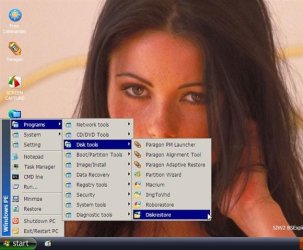
To avoid Windows restrictions, operate as system - you can do that from winpe - you could knock yourself up a winpe disc with a few tools on it like this for example:

WinPe3 (Small).jpg

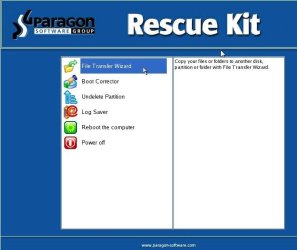
You have to know how to do that, of course, so a simpler way is to get a free premade boot disc - the Paragon Rescue kit has a great file transfer/copy/rename/delete function. It also has an excellent partition undelete and boot corrector.

Paragon Rescue Kit Free Edition

Par-resc-kit.jpg
 

My Computers My Computers

  • At a glance

    7 X64i5 84002x8gb 3200mhz
    Computer type
    PC/Desktop
    OS
    7 X64
    CPU
    i5 8400
    Motherboard
    gigabyte b365m ds3h
    Memory
    2x8gb 3200mhz
    Hard Drives
    various
    PSU
    pure power 11 400w cm
    Case
    Coolermaster
    Cooling
    cryorig m9i
  • At a glance

    7x64g54008gb ddr4 2400
    Computer type
    PC/Desktop
    OS
    7x64
    CPU
    g5400
    Motherboard
    ga b365m ds3h
    Memory
    8gb ddr4 2400
    PSU
    xfx pro 450w
You need to take ownership of the files and folders you want to delete. Open a Command line Start> type cmd and right mouse click to run as administrator, then type the following in the terminal window

F: hit enter

F: Drive opens then type

takeown /f \Windows

You should now be able to go back to C: and

type del F:/Windows*.*

There may be some hidden files along the way that you will be told it cannot delete, notate them as you will have to go into F:/windows and any sub directory and use the attrib command to make them unhidden (if you have never used attrib type attrib help in a terminal session and the command and actions will come up).
Let us know how it goes.........
 

My Computer My Computer

At a glance

Vista 64 Ultimate, Windows 7 64 Ultimate, Ubu...i7 975 3.3 GHz Extreme (Factory OC'd to 3.6 GHz)18 Gb Tri-Channel 1066ATI 5970 2048 Mb
Computer Manufacturer/Model Number
DELL XPS Studio 435T
OS
Vista 64 Ultimate, Windows 7 64 Ultimate, Ubuntu 9.10
CPU
i7 975 3.3 GHz Extreme (Factory OC'd to 3.6 GHz)
Motherboard
DELL provided
Memory
18 Gb Tri-Channel 1066
Graphics Card(s)
ATI 5970 2048 Mb
Sound Card
X-Fi Extreme Gamer
Monitor(s) Displays
Vizio 37" HD-TV
Screen Resolution
1920 x 1080
Hard Drives
1.5 Tb HDD
1.5 Tb HDD
2.0 Tb Network Drive
512 Gb Crucial SSD
PSU
DELL Provided 475 watts
Case
DELL
Cooling
3 fans
Keyboard
Logitech Performance K350 Wireless
Mouse
Logitech Performance MX Wireless
Internet Speed
3 Mb up 750 Kb down
Other Info
Bamboo Fun Tablet, Belkin N+ Wireless router, Pioneer Dolby System Wireless Headphones, Bose 5.1 Dolby Surround Sound System, LifeCam VX 3000 Webcam, Blu-Ray/Hi Def DVD +RW combo and Blu-ray +RW,l 15 in 1 media card reader, Logitech Rumblepad 2, Hauppauge 2250 DTV Tuner with MS Media Center Remote

Laptop:Alienware M17x, Q9100 CPU, 8Gb RAM, 1920x1200 WUXGA LCD driven by 4870's in CrossFireX, Bl
Thanks fish, but no joy. "Access denied" is all I get after the del command.
 

My Computer My Computer

At a glance

Win7-64Intel i7-3770S16GBnVidia GT630
Computer type
PC/Desktop
Computer Manufacturer/Model Number
Custom built
OS
Win7-64
CPU
Intel i7-3770S
Motherboard
ASUS P8Z77-M
Memory
16GB
Graphics Card(s)
nVidia GT630
Sound Card
onboard
Monitor(s) Displays
dual
Screen Resolution
1920x1200 (primary) 1050x1680 (secondary)
Hard Drives
128GB SSD (boot)
64GB SSD (Temp/My Documents)
500GB (photos/videos)
1TB (rendered video, backups)
PSU
650W
Case
Thermaltake A30
Cooling
Thermaltake
Keyboard
Logitech Lighted
Mouse
Kensington Expert Mouse (trackball)
Internet Speed
FIOS 35/35
Antivirus
MS Security Essentials
Browser
Chrome (beta)
Check in Disk Mgmt to see if your Win7 partition is marked "System Active Boot" - otherwise you'll have more problems with boot-critical files on your data/jambalaya partition.

Use Paragon Rescue disk as suggested by our top Install Guru here. It also is the single most valuable tool you could have to recover files if Win7 won't boot or repair with Repair DVD/CD.
 
Take ownership will not work, the Windows folder is an INSANE maze of permissions as well as ownership assignments.

Easiest way is to copy data you want to keep off of the partition and repartition it.

Second easiest is to boot up a non Windows 7 Disk utility, WinPE etc (Possibly even Linux) and delete it that way.

I just went through this and after about a half hour of permisions hell I gave up and repartitioned it :)
 

My Computer My Computer

At a glance

Windows 7 x64 Ultimatei7 96012 Gig Corsair DominatorNvidia 480
Computer Manufacturer/Model Number
Scratch built
OS
Windows 7 x64 Ultimate
CPU
i7 960
Motherboard
Asus P6X58D
Memory
12 Gig Corsair Dominator
Graphics Card(s)
Nvidia 480
Sound Card
Maudio Delta 44 + breakout box
Monitor(s) Displays
Dell UltraSharp U2410 24in and Samsung 21 dual monitors
Screen Resolution
1920x1200 and 1280x1024
Hard Drives
Primary: Intel X-25M G2 160G SSD
Secondary: Segate baracuda 1.0 TB
HDs in AHCI mode.
PSU
Corasair TX850
Case
Cooler Master HAF
Cooling
Corsair H50
Keyboard
Logitech G15 + N52 game pad
Mouse
Logitech MX518
Internet Speed
15kbs down 4.5kbps up
Other Info
WEI 7.6
CPU & RAM 7.6
Graphics 7.9
Hard disk 7.7
Take note of SIWs &gregrocker posts.
 

My Computer My Computer

At a glance

ME/XP/Vista/Win7
OS
ME/XP/Vista/Win7
You might want to make sure the SSD is first in bios boot order - and/or make sure the other HD doesn't have an active partition on it.
 

My Computers My Computers

  • At a glance

    7 X64i5 84002x8gb 3200mhz
    Computer type
    PC/Desktop
    OS
    7 X64
    CPU
    i5 8400
    Motherboard
    gigabyte b365m ds3h
    Memory
    2x8gb 3200mhz
    Hard Drives
    various
    PSU
    pure power 11 400w cm
    Case
    Coolermaster
    Cooling
    cryorig m9i
  • At a glance

    7x64g54008gb ddr4 2400
    Computer type
    PC/Desktop
    OS
    7x64
    CPU
    g5400
    Motherboard
    ga b365m ds3h
    Memory
    8gb ddr4 2400
    PSU
    xfx pro 450w
Check in Disk Mgmt to see if your Win7 partition is marked "System Active Boot" - otherwise you'll have more problems with boot-critical files on your data/jambalaya partition.

Disk Mgmt says my Disk 0 drive has 2 partitions:

System Reserved: Healthy (System, Active, Primary Partition) <== standard 100MB for SSD drives

C: Healthy(Boot, CrashDump, Primary Partition) <== 59.63 GB NTFS which is correct

Disk 1 has 1 partition:

F: Healthy (Page File, Active, Primary Partition)

So C: does not show as Active but does this matter? I mean, everything works OK. In particular, I haven't done it in a long time but I know I can boot directly from C: with the F: drive powered off.
 

My Computer My Computer

At a glance

Win7-64Intel i7-3770S16GBnVidia GT630
Computer type
PC/Desktop
Computer Manufacturer/Model Number
Custom built
OS
Win7-64
CPU
Intel i7-3770S
Motherboard
ASUS P8Z77-M
Memory
16GB
Graphics Card(s)
nVidia GT630
Sound Card
onboard
Monitor(s) Displays
dual
Screen Resolution
1920x1200 (primary) 1050x1680 (secondary)
Hard Drives
128GB SSD (boot)
64GB SSD (Temp/My Documents)
500GB (photos/videos)
1TB (rendered video, backups)
PSU
650W
Case
Thermaltake A30
Cooling
Thermaltake
Keyboard
Logitech Lighted
Mouse
Kensington Expert Mouse (trackball)
Internet Speed
FIOS 35/35
Antivirus
MS Security Essentials
Browser
Chrome (beta)
Type

diskpart

sel vol f

inact

exi

If you want to inactivate F - not necessary here , tho.

That looks fine as it is.
 

My Computers My Computers

  • At a glance

    7 X64i5 84002x8gb 3200mhz
    Computer type
    PC/Desktop
    OS
    7 X64
    CPU
    i5 8400
    Motherboard
    gigabyte b365m ds3h
    Memory
    2x8gb 3200mhz
    Hard Drives
    various
    PSU
    pure power 11 400w cm
    Case
    Coolermaster
    Cooling
    cryorig m9i
  • At a glance

    7x64g54008gb ddr4 2400
    Computer type
    PC/Desktop
    OS
    7x64
    CPU
    g5400
    Motherboard
    ga b365m ds3h
    Memory
    8gb ddr4 2400
    PSU
    xfx pro 450w
You Win7 is correctly labeled for both its component partitions, but as SIW2 says you should consider deactivating F as having it marked active is potentially problematic and incorrect.

Use the commands he gives from an elevated CMD prompt in Win7 or Repair disk.
 
Thanks greg & siw2 - I have looked at the diskpart command and it certainly seems straightforward. But are you saying that using it to make the F: partition inactive will then allow me to delete the old Vista Windows folder? In other words, is it true that what Win7 is checking is not the permissions etc. of the individual files in the old Vista Windows folder, but whether or not that folder is in an active partition?
 

My Computer My Computer

At a glance

Win7-64Intel i7-3770S16GBnVidia GT630
Computer type
PC/Desktop
Computer Manufacturer/Model Number
Custom built
OS
Win7-64
CPU
Intel i7-3770S
Motherboard
ASUS P8Z77-M
Memory
16GB
Graphics Card(s)
nVidia GT630
Sound Card
onboard
Monitor(s) Displays
dual
Screen Resolution
1920x1200 (primary) 1050x1680 (secondary)
Hard Drives
128GB SSD (boot)
64GB SSD (Temp/My Documents)
500GB (photos/videos)
1TB (rendered video, backups)
PSU
650W
Case
Thermaltake A30
Cooling
Thermaltake
Keyboard
Logitech Lighted
Mouse
Kensington Expert Mouse (trackball)
Internet Speed
FIOS 35/35
Antivirus
MS Security Essentials
Browser
Chrome (beta)
No, you will still have the permissions issues.

The marking of the partition being active is only a boot issue resolution (which you may not be having).

Use of a non Windows 7 disk utility to erase the Windows folder or reformatting the partition are the only "easy" options for deleting an old installed Vista or windows 7 folder that I know of.
 

My Computer My Computer

At a glance

Windows 7 x64 Ultimatei7 96012 Gig Corsair DominatorNvidia 480
Computer Manufacturer/Model Number
Scratch built
OS
Windows 7 x64 Ultimate
CPU
i7 960
Motherboard
Asus P6X58D
Memory
12 Gig Corsair Dominator
Graphics Card(s)
Nvidia 480
Sound Card
Maudio Delta 44 + breakout box
Monitor(s) Displays
Dell UltraSharp U2410 24in and Samsung 21 dual monitors
Screen Resolution
1920x1200 and 1280x1024
Hard Drives
Primary: Intel X-25M G2 160G SSD
Secondary: Segate baracuda 1.0 TB
HDs in AHCI mode.
PSU
Corasair TX850
Case
Cooler Master HAF
Cooling
Corsair H50
Keyboard
Logitech G15 + N52 game pad
Mouse
Logitech MX518
Internet Speed
15kbs down 4.5kbps up
Other Info
WEI 7.6
CPU & RAM 7.6
Graphics 7.9
Hard disk 7.7
fseal:

thanks. I used diskpart to set the old Vista drive's partition to Inactive. After rebooting I used Disk Mgr. to check the partition status and was a little surprised to find that the now-active partition is not the one from which I boot Win7 but instead the 100MB System Reserved partition, which is the other partition on my SSD.
 

My Computer My Computer

At a glance

Win7-64Intel i7-3770S16GBnVidia GT630
Computer type
PC/Desktop
Computer Manufacturer/Model Number
Custom built
OS
Win7-64
CPU
Intel i7-3770S
Motherboard
ASUS P8Z77-M
Memory
16GB
Graphics Card(s)
nVidia GT630
Sound Card
onboard
Monitor(s) Displays
dual
Screen Resolution
1920x1200 (primary) 1050x1680 (secondary)
Hard Drives
128GB SSD (boot)
64GB SSD (Temp/My Documents)
500GB (photos/videos)
1TB (rendered video, backups)
PSU
650W
Case
Thermaltake A30
Cooling
Thermaltake
Keyboard
Logitech Lighted
Mouse
Kensington Expert Mouse (trackball)
Internet Speed
FIOS 35/35
Antivirus
MS Security Essentials
Browser
Chrome (beta)
Back
Top