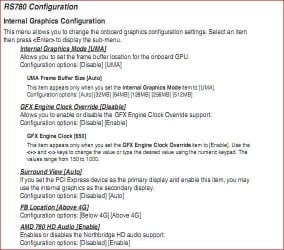
Hello, SevenForums.
I was recently working with Adobe Illustrator (rendering 3d) when it told me that there was not enough Graphics Memory available (I have an IGP w/ 256 mb of RAM allocated to it). I have tried to increase it in the BIOS, to no avail, as there was not an option.
So, the question is: How can I increase the amount of RAM dedicated to my IGP?
Here are the specs of my comp:
OS: Win 7 Ultimate
Processor: AMD Phenom II X4 810
GPU (Integrated Graphics): ATI Radeon HD 4200, 256 mb of allocated system RAM.
RAM: 8 GB
BIOS Version: America Megatrends Inc. 5.03, 9/11/2009
SMBIOS Version: 2.6
This is a Desktop running CS3 w/ a 300w PSU. I'm not in the position to swap it out.
Thanks in advance!
I was recently working with Adobe Illustrator (rendering 3d) when it told me that there was not enough Graphics Memory available (I have an IGP w/ 256 mb of RAM allocated to it). I have tried to increase it in the BIOS, to no avail, as there was not an option.
So, the question is: How can I increase the amount of RAM dedicated to my IGP?
Here are the specs of my comp:
OS: Win 7 Ultimate
Processor: AMD Phenom II X4 810
GPU (Integrated Graphics): ATI Radeon HD 4200, 256 mb of allocated system RAM.
RAM: 8 GB
BIOS Version: America Megatrends Inc. 5.03, 9/11/2009
SMBIOS Version: 2.6
This is a Desktop running CS3 w/ a 300w PSU. I'm not in the position to swap it out.
Thanks in advance!
Last edited:
My Computer
At a glance
Windows 7 ProfessionalIntel i7-620M4 GB DDR3 1066 MhZGeforce GT 330M
- Computer type
- PC/Desktop
- Computer Manufacturer/Model Number
- Apple Macbook Pro
- OS
- Windows 7 Professional
- CPU
- Intel i7-620M
- Motherboard
- Apple Logic Board
- Memory
- 4 GB DDR3 1066 MhZ
- Graphics Card(s)
- Geforce GT 330M
- Monitor(s) Displays
- Asus VE278Q
- Screen Resolution
- 1440x900 and 1920x1080p
- Hard Drives
- 1 500GB Hitachi 5400rpm HDD (Win7 Partition: 150 GB)
- PSU
- 85 W
- Case
- Apple
- Cooling
- Apple
- Antivirus
- AVG Free
- Browser
- Chrome