Solved Need Help | Cant View Folders in Tile

oss279

New member
Local time
12:16 PM
Messages
20
Location
KSA
I just downloaded a new software for changing folder background in Win7 and some how it crippled my Win Explorer settings by removing the TILE view which i mostly used.

The software i downloaded was from this site:
Change Folder Background In Windows 7 With Windows 7 Folder Background Changer

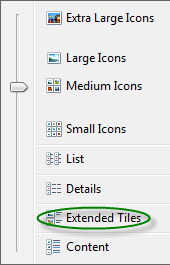
Also i can still view folders in Tile but only in Library Pane Window. In all other drives and folders there is no tile option. All other are available like (Extra large,large,medium,Detail,List,Content and especially EXTENDED TILE)

So any1 with suggestions on how to resolve the issue? Really looking forward to the replies :D
 

My Computer My Computer

Computer Manufacturer/Model Number
Samsung R480
OS
Windows 7 Ultimate Edition x32
CPU
Core i5 520M @ 2.4Ghz
Motherboard
Intel
Memory
4GB DDR 3
Graphics Card(s)
Nvidia Geforce GT 330M
Monitor(s) Displays
WideScreen 1366*768
Hard Drives
500GB Hitachi @5200RPM
I hate to break it to you but the problem is with your memory (the soft squidgy variety between your ears not the metallic shiny type in your computer). There never has been a Tile option in non-library folders other than Extended Tiles
 

My Computer My Computer

OS
Windows 7
lol @dunfiddlin

But how can you explain that all of a sudden all my folders shape & size changed right after when i ran the software, It did some adjustments, and in order to prove it ,refer to this post:
http://www.sevenforums.com/customiz...d-changer-change-any-folder-s-background.html

and i am not suffering from short term memory loss because when you custom your view per folder and all of a sudden,you view it in a different manner, you simple try to restore the older ver :)
 

My Computer My Computer

Computer Manufacturer/Model Number
Samsung R480
OS
Windows 7 Ultimate Edition x32
CPU
Core i5 520M @ 2.4Ghz
Motherboard
Intel
Memory
4GB DDR 3
Graphics Card(s)
Nvidia Geforce GT 330M
Monitor(s) Displays
WideScreen 1366*768
Hard Drives
500GB Hitachi @5200RPM

My Computer My Computer

Computer Manufacturer/Model Number
Asus
OS
Genuine Windows 7 Ultimate 32-bit / 64-bit
CPU
Core 2 Duo
Motherboard
Asus
Memory
3 GB
Graphics Card(s)
XFX Ge-Force
Monitor(s) Displays
AOC 22-inch LED
Screen Resolution
1920x1080
Hard Drives
Seagate 1 TB
Case
iBall
Keyboard
Apple
Mouse
iBall
Internet Speed
2 MBPS
Hi,i have the same problem as oss279,i.e the tile view settings is replaced by extended tile view for all my folders and even registry key by kishan doesn't solve the problem...i have attached the screenshot which shows the "extended tiles" option insted of "tiles",plz help me get back tiles view!!
 

Attachments

  • 12.06.png
    12.06.png
    3.8 KB · Views: 1,661

My Computer My Computer

Computer Manufacturer/Model Number
Dell
OS
Win7 Ultimate x64
CPU
i5 430iM
Memory
4Gb
Graphics Card(s)
ATI HD 5470
Screen Resolution
1366x768
Internet Speed
64Kbps
@Kishan This registry didn't restored the settings back :( Also kindly attach a revert back registry so i can get the configured backgrounds back. Desktop.ini settings are still preserved so i think it just the reg values that need to be changed Also any other suggestions how to change Extended Tiles view back to Tiles view? Regards!
 

My Computer My Computer

Computer Manufacturer/Model Number
Samsung R480
OS
Windows 7 Ultimate Edition x32
CPU
Core i5 520M @ 2.4Ghz
Motherboard
Intel
Memory
4GB DDR 3
Graphics Card(s)
Nvidia Geforce GT 330M
Monitor(s) Displays
WideScreen 1366*768
Hard Drives
500GB Hitachi @5200RPM
^^I have added an option to uninstall the app. Please re-download it.
 

My Computer My Computer

Computer Manufacturer/Model Number
Asus
OS
Genuine Windows 7 Ultimate 32-bit / 64-bit
CPU
Core 2 Duo
Motherboard
Asus
Memory
3 GB
Graphics Card(s)
XFX Ge-Force
Monitor(s) Displays
AOC 22-inch LED
Screen Resolution
1920x1080
Hard Drives
Seagate 1 TB
Case
iBall
Keyboard
Apple
Mouse
iBall
Internet Speed
2 MBPS
@Kishan,i did not get the original tile view back and moreover the app crashes when i click uninstall!!
 

Attachments

  • 13.06.png
    13.06.png
    5.8 KB · Views: 20

My Computer My Computer

Computer Manufacturer/Model Number
Dell
OS
Win7 Ultimate x64
CPU
i5 430iM
Memory
4Gb
Graphics Card(s)
ATI HD 5470
Screen Resolution
1366x768
Internet Speed
64Kbps
@Kishan, Still the same results after un-installing from app, Extending tiles instead of tiles view :(

Moreover can you tell me how to revert the registry settings? Because still i want the background images :)
Settings are still there in Desktop.ini, but it is not applied due to uninstall reg u gave :|
 

My Computer My Computer

Computer Manufacturer/Model Number
Samsung R480
OS
Windows 7 Ultimate Edition x32
CPU
Core i5 520M @ 2.4Ghz
Motherboard
Intel
Memory
4GB DDR 3
Graphics Card(s)
Nvidia Geforce GT 330M
Monitor(s) Displays
WideScreen 1366*768
Hard Drives
500GB Hitachi @5200RPM
no Solution for this problem??:confused:
 

My Computer My Computer

Computer Manufacturer/Model Number
Dell
OS
Win7 Ultimate x64
CPU
i5 430iM
Memory
4Gb
Graphics Card(s)
ATI HD 5470
Screen Resolution
1366x768
Internet Speed
64Kbps
^^You have to press the button two times. Once the error comes, click Continue & press the button again.
 

My Computer My Computer

Computer Manufacturer/Model Number
Asus
OS
Genuine Windows 7 Ultimate 32-bit / 64-bit
CPU
Core 2 Duo
Motherboard
Asus
Memory
3 GB
Graphics Card(s)
XFX Ge-Force
Monitor(s) Displays
AOC 22-inch LED
Screen Resolution
1920x1080
Hard Drives
Seagate 1 TB
Case
iBall
Keyboard
Apple
Mouse
iBall
Internet Speed
2 MBPS
The reason you are seeing the Extended Tiles view is because to enable the folder backgrounds the class that explorer uses is forced to use the older class that is background capable. The reason you can still see Tile in My Computer, User Documents........... is because the script has a key inserted to keep explorer using the newer class for those files. The reason for this is if you switch the class for those as well you will no longer be able to view things like the capacity bar under drives and such. The only workaround for this is to uninstall using the registry script and not use a background changer. There is no workaround to allow for Tile view and still be able to use a Background Changer
 

My Computer My Computer

Computer Manufacturer/Model Number
Toshiba Satellite
OS
Windows 7 Premium 32Bit\64Bit
Lee i can understand the reason,but i tried the reg scrip and also uninstall option...but still i did not revert back to original settings,may be then reg script doesn't work on x64!:rolleyes:
 

My Computer My Computer

Computer Manufacturer/Model Number
Dell
OS
Win7 Ultimate x64
CPU
i5 430iM
Memory
4Gb
Graphics Card(s)
ATI HD 5470
Screen Resolution
1366x768
Internet Speed
64Kbps
Thnx a lot for the description Lee but as Gocool pointed, i am unable to revert my settings back to normal, even by uninstalling or applying uninstall reg, the view remains the same. When i install back i get the backgrounds back but i dont get my tiles view back on un-installation..
 

My Computer My Computer

Computer Manufacturer/Model Number
Samsung R480
OS
Windows 7 Ultimate Edition x32
CPU
Core i5 520M @ 2.4Ghz
Motherboard
Intel
Memory
4GB DDR 3
Graphics Card(s)
Nvidia Geforce GT 330M
Monitor(s) Displays
WideScreen 1366*768
Hard Drives
500GB Hitachi @5200RPM
Sorry guys. To revert it back manually Open Registry Editor and go to the following location,
HKey_Current User\Software\Classes\Local Settings\Software\Microsoft\Windows\Shell

and Delete the key

Note: Though this reverts your view settings back to default, this will also clear your personalized folder options such as icon, thumbnail and view settings. Log Off or Restart Explorer to view changes
 

My Computer My Computer

Computer Manufacturer/Model Number
Toshiba Satellite
OS
Windows 7 Premium 32Bit\64Bit
Thnx a lot Lee. I did not revert, instead i installed it back and all backgrounds are back now
@Gocool... Kindly do try this out
@Kishan: When i install your soft's new version 1.1, i didnt get back my background but after trying the old version i got all my BG's clean and clear :) I think the registry script didnt invoked for the new version.
 

My Computer My Computer

Computer Manufacturer/Model Number
Samsung R480
OS
Windows 7 Ultimate Edition x32
CPU
Core i5 520M @ 2.4Ghz
Motherboard
Intel
Memory
4GB DDR 3
Graphics Card(s)
Nvidia Geforce GT 330M
Monitor(s) Displays
WideScreen 1366*768
Hard Drives
500GB Hitachi @5200RPM
oss279,did you get tile view back using lee's method..,i did not!:(
If you have any solution please tell me oss279.:)
 

My Computer My Computer

Computer Manufacturer/Model Number
Dell
OS
Win7 Ultimate x64
CPU
i5 430iM
Memory
4Gb
Graphics Card(s)
ATI HD 5470
Screen Resolution
1366x768
Internet Speed
64Kbps
oss279,did you get tile view back using lee's method..,i did not!:(
If you have any solution please tell me oss279.:)

Have you tried restarting, logging off and back, or restarting your computer.
Load Registry Editor and Delete the Bags key from the following location

HKEY_CLASSES_ROOT\Local Settings\Software\Microsoft\Windows\Shell

Should have allready been removed but you can check there to make sure
 

My Computer My Computer

Computer Manufacturer/Model Number
Toshiba Satellite
OS
Windows 7 Premium 32Bit\64Bit
I have tried removing the 'Bags' and 'BagMRU' keys from both 'Classes_Root' and 'Current_User'.

The uninstall option available in the version 1.1 seems to be working on 32-bit but not on 64-bit. I have tried everything but am not able to get back the Tiles view.

I am in the process of testing this on virtual machine to see if I can reproduce this issue on 64-bit OS
 

My Computer My Computer

OS
Windows 7 Enterprise x64
Also go to the following location and delete BagMRU

HKEY_CURRENT_USER\Software\Microsoft\Windows\ShellNoRoam
 

My Computer My Computer

Computer Manufacturer/Model Number
Toshiba Satellite
OS
Windows 7 Premium 32Bit\64Bit
Back
Top