
How do I use Remote Connection to help Family?

BugOutMachine

Windows Power User
Pro User
Local time
9:20 AM
Messages
196
Location
NY
Hey Everyone!

:tip: Today my father finally purchased a laptop with Windows 7 x64 after using an old Dell XP for nearly a decade, lol!

He needs obvious assistance and although I'm aware of the new Windows 7 Remote Connection capabilities, I'm totally unfamiliar with how to connect to another PC with different ISP's (I'm Comcast, he's FIOS) and in two different geographical locations.

I read one tutorial that mentioned my editing the registry to force his PC to seek a certain port but that seems like a lot for such a simple problem. Any advice would be greatly appreciated, especially with Father's Day coming up and my being incapable of a home visit.

Thank you in advance! :thumbsup:
 

My Computer My Computer

At a glance

Windows 7 / Windows 8.1Devils Canyon i7-4790K @ 4.8 GHz ~ 1.33vCorsair Vengeance Pro PC3-19200 DDR3 2400MHzEVGA GeForce GTX 980 SuperClocked ACX 2.0
Computer type
PC/Desktop
Computer Manufacturer/Model Number
Custom Desktop PC
OS
Windows 7 / Windows 8.1
CPU
Devils Canyon i7-4790K @ 4.8 GHz ~ 1.33v
Motherboard
Asus Z97 Deluxe
Memory
Corsair Vengeance Pro PC3-19200 DDR3 2400MHz
Graphics Card(s)
EVGA GeForce GTX 980 SuperClocked ACX 2.0
Sound Card
Realtek ALC1150 8 channels
Monitor(s) Displays
BenQ XL2720Z 27"
Screen Resolution
1920 x 1080 @ 144Hz
Hard Drives
SSD1: 512GB Samsung 850 Pro
SSD2: 1TB Samsung 850 EVO
SSD3: 1TB Samsung 850 EVO
HDD: 4TB Western Digital Black
Backup: Western Digital My Book Duo 8TB
PSU
Corsair HX1000i / CyberPower CP1500PFCLCD PFC Sinewave UPS 1
Case
Corsair Graphite 780T
Cooling
Custom single loop liquid; CPU delidded; Aerocool DS Fans
Keyboard
Logitech G710 Cherry MX Blue
Mouse
LogitechG502 Proteus Core
Internet Speed
Download: 119MBs /Upload 39.12MBs via Optimum 101 Ultra
Antivirus
MYOB
Browser
Firefox
Other Info
Cooling: EK-Supremecy MX Waterblock, XSPC AX360 Radiator, Swiftech MCP655 Series 12VDC D5 Pump, EK-RES x3 250 Reservoir, Primochill Ice Intensified Coolant, 11x AerocoolDS fans, Primochill Primoflex Avanced LRT Tubing

My Computer My Computer

At a glance

Windows 7 Ult, Windows 8.1 Pro,Q9650-4.275GHz, E8600 4.5GHz, E6750-3.8GHzG.Skill PC2 9600 1200Mhz 5 5 5 15 2TGTX480
Computer type
PC/Desktop
Computer Manufacturer/Model Number
Home built
OS
Windows 7 Ult, Windows 8.1 Pro,
CPU
Q9650-4.275GHz, E8600 4.5GHz, E6750-3.8GHz
Motherboard
Evga 780i FTW
Memory
G.Skill PC2 9600 1200Mhz 5 5 5 15 2T
Graphics Card(s)
GTX480
Sound Card
Asus Xonar D2
Monitor(s) Displays
HannsG
Screen Resolution
1680X1050
Hard Drives
GSkill Phoenix Pro 120GB SSD
PSU
ThermalTake Toughpower 1000Watt modular
Case
ThermalTake XaserV
Cooling
Xigmatek S1283
Keyboard
Logitech G15
Mouse
Logitech G9
Internet Speed
T1
That's very refreshing to hear! I know my way around Windows 7 very well but in the past have never had a use for Remote or Desktop Connections and would disable them for increased security. Before try a different program (thank you for the link) I would like to know what my father would have to do on his end to make the situation run smoothly. My sister is tech savvy and can help him out :)
 

My Computer My Computer

At a glance

Windows 7 / Windows 8.1Devils Canyon i7-4790K @ 4.8 GHz ~ 1.33vCorsair Vengeance Pro PC3-19200 DDR3 2400MHzEVGA GeForce GTX 980 SuperClocked ACX 2.0
Computer type
PC/Desktop
Computer Manufacturer/Model Number
Custom Desktop PC
OS
Windows 7 / Windows 8.1
CPU
Devils Canyon i7-4790K @ 4.8 GHz ~ 1.33v
Motherboard
Asus Z97 Deluxe
Memory
Corsair Vengeance Pro PC3-19200 DDR3 2400MHz
Graphics Card(s)
EVGA GeForce GTX 980 SuperClocked ACX 2.0
Sound Card
Realtek ALC1150 8 channels
Monitor(s) Displays
BenQ XL2720Z 27"
Screen Resolution
1920 x 1080 @ 144Hz
Hard Drives
SSD1: 512GB Samsung 850 Pro
SSD2: 1TB Samsung 850 EVO
SSD3: 1TB Samsung 850 EVO
HDD: 4TB Western Digital Black
Backup: Western Digital My Book Duo 8TB
PSU
Corsair HX1000i / CyberPower CP1500PFCLCD PFC Sinewave UPS 1
Case
Corsair Graphite 780T
Cooling
Custom single loop liquid; CPU delidded; Aerocool DS Fans
Keyboard
Logitech G710 Cherry MX Blue
Mouse
LogitechG502 Proteus Core
Internet Speed
Download: 119MBs /Upload 39.12MBs via Optimum 101 Ultra
Antivirus
MYOB
Browser
Firefox
Other Info
Cooling: EK-Supremecy MX Waterblock, XSPC AX360 Radiator, Swiftech MCP655 Series 12VDC D5 Pump, EK-RES x3 250 Reservoir, Primochill Ice Intensified Coolant, 11x AerocoolDS fans, Primochill Primoflex Avanced LRT Tubing
Just go through the steps in Team Viewer, it explains the process in great detail, once you understand it all just send him the link so he can install it on his system. It tells you everything you need to know. It's a very popular program and is supposed to be easy to use. I believe it uses IP addresses to make the connection.

You can use the link below to look up your true WAN IP address.
http://whatismyipaddress.com/
 

My Computer My Computer

At a glance

Windows 7 Ult, Windows 8.1 Pro,Q9650-4.275GHz, E8600 4.5GHz, E6750-3.8GHzG.Skill PC2 9600 1200Mhz 5 5 5 15 2TGTX480
Computer type
PC/Desktop
Computer Manufacturer/Model Number
Home built
OS
Windows 7 Ult, Windows 8.1 Pro,
CPU
Q9650-4.275GHz, E8600 4.5GHz, E6750-3.8GHz
Motherboard
Evga 780i FTW
Memory
G.Skill PC2 9600 1200Mhz 5 5 5 15 2T
Graphics Card(s)
GTX480
Sound Card
Asus Xonar D2
Monitor(s) Displays
HannsG
Screen Resolution
1680X1050
Hard Drives
GSkill Phoenix Pro 120GB SSD
PSU
ThermalTake Toughpower 1000Watt modular
Case
ThermalTake XaserV
Cooling
Xigmatek S1283
Keyboard
Logitech G15
Mouse
Logitech G9
Internet Speed
T1
Remote Assistance might be a better option if you have to walk him through things, as most of the others will lock him out from seeing what you are doing (not sure about Teamviewer, but RDC definitely does),

Windows Remote Assistance: frequently asked questions

If you decide to try it you can either use the one built in to Windows 7, or might be easier to use the version built into Live Messenger. At least with either of these he can see what you are doing, and you can show him where things are.
 

My Computer My Computer

At a glance

Win 7 Ultimate x64FX-8350 @ 4.6 GHz so farADATA XPG V1 Series Black 8GB DDR3 1600Sapphire R9 270x Dual-X
Computer type
PC/Desktop
Computer Manufacturer/Model Number
Me
OS
Win 7 Ultimate x64
CPU
FX-8350 @ 4.6 GHz so far
Motherboard
Asus M5A97 EVO
Memory
ADATA XPG V1 Series Black 8GB DDR3 1600
Graphics Card(s)
Sapphire R9 270x Dual-X
Sound Card
Xonar DGX w/ Corsair Vengence 1300
Monitor(s) Displays
Acer S232HL Abid
Screen Resolution
1920x1080
Hard Drives
120 GB OCZ Vertex 3
500 GB Seagate 7200.12
PSU
Antec Earthwatts 650W Green
Case
Antec Three Hundred
Cooling
Cooler Master 212 EVO
Keyboard
Logitech G510
Mouse
Logitech G500s
Internet Speed
35000/3000
Just go through the steps in Team Viewer, it explains the process in great detail, once you understand it all just send him the link so he can install it on his system. It tells you everything you need to know. It's a very popular program and is supposed to be easy to use. I believe it uses IP addresses to make the connection.

You can use the link below to look up your true WAN IP address.
What Is My IP Address? Lookup IP, Hide IP, Change IP, Trace IP and more...

This looks like a good idea and I'm going to research it this evening. Thank you so much for the tip!

Remote Assistance might be a better option if you have to walk him through things, as most of the others will lock him out from seeing what you are doing (not sure about Teamviewer, but RDC definitely does),

Windows Remote Assistance: frequently asked questions

If you decide to try it you can either use the one built in to Windows 7, or might be easier to use the version built into Live Messenger. At least with either of these he can see what you are doing, and you can show him where things are.

I do want him to be able to see what I'm doing so thank you for the tip on using Live Messenger. Since we both have Windows 7 I assumed we would use Remote Assistance First but I have to read the link you posted above.

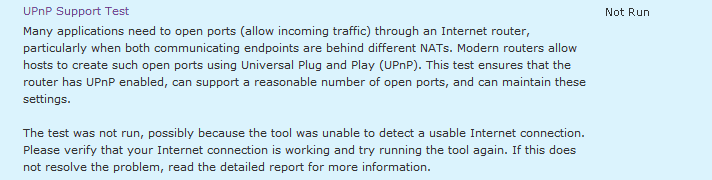
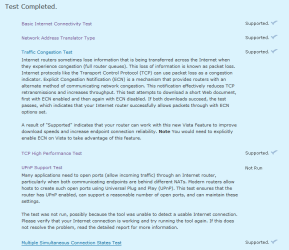
NOTE: I just ran the Windows Remote Assistance Test and failed the UPnP setting. I passed everything else. I may have it unchecked on my Linksys WRT54G2 but it could be disabled in my Services so I will have to check. Would that effect the other program? I hate having so many ports open.
 

Attachments

  • UPnP Failure.PNG
    UPnP Failure.PNG
    6.3 KB · Views: 6
  • UPnP Test 2.PNG
    UPnP Test 2.PNG
    18.4 KB · Views: 7
Last edited:

My Computer My Computer

At a glance

Windows 7 / Windows 8.1Devils Canyon i7-4790K @ 4.8 GHz ~ 1.33vCorsair Vengeance Pro PC3-19200 DDR3 2400MHzEVGA GeForce GTX 980 SuperClocked ACX 2.0
Computer type
PC/Desktop
Computer Manufacturer/Model Number
Custom Desktop PC
OS
Windows 7 / Windows 8.1
CPU
Devils Canyon i7-4790K @ 4.8 GHz ~ 1.33v
Motherboard
Asus Z97 Deluxe
Memory
Corsair Vengeance Pro PC3-19200 DDR3 2400MHz
Graphics Card(s)
EVGA GeForce GTX 980 SuperClocked ACX 2.0
Sound Card
Realtek ALC1150 8 channels
Monitor(s) Displays
BenQ XL2720Z 27"
Screen Resolution
1920 x 1080 @ 144Hz
Hard Drives
SSD1: 512GB Samsung 850 Pro
SSD2: 1TB Samsung 850 EVO
SSD3: 1TB Samsung 850 EVO
HDD: 4TB Western Digital Black
Backup: Western Digital My Book Duo 8TB
PSU
Corsair HX1000i / CyberPower CP1500PFCLCD PFC Sinewave UPS 1
Case
Corsair Graphite 780T
Cooling
Custom single loop liquid; CPU delidded; Aerocool DS Fans
Keyboard
Logitech G710 Cherry MX Blue
Mouse
LogitechG502 Proteus Core
Internet Speed
Download: 119MBs /Upload 39.12MBs via Optimum 101 Ultra
Antivirus
MYOB
Browser
Firefox
Other Info
Cooling: EK-Supremecy MX Waterblock, XSPC AX360 Radiator, Swiftech MCP655 Series 12VDC D5 Pump, EK-RES x3 250 Reservoir, Primochill Ice Intensified Coolant, 11x AerocoolDS fans, Primochill Primoflex Avanced LRT Tubing
I downloaded TeamViewer and it DOES look much simpler for the needs I have. I recall TechNet having a similiar tool/program available back with Vista.
 

My Computer My Computer

At a glance

Windows 7 / Windows 8.1Devils Canyon i7-4790K @ 4.8 GHz ~ 1.33vCorsair Vengeance Pro PC3-19200 DDR3 2400MHzEVGA GeForce GTX 980 SuperClocked ACX 2.0
Computer type
PC/Desktop
Computer Manufacturer/Model Number
Custom Desktop PC
OS
Windows 7 / Windows 8.1
CPU
Devils Canyon i7-4790K @ 4.8 GHz ~ 1.33v
Motherboard
Asus Z97 Deluxe
Memory
Corsair Vengeance Pro PC3-19200 DDR3 2400MHz
Graphics Card(s)
EVGA GeForce GTX 980 SuperClocked ACX 2.0
Sound Card
Realtek ALC1150 8 channels
Monitor(s) Displays
BenQ XL2720Z 27"
Screen Resolution
1920 x 1080 @ 144Hz
Hard Drives
SSD1: 512GB Samsung 850 Pro
SSD2: 1TB Samsung 850 EVO
SSD3: 1TB Samsung 850 EVO
HDD: 4TB Western Digital Black
Backup: Western Digital My Book Duo 8TB
PSU
Corsair HX1000i / CyberPower CP1500PFCLCD PFC Sinewave UPS 1
Case
Corsair Graphite 780T
Cooling
Custom single loop liquid; CPU delidded; Aerocool DS Fans
Keyboard
Logitech G710 Cherry MX Blue
Mouse
LogitechG502 Proteus Core
Internet Speed
Download: 119MBs /Upload 39.12MBs via Optimum 101 Ultra
Antivirus
MYOB
Browser
Firefox
Other Info
Cooling: EK-Supremecy MX Waterblock, XSPC AX360 Radiator, Swiftech MCP655 Series 12VDC D5 Pump, EK-RES x3 250 Reservoir, Primochill Ice Intensified Coolant, 11x AerocoolDS fans, Primochill Primoflex Avanced LRT Tubing
Perfection!

Today I used Team Viewer 5 while my parents installed the Team Viewer Quick Support. My fathers Windows 7 and mothers Vista both worked without any issues arising. I have to say that everything that I needed to do worked *flawlessly* and I am grateful for the quick and solid advice!

I highly recommend this to anyone who wants to do remote support for a friend or family member!

:thumbsup: :thumbsup: :thumbsup: :thumbsup: :thumbsup::thumbsup::thumbsup::thumbsup::thumbsup::thumbsup:
 

My Computer My Computer

At a glance

Windows 7 / Windows 8.1Devils Canyon i7-4790K @ 4.8 GHz ~ 1.33vCorsair Vengeance Pro PC3-19200 DDR3 2400MHzEVGA GeForce GTX 980 SuperClocked ACX 2.0
Computer type
PC/Desktop
Computer Manufacturer/Model Number
Custom Desktop PC
OS
Windows 7 / Windows 8.1
CPU
Devils Canyon i7-4790K @ 4.8 GHz ~ 1.33v
Motherboard
Asus Z97 Deluxe
Memory
Corsair Vengeance Pro PC3-19200 DDR3 2400MHz
Graphics Card(s)
EVGA GeForce GTX 980 SuperClocked ACX 2.0
Sound Card
Realtek ALC1150 8 channels
Monitor(s) Displays
BenQ XL2720Z 27"
Screen Resolution
1920 x 1080 @ 144Hz
Hard Drives
SSD1: 512GB Samsung 850 Pro
SSD2: 1TB Samsung 850 EVO
SSD3: 1TB Samsung 850 EVO
HDD: 4TB Western Digital Black
Backup: Western Digital My Book Duo 8TB
PSU
Corsair HX1000i / CyberPower CP1500PFCLCD PFC Sinewave UPS 1
Case
Corsair Graphite 780T
Cooling
Custom single loop liquid; CPU delidded; Aerocool DS Fans
Keyboard
Logitech G710 Cherry MX Blue
Mouse
LogitechG502 Proteus Core
Internet Speed
Download: 119MBs /Upload 39.12MBs via Optimum 101 Ultra
Antivirus
MYOB
Browser
Firefox
Other Info
Cooling: EK-Supremecy MX Waterblock, XSPC AX360 Radiator, Swiftech MCP655 Series 12VDC D5 Pump, EK-RES x3 250 Reservoir, Primochill Ice Intensified Coolant, 11x AerocoolDS fans, Primochill Primoflex Avanced LRT Tubing
Thanks for the rep, and thank you for posting back that Teamviewer worked.
 

My Computer My Computer

At a glance

Win 7 Ultimate x64FX-8350 @ 4.6 GHz so farADATA XPG V1 Series Black 8GB DDR3 1600Sapphire R9 270x Dual-X
Computer type
PC/Desktop
Computer Manufacturer/Model Number
Me
OS
Win 7 Ultimate x64
CPU
FX-8350 @ 4.6 GHz so far
Motherboard
Asus M5A97 EVO
Memory
ADATA XPG V1 Series Black 8GB DDR3 1600
Graphics Card(s)
Sapphire R9 270x Dual-X
Sound Card
Xonar DGX w/ Corsair Vengence 1300
Monitor(s) Displays
Acer S232HL Abid
Screen Resolution
1920x1080
Hard Drives
120 GB OCZ Vertex 3
500 GB Seagate 7200.12
PSU
Antec Earthwatts 650W Green
Case
Antec Three Hundred
Cooling
Cooler Master 212 EVO
Keyboard
Logitech G510
Mouse
Logitech G500s
Internet Speed
35000/3000
Today I used Team Viewer 5 while my parents installed the Team Viewer Quick Support. My fathers Windows 7 and mothers Vista both worked without any issues arising. I have to say that everything that I needed to do worked *flawlessly* and I am grateful for the quick and solid advice!

I highly recommend this to anyone who wants to do remote support for a friend or family member!

:thumbsup: :thumbsup: :thumbsup: :thumbsup: :thumbsup::thumbsup::thumbsup::thumbsup::thumbsup::thumbsup:

Just go through the steps in Team Viewer, it explains the process in great detail, once you understand it all just send him the link so he can install it on his system. It tells you everything you need to know. It's a very popular program and is supposed to be easy to use. I believe it uses IP addresses to make the connection.

Team viewer might be easier to set up if that seems too complicated. :)
http://www.teamviewer.com/index.aspx

Everyone says that is the easier one to use which is mostly why I recommended it. I'm glad that you and your Dan found it easy to use. Hopefully someday I'll actually have a use for this program because everyone seems to be happy with it. ;)
 

My Computer My Computer

At a glance

Windows 7 Ult, Windows 8.1 Pro,Q9650-4.275GHz, E8600 4.5GHz, E6750-3.8GHzG.Skill PC2 9600 1200Mhz 5 5 5 15 2TGTX480
Computer type
PC/Desktop
Computer Manufacturer/Model Number
Home built
OS
Windows 7 Ult, Windows 8.1 Pro,
CPU
Q9650-4.275GHz, E8600 4.5GHz, E6750-3.8GHz
Motherboard
Evga 780i FTW
Memory
G.Skill PC2 9600 1200Mhz 5 5 5 15 2T
Graphics Card(s)
GTX480
Sound Card
Asus Xonar D2
Monitor(s) Displays
HannsG
Screen Resolution
1680X1050
Hard Drives
GSkill Phoenix Pro 120GB SSD
PSU
ThermalTake Toughpower 1000Watt modular
Case
ThermalTake XaserV
Cooling
Xigmatek S1283
Keyboard
Logitech G15
Mouse
Logitech G9
Internet Speed
T1
I would recommend using www.logmein.com , you dont have to have him do anything to the computer in order to remote into it (after the initial install.) As long as the computer is powered on and connected to the internet, you will be able to remote into it (even if its not logged in.) Which is a major weak point for teamviewer. You can have more than 10 computers on the free account option.
 

My Computer My Computer

At a glance

windows 7 RTM x64Phenom II 965 Quad Core 3.4GhzMushkin Blackline 8GB (4x2gb)XFX Radeon 5970 Black Edition
Computer Manufacturer/Model Number
Black_Box (homebuilt)
OS
windows 7 RTM x64
CPU
Phenom II 965 Quad Core 3.4Ghz
Motherboard
Asus M4A79T Deluxe
Memory
Mushkin Blackline 8GB (4x2gb)
Graphics Card(s)
XFX Radeon 5970 Black Edition
Sound Card
onboard
Monitor(s) Displays
Dell 2408WPF-main Dell E248WFP-secondary
Screen Resolution
1920x1200-main 1920x1200-secondary
Hard Drives
OCZ Vertex Limited Edition 100GB (OS)
x1 WD Black Edition 500GB drive (Storage)
PSU
XFX 850w Black Edition (Modular)
Case
Mountian Mods H2go
Cooling
CoolITSystems ECO A.L.C.
Keyboard
Logitech MX 5500 wireless keyboard
Mouse
Razor Copperhead
Internet Speed
16Mb down/2Mb up Wowway Cable Internet
Back
Top