
Windows 7's new feature: Windows XP Mode

Hi there
Of course you need RAM for the VM but my point was that since most corporate desktops will have at least 2GB RAM in them anyway a 512MB VM or even a 1GB VM will run easily.

Most corporate desktops don't really run very intensive applications anyway (Photoshop / video / multi-media editinf and production excluded) so the "Overhead" of a VM is not very much.

Here's an example of small (768MB) XP VM running SAP, Photoshop, and IE without ANY problems -- the HOST OS doesn't feel sluggish at all even while the VM is running. This is running on a 3rd party product VMWARE.

I'd expect Microsoft's "Compatability" feature to be even more efficient than VMWARE's implementation as it will be designed for specific purposes whereas VMWARE is more of a "development tool" and has to run a multiple of different Guest OS'es.

A VM doesn't have to involve a lot of overhead and in any case if it will run your legacy apps it's usually well worth while in any case.
 

Attachments
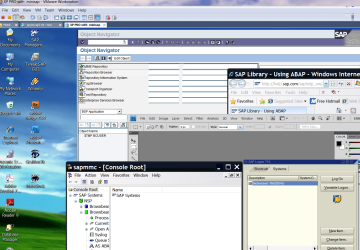
  • xpprovm.png
    xpprovm.png
    645.3 KB · Views: 59

My Computer

Computer type
PC/Desktop
Computer Manufacturer/Model Number
Custom built, several laptops HP/ASUS
OS
Linux CENTOS 7 / various Windows OS'es and servers
CPU
Intel i7 Intel i5
Memory
8GB, 16GB
Graphics Card(s)
On Motherboard
Sound Card
Realtek HD audio
Monitor(s) Displays
Apple Cinema display, Samsung LCD
Screen Resolution
1920 X 1080
Hard Drives
4 X 1TB SATA
Mouse
Toshiba wireless laser
Internet Speed
> 20MB up
now in win7 for "Repair your Computer" option you need not to boot from DVD or recovery disc unlikely in vista but this "Repair your computer" tool is inbuilt given in "Advanced boot options" screen which comes to you when you press F8 during reboot. here is screen shot:

yxfssx8srlzxhz4f1oii.jpg
 

My Computer

Computer Manufacturer/Model Number
Lenovo Ideapad Z570
OS
Windows 7 Ultimate x64 bits
CPU
Intel(R) Core(TM) i5-2410M CPU @ 2.30GHz
Motherboard
Sandy Bridge HuronRiver Platform x64-based PC
Memory
8.00 GB DDR3 (667 MHz)
Graphics Card(s)
Gforce GT 520M 1024 MB
Screen Resolution
1366 x 768
Hard Drives
Seagate 750 GB
this is exciting, but it's also disappointing. i was planning to just grab Home Premium. i might have to get Ultimate just for this. hrmm...
Right I agree. Killer app? Maybe with this MS has just pushed many of us casuals up to professionals.
 

My Computer

Computer Manufacturer/Model Number
Gateway GT5692
OS
Windows 7 Ulti. x64
CPU
AMD Phenom 8450 triple-core 2.10 ghz
Memory
4GB
Graphics Card(s)
ATI Radion HD 3200
Monitor(s) Displays
Gateway FPD1775W
Screen Resolution
1280x720
Hard Drives
465.6613 Gibibytes
If I may add my two coppers...

I do not feel there is much value add for a home user for the simple reason that 7 runs any recent windows app just fine, and without any need for virtualization. I'm sure that enthusiasts can, and will, find the exceptions - even if only just to play with it. :) But Mom and Pop make due with whatever OS comes on the new computer.


For a corporate environment, it's a little different. And I'm a little surprised the obvious implication has so far been missed: The Virtualized environment is *not* there to transform your Pentium HT el~Cheapo~Corporate~sh*tbox into a modern machine by giving it a facelift. Because, well, face it: A sh*tbox is a sh*tbox is a sh*tbox. And you'd be wasting your time to give it a new OS, so you can virtualize the OS that's already there, and load down the old dog even more than it already is. As pointed out already, that would be pretty dumb and a lot of work for little to no benefit.

It *IS* there so when you finally do take the thing out back and shoot it - (as should have probably been done years ago, except nobody wanted to allocate budget for a new PC) - you can buy a new Win 7 PC as the replacement and have the confidence that you can run an XP SP3 environment. Why? So your new PC that replaced some 10 year old piece of garbage can present itself to the remaining 10 year old pieces of garbage as "One Of Their Own".

Then over time you can transition to a Win 7/Server 2006+

It's an upgrade path, existing to provide the necessary backward compatibility with whatever legacy stuff is laying around so nobody has to downgrade to XP any more. No more, no less.
 

My Computer

Computer Manufacturer/Model Number
Home Built
OS
Windows 7 (x64)
CPU
Intel Core i7 960 @ 3.8GHz (3.2GHz stock)
Motherboard
EVGA E758 X-58
Memory
6GB OCZ DDR3 1600
Graphics Card(s)
Powercolor AX5870 (ATI 5870 w/improved cooling)
Sound Card
Omega Claro+
Monitor(s) Displays
1. Acer P243W (24") 2. Samsung T260 HD HDMI HDTV/Monitor
Screen Resolution
1920 x 1200 x 2
Hard Drives
(1) 128GB Kingston SNVP325-S2 SSD for OS/Games
(2) 500GB WD Caviar Black - Storage
PSU
Corsair CMPSU-850HX
Case
Lian Li PC-K60WB
Cooling
Thermalright Venemous-X
Keyboard
Microsoft Natural keyboard 4000
Mouse
Microsoft Sidewinder
Internet Speed
Cable
Other Info
165 bclk, 23 Multi
So MS is making people buy the more pricier editions just to get this virtualization add on?

Some people still have old programs they want to use...this is ridiculous...
 

My Computer

Computer Manufacturer/Model Number
Dell Inspiron 1520 (Laptop)/ Home (Desktop)
OS
Windows 7 x64 / Same
CPU
Intel Core 2 Duo T7250 / Intel Core i7 930
Motherboard
Intel 945 / Asus P6X58D-E
Memory
4GB / 6GB
Graphics Card(s)
NVIDIA GeForce 8400M GS / ASUS 1GB
Sound Card
Whatever Dell gave me :-( / Onboard
Monitor(s) Displays
15.4" LCD / Crappy CRT
Hard Drives
Seagate 500GB SATA; 7200 RPM / Seagate 1TB SATA; 7200 RPM
PSU
N/A / OCZ Fatal1ty 550W Modular
Case
N/A / Antec 900
Cooling
Air
Mouse
Microsoft Presenter (Bluetooth)
Do not worry. I speak bad Spanish. I know how you feel :D
this is America! use contractions! jk :D

also, i know Vista used "compatibility mode" personally i have yet to find an application that Vista 64 bit wont work (even old stuff). although im mostly playing games but i do some app programing etc for school... i never knew why people got so upset over compatibility in Vista
 

My Computer

OS
w7 x86
CPU
phen 2 940
Motherboard
790x
Memory
8GB crucial
Graphics Card(s)
ATI sapphire 4870 1GB!
Monitor(s) Displays
26" Asus
Mouse
cyba snipa
Internet Speed
TWC : (
So MS is making people buy the more pricier editions just to get this virtualization add on?

Some people still have old programs they want to use...this is ridiculous...


What old programs don't run? Is there a specific issue? If it's merely 'cost of the OS', and for whatever reason you must virtualize then figure the difference in price of the operating system versions against {your existing + VM Ware}. Your answer is whichever's cheaper.

If it's a question of Home Premium or Business, then let me ask: Do you use your own 3rd party apps for media? Meaning, you habitually replace Media Player and Movie Maker with an aftermarket one you like better? If so, then I'd recommend buying Business as your baseline, even for home usage. You're going to replace the media stuff anyhow, the Business version gets you some tools the home version does not, and you can get the virtual stuff for free.
 

My Computer

Computer Manufacturer/Model Number
Home Built
OS
Windows 7 (x64)
CPU
Intel Core i7 960 @ 3.8GHz (3.2GHz stock)
Motherboard
EVGA E758 X-58
Memory
6GB OCZ DDR3 1600
Graphics Card(s)
Powercolor AX5870 (ATI 5870 w/improved cooling)
Sound Card
Omega Claro+
Monitor(s) Displays
1. Acer P243W (24") 2. Samsung T260 HD HDMI HDTV/Monitor
Screen Resolution
1920 x 1200 x 2
Hard Drives
(1) 128GB Kingston SNVP325-S2 SSD for OS/Games
(2) 500GB WD Caviar Black - Storage
PSU
Corsair CMPSU-850HX
Case
Lian Li PC-K60WB
Cooling
Thermalright Venemous-X
Keyboard
Microsoft Natural keyboard 4000
Mouse
Microsoft Sidewinder
Internet Speed
Cable
Other Info
165 bclk, 23 Multi

My Computer

Computer Manufacturer/Model Number
Acer Aspire 5610
OS
Windows 7 Professional, Windows Longhorn 4074
CPU
Intel Centrino Duo T2350 @ 1.87 GHz
Motherboard
Acer Grapevine
Memory
1GB (2x 512MB DDR2 400Mz)
Graphics Card(s)
Intel Integrated 945GM Chipset
Sound Card
On-Board RealTek HD Audio
Monitor(s) Displays
Generic PnP Monitor
Screen Resolution
1280x800
Hard Drives
160GB SATA HD
PSU
Generic PSU
Case
Acer Aspire 5610 Standard Case (U.S. Version)
Cooling
Air
Keyboard
Built-In / Random Logitech wireless keyboard
Mouse
Synaptics Touchpad / Logitech Click! optical mouse.
Internet Speed
2.57 Mbps Download / 0.29 Mbps Upload / 57ms Ping
Other Info
I call it the craptop.
I'm confused on what's going on here..

This is what I got so far: "You can basically run XP on win7"... ?
 

My Computer

OS
Win7
CPU
Intel E8300 @ 2.83
Motherboard
nVidia
Memory
2 Gigs
Graphics Card(s)
nVidia 9800GT
Monitor(s) Displays
Acer V173
Hard Drives
500GB HD
I'm confused on what's going on here..

This is what I got so far: "You can basically run XP on win7"... ?
kind of.
you can run programs in 'xp mode' so you dont need xp anymore and everyone can buy windows 7.
 

My Computer

Computer Manufacturer/Model Number
Dell Vostro 1000
OS
Windows 7 Ultimate x86
CPU
AMD Sempron 3600+
Graphics Card(s)
ATI Radeon Xpress 1150
Monitor(s) Displays
Generic PnP Monitor
Screen Resolution
1200 x 800
Hard Drives
WD Scorpio Blue 500 GB (WD5000BEVT)
Mouse
Logitech V320 Cordless Optical Mouse
If I may add my two coppers...

I do not feel there is much value add for a home user for the simple reason that 7 runs any recent windows app just fine, and without any need for virtualization. I'm sure that enthusiasts can, and will, find the exceptions - even if only just to play with it. :) But Mom and Pop make due with whatever OS comes on the new computer.


For a corporate environment, it's a little different. And I'm a little surprised the obvious implication has so far been missed: The Virtualized environment is *not* there to transform your Pentium HT el~Cheapo~Corporate~sh*tbox into a modern machine by giving it a facelift. Because, well, face it: A sh*tbox is a sh*tbox is a sh*tbox. And you'd be wasting your time to give it a new OS, so you can virtualize the OS that's already there, and load down the old dog even more than it already is. As pointed out already, that would be pretty dumb and a lot of work for little to no benefit.

It *IS* there so when you finally do take the thing out back and shoot it - (as should have probably been done years ago, except nobody wanted to allocate budget for a new PC) - you can buy a new Win 7 PC as the replacement and have the confidence that you can run an XP SP3 environment. Why? So your new PC that replaced some 10 year old piece of garbage can present itself to the remaining 10 year old pieces of garbage as "One Of Their Own".

Then over time you can transition to a Win 7/Server 2006+

It's an upgrade path, existing to provide the necessary backward compatibility with whatever legacy stuff is laying around so nobody has to downgrade to XP any more. No more, no less.


I just have to say I agree with this 100 percent as someone who works in the business you described. The introduction of xp mode completely changes how I approach windows 7 for our business customers. For example, one of our customers runs an old insurance application that wont run in vista/win 7 by any means but does in xp. There is no upgrade to this software. This customer has been hindered from upgrading because of this one critical app. Now with xp mode, I can finally upgrade them without worry, sooner rather than later and start utilizing the benefits of Win 7/Server 2008 R2 Technology (DirectAccess..etc)
 

My Computer

OS
Win 7 RC1
pretty boring...its just a pimped virtual pc version for win7 that will then run xp ... and be able to display them on your win7 desktop natively... however there won't be any direct hardware access so games will still be slow in 7.
 

My Computer

OS
PTS-Dos
CPU
Q9450
pretty boring...its just a pimped virtual pc version for win7 that will then run xp ... and be able to display them on your win7 desktop natively... however there won't be any direct hardware access so games will still be slow in 7.

Game developers will make the best games for 7 :)
 

My Computer

Computer Manufacturer/Model Number
Acer Aspire 5610
OS
Windows 7 Professional, Windows Longhorn 4074
CPU
Intel Centrino Duo T2350 @ 1.87 GHz
Motherboard
Acer Grapevine
Memory
1GB (2x 512MB DDR2 400Mz)
Graphics Card(s)
Intel Integrated 945GM Chipset
Sound Card
On-Board RealTek HD Audio
Monitor(s) Displays
Generic PnP Monitor
Screen Resolution
1280x800
Hard Drives
160GB SATA HD
PSU
Generic PSU
Case
Acer Aspire 5610 Standard Case (U.S. Version)
Cooling
Air
Keyboard
Built-In / Random Logitech wireless keyboard
Mouse
Synaptics Touchpad / Logitech Click! optical mouse.
Internet Speed
2.57 Mbps Download / 0.29 Mbps Upload / 57ms Ping
Other Info
I call it the craptop.
I just have to say I agree with this 100 percent as someone who works in the business you described. The introduction of xp mode completely changes how I approach windows 7 for our business customers. For example, one of our customers runs an old insurance application that wont run in vista/win 7 by any means but does in xp. There is no upgrade to this software. This customer has been hindered from upgrading because of this one critical app. Now with xp mode, I can finally upgrade them without worry, sooner rather than later and start utilizing the benefits of Win 7/Server 2008 R2 Technology (DirectAccess..etc)


Not only Software -- but as I keep pointing out (in spite of people making totally OT comments like the new Games will run on 7 as well as a lot of old ones) but also EXPENSIVE LEGACY HARDWARE.

I can't understand how especially in THESE times people seem to have some mental block here. - The typical response is "Get manufacturers to upgrade device drivers - or simply buy new gear"

1) As I keep pointing out "Ad Nauseam" but few seem to grasp the simple concept -- the Manufacturer may be OUT OF BUSINESS often without a successor so no device driver available.

2)Some of this legacy Hardware is VERY VERY expensive -- you can't just go out to Wallmart or wherever and by some new gear - epecially at several 000's of dollars even if you COULD find a suitable replacement.

This upgrade approach is aimed primarily at BUSINESSES for which it is an EXCELLENT IDEA. As I also posted the way this is implemented of course will be critical.

For Home users software like Virtual Box, Vmware , and Virtual PC would be 100% OK. Corporates will want quick and fairly easy installation and maintenance without having to configure zillions of Virtual PC's.

Another possibility for Larger corporates would be to use something like a "Local Cloud". With one or more Virtual servers supplying the XP Images a very large number of people could continue using their legacy apps for as long as needed whilst the hardware was updated in stages and eventually replacement solutions for legacy gear sought.

More difficult to implement however and is a longer term solution. The advantage here would be that eventually as the legacy apps are phased out the same approach could be used to install any OS upgrades on the virtual servers -- client machines would be unaffected.

To repeat --this is a BUSINESS type solution (although as an individual there would be nothing to stop you using it) and if you view it in THAT context -- not as a leading edge home user probably more interested in gaming and multi-media steaming then you will see it makes perfect sense -- and certainly far better than that totally cretinous idea of a W7 ==> XP "downgrade".

Cheers
jimbo
 

My Computer

Computer type
PC/Desktop
Computer Manufacturer/Model Number
Custom built, several laptops HP/ASUS
OS
Linux CENTOS 7 / various Windows OS'es and servers
CPU
Intel i7 Intel i5
Memory
8GB, 16GB
Graphics Card(s)
On Motherboard
Sound Card
Realtek HD audio
Monitor(s) Displays
Apple Cinema display, Samsung LCD
Screen Resolution
1920 X 1080
Hard Drives
4 X 1TB SATA
Mouse
Toshiba wireless laser
Internet Speed
> 20MB up
most business are still and will be running XP :)

why should they upgrade to 7 ? WHY ?

Well they could also just run Linux and VirtualBox or VMware etc. lol...

MS releases OS after OS that does not offer any real benefit...
 

My Computer

OS
PTS-Dos
CPU
Q9450

My Computer

Computer Manufacturer/Model Number
NeverWinter Systems X38
OS
Seven X64 Ultimate 7100 RC1/Vista X64 Ultimate SP1/XP X64 SP2 tri-boot
CPU
Intel E6850 @ 3.2GHz (8 X 400)
Motherboard
GA-X38-DQ6
Memory
2X 2048MB Corsair Dominator PC2-8500
Graphics Card(s)
Crossfire'd ASUS EAH2900XT's
Sound Card
Creative X-Fi Fatal1ty Pro Gamer
Monitor(s) Displays
two (side by side) Samsung 930BF 19" 4ms LCD's
Screen Resolution
1280 X 1024 @ 75Hz
Hard Drives
Two 1TB Seagate Barracuda SATA-II's in RAID(0)
Two 500GB Seagate Barracuda SATA-II's as backups
Two Maxtor 300GB SATA-II's as external storage
PSU
Coolermaster RealPower Pro 850W
Case
Gigabyte 3D Aurora
Cooling
Zalman 9700LED
Keyboard
Logitech G11
Mouse
Logitech MX Revolution
Internet Speed
ADSL1 (1500kpbs down / 256kbps up)
Other Info
Two ASUS 20X DVD-RW Lightscribe optical drives
Logitech X530 5.1ch speaker system
Creative Fatal1ty gaming headset
why should they upgrade to 7 ? WHY ?


Because new hardware are sold with new OS. Enterprise never upgrade the Os, but the hardware, and the OS come with it.
Because XP is totally out to date (9 years old when Seven will go out!!!)
Because XP is totally unsecure compare to Vista/Seven
Because there's lot of many little improvment in Vista/Seven. Kind of improvment that linux/Mac users are proud, but totlly denigrated when it's for Windows.
Because you cant stay on old things all your life
Because XP must die on time for all!


MS releases OS after OS that does not offer any real benefit...

And if you do not understand what Vista/Seven have more than XP... what are you doing here ?
 

My Computer

OS
Vista H.P. SP1 x32 Seven RC x64
CPU
Q6600 @ 3.4Ghz
Motherboard
GA-EP45-DS3L
Memory
4Go PC2-6400
Graphics Card(s)
8500GT @ 700/500
Sound Card
Audigy Platinium
Monitor(s) Displays
Mitsubishi Diamond Pro 920 + Mitsubishi Diamond Pro 720
Screen Resolution
1600x1200 twice
Hard Drives
Hitachi 160Go
Maxtor 160Go (system drive)
Maxtor 200Go in Antec MX-1 EC external box (eSATA-USB2.0)
PSU
Corsair VX550W
Case
Thermaltake Xaser III
Cooling
Watercooling (CPU, GPU, HDD, NB)
Keyboard
MS Wireless Multimedia 6000 V2.0
Mouse
IntellEye Explorer 3.0
Internet Speed
ADSL 18Mbit/s/1Mbit/s
I say out with the old, in with the new!
 

My Computer

Computer Manufacturer/Model Number
Acer Aspire 5610
OS
Windows 7 Professional, Windows Longhorn 4074
CPU
Intel Centrino Duo T2350 @ 1.87 GHz
Motherboard
Acer Grapevine
Memory
1GB (2x 512MB DDR2 400Mz)
Graphics Card(s)
Intel Integrated 945GM Chipset
Sound Card
On-Board RealTek HD Audio
Monitor(s) Displays
Generic PnP Monitor
Screen Resolution
1280x800
Hard Drives
160GB SATA HD
PSU
Generic PSU
Case
Acer Aspire 5610 Standard Case (U.S. Version)
Cooling
Air
Keyboard
Built-In / Random Logitech wireless keyboard
Mouse
Synaptics Touchpad / Logitech Click! optical mouse.
Internet Speed
2.57 Mbps Download / 0.29 Mbps Upload / 57ms Ping
Other Info
I call it the craptop.
Back
Top