windows wont load after removing ubuntu

timothyp

New member
Local time
6:11 PM
Messages
50
i was dual booting with windows 7 and ubuntu. i wanted to remove ubuntu so i formatted the hd it was on (not on the same hd as w7), but now, my pc wont start up. i tried the repair feature with the windows disc as well as restoring to a previous back up. windows 7 does not show up as an option. so i removed the hd that ubuntu was on, and still nothing. the pc wont even load. all i get is the flashing cursor on the screen.

now, i put in the windows 7 disc and selected to try and find my os, My Computer pops up and i am able to see my files and the hd that windows is on. but it tells me to load a driver. im not sure where to find this driver.

any help would be greatly appreciated
 

My Computer My Computer

OS
Windows 7 x64 bit
CPU
Intel Core i7 920
Motherboard
ASUSTeK Computer INC. P6T (LGA1366)
Memory
12.0GB Triple-Channel DDR3 @ 535MHz 8-8-8-20
Graphics Card(s)
ATI Radeon HD 5700 Series
Monitor(s) Displays
DELL S2409W
Screen Resolution
1920x1080
Hard Drives
1.5tb Buffalo
1tb Lacie
1tb Cavalry
500gb WD
1tb Internal
2 x 500gb Internal
40gb Internal
PSU
Corsair TX750W 750-Watt Power Supply
Case
NZXT Tempest ATX Mid-Tower Case
Keyboard
Pro Media Keyboard
Mouse
Logitech Track Marble
Internet Speed
28.97mb/s
let me also mentioned that i tried to reinstall ubuntu to the hd and it did not work. i tried to install a different version of windows 7 over the hd and nothing. i got a message saying that the format (NTFS) was not usable with windows 7. i removed the hd from my pc, put it into an external case and connected it to a laptop. it was not recognized.
 

My Computer My Computer

OS
Windows 7 x64 bit
CPU
Intel Core i7 920
Motherboard
ASUSTeK Computer INC. P6T (LGA1366)
Memory
12.0GB Triple-Channel DDR3 @ 535MHz 8-8-8-20
Graphics Card(s)
ATI Radeon HD 5700 Series
Monitor(s) Displays
DELL S2409W
Screen Resolution
1920x1080
Hard Drives
1.5tb Buffalo
1tb Lacie
1tb Cavalry
500gb WD
1tb Internal
2 x 500gb Internal
40gb Internal
PSU
Corsair TX750W 750-Watt Power Supply
Case
NZXT Tempest ATX Mid-Tower Case
Keyboard
Pro Media Keyboard
Mouse
Logitech Track Marble
Internet Speed
28.97mb/s
If you need to restall,

All Linux code must be deleted.
http://www.sevenforums.com/tutorials/52129-disk-clean-clean-all-diskpart-command.html
http://www.sevenforums.com/tutorials/2668-partition-volume-delete.html?ltr=P
http://www.sevenforums.com/tutorials/2674-partition-volume-create-new.html?ltr=P
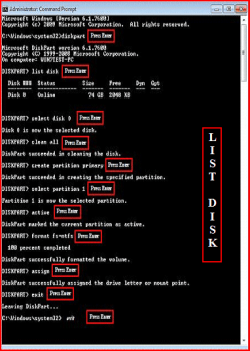
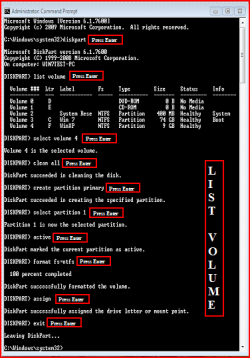
Try a full clean & full format.
1) Boot DVD.
2) Press Shift+F10 (for command prompt)

Type in command line
DISKPART
LIST DISK
SELECT DISK # (win HD)
CLEAN ALL
CREATE PARTITION PRIMARY
SELECT PARTITION 1
ACTIVE
FORMAT=NTFS
ASSIGN
EXIT
EXIT

List Disk.PNG List Volume.PNG

http://www.sevenforums.com/tutorials/91339-ssd-optimize-windows-re-installation.html
 

My Computer My Computer

OS
ME/XP/Vista/Win7

My Computer My Computer

OS
Windows 7 x64 bit
CPU
Intel Core i7 920
Motherboard
ASUSTeK Computer INC. P6T (LGA1366)
Memory
12.0GB Triple-Channel DDR3 @ 535MHz 8-8-8-20
Graphics Card(s)
ATI Radeon HD 5700 Series
Monitor(s) Displays
DELL S2409W
Screen Resolution
1920x1080
Hard Drives
1.5tb Buffalo
1tb Lacie
1tb Cavalry
500gb WD
1tb Internal
2 x 500gb Internal
40gb Internal
PSU
Corsair TX750W 750-Watt Power Supply
Case
NZXT Tempest ATX Mid-Tower Case
Keyboard
Pro Media Keyboard
Mouse
Logitech Track Marble
Internet Speed
28.97mb/s
Have you tried start-up repair? If Win7 is installed on a different disk, the start-up repair should pick it up in no time... Unless you install it on a RAID setup (or AHCI), that might require a driver to be loaded prior OS detection...

zzz2496
 

My Computer My Computer

Computer Manufacturer/Model Number
Self Built
OS
Windows7 Ultimate 64bit
CPU
Intel Core 2 Quad Q6600
Motherboard
Abit IN9-32X-MMAX
Memory
DDR2 Adata 4GB
Graphics Card(s)
Nvidia GeForce GTX 285 1024 and Nvidia GeForce 8800GT 512
Sound Card
Asus Xonar HDAV 1.3
Monitor(s) Displays
Dell 2407WFP and BenQ 2400v and Philips 150v3
Screen Resolution
3840x1200 and 1024x768
Hard Drives
2 WDC 1TB
1 WDC 1.5TB
1 WDC 640GB
1 WDC 320GB
1 Seagate 200GB
PSU
Corsair TX 850W
Case
Cooler Master HAF932
Cooling
Arctic Cooling Freezer Extreme and plenty of fans...
Keyboard
MicrosoftNaturalKeyboard 4000/Apple Alu keyboard/Dinovo mini
Mouse
Logitech G5/MarbleMouseTrackball/PerformanceMX/SpacePilotPRO
Internet Speed
1.5Mbps down/384Kbps up
Other Info
APC SURT 1000XL
Logitech Z-560
Wiimote
Mikrotik Router
Linksys (now Cisco) SD2008 8 port Gigabit switch
Linksys WRT54G (acting as AP)
Apple wireless Aluminium keyboard
Apple Magic Mouse
Xbox360 wired controller
Have you tried start-up repair? If Win7 is installed on a different disk, the start-up repair should pick it up in no time... Unless you install it on a RAID setup (or AHCI), that might require a driver to be loaded prior OS detection...

zzz2496

theog, i am trying your suggestion now.

zzz, i have tried start up repair. windows is not picked up. i do not have a raid setup
 

My Computer My Computer

OS
Windows 7 x64 bit
CPU
Intel Core i7 920
Motherboard
ASUSTeK Computer INC. P6T (LGA1366)
Memory
12.0GB Triple-Channel DDR3 @ 535MHz 8-8-8-20
Graphics Card(s)
ATI Radeon HD 5700 Series
Monitor(s) Displays
DELL S2409W
Screen Resolution
1920x1080
Hard Drives
1.5tb Buffalo
1tb Lacie
1tb Cavalry
500gb WD
1tb Internal
2 x 500gb Internal
40gb Internal
PSU
Corsair TX750W 750-Watt Power Supply
Case
NZXT Tempest ATX Mid-Tower Case
Keyboard
Pro Media Keyboard
Mouse
Logitech Track Marble
Internet Speed
28.97mb/s
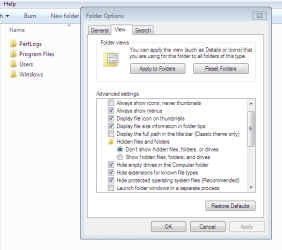
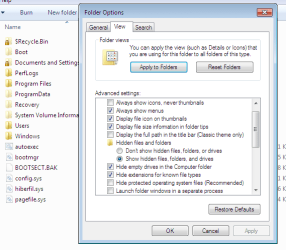
how can i access the folder options, if i cant boot up?
 

My Computer My Computer

OS
Windows 7 x64 bit
CPU
Intel Core i7 920
Motherboard
ASUSTeK Computer INC. P6T (LGA1366)
Memory
12.0GB Triple-Channel DDR3 @ 535MHz 8-8-8-20
Graphics Card(s)
ATI Radeon HD 5700 Series
Monitor(s) Displays
DELL S2409W
Screen Resolution
1920x1080
Hard Drives
1.5tb Buffalo
1tb Lacie
1tb Cavalry
500gb WD
1tb Internal
2 x 500gb Internal
40gb Internal
PSU
Corsair TX750W 750-Watt Power Supply
Case
NZXT Tempest ATX Mid-Tower Case
Keyboard
Pro Media Keyboard
Mouse
Logitech Track Marble
Internet Speed
28.97mb/s
Ah, I had this issue when I did this with an XP machine. What happened is you removed GRUB, the Linux bootloader that replaces the default Windows bootloader. Your master boot record was modified. Since GRUB is gone, nothing's there to load Windows.

Put in your 7 installation disc/startup repair disc and go to the the repair/recovery console (don't do startup repair). You might have to click "Advanced". Type "fixboot". Hit enter. "Type fixmbr". Hit enter. Reboot.
 

My Computer My Computer

OS
Windows 7 Enterprise 64-bit
CPU
AMD Phenom II X4 3.0GHz
Motherboard
ASUS M5A97
Memory
8GB G-Skill Ripjaws DDR3 1333
Graphics Card(s)
PNY GeForce 460 GTX 1GB OC - Enthusiast Edition
Sound Card
VIA High Definition Audio
Monitor(s) Displays
Dell 19"
Screen Resolution
1280x1024
Hard Drives
1TB - Primary
160GB - Secondary
250GB - External backup for important files
PSU
OCZ Fata1ty 700W Modular PSU
Case
ASUS
Keyboard
Microsoft Wireless Keyboard 2000
Mouse
Microsoft Wireless Mouse 2000
Internet Speed
3 Mbps/768 kbps
Put your HDD in external case, boot up Linux on a flashdisk, copy the files from Win7 DVD to your HDD.

zzz2496
 

My Computer My Computer

Computer Manufacturer/Model Number
Self Built
OS
Windows7 Ultimate 64bit
CPU
Intel Core 2 Quad Q6600
Motherboard
Abit IN9-32X-MMAX
Memory
DDR2 Adata 4GB
Graphics Card(s)
Nvidia GeForce GTX 285 1024 and Nvidia GeForce 8800GT 512
Sound Card
Asus Xonar HDAV 1.3
Monitor(s) Displays
Dell 2407WFP and BenQ 2400v and Philips 150v3
Screen Resolution
3840x1200 and 1024x768
Hard Drives
2 WDC 1TB
1 WDC 1.5TB
1 WDC 640GB
1 WDC 320GB
1 Seagate 200GB
PSU
Corsair TX 850W
Case
Cooler Master HAF932
Cooling
Arctic Cooling Freezer Extreme and plenty of fans...
Keyboard
MicrosoftNaturalKeyboard 4000/Apple Alu keyboard/Dinovo mini
Mouse
Logitech G5/MarbleMouseTrackball/PerformanceMX/SpacePilotPRO
Internet Speed
1.5Mbps down/384Kbps up
Other Info
APC SURT 1000XL
Logitech Z-560
Wiimote
Mikrotik Router
Linksys (now Cisco) SD2008 8 port Gigabit switch
Linksys WRT54G (acting as AP)
Apple wireless Aluminium keyboard
Apple Magic Mouse
Xbox360 wired controller
Ah, I had this issue when I did this with an XP machine. What happened is you removed GRUB, the Linux bootloader that replaces the default Windows bootloader. Your master boot record was modified. Since GRUB is gone, nothing's there to load Windows.

Put in your 7 installation disc/startup repair disc and go to the the repair/recovery console (don't do startup repair). You might have to click "Advanced". Type "fixboot". Hit enter. "Type fixmbr". Hit enter. Reboot.

walk me thru this. when and where do i have a choice to choose "advanced"


edit: i guess you are referring to advanced under "re-image your computer", if so, i dont have option to type "fixboot"
 

My Computer My Computer

OS
Windows 7 x64 bit
CPU
Intel Core i7 920
Motherboard
ASUSTeK Computer INC. P6T (LGA1366)
Memory
12.0GB Triple-Channel DDR3 @ 535MHz 8-8-8-20
Graphics Card(s)
ATI Radeon HD 5700 Series
Monitor(s) Displays
DELL S2409W
Screen Resolution
1920x1080
Hard Drives
1.5tb Buffalo
1tb Lacie
1tb Cavalry
500gb WD
1tb Internal
2 x 500gb Internal
40gb Internal
PSU
Corsair TX750W 750-Watt Power Supply
Case
NZXT Tempest ATX Mid-Tower Case
Keyboard
Pro Media Keyboard
Mouse
Logitech Track Marble
Internet Speed
28.97mb/s
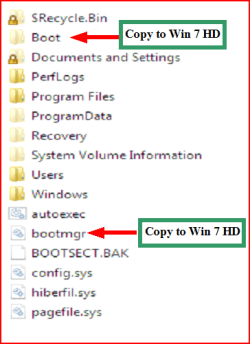
Do you have the files on the HD?
 

My Computer My Computer

OS
ME/XP/Vista/Win7
Do you have the files on the HD?

inside the boot folder are sub folders. i clicked on one that said "en-us", i opened that and saw the "bootmgr" file. what next?
 

My Computer My Computer

OS
Windows 7 x64 bit
CPU
Intel Core i7 920
Motherboard
ASUSTeK Computer INC. P6T (LGA1366)
Memory
12.0GB Triple-Channel DDR3 @ 535MHz 8-8-8-20
Graphics Card(s)
ATI Radeon HD 5700 Series
Monitor(s) Displays
DELL S2409W
Screen Resolution
1920x1080
Hard Drives
1.5tb Buffalo
1tb Lacie
1tb Cavalry
500gb WD
1tb Internal
2 x 500gb Internal
40gb Internal
PSU
Corsair TX750W 750-Watt Power Supply
Case
NZXT Tempest ATX Mid-Tower Case
Keyboard
Pro Media Keyboard
Mouse
Logitech Track Marble
Internet Speed
28.97mb/s
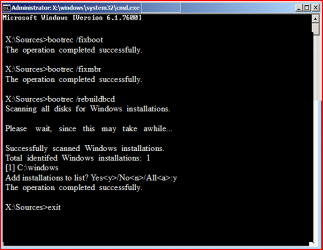
Go to post 8, look at pic 3, Do you have the folder & file? if yes

Try this:
1) Boot DVD.
2) Press Shift+F10 (for command prompt)

Type in command line

bootrec /fixboot
bootrec /fixmbr
bootrec /rebuildbcd

Capturefixboot.PNG

OR

http://www.sevenforums.com/tutorials/681-startup-repair.html?ltr=S
Note: You may need to do startup repair 3 to 4 times.
 
Last edited:

My Computer My Computer

OS
ME/XP/Vista/Win7
Go to post 8, look at pic 3, Do you have the folder & file? if yes

Try this:
1) Boot DVD.
2) Press Shift+F10 (for command prompt)

Type in command line

bootrec /fixboot
bootrec /fixmbr
bootrec /rebuildbcd

View attachment 79802

OR

http://www.sevenforums.com/tutorials/681-startup-repair.html?ltr=S
Note: You may need to do startup repair 3 to 4 times.

those two files are on the hd. i tried that first option and when i type in the commands, i get "element not found" i typed in just "bootrec" and i get a lit of commands, the same ones you mentioned, but when i type them in, i get the element not found message
 

My Computer My Computer

OS
Windows 7 x64 bit
CPU
Intel Core i7 920
Motherboard
ASUSTeK Computer INC. P6T (LGA1366)
Memory
12.0GB Triple-Channel DDR3 @ 535MHz 8-8-8-20
Graphics Card(s)
ATI Radeon HD 5700 Series
Monitor(s) Displays
DELL S2409W
Screen Resolution
1920x1080
Hard Drives
1.5tb Buffalo
1tb Lacie
1tb Cavalry
500gb WD
1tb Internal
2 x 500gb Internal
40gb Internal
PSU
Corsair TX750W 750-Watt Power Supply
Case
NZXT Tempest ATX Mid-Tower Case
Keyboard
Pro Media Keyboard
Mouse
Logitech Track Marble
Internet Speed
28.97mb/s
how about this. i have a boot cd of arconis true image. i created a backup about a month ago, will restoring this backup fix the issue. this is a last resort because i have newer items on my pc since my last back up.
 

My Computer My Computer

OS
Windows 7 x64 bit
CPU
Intel Core i7 920
Motherboard
ASUSTeK Computer INC. P6T (LGA1366)
Memory
12.0GB Triple-Channel DDR3 @ 535MHz 8-8-8-20
Graphics Card(s)
ATI Radeon HD 5700 Series
Monitor(s) Displays
DELL S2409W
Screen Resolution
1920x1080
Hard Drives
1.5tb Buffalo
1tb Lacie
1tb Cavalry
500gb WD
1tb Internal
2 x 500gb Internal
40gb Internal
PSU
Corsair TX750W 750-Watt Power Supply
Case
NZXT Tempest ATX Mid-Tower Case
Keyboard
Pro Media Keyboard
Mouse
Logitech Track Marble
Internet Speed
28.97mb/s
You need to mark Windows 7 Active, then run Startup Repair to write the MBR to it's partition.

To do this, unplug HD which had GRUB, set Win7 HD as first HD to boot in BIOS setup (after DVD), boot the WIn7 DVD Repair console, click through to Recovery TOols list to open a Command Line, type:

DISKPART
LIST DISK
SELECT DISK # (replace # with Win7 HD#)
LIST PARTITION
SELECT PARTITION # (replace # with Win7 partition #)
ACTIVE
EXIT

Now return to Recovery Tools list to run Startup Repair up to 3 separate times with reboots until WIn7 starts up.

Before starting up again with HD plugged which had GRUB, you may need to clean it with DISKPART from DVD command line to remove all traces of GRUB: http://www.sevenforums.com/tutorials/52129-disk-clean-clean-all-diskpart-command.html
 
Back
Top