
Windows 7 Home Pre. 32bit clean install reboot issue

LunarFuror

New member
Local time
11:39 AM
Messages
5
Howdy, I'm trying to install Win 7 HP on my computer and It gets through everything until it has to reboot, the first reboot works, and the second time it reboots it says that the computer didn't shut down properly.

It goes to a blue screen (not of death) for a little bit but It goes by too fast for me to read. Then I get the generic Windows Error Recovery screen with safe mode etc.

Emachines W3052

AMD Sempron Processor 3000+ 1.99 GHz
2G DDR Ram
120 GB HD (IDE)

Compatibility check says it's fine when I had XP on it, I had to format because it used to not get past the copying files part (I have everything on ext hard drive anyway). Halp me...
 

My Computer My Computer

At a glance

NoneAMD Sempron™ 3000+ Processor (512KB L2 cache,...2G DDR SDRAMATI Radeon HD 4350 (agp)
Computer Manufacturer/Model Number
emachines W4052
OS
None
CPU
AMD Sempron™ 3000+ Processor (512KB L2 cache, 2GHz, 333MHz F
Motherboard
Unsure
Memory
2G DDR SDRAM
Graphics Card(s)
ATI Radeon HD 4350 (agp)
Sound Card
nForce™ 6-Channel Audio
Monitor(s) Displays
Emerson 32" LCD
Hard Drives
120GB HDD (IDE)
PSU
Unsure
Cooling
Unsure
Keyboard
USB Micro Innovations Model #:kb570BL
Mouse
USB Dynex Model #: DX-WMSE
Other Info
I bought the computer used a few years back, upgraded the Graphics card, and Ram everything else should be the same assuming the guy that had it before me didn't change anything on it, so I'm unsure about power supply and some other things.
Where do I find my specs? I can fill out some of that but I have a hard time with some of this stuff, even after a computer hardware class and several programming classes.

EDIT: Spec updated to the best of my ability so far. I just can't stand abreviations like CPU and PSU idk what that means... If the CPU is my processor why doesn't it just say Processor I dont know the difference but that's what I put in there...
 

My Computer My Computer

At a glance

NoneAMD Sempron™ 3000+ Processor (512KB L2 cache,...2G DDR SDRAMATI Radeon HD 4350 (agp)
Computer Manufacturer/Model Number
emachines W4052
OS
None
CPU
AMD Sempron™ 3000+ Processor (512KB L2 cache, 2GHz, 333MHz F
Motherboard
Unsure
Memory
2G DDR SDRAM
Graphics Card(s)
ATI Radeon HD 4350 (agp)
Sound Card
nForce™ 6-Channel Audio
Monitor(s) Displays
Emerson 32" LCD
Hard Drives
120GB HDD (IDE)
PSU
Unsure
Cooling
Unsure
Keyboard
USB Micro Innovations Model #:kb570BL
Mouse
USB Dynex Model #: DX-WMSE
Other Info
I bought the computer used a few years back, upgraded the Graphics card, and Ram everything else should be the same assuming the guy that had it before me didn't change anything on it, so I'm unsure about power supply and some other things.
I've done The CMOS thing, no help there. And I don't have an OS to check the disk thing for the first one.

I'm really new at all of this since I've never had a problem with putting an OS on a computer, not to mention I have a mildish case of dyslexia so reading all of the text that everyone seems so accustomed to posting is incredibly hard for me.

When I look up all of my questions on google or anywhere for that matter every sollution assumes that the computer i'm using has an OS so since I don't step one "click start" is kind of a tricky one. So how do I check my BIOS? It goes by too fast for me to read.

I can get a command prompt from boot, but how do i get from there to Elevated command prompt?
 

My Computer My Computer

At a glance

NoneAMD Sempron™ 3000+ Processor (512KB L2 cache,...2G DDR SDRAMATI Radeon HD 4350 (agp)
Computer Manufacturer/Model Number
emachines W4052
OS
None
CPU
AMD Sempron™ 3000+ Processor (512KB L2 cache, 2GHz, 333MHz F
Motherboard
Unsure
Memory
2G DDR SDRAM
Graphics Card(s)
ATI Radeon HD 4350 (agp)
Sound Card
nForce™ 6-Channel Audio
Monitor(s) Displays
Emerson 32" LCD
Hard Drives
120GB HDD (IDE)
PSU
Unsure
Cooling
Unsure
Keyboard
USB Micro Innovations Model #:kb570BL
Mouse
USB Dynex Model #: DX-WMSE
Other Info
I bought the computer used a few years back, upgraded the Graphics card, and Ram everything else should be the same assuming the guy that had it before me didn't change anything on it, so I'm unsure about power supply and some other things.
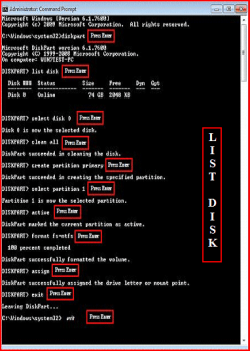
Try a full clean & full format.
http://www.sevenforums.com/tutorials/52129-disk-clean-clean-all-diskpart-command.html
http://www.sevenforums.com/tutorials/2668-partition-volume-delete.html?ltr=P
http://www.sevenforums.com/tutorials/2674-partition-volume-create-new.html?ltr=P
1) Boot DVD.
2) Press Shift+F10 (for command prompt)

Type in command line
DISKPART
LIST DISK OR List Volume (If you have partitions)
SELECT DISK # (win HD)
CLEAN ALL
CREATE PARTITION PRIMARY
SELECT PARTITION 1
ACTIVE
FORMAT=NTFS
ASSIGN
EXIT
EXIT

List Disk.PNG List Volume.PNG

http://www.sevenforums.com/tutorials/91339-ssd-optimize-windows-re-installation.html
 

My Computer My Computer

At a glance

ME/XP/Vista/Win7
OS
ME/XP/Vista/Win7
Theog has been good enough to post up the steps for cleaning your HD, so try that approach first.
 
I read all of that but my issue remains I don't have start. Everything says press start, but I don't have start. The ONLY command prompt i can get to is the windows seven one. Unless I'm reading this wrong I need to be in elevated command prompt, which can't (from what I'm reading) be got to from that command prompt. Safe mode with command prompt wont work because it needs an actual OS apparently, remind you I have no OS or a disk to get one besides the one i'm having issues with. Can I clean from that X:\system (or what ever it says)?
 

My Computer My Computer

At a glance

NoneAMD Sempron™ 3000+ Processor (512KB L2 cache,...2G DDR SDRAMATI Radeon HD 4350 (agp)
Computer Manufacturer/Model Number
emachines W4052
OS
None
CPU
AMD Sempron™ 3000+ Processor (512KB L2 cache, 2GHz, 333MHz F
Motherboard
Unsure
Memory
2G DDR SDRAM
Graphics Card(s)
ATI Radeon HD 4350 (agp)
Sound Card
nForce™ 6-Channel Audio
Monitor(s) Displays
Emerson 32" LCD
Hard Drives
120GB HDD (IDE)
PSU
Unsure
Cooling
Unsure
Keyboard
USB Micro Innovations Model #:kb570BL
Mouse
USB Dynex Model #: DX-WMSE
Other Info
I bought the computer used a few years back, upgraded the Graphics card, and Ram everything else should be the same assuming the guy that had it before me didn't change anything on it, so I'm unsure about power supply and some other things.
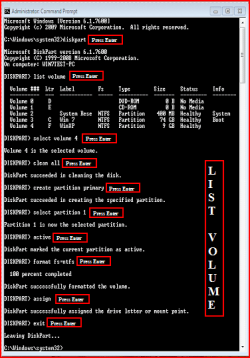
Yes.
4 B.PNG
List Disk.PNG
 

My Computer My Computer

At a glance

ME/XP/Vista/Win7
OS
ME/XP/Vista/Win7
AWESOME! Sorry if i'm being difficult i'm just new. I'll try this and get back to ye
 

My Computer My Computer

At a glance

NoneAMD Sempron™ 3000+ Processor (512KB L2 cache,...2G DDR SDRAMATI Radeon HD 4350 (agp)
Computer Manufacturer/Model Number
emachines W4052
OS
None
CPU
AMD Sempron™ 3000+ Processor (512KB L2 cache, 2GHz, 333MHz F
Motherboard
Unsure
Memory
2G DDR SDRAM
Graphics Card(s)
ATI Radeon HD 4350 (agp)
Sound Card
nForce™ 6-Channel Audio
Monitor(s) Displays
Emerson 32" LCD
Hard Drives
120GB HDD (IDE)
PSU
Unsure
Cooling
Unsure
Keyboard
USB Micro Innovations Model #:kb570BL
Mouse
USB Dynex Model #: DX-WMSE
Other Info
I bought the computer used a few years back, upgraded the Graphics card, and Ram everything else should be the same assuming the guy that had it before me didn't change anything on it, so I'm unsure about power supply and some other things.
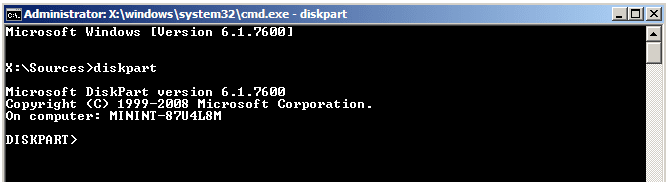
1) Boot DVD.
2) Press Shift+F10 (for command prompt)

Type in command line
DISKPART
LIST DISK OR List Volume (If you have partitions)
SELECT DISK # (win HD)
CLEAN ALL
CREATE PARTITION PRIMARY
SELECT PARTITION 1
ACTIVE
FORMAT=NTFS
ASSIGN
EXIT
EXIT

If you cannot open a Command Prompt as given above, then click on Repair My Computer, click through to Recovery Tools list to select it from list.
 
Back
Top