Another "can't connect wirelessly thread"

skitchbeatz

New member
So I have a Toshiba Satellite a135-s4727.

I cannot connect to my wireless router. I was about to connect with Betas 7000 and 7057 but now that I've moved onto RC1 7100 I haven't been able to connect to the internet wirelessly. The default drivers worked with previous betas.

I've downloaded maybe 5-6 different 32-bit vista drivers from ATHEROS drivers for Microsoft Windows
but with no luck.
updatedriversoftware.jpg


Windows keeps telling me "No connections are available." I live in an apartment building so I should see about 5-8 different SSIDs broadcasting.
noconnectionsavailable.jpg


It must be an issue with my laptop because 3 other computers are able to connect to the router. I have (or so windows 7 tells me) an AtherosAR5006EG pci card.

wirelessproperties.jpg


What do I do?

edit: added images

 
Last edited:

My Computer

OS
Windows 7 RC1
Hi skitchbeatz welcome to the forum,

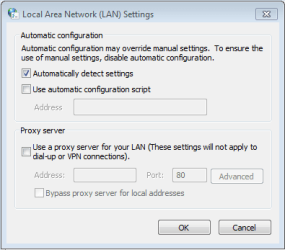
You may want to try disabling automatic lan detection settings in Internet Settings->Connections->Lan Settings. (see pic)

This has been known to cause issues in the past.

Hope this helps :)

p.s. sorry for the late reply
 

Attachments

  • Capture.PNG
    Capture.PNG
    17.8 KB · Views: 44

My Computer

Computer Manufacturer/Model Number
Compaq Desktop
OS
Windows 7 Ultimate x64
CPU
AMD Sempron Dual Core
Memory
3GB
Graphics Card(s)
NVIDIA GeForce 6150SE nForce 430
Screen Resolution
1024x768
Hard Drives
150GB Sata
or simply run the network diagnostics to eliminate the cause of this problem.
 

My Computer

Computer Manufacturer/Model Number
Samsung NP530U4B-S02IN
OS
Windows® 8 Pro (64-bit)
CPU
Intel® Core™ i5 Processor 2467M (1.60GHz, 3MB L3 Cache)
Motherboard
Samsung Electronics
Memory
6GB DDR3 System Memory at 1,333MHz (on BD 4GB + 2GB x 1)
Graphics Card(s)
AMD Radeon™ HD7550M 1GB DDR3 (Ext. Graphic)
Sound Card
Realtek High Definition Audio
Monitor(s) Displays
35.56cm (14.0) SuperBright 300nit HD LED Display
Screen Resolution
1366x768
Hard Drives
1TB S-ATA II Hard Drive (5400RPM) with ExpressCache 16GB SSD
Internet Speed
sucks
Antivirus
Microsoft Security Essentials
Browser
Google Chrome (Sync enabled)
Hi skitchbeatz welcome to the forum,

You may want to try disabling automatic lan detection settings in Internet Settings->Connections->Lan Settings. (see pic)

This has been known to cause issues in the past.

Hope this helps :)

p.s. sorry for the late reply

Unfortunately doing this did not work.:confused:

or simply run the network diagnostics to eliminate the cause of this problem.

Network diagnostics? As in the built in troubleshooter? Tried that but had no luck...
 

My Computer

OS
Windows 7 RC1
Gotta ask, did you do a clean install or an upgrade?
clean install... :-/ I think I'm going to drop back down to 7057... for now... RC1 doesn't have that many NEEDED features over 7057.

hopefully 7057 will work. Thanks for the help guys.
 

My Computer

OS
Windows 7 RC1
i have a similar problem,i installed 7100 x86 on an acer laptop this morning and it wont connect wirelessly it uses an atheros AR5005G i have configured the card(i use static ip's) my network was detected but it wouldnt connect even after using the network key,but as i am typing this i have sussed it and its working yipeeeee.

this is what i did and found out by doing some digging so if you are using a static ip and WPA-PSK(wi-fi protected access pre-shared key) this is what solved the problem for me-
goto control panel/network and sharing centre/change adapter settings right click on the wireless adapter and click properties.
in the window click internet protocol version 4(TCP/IPv4) and click properties fill in your usual static ip details but once done dont exit just yet click on advanced and click the WINS tab at the bottom the setting was for the default but by checking the enable netbios over tcp/ip it connected instantly hope this helps:D
 

My Computer

OS
windows7 7100 x64
CPU
amd athlon 64 3500+
Motherboard
asus a8n sli deluxe
Memory
2gb
Graphics Card(s)
nvidia 7800gt
Screen Resolution
1280x1024
this is a driver problem. have to find out which one will work for you now, trial and error... try different comp modes, more likely vista.... but this sounds like its just the driver, then all else will be solved.
 

My Computer

Computer Manufacturer/Model Number
CUSTOM
OS
XP/win7 x86 build 7127
CPU
Athlon64 X2 DUAL 4200+ 2.21ghz
Motherboard
ASUS K8 PRO SLI
Memory
2GB Dual Chan DDR2 Corsair
Graphics Card(s)
Nvidia 6800GT
Sound Card
nvidia
Monitor(s) Displays
19' LCD
Screen Resolution
1280x1024
Hard Drives
WD 250, 2x500, 2x1TB IDE/USB
WD 250 SATA (system)
SEAGATE 120 Sata
PSU
coolermaster 450
Case
SUPERFLOWER
Cooling
1 HDD bay fan, 5x80mm Case Fans, AEROGATE II Fan/Temp
Keyboard
MS wireless
Mouse
MS Wireless
Internet Speed
fassssssssst
this is a driver problem. have to find out which one will work for you now, trial and error... try different comp modes, more likely vista.... but this sounds like its just the driver, then all else will be solved.
So I'm back down to 7057.. included driver works. Is there any way to copy the driver from this version of 7 and use it in RC1?
 

My Computer

OS
Windows 7 RC1
I've been having the same issues with build 7100. I installed it on my Asus Eee PC. Yesterday it worked fine. It took some work to get everything connected then, but now it doesn't show any available connections at all. I ran the diagnostic and it didn't come up with anything. I'm on a campus with WiFi everywhere, and internet works on the same laptop in XP (where I am now).
 

My Computer

OS
Windows 7 Professional x64
CPU
Intel Core i7 970
Motherboard
Gigabyte GA-X58A-UD9
Memory
6GB STT Speed (Hypers)
Graphics Card(s)
Nvidia GTX 570, 470
Monitor(s) Displays
Dell 22"
Screen Resolution
1680x1050
Hard Drives
WD Caviar Black 500GB
WD Caviar Black 1TB
Samsung Spinpoint F3 1TB
Seagate Barracuda
PSU
Corsair HX1000
I got a D-Link AirPlus DWL-520+ network adapter, installed the drivers from the CD and I still can't connect to wi-fi (I did everything what you said in this thread).
"Windows was unable to connect to..."

Do I have to buy new adapter or can I solve this somehow?
 

My Computer

OS
Windows 7
I remember having a simliar issue, I did a bunch of disabling/enabling of both the lan and the wlan and eventually the wlan picked up the wifis nearby.

I think I also uninstalled the lan device and reinstalled it.
 

My Computer

OS
7264x64/7260x86
Back
Top