When logging on, or coming back from sleep, screen has an orange tint

tylar112

New member
Member
Local time
3:36 PM
Messages
51
When I turn on my computer, the screen has an orange/yellow tint to it, sometimes it stays there for about a second, then goes back to normal. Sometimes it stays there until I restart.

I tried to screen capture it, but it didnt show up in the screen shot.
My display driver is "Mobile Intel(R) 4 Series Express Chipset Family"
I have an Asus computer running windows 7 x64

Im not sure if theres some type of driver I can download and install to fix this, or what.

I hope someone can help me out! Its a real pain to have to keep restarting until it goes away

Thank you
 

My Computer My Computer

At a glance

Windows 7 Home Premium x64Genuine Intel(R) CPU U7300 @ 1.30GHz4.00 GigsMobile Intel(R) 4 Series Express Chipset Family
Computer Manufacturer/Model Number
Asus UL50A/UL50Ag Series
OS
Windows 7 Home Premium x64
CPU
Genuine Intel(R) CPU U7300 @ 1.30GHz
Memory
4.00 Gigs
Graphics Card(s)
Mobile Intel(R) 4 Series Express Chipset Family
Sound Card
Realtek High Definition Audio
Monitor(s) Displays
Generic PnP Monitor
Screen Resolution
1366 x 768 - 60Hz
Hard Drives
500 Gigs
Internet Speed
Slow as hell.
Check your monitor cable, give it a little wiggle and see if that affects the tint. The fact that it didn't show up on a screenshot means that it is just the monitor, not the system itself.

~Lordbob
 

My Computer My Computer

At a glance

Windows 7 Ultimate x64, Mint 9Intel i5-2500k2x 4Gb Corsair VENGEANCE DDR3-1600NVidia GeForce N260GTX Twin Frozr
Computer Manufacturer/Model Number
Hera
OS
Windows 7 Ultimate x64, Mint 9
CPU
Intel i5-2500k
Motherboard
ASUS P8P67 Pro
Memory
2x 4Gb Corsair VENGEANCE DDR3-1600
Graphics Card(s)
NVidia GeForce N260GTX Twin Frozr
Sound Card
Realtek HD OnBoard Audio
Monitor(s) Displays
ASUS 24" Monitor
Screen Resolution
1920x1080
Hard Drives
G.SKILL Phoenix Series 60GB SATA II MLC Internal Solid State Drive (SSD)
SAMSUNG Spinpoint F3R 1TB 7200 RPM 32MB Cache SATA II
PSU
Cooler Master Real Power Pro 750W
Case
Cooler Master Haf 932
Cooling
Fans
Keyboard
Razer Tarantula
Mouse
Razer Lachesis
Internet Speed
not fast enough
Check your monitor cable, give it a little wiggle and see if that affects the tint. The fact that it didn't show up on a screenshot means that it is just the monitor, not the system itself.

~Lordbob

Thanks for the advice
But this is a laptop :/

It goes away if I disable the display driver, then enable it again
 

My Computer My Computer

At a glance

Windows 7 Home Premium x64Genuine Intel(R) CPU U7300 @ 1.30GHz4.00 GigsMobile Intel(R) 4 Series Express Chipset Family
Computer Manufacturer/Model Number
Asus UL50A/UL50Ag Series
OS
Windows 7 Home Premium x64
CPU
Genuine Intel(R) CPU U7300 @ 1.30GHz
Memory
4.00 Gigs
Graphics Card(s)
Mobile Intel(R) 4 Series Express Chipset Family
Sound Card
Realtek High Definition Audio
Monitor(s) Displays
Generic PnP Monitor
Screen Resolution
1366 x 768 - 60Hz
Hard Drives
500 Gigs
Internet Speed
Slow as hell.
Check your monitor cable, give it a little wiggle and see if that affects the tint. The fact that it didn't show up on a screenshot means that it is just the monitor, not the system itself.

~Lordbob

Thanks for the advice
But this is a laptop :/

It goes away if I disable the display driver, then enable it again
The monitor cable might be going bad then, but you would be best sending it in for repair for that, as it can be tricky.

~Lordbob
 

My Computer My Computer

At a glance

Windows 7 Ultimate x64, Mint 9Intel i5-2500k2x 4Gb Corsair VENGEANCE DDR3-1600NVidia GeForce N260GTX Twin Frozr
Computer Manufacturer/Model Number
Hera
OS
Windows 7 Ultimate x64, Mint 9
CPU
Intel i5-2500k
Motherboard
ASUS P8P67 Pro
Memory
2x 4Gb Corsair VENGEANCE DDR3-1600
Graphics Card(s)
NVidia GeForce N260GTX Twin Frozr
Sound Card
Realtek HD OnBoard Audio
Monitor(s) Displays
ASUS 24" Monitor
Screen Resolution
1920x1080
Hard Drives
G.SKILL Phoenix Series 60GB SATA II MLC Internal Solid State Drive (SSD)
SAMSUNG Spinpoint F3R 1TB 7200 RPM 32MB Cache SATA II
PSU
Cooler Master Real Power Pro 750W
Case
Cooler Master Haf 932
Cooling
Fans
Keyboard
Razer Tarantula
Mouse
Razer Lachesis
Internet Speed
not fast enough
Check your monitor cable, give it a little wiggle and see if that affects the tint. The fact that it didn't show up on a screenshot means that it is just the monitor, not the system itself.

~Lordbob

Thanks for the advice
But this is a laptop :/

It goes away if I disable the display driver, then enable it again
The monitor cable might be going bad then, but you would be best sending it in for repair for that, as it can be tricky.

~Lordbob


As an elimination test, try running with the generic VGA driver (disabled intel) for an extended amount of time to see if the problem persists.

If it does the same thing with both the Generic and intel driver, then it could indeed be hardware.

If it only occurs with the intel driver, then that's the most likely culprit.
 

My Computer My Computer

At a glance

8 Pro x64i7 3770K 4.6GHz16GB G.Skill Trident X 2666mhzx2 EVGA 780 Ti Superclocked SLI
Computer type
PC/Desktop
Computer Manufacturer/Model Number
Systems by SmartEyeball
OS
8 Pro x64
CPU
i7 3770K 4.6GHz
Motherboard
ASUS P8Z77 WS
Memory
16GB G.Skill Trident X 2666mhz
Graphics Card(s)
x2 EVGA 780 Ti Superclocked SLI
Sound Card
SB X-FI Surround 5.1 PRO USB / ATH-AD900 Headphones
Monitor(s) Displays
x3 Dell U2410 / 58" Samsung
Screen Resolution
5760*1200/ 1920*1200
Hard Drives
2x Intel 520 240GB (RAID 0) * 2x WD Caviar Blacks 2TB (RAID 0) * 2TB WD Caviar Black * Sony Optirac DVD
PSU
Silverstone Strider Evolution 1200W
Case
Thermaltake Level 10 GT Snow Edition
Cooling
Noctua NH-D14
Keyboard
Topre Realforce // Ducky Shine MX Black // Filco Ninja TKL
Mouse
Thermaltake Theron (Highly Recommended) + Razer Imperator
Antivirus
MSE
Browser
IE, FF, WaterFox
Other Info
GT Extreme V2 Sim Racing Cockpit + 40" LCD and K/B Mouse stand ▼
Fanatec CSR Elite Wheel + Clubsport V1 Pedals + CSR shifter/7G-H ▼Saitek X52 Pro ▼ TrackIR 5 Pro
Buttkicker v2 Seat Rumbler with Dedicated 5.1 and Sub Woofer attached to frame ▼
=
Bloody Big Grin
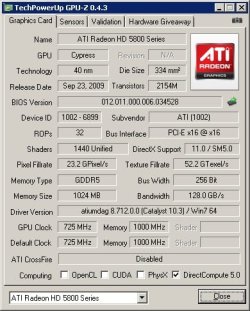
Try that attachment and post the info screen, it will give lots of details for your video to assist in troubleshoot driver(s).

Mine is:
 

Attachments

  • faladu_gpuz.jpg
    faladu_gpuz.jpg
    42.9 KB · Views: 14

My Computer My Computer

At a glance

Windows 7 Ultimate Retail Box (64-bit install...AMD FX-8350 CPU v1.15 (or 1.0F) BIOS was requ...8G CAS-7 G-Skill DDR3 @1333 (2 fours) [mobo n...Radeon HD 7950 [3 gigs of GDDR5] MSI Twin Fro...
Computer type
PC/Desktop
Computer Manufacturer/Model Number
Self Built Custom
OS
Windows 7 Ultimate Retail Box (64-bit installed) + Service Pack 1
CPU
AMD FX-8350 CPU v1.15 (or 1.0F) BIOS was required!
Motherboard
MSI 890FXA-GD70
Memory
8G CAS-7 G-Skill DDR3 @1333 (2 fours) [mobo nonOC max rec'd]
Graphics Card(s)
Radeon HD 7950 [3 gigs of GDDR5] MSI Twin Frozr model
Sound Card
Realtek High Definition Audio (onboard mobo, ALC-889 chip)
Monitor(s) Displays
2 WS LED Monitors: One LG One Viewsonic
Screen Resolution
1920 by 1080
Hard Drives
SSD for OS: Samsung 840 Pro
SSD for VM and utilities: Adata SX900
7200 RPM SATA HDs for the rest: Hitachi and Seagate
PSU
Corsair TX850 - 850W max, in service since August 2010.
Case
Thermaltake Armor A90
Cooling
Thermaltake Spin Q CPU Cooler, in service since August 2010
Keyboard
Logitech G11
Mouse
Logitech M310 Wireless
Internet Speed
100 Megabit broadband supposedly upgraded from 50 (Cable)
Antivirus
Bitdefender Internet Security 2014 suite
Browser
Pale Moon 64-bit main, also IceDragon, Opera, and Maxthon.
Other Info
CompTIA A+ certified (220-800 series) in July 2013.
Thanks for the advice
But this is a laptop :/

It goes away if I disable the display driver, then enable it again
The monitor cable might be going bad then, but you would be best sending it in for repair for that, as it can be tricky.

~Lordbob


As an elimination test, try running with the generic VGA driver (disabled intel) for an extended amount of time to see if the problem persists.

If it does the same thing with both the Generic and intel driver, then it could indeed be hardware.

If it only occurs with the intel driver, then that's the most likely culprit.

Well, my laptop has a HDMI output, and when I use that, I've never had the problem.
It seems to only occur with intel.
 

My Computer My Computer

At a glance

Windows 7 Home Premium x64Genuine Intel(R) CPU U7300 @ 1.30GHz4.00 GigsMobile Intel(R) 4 Series Express Chipset Family
Computer Manufacturer/Model Number
Asus UL50A/UL50Ag Series
OS
Windows 7 Home Premium x64
CPU
Genuine Intel(R) CPU U7300 @ 1.30GHz
Memory
4.00 Gigs
Graphics Card(s)
Mobile Intel(R) 4 Series Express Chipset Family
Sound Card
Realtek High Definition Audio
Monitor(s) Displays
Generic PnP Monitor
Screen Resolution
1366 x 768 - 60Hz
Hard Drives
500 Gigs
Internet Speed
Slow as hell.
Try that attachment and post the info screen, it will give lots of details for your video to assist in troubleshoot driver(s).

Mine is:

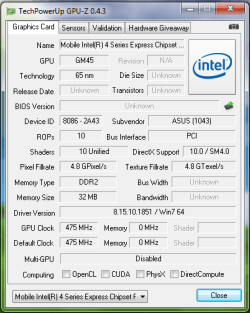
Heres a screenshot of my info. Im not sure what a lot of it means, and how it will help me fix it, But here ya go!
 

Attachments

  • Driver info.png
    Driver info.png
    15.8 KB · Views: 15

My Computer My Computer

At a glance

Windows 7 Home Premium x64Genuine Intel(R) CPU U7300 @ 1.30GHz4.00 GigsMobile Intel(R) 4 Series Express Chipset Family
Computer Manufacturer/Model Number
Asus UL50A/UL50Ag Series
OS
Windows 7 Home Premium x64
CPU
Genuine Intel(R) CPU U7300 @ 1.30GHz
Memory
4.00 Gigs
Graphics Card(s)
Mobile Intel(R) 4 Series Express Chipset Family
Sound Card
Realtek High Definition Audio
Monitor(s) Displays
Generic PnP Monitor
Screen Resolution
1366 x 768 - 60Hz
Hard Drives
500 Gigs
Internet Speed
Slow as hell.
This link has more info on your GPU, not to be confused with the laptop equivalent of a video card, you have a 4500MHD in that regard, I had you run GPU-Z to get that out of you with little trouble and other info might be useful, 32 megs of video RAM seems out of place (low # these days) and couldn't find some info, might just be because it's a laptop though.

Basic info on that one here:
Mobile Intel® GM45 Chipset - Overview

Your series downloads search page here:

http://downloadcenter.intel.com/SearchResult.aspx?lang=eng&ProductFamily=Chipsets&ProductLine=Laptop+Chipsets&ProductProduct=Mobile+Intel%C2%AE+4+Series+Express+Chipset+Family

Get the latest and greatest, install and reboot, and give the results.
That is assuming you are still having that problem?

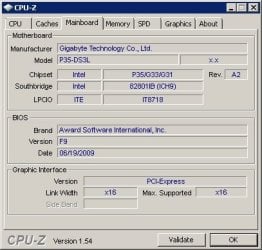
Couldn't hurt to run this next attachment (unzip someplace, run the .exe) and post a screen shot also, please show the 3rd tab (Mainboard)

All this info is to help troubleshoot further and verify specifics such as BIOS version, be it me or someone else, std operating procedure for me, at least. DETAILS DETAILS DETAILS!

Mine is:
 

Attachments

My Computer My Computer

At a glance

Windows 7 Ultimate Retail Box (64-bit install...AMD FX-8350 CPU v1.15 (or 1.0F) BIOS was requ...8G CAS-7 G-Skill DDR3 @1333 (2 fours) [mobo n...Radeon HD 7950 [3 gigs of GDDR5] MSI Twin Fro...
Computer type
PC/Desktop
Computer Manufacturer/Model Number
Self Built Custom
OS
Windows 7 Ultimate Retail Box (64-bit installed) + Service Pack 1
CPU
AMD FX-8350 CPU v1.15 (or 1.0F) BIOS was required!
Motherboard
MSI 890FXA-GD70
Memory
8G CAS-7 G-Skill DDR3 @1333 (2 fours) [mobo nonOC max rec'd]
Graphics Card(s)
Radeon HD 7950 [3 gigs of GDDR5] MSI Twin Frozr model
Sound Card
Realtek High Definition Audio (onboard mobo, ALC-889 chip)
Monitor(s) Displays
2 WS LED Monitors: One LG One Viewsonic
Screen Resolution
1920 by 1080
Hard Drives
SSD for OS: Samsung 840 Pro
SSD for VM and utilities: Adata SX900
7200 RPM SATA HDs for the rest: Hitachi and Seagate
PSU
Corsair TX850 - 850W max, in service since August 2010.
Case
Thermaltake Armor A90
Cooling
Thermaltake Spin Q CPU Cooler, in service since August 2010
Keyboard
Logitech G11
Mouse
Logitech M310 Wireless
Internet Speed
100 Megabit broadband supposedly upgraded from 50 (Cable)
Antivirus
Bitdefender Internet Security 2014 suite
Browser
Pale Moon 64-bit main, also IceDragon, Opera, and Maxthon.
Other Info
CompTIA A+ certified (220-800 series) in July 2013.
It seems to only occur with intel.

I'd still err on the side of it being a software issue, rather than hardware.

As Faladu suggested, update your video driver to the latest version:

8.15.10.2119 x64


And then see how it goes.

32 megs of video RAM seems out of place (low # these days) and couldn't find some info, might just be because it's a laptop though.

The 32 megs is low, but that would be the dedicated amount of VRAM that particular chip has - there may be a BIOS setting to increase the amount of dedicated VRAM it utilises. The rest of the video memory would be 'shared' with the system RAM.
 

My Computer My Computer

At a glance

8 Pro x64i7 3770K 4.6GHz16GB G.Skill Trident X 2666mhzx2 EVGA 780 Ti Superclocked SLI
Computer type
PC/Desktop
Computer Manufacturer/Model Number
Systems by SmartEyeball
OS
8 Pro x64
CPU
i7 3770K 4.6GHz
Motherboard
ASUS P8Z77 WS
Memory
16GB G.Skill Trident X 2666mhz
Graphics Card(s)
x2 EVGA 780 Ti Superclocked SLI
Sound Card
SB X-FI Surround 5.1 PRO USB / ATH-AD900 Headphones
Monitor(s) Displays
x3 Dell U2410 / 58" Samsung
Screen Resolution
5760*1200/ 1920*1200
Hard Drives
2x Intel 520 240GB (RAID 0) * 2x WD Caviar Blacks 2TB (RAID 0) * 2TB WD Caviar Black * Sony Optirac DVD
PSU
Silverstone Strider Evolution 1200W
Case
Thermaltake Level 10 GT Snow Edition
Cooling
Noctua NH-D14
Keyboard
Topre Realforce // Ducky Shine MX Black // Filco Ninja TKL
Mouse
Thermaltake Theron (Highly Recommended) + Razer Imperator
Antivirus
MSE
Browser
IE, FF, WaterFox
Other Info
GT Extreme V2 Sim Racing Cockpit + 40" LCD and K/B Mouse stand ▼
Fanatec CSR Elite Wheel + Clubsport V1 Pedals + CSR shifter/7G-H ▼Saitek X52 Pro ▼ TrackIR 5 Pro
Buttkicker v2 Seat Rumbler with Dedicated 5.1 and Sub Woofer attached to frame ▼
=
Bloody Big Grin
Back
Top