Where do I extract bios and chipset drivers to?

blanchflower

New member
Member
Local time
5:22 PM
Messages
67
Firstly, allow me to list my system specification:

P-7805g Notebook Gateway FX
Windows 7 Premium 64-bit
Intel Core 2 Duo processor P8700 2.53Ghz
4 GB DDR3 RAM
Nvidia GeForce 9800M GTS with 1 GB of DDR 3 discrete video memory

I am trying to update my bios and chipset drivers but a pop up window comes out and says Driver (WDM) Init fail!(0x130)

What on earth does this mean? These come in zip files so where do I extract them?

The reason I am doing this is because I always keep getting an error message display Nvidia Windows kernel mode driver version 257.21 has stooped responding and has successfully recovered, while playing Youtube videos with enabled hardware acceleration as well as Windows Media Player 12. I face no issues when hardware acceleration is unchecked and I play DVDs using other media players.

I took my laptop to a computer repair shop and they told me that this laptop is designed for Windows Vista. I upgraded the OS with a clean reinstall to Windows 7 and they told me that sometimes a laptop hardware is not designed to take in a new OS. Is this true? Their only solution is to revert back my OS to Vista because they told me that there is nothing wrong with my graphics hardware as well as other components of my laptop.

I read somewhere in the web that updating my Bios and chipset drivers would solve this issue so I am trying this method but I can't install the drivers!

Also, I don't want to revert back to Vista so what is the solution? My hardware is working fine and I believe that this could be a driver issue.

Please help! I am a newbie when it comes to computers and I have never in my life tried to update chipset or bios drivers!

:(:(:(:(:(:(:(:(:(
 

My Computer My Computer

Computer Manufacturer/Model Number
P-7805g Notebook Gateway FX
OS
Windows 7 Premium 64 bit
CPU
Intel Core 2 Duo processor P8700 2.53Ghz
Memory
4 GB DDR3 RAM
Graphics Card(s)
Nvidia GeForce 9800M GTS with 1 GB of DDR 3
There should be install instructions where you downloaded your bios update, however.....usually the instructions tell you to download to your desktop and extract there. From there the instructions can very as there are different ways to apply the bios update. Some you copy to a floppy or flash drive (it must be one of your boot devices). Some you run from the desktop and then when you reboot they update.

You really need to read the "Read me" and install instructions from your vendor.

Bios updates are not that hard BUT....be careful and follow the instructions exactly.
 

My Computer My Computer

Computer Manufacturer/Model Number
Systemax N2000 Gaming PC
OS
Windows 7 Ultimate x64
CPU
Q6600 @2.4ghz (G0 stepping)
Motherboard
XFX nforce 680i LT
Memory
8 gb OCZ vista essential sli PC-6400
Graphics Card(s)
Dual 9800gt in SLI mode
Sound Card
Integrated 8.1 High Definition Audio
Monitor(s) Displays
Dual Sceptre x246w 24 inch monitors
Screen Resolution
1920 x 1200 each monitor
Hard Drives
500 GB SATA II / 7500 rpm
PSU
Cooler Master Real Power Pro 1250W
Case
N2000 server tower
Cooling
Thermaltake Bigwater 760 is
Keyboard
MS Intelitype 6000 v2.0
Mouse
MS Intelipoint 6000
Internet Speed
Wi-power 1.5GB up / 512k down
Other Info
Windows 7 Ultimate x64, Windows 7 Pro x64, Windows Home Premium X86, Windows XP pro, Windows Home Server x86, Ubuntu 10.4 x86 and x64, Ubuntu server 10.4, SQL Server 2005, MySQL 5.0
Well, there are no instructions on Gateway Singapore website.....

:(:(:(:(:(:(:(:(
 

My Computer My Computer

Computer Manufacturer/Model Number
P-7805g Notebook Gateway FX
OS
Windows 7 Premium 64 bit
CPU
Intel Core 2 Duo processor P8700 2.53Ghz
Memory
4 GB DDR3 RAM
Graphics Card(s)
Nvidia GeForce 9800M GTS with 1 GB of DDR 3
Well, there are no instructions on Gateway Singapore website.....

:(:(:(:(:(:(:(:(

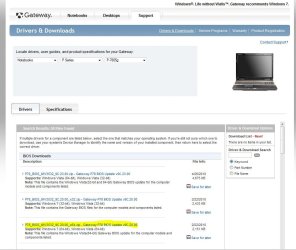
This is what I found on Gateway Singapore for your model,

Gateway Singapore Official Site: Support - Drivers and Downloads#

Just select, notebook, P series, 7805g and you get this page below.

Is that what you downloaded, the one I highlighted?

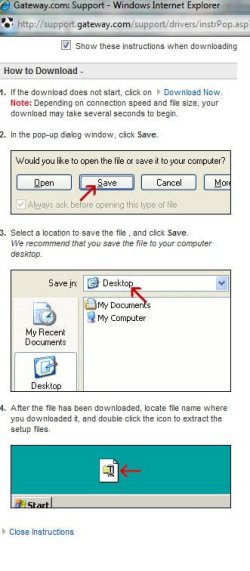
The next picture is the download instructions.

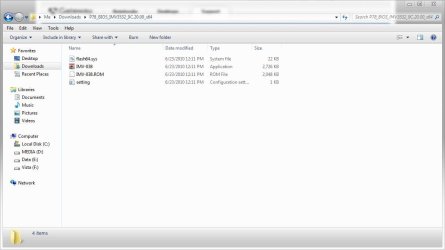
The last two are for someone that can explain it better,

contents of the zip and

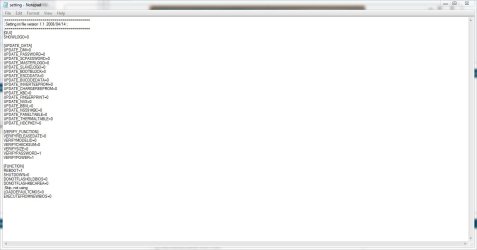
contents of the text in the zip.

Post back if that's not your model or the download you have.
 

Attachments

  • bios.JPG
    bios.JPG
    91.1 KB · Views: 107
  • instructions.JPG
    instructions.JPG
    46.4 KB · Views: 70
  • bios zip.JPG
    bios zip.JPG
    51.3 KB · Views: 118
  • bios text.JPG
    bios text.JPG
    55.6 KB · Views: 104

My Computer My Computer

Computer type
PC/Desktop
Computer Manufacturer/Model Number
Self Built
OS
Win 10 Pro x64
CPU
Intel I5-2500K @3.3GHz
Motherboard
Asrock P67 Extreme4
Memory
16GB G.Skill Ripjaws X (4x4GB)
Graphics Card(s)
EVGA GeForce 750 Ti SC 2GB
Sound Card
ASUS Xonar DG 5.1 Channels 24-bit 96KHz PCI Interface Sound
Monitor(s) Displays
auria eq2367
Screen Resolution
1920 x 1080
Hard Drives
250GB Samsung 850 EVO SSD
1TB WD Blue
1TB Hitachi
PSU
SeaSonic X 650W 80 Plus Gold
Case
Corsair Obsidian 750D
Cooling
Corsair H60, Three 140mm case fans
Keyboard
Logitech Wireless Keyboard K520
Mouse
Logitech Wireless Mouse M310
Internet Speed
Wave Broadband ~ 100 dn 5 up
Antivirus
Windows Defender, Malwarebytes Premium
Browser
Edge, IE11, Chrome
Other Info
Laptop specs: HP g7-1365dx /
CPU: AMD A6-3420M APU with Radeon(tm) HD Graphics /
RAM: Crucial 8Gb (2x4Gb) /
SSD: Crucial M4-CT128M4SSD2 ATA Device/ FW 000F /
GFX: AMD Radeon HD 6520G /
OS: Windows 10 Pro x64
Well, after checking and rechecking, I realize that my BIOS drivers are up to date after all! :o

Anyway, thanks for your help! I am happy that I don't have to update my BIOS drivers because it is dangerous for a newbie like me. I have no experience in using DOS at all!

:D:D
 

My Computer My Computer

Computer Manufacturer/Model Number
P-7805g Notebook Gateway FX
OS
Windows 7 Premium 64 bit
CPU
Intel Core 2 Duo processor P8700 2.53Ghz
Memory
4 GB DDR3 RAM
Graphics Card(s)
Nvidia GeForce 9800M GTS with 1 GB of DDR 3
By the way, i use a program called Drive Detective to search for any outdated drivers and the scan showed that I had no outdated drivers.

Also, I want to be sure. Where in the Devise Manager do I check for my BIOS driver version?

:huh:
 

My Computer My Computer

Computer Manufacturer/Model Number
P-7805g Notebook Gateway FX
OS
Windows 7 Premium 64 bit
CPU
Intel Core 2 Duo processor P8700 2.53Ghz
Memory
4 GB DDR3 RAM
Graphics Card(s)
Nvidia GeForce 9800M GTS with 1 GB of DDR 3
Well that's good to hear!

You're welcome! :D
 

My Computer My Computer

Computer type
PC/Desktop
Computer Manufacturer/Model Number
Self Built
OS
Win 10 Pro x64
CPU
Intel I5-2500K @3.3GHz
Motherboard
Asrock P67 Extreme4
Memory
16GB G.Skill Ripjaws X (4x4GB)
Graphics Card(s)
EVGA GeForce 750 Ti SC 2GB
Sound Card
ASUS Xonar DG 5.1 Channels 24-bit 96KHz PCI Interface Sound
Monitor(s) Displays
auria eq2367
Screen Resolution
1920 x 1080
Hard Drives
250GB Samsung 850 EVO SSD
1TB WD Blue
1TB Hitachi
PSU
SeaSonic X 650W 80 Plus Gold
Case
Corsair Obsidian 750D
Cooling
Corsair H60, Three 140mm case fans
Keyboard
Logitech Wireless Keyboard K520
Mouse
Logitech Wireless Mouse M310
Internet Speed
Wave Broadband ~ 100 dn 5 up
Antivirus
Windows Defender, Malwarebytes Premium
Browser
Edge, IE11, Chrome
Other Info
Laptop specs: HP g7-1365dx /
CPU: AMD A6-3420M APU with Radeon(tm) HD Graphics /
RAM: Crucial 8Gb (2x4Gb) /
SSD: Crucial M4-CT128M4SSD2 ATA Device/ FW 000F /
GFX: AMD Radeon HD 6520G /
OS: Windows 10 Pro x64
By the way, i use a program called Drive Detective to search for any outdated drivers and the scan showed that I had no outdated drivers.

Also, I want to be sure. Where in the Devise Manager do I check for my BIOS driver version?

:huh:

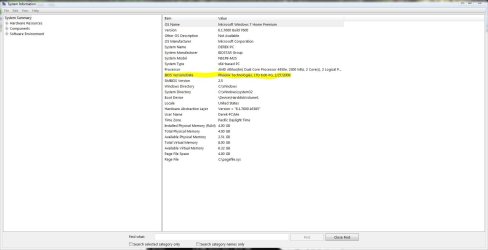
Type msinfo32 in start menu search, click on that and you'll get a window like this below.
 

Attachments

  • bios.JPG
    bios.JPG
    85.3 KB · Views: 124

My Computer My Computer

Computer type
PC/Desktop
Computer Manufacturer/Model Number
Self Built
OS
Win 10 Pro x64
CPU
Intel I5-2500K @3.3GHz
Motherboard
Asrock P67 Extreme4
Memory
16GB G.Skill Ripjaws X (4x4GB)
Graphics Card(s)
EVGA GeForce 750 Ti SC 2GB
Sound Card
ASUS Xonar DG 5.1 Channels 24-bit 96KHz PCI Interface Sound
Monitor(s) Displays
auria eq2367
Screen Resolution
1920 x 1080
Hard Drives
250GB Samsung 850 EVO SSD
1TB WD Blue
1TB Hitachi
PSU
SeaSonic X 650W 80 Plus Gold
Case
Corsair Obsidian 750D
Cooling
Corsair H60, Three 140mm case fans
Keyboard
Logitech Wireless Keyboard K520
Mouse
Logitech Wireless Mouse M310
Internet Speed
Wave Broadband ~ 100 dn 5 up
Antivirus
Windows Defender, Malwarebytes Premium
Browser
Edge, IE11, Chrome
Other Info
Laptop specs: HP g7-1365dx /
CPU: AMD A6-3420M APU with Radeon(tm) HD Graphics /
RAM: Crucial 8Gb (2x4Gb) /
SSD: Crucial M4-CT128M4SSD2 ATA Device/ FW 000F /
GFX: AMD Radeon HD 6520G /
OS: Windows 10 Pro x64
OK, I got some bad news! This is my current BIOS version!

Phoenix Technologies LTD 9C.17.00 16/12/2008.

The updated version is 9C.20.00 which is dated February 22nd 2010!

I need professional help in updating my BIOS here. I heard this is the most dangerous part in updating your laptop!

Is it really necessary to update BIOS? What would be the risk?

I took my laptop to a PC maintenance shopand they told me that my laptop is designed for Windows Vista. Computer companies generally give upgrade options to upgrade ones OS to boost sales. The laptop was designed specifically for Vista 64-bit usage. By doing a clean installation of Windows 7, potential problems could happen.

Now, when I update my Adobe Flash player to 10.1 and watching Flash videos like Youtube with enabled hardware acceleration ticked, there is an error message which says Nvidia Windows kernel mode driver version 257.21 has stopped responding and has successfully recovered. This same error message appears when I watch DVDs using Windows Media Player 12.

This problem does not occur when I disable hardware acceleration and watch my DVD movies on VLC or Windows Media Player Classic. Also with Flash player 10.0, this problem did not appear when I enabled hardware acceleration.

What should I do now? How on earth am I going to update my BIOS!? I have even recently updated my graphics drivers a few days ago for the first time in my life, so you guys can guess that I am a total newbie when it comes to these things!

The instructions provided by Gateway Singapore is totally insufficient and only an IT software expert can understand!

How do I proceed from here? The PC technician told me that this error message is NOT a result of any hardware failures but software driver issues. My hardware is working perfectly fine by the way.

:(:(:(:(:(:(:(:(:(:(

And I guess the program called Driver detective is not a good one after all! :o:o
 

My Computer My Computer

Computer Manufacturer/Model Number
P-7805g Notebook Gateway FX
OS
Windows 7 Premium 64 bit
CPU
Intel Core 2 Duo processor P8700 2.53Ghz
Memory
4 GB DDR3 RAM
Graphics Card(s)
Nvidia GeForce 9800M GTS with 1 GB of DDR 3
OK, There's plenty of qualified people here to help you out with that, unfortunately

I'm not one of them. I do know that you don't need any program to tell you if you

need to update your drivers. There will be more qualified people along to help you

as soon as they see this.
 

My Computer My Computer

Computer type
PC/Desktop
Computer Manufacturer/Model Number
Self Built
OS
Win 10 Pro x64
CPU
Intel I5-2500K @3.3GHz
Motherboard
Asrock P67 Extreme4
Memory
16GB G.Skill Ripjaws X (4x4GB)
Graphics Card(s)
EVGA GeForce 750 Ti SC 2GB
Sound Card
ASUS Xonar DG 5.1 Channels 24-bit 96KHz PCI Interface Sound
Monitor(s) Displays
auria eq2367
Screen Resolution
1920 x 1080
Hard Drives
250GB Samsung 850 EVO SSD
1TB WD Blue
1TB Hitachi
PSU
SeaSonic X 650W 80 Plus Gold
Case
Corsair Obsidian 750D
Cooling
Corsair H60, Three 140mm case fans
Keyboard
Logitech Wireless Keyboard K520
Mouse
Logitech Wireless Mouse M310
Internet Speed
Wave Broadband ~ 100 dn 5 up
Antivirus
Windows Defender, Malwarebytes Premium
Browser
Edge, IE11, Chrome
Other Info
Laptop specs: HP g7-1365dx /
CPU: AMD A6-3420M APU with Radeon(tm) HD Graphics /
RAM: Crucial 8Gb (2x4Gb) /
SSD: Crucial M4-CT128M4SSD2 ATA Device/ FW 000F /
GFX: AMD Radeon HD 6520G /
OS: Windows 10 Pro x64
  • Like
Reactions: JMH
Thanks for the kind advise, mate!

I just called the official gateway support center and they advised me to bring my laptop to the service center to check. They also told me that it is not advisable to update my BIOS. Is this really true??

I will keep you guys informed about this problem once this is resolved!

:)
 

My Computer My Computer

Computer Manufacturer/Model Number
P-7805g Notebook Gateway FX
OS
Windows 7 Premium 64 bit
CPU
Intel Core 2 Duo processor P8700 2.53Ghz
Memory
4 GB DDR3 RAM
Graphics Card(s)
Nvidia GeForce 9800M GTS with 1 GB of DDR 3
Thanks for the kind advise, mate!

I just called the official gateway support center and they advised me to bring my laptop to the service center to check. They also told me that it is not advisable to update my BIOS. Is this really true??

I will keep you guys informed about this problem once this is resolved!

:)

You're very welcome mate!

Honestly, that sounds like good advice! You would be better off with a

professional fixing your computer.

And do let us know how it turns out. :)
 

My Computer My Computer

Computer type
PC/Desktop
Computer Manufacturer/Model Number
Self Built
OS
Win 10 Pro x64
CPU
Intel I5-2500K @3.3GHz
Motherboard
Asrock P67 Extreme4
Memory
16GB G.Skill Ripjaws X (4x4GB)
Graphics Card(s)
EVGA GeForce 750 Ti SC 2GB
Sound Card
ASUS Xonar DG 5.1 Channels 24-bit 96KHz PCI Interface Sound
Monitor(s) Displays
auria eq2367
Screen Resolution
1920 x 1080
Hard Drives
250GB Samsung 850 EVO SSD
1TB WD Blue
1TB Hitachi
PSU
SeaSonic X 650W 80 Plus Gold
Case
Corsair Obsidian 750D
Cooling
Corsair H60, Three 140mm case fans
Keyboard
Logitech Wireless Keyboard K520
Mouse
Logitech Wireless Mouse M310
Internet Speed
Wave Broadband ~ 100 dn 5 up
Antivirus
Windows Defender, Malwarebytes Premium
Browser
Edge, IE11, Chrome
Other Info
Laptop specs: HP g7-1365dx /
CPU: AMD A6-3420M APU with Radeon(tm) HD Graphics /
RAM: Crucial 8Gb (2x4Gb) /
SSD: Crucial M4-CT128M4SSD2 ATA Device/ FW 000F /
GFX: AMD Radeon HD 6520G /
OS: Windows 10 Pro x64
1) You dont have to necessarily update your bios. Updating makes sense only if the new version resolves a known problem or otherwise brings some beneficial new feature. If your hardware is working fine, theres no need to update. Go through the changelog of the new bios on the Gateway site. It'll tell you whats new in this version.

What I also do in such a case is to google for the new bios number. There would be dozens of people who are already using the new bios. Go through the search results. You'll be able to get a fair idea of whats good and bad in the new bios.

2) If your computer was designed for vista, it'll likely run win7 fine. Reason is hardware requirements for win7 are not as stringent. In fact people have been running win7 on ancient machines. IDK what the maintenance shop means by saying installing win7 could lead to potential problems. The best way to find out is to run the Win7 upgrade advisor. It'll tell you exactly what deficient hardware there is, if any.

Download details: Windows 7 Upgrade Advisor
 

My Computer My Computer

Computer Manufacturer/Model Number
Too many to describe...
OS
Windows 7 x64 pro/ Windows 7 x86 Pro/ XP SP3 x86
Thanks for the kind advise, mate!

I just called the official gateway support center and they advised me to bring my laptop to the service center to check. They also told me that it is not advisable to update my BIOS. Is this really true??

I will keep you guys informed about this problem once this is resolved!

:)

You're very welcome mate!

Honestly, that sounds like good advice! You would be better off with a

professional fixing your computer.

And do let us know how it turns out. :)

Well, I just talked to them and they told me that if this is a software problem, all my current data would be lost.

As I do not have an external hard disk and did not do any back ups pf my files yet, I decided not to send my laptop for repair. If I did, I would only get back the laptop within 7 working days, potentially losing all my current data.

Besides, the problem I am having is not a serious issue to me. I can always watch DVD movies using VLC media player or Windows Media Classic player. Also, as for watching Youtube videos, I can always untick enable hardware acceleration and the flash videos will run just fine.

As for gaming, I did not face any issues at all. Of course, if the problem gets worse, for example, unticking enable hardware acceleration DOES NOT solve the problem, then I would most definitely send my laptop for major servicing. Also, if I face this problem during gaming, I would send my laptop for servicing too!

As an extra protection, I have decided to purchase an extra 2 years warranty for my beloved laptop in case these issues pop up in the future during gaming or watching Flash videos with disabling hardware acceleration.

:D
 

My Computer My Computer

Computer Manufacturer/Model Number
P-7805g Notebook Gateway FX
OS
Windows 7 Premium 64 bit
CPU
Intel Core 2 Duo processor P8700 2.53Ghz
Memory
4 GB DDR3 RAM
Graphics Card(s)
Nvidia GeForce 9800M GTS with 1 GB of DDR 3
1) You dont have to necessarily update your bios. Updating makes sense only if the new version resolves a known problem or otherwise brings some beneficial new feature. If your hardware is working fine, theres no need to update. Go through the changelog of the new bios on the Gateway site. It'll tell you whats new in this version.

What I also do in such a case is to google for the new bios number. There would be dozens of people who are already using the new bios. Go through the search results. You'll be able to get a fair idea of whats good and bad in the new bios.

2) If your computer was designed for vista, it'll likely run win7 fine. Reason is hardware requirements for win7 are not as stringent. In fact people have been running win7 on ancient machines. IDK what the maintenance shop means by saying installing win7 could lead to potential problems. The best way to find out is to run the Win7 upgrade advisor. It'll tell you exactly what deficient hardware there is, if any.

Download details: Windows 7 Upgrade Advisor

I did that a few months ago and did not find any issues.
 

My Computer My Computer

Computer Manufacturer/Model Number
P-7805g Notebook Gateway FX
OS
Windows 7 Premium 64 bit
CPU
Intel Core 2 Duo processor P8700 2.53Ghz
Memory
4 GB DDR3 RAM
Graphics Card(s)
Nvidia GeForce 9800M GTS with 1 GB of DDR 3
There are 2 ways for you to update the BIOS:

1. DOS mode

a. First at all you need a DOS bootable USB device (floppy/CD also) for the DOS mode.
b. Ensure that the DOS package has been unzip and saved onto the DOS
bootable USB device of your choice (floppy/CD also).
c. After ensuring you are in the DOS mode, you will go to the saved file directory
d. Type in the command of “BIOS.bat”
e. Then the flash process should be started


2. Windows Mode

a. Before using the windows mode package, you need to ensure what OS you are on. Vista/Win7 32 or Vista/Win7 64?
b. Inside the package, you should copy the proper folder into your system
c. Run the executable file in “Administrators” Mode, ie: select the executable file and right click. You will see an option “Run as Administrator”. Select it to start the flashing process.

--------------------------------------------------------------------------------

I would recommend you have a copy of the current bios on hand in case something goes wrong with the upgrade so you can put it back. Good luck with this issue and If you don't feel comfortable with this upgrade I would get professional help. I have however updated multiple system bios. It was necessary for my upgrade to Windows 7 x64 stability (including Nvidia drivers by the way) and for my Dell C640 laptop to use 2gb ram so there are good reasons to do it if you need to, just don't do it unless you NEED to. I agree with what everyone here says about Windows 7 on your pc.....if it is Vista capable is it DEFINITELY Windows 7 capable.
 

My Computer My Computer

Computer Manufacturer/Model Number
Systemax N2000 Gaming PC
OS
Windows 7 Ultimate x64
CPU
Q6600 @2.4ghz (G0 stepping)
Motherboard
XFX nforce 680i LT
Memory
8 gb OCZ vista essential sli PC-6400
Graphics Card(s)
Dual 9800gt in SLI mode
Sound Card
Integrated 8.1 High Definition Audio
Monitor(s) Displays
Dual Sceptre x246w 24 inch monitors
Screen Resolution
1920 x 1200 each monitor
Hard Drives
500 GB SATA II / 7500 rpm
PSU
Cooler Master Real Power Pro 1250W
Case
N2000 server tower
Cooling
Thermaltake Bigwater 760 is
Keyboard
MS Intelitype 6000 v2.0
Mouse
MS Intelipoint 6000
Internet Speed
Wi-power 1.5GB up / 512k down
Other Info
Windows 7 Ultimate x64, Windows 7 Pro x64, Windows Home Premium X86, Windows XP pro, Windows Home Server x86, Ubuntu 10.4 x86 and x64, Ubuntu server 10.4, SQL Server 2005, MySQL 5.0
Back
Top