Windows 7 can't format my WD6401AALS

fenrir888

New member
Local time
4:26 PM
Messages
7
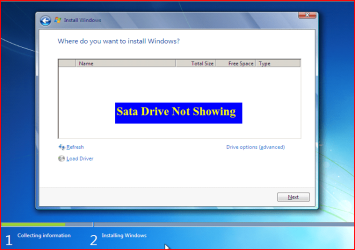
Well i just recently got this system together everything is brand new, and when i try to install windows 7 64-bit home premium it cant see any drives. when i try to load my hard drive it requests that i format the drive. But windows immediately replies saying that "Windows cannot format c:" telling me to check if the drive is connected of if its a read-only file. The BIOS can detect all 640GB of the hard drive, so i know its connected, and there is nothing inside the hard drive at all, so i doubt its a read-only file. I did some surfing and learned that this Hard Drive should not require additional software for windows 7, yet windows 7 appear to say the opposite. I've been working on this build for over a month now and would really like it if i could get this thing up and running already.
 

My Computer My Computer

Computer Manufacturer/Model Number
N/A
OS
Windows 7
CPU
AMD Anthlon-II 3.0GHz triple core
Motherboard
Gigabyte M68M-S2P
Memory
Corsair 4GB (2x2GB) 1.8V RAM
Graphics Card(s)
Nvidia GeForce 9800
Sound Card
None
Monitor(s) Displays
2 (25.5" & 13")
Hard Drives
Western Digital 640GB WD6401AALS
PSU
Rosewill 530W
Case
Cooler Master Storm
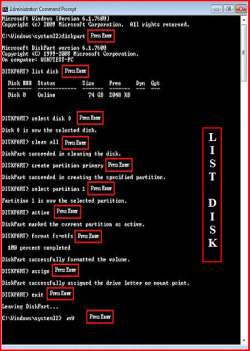
Try a full clean & full format in command prompt.
http://www.sevenforums.com/tutorials/52129-disk-clean-clean-all-diskpart-command.html
http://www.sevenforums.com/tutorials/2668-partition-volume-delete.html?ltr=P
http://www.sevenforums.com/tutorials/2674-partition-volume-create-new.html?ltr=P
http://www.sevenforums.com/tutorials/71432-partition-mark-active.html?ltr=P
1) Boot DVD, & Press Shift+F10 (for command prompt)
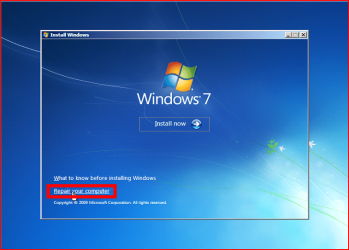
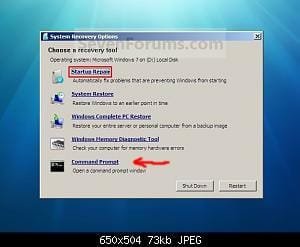
2) Boot DVD, & http://www.sevenforums.com/tutorials/682-command-prompt-startup.html(for command prompt)

Type in command line
DISKPART
LIST DISK OR List Volume (If you have partitions)
SELECT DISK # (win HD)
CLEAN ALL
CREATE PARTITION PRIMARY
SELECT PARTITION 1
ACTIVE
FORMAT=NTFS
ASSIGN
EXIT
EXIT

List Disk.PNG List Volume.PNG

http://www.sevenforums.com/tutorials/91339-ssd-optimize-windows-re-installation.html
 

My Computer My Computer

OS
ME/XP/Vista/Win7
that's impossible. It is a blank hard drive, that is intended to be the main hard drive. I'm not simply upgrading the drive from an older version of windows. I'm trying to do a Clean Install of windows 7. so i cannot open a command prompt
 

My Computer My Computer

Computer Manufacturer/Model Number
N/A
OS
Windows 7
CPU
AMD Anthlon-II 3.0GHz triple core
Motherboard
Gigabyte M68M-S2P
Memory
Corsair 4GB (2x2GB) 1.8V RAM
Graphics Card(s)
Nvidia GeForce 9800
Sound Card
None
Monitor(s) Displays
2 (25.5" & 13")
Hard Drives
Western Digital 640GB WD6401AALS
PSU
Rosewill 530W
Case
Cooler Master Storm
Hi fenrir888

Welcome to Seven Forums :)
Have a look at this thread (2nd post) - it's based on Vista but works for Windows 7 too.

More info here

Hope this helps and regards
 

My Computer My Computer

Computer Manufacturer/Model Number
Custom
OS
Win7 HP (x64)/Win7 Ultimate (x64)
CPU
Core i7 920
Motherboard
Intel X58
Memory
6 x 2GB Corsair XMS3
Graphics Card(s)
CF HD4890
Sound Card
Asus Xonar
Monitor(s) Displays
Dell 2408WFP
Screen Resolution
1920 x 1200
Hard Drives
2 x 150GB WDC Velociraptors (Raid 0)
1 x 1TB Seagate
1 x 1.5TB Seagate
PSU
Corsair HX1000W
Case
Antec 1200
Keyboard
Razer Lycosa/N52te
Mouse
Razer Lachesis
that's impossible. It is a blank hard drive, that is intended to be the main hard drive. I'm not simply upgrading the drive from an older version of windows. I'm trying to do a Clean Install of windows 7. so i cannot open a command prompt

1) Boot DVD, & Press Shift+F10 (for command prompt)

2.PNG 1.PNG

2) Boot DVD, & Command Prompt at Startup command prompt)

Repair.jpg
 
Last edited:

My Computer My Computer

OS
ME/XP/Vista/Win7
Hi fenrir888

Welcome to Seven Forums :)
Have a look at this thread (2nd post) - it's based on Vista but works for Windows 7 too.

More info here

Hope this helps and regards
these links seem to instruct how to initialize a hard drive on an already installed OS, my system is new, and does not have an OS installed yet, and that is the problem i'm trying to fix.
 

My Computer My Computer

Computer Manufacturer/Model Number
N/A
OS
Windows 7
CPU
AMD Anthlon-II 3.0GHz triple core
Motherboard
Gigabyte M68M-S2P
Memory
Corsair 4GB (2x2GB) 1.8V RAM
Graphics Card(s)
Nvidia GeForce 9800
Sound Card
None
Monitor(s) Displays
2 (25.5" & 13")
Hard Drives
Western Digital 640GB WD6401AALS
PSU
Rosewill 530W
Case
Cooler Master Storm
Hi fenrir888

Have a look at what theog has posted above.
If you still cannot access that - then have a look at this (especially screen-shots 6, 8 and 9 - they are not numbered as such but you can count them in sequence from the first)
Hope this helps

Regards
 

My Computer My Computer

Computer Manufacturer/Model Number
Custom
OS
Win7 HP (x64)/Win7 Ultimate (x64)
CPU
Core i7 920
Motherboard
Intel X58
Memory
6 x 2GB Corsair XMS3
Graphics Card(s)
CF HD4890
Sound Card
Asus Xonar
Monitor(s) Displays
Dell 2408WFP
Screen Resolution
1920 x 1200
Hard Drives
2 x 150GB WDC Velociraptors (Raid 0)
1 x 1TB Seagate
1 x 1.5TB Seagate
PSU
Corsair HX1000W
Case
Antec 1200
Keyboard
Razer Lycosa/N52te
Mouse
Razer Lachesis
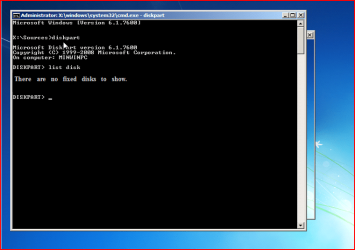
Can setup see your HD at this screen?

1.PNG
 

My Computer My Computer

OS
ME/XP/Vista/Win7
no it cant, but the command prompt could, i'm currently in the middle of the clean all waiting for everything to be 0 out.
 

My Computer My Computer

Computer Manufacturer/Model Number
N/A
OS
Windows 7
CPU
AMD Anthlon-II 3.0GHz triple core
Motherboard
Gigabyte M68M-S2P
Memory
Corsair 4GB (2x2GB) 1.8V RAM
Graphics Card(s)
Nvidia GeForce 9800
Sound Card
None
Monitor(s) Displays
2 (25.5" & 13")
Hard Drives
Western Digital 640GB WD6401AALS
PSU
Rosewill 530W
Case
Cooler Master Storm
Last edited:

My Computer My Computer

OS
ME/XP/Vista/Win7
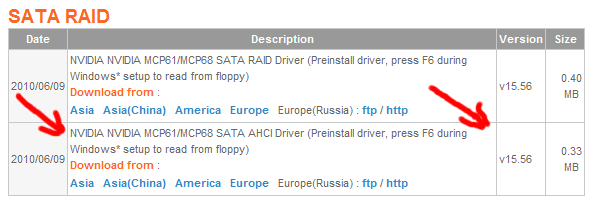
okay, so i just downloaded that driver you told me to get, but first i want to finish this thing on the command prompt. when i typed in FORMAT=NTFS it said the command was invalid, was there a typo?
 

My Computer My Computer

Computer Manufacturer/Model Number
N/A
OS
Windows 7
CPU
AMD Anthlon-II 3.0GHz triple core
Motherboard
Gigabyte M68M-S2P
Memory
Corsair 4GB (2x2GB) 1.8V RAM
Graphics Card(s)
Nvidia GeForce 9800
Sound Card
None
Monitor(s) Displays
2 (25.5" & 13")
Hard Drives
Western Digital 640GB WD6401AALS
PSU
Rosewill 530W
Case
Cooler Master Storm
Make sure that you have no USB drives, card readers or thumbdrives or anything like that connected to your machine.

Also, make sure that the one drive you are trying to install to is the ONLY driver currentlly connected to the machine.
 

My Computer My Computer

Computer Manufacturer/Model Number
Scratch built
OS
Windows 7 x64 Ultimate
CPU
i7 960
Motherboard
Asus P6X58D
Memory
12 Gig Corsair Dominator
Graphics Card(s)
Nvidia 480
Sound Card
Maudio Delta 44 + breakout box
Monitor(s) Displays
Dell UltraSharp U2410 24in and Samsung 21 dual monitors
Screen Resolution
1920x1200 and 1280x1024
Hard Drives
Primary: Intel X-25M G2 160G SSD
Secondary: Segate baracuda 1.0 TB
HDs in AHCI mode.
PSU
Corasair TX850
Case
Cooler Master HAF
Cooling
Corsair H50
Keyboard
Logitech G15 + N52 game pad
Mouse
Logitech MX518
Internet Speed
15kbs down 4.5kbps up
Other Info
WEI 7.6
CPU & RAM 7.6
Graphics 7.9
Hard disk 7.7
only other things connected to the sata slots are the cd/dvd drive and the esata thats part of my tower
 

My Computer My Computer

Computer Manufacturer/Model Number
N/A
OS
Windows 7
CPU
AMD Anthlon-II 3.0GHz triple core
Motherboard
Gigabyte M68M-S2P
Memory
Corsair 4GB (2x2GB) 1.8V RAM
Graphics Card(s)
Nvidia GeForce 9800
Sound Card
None
Monitor(s) Displays
2 (25.5" & 13")
Hard Drives
Western Digital 640GB WD6401AALS
PSU
Rosewill 530W
Case
Cooler Master Storm
okay, so i just downloaded that driver you told me to get, but first i want to finish this thing on the command prompt. when i typed in FORMAT=NTFS it said the command was invalid, was there a typo?

Sorry,typo

FORMAT FS=NTFS
 

My Computer My Computer

OS
ME/XP/Vista/Win7
well thanks to your advice my new pc is up and running. the command prompt format fixed it right up. thanks a lot!
 

My Computer My Computer

Computer Manufacturer/Model Number
N/A
OS
Windows 7
CPU
AMD Anthlon-II 3.0GHz triple core
Motherboard
Gigabyte M68M-S2P
Memory
Corsair 4GB (2x2GB) 1.8V RAM
Graphics Card(s)
Nvidia GeForce 9800
Sound Card
None
Monitor(s) Displays
2 (25.5" & 13")
Hard Drives
Western Digital 640GB WD6401AALS
PSU
Rosewill 530W
Case
Cooler Master Storm
Back
Top