"Windows is not connected to a network" when I am.

Everlong

To xor or not to xor
Guru
Gold Member
SF Team
Local time
10:36 PM
Messages
3,317
Location
Morecambe, Lancashire, England
This is annoying me now, I've tried everything I know but nothing seems to work. I've looked on this forum and other forums and tried what's been recommended for similar problems but nothing seems to work.

This problem started a couple of months ago when I was living on my University campus. I had a wired Ethernet connection and one day Windows was saying I'm not connected to a network and I couldn't see anyone on the network and they couldn't see me. I thought this was just a problem with the Uni connection, so I left it for now.

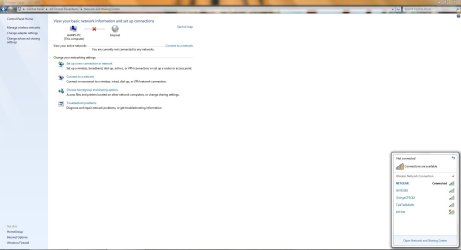
I came home this weekend where I use a wireless connection, and the same problem is happening. Network and Sharing centre is saying I'm not connected to a network, and the Internet connection icon i the task bar has the wireless icon with the gold star on it showing there is networks available. If I click that, at the top it says "Not connected", but it shows my wireless connection and says "Connected" next to it. I still can't see computers on the network either.

I'm using Windows Firewall and Microsoft Security Essentials on Windows 7 Ultimate. My wireless adapter is an Abit AirPace, and my Ethernet port is an Nvidia nForce NIC. If I disable Windows Firewall, then I can see other computers on my network, but I guess that's because by default, whatver network it's set me on is set to "Public".

I've checked all the needed networking services are enabled and running, and tried resetting the firewall settings to default. When I came home as well, it was the first time this Windows installation has seen this wireless connection as well as I did a clean install while I was living away, and normally it should have come up saying a new network has been found etc and to choose either Home, Public or Work, but none of that came up when I connected.

Any help would be appreciated as it's annoying when I need to transfer files between my computer and netbook.
 

My Computer My Computer

At a glance

Windows 8.1 Pro x64Intel Core i7 4790k8GB Corsair Dominator 1600MHzMSI TwinFrozr GeForce GTX770
Computer type
PC/Desktop
Computer Manufacturer/Model Number
Custom Built
OS
Windows 8.1 Pro x64
CPU
Intel Core i7 4790k
Motherboard
MSI Z97S Krait Edition
Memory
8GB Corsair Dominator 1600MHz
Graphics Card(s)
MSI TwinFrozr GeForce GTX770
Sound Card
ASUS Xonar DX/XD 7.1
Monitor(s) Displays
Dell 24" S2409W + Dell 20" E207WFP
Screen Resolution
1920x1080 + 1680x1050
Hard Drives
1x 120GB OCZ Agility 3, 1x 750GB Western Digital Caviar Black, 1x 1TB Western Digital Caviar Blue
PSU
Corsair HX850 modular
Case
Fractal Design Define R4
Cooling
Corsair H60 w/ twin Corsair SP120 fans
Keyboard
Logitech G510S Keyboard
Mouse
Logitech G500S Laser Mouse
Internet Speed
40Mbps
Antivirus
Microsoft Security Essentials
Browser
Google Chrome
Other Info
LG Blu-Ray player
This is annoying me now, I've tried everything I know but nothing seems to work. I've looked on this forum and other forums and tried what's been recommended for similar problems but nothing seems to work.

This problem started a couple of months ago when I was living on my University campus. I had a wired Ethernet connection and one day Windows was saying I'm not connected to a network and I couldn't see anyone on the network and they couldn't see me. I thought this was just a problem with the Uni connection, so I left it for now.

I came home this weekend where I use a wireless connection, and the same problem is happening. Network and Sharing centre is saying I'm not connected to a network, and the Internet connection icon i the task bar has the wireless icon with the gold star on it showing there is networks available. If I click that, at the top it says "Not connected", but it shows my wireless connection and says "Connected" next to it. I still can't see computers on the network either.

I'm using Windows Firewall and Microsoft Security Essentials on Windows 7 Ultimate. My wireless adapter is an Abit AirPace, and my Ethernet port is an Nvidia nForce NIC. If I disable Windows Firewall, then I can see other computers on my network, but I guess that's because by default, whatver network it's set me on is set to "Public".

I've checked all the needed networking services are enabled and running, and tried resetting the firewall settings to default. When I came home as well, it was the first time this Windows installation has seen this wireless connection as well as I did a clean install while I was living away, and normally it should have come up saying a new network has been found etc and to choose either Home, Public or Work, but none of that came up when I connected.

Any help would be appreciated as it's annoying when I need to transfer files between my computer and netbook.


Are you running "homegroup" by chance?
 

My Computer My Computer

At a glance

Win 8 Release candidate 8400[email protected]4 gigsNvidia 9600M
Computer Manufacturer/Model Number
HP Pavillion dv-7 1005 Tx
OS
Win 8 Release candidate 8400
CPU
[email protected]
Memory
4 gigs
Graphics Card(s)
Nvidia 9600M
Sound Card
HD built-in
Monitor(s) Displays
17" Wxga
Screen Resolution
1440x900
Cooling
none
Internet Speed
45Mb down 5Mb up
Homegroup is running, but I'm not connected to it. If I click "choose homegroup" in Network and Sharing centre, it says "The computer cannot connect to a homegroup" and says I need to connect to an existing network.
 

My Computer My Computer

At a glance

Windows 8.1 Pro x64Intel Core i7 4790k8GB Corsair Dominator 1600MHzMSI TwinFrozr GeForce GTX770
Computer type
PC/Desktop
Computer Manufacturer/Model Number
Custom Built
OS
Windows 8.1 Pro x64
CPU
Intel Core i7 4790k
Motherboard
MSI Z97S Krait Edition
Memory
8GB Corsair Dominator 1600MHz
Graphics Card(s)
MSI TwinFrozr GeForce GTX770
Sound Card
ASUS Xonar DX/XD 7.1
Monitor(s) Displays
Dell 24" S2409W + Dell 20" E207WFP
Screen Resolution
1920x1080 + 1680x1050
Hard Drives
1x 120GB OCZ Agility 3, 1x 750GB Western Digital Caviar Black, 1x 1TB Western Digital Caviar Blue
PSU
Corsair HX850 modular
Case
Fractal Design Define R4
Cooling
Corsair H60 w/ twin Corsair SP120 fans
Keyboard
Logitech G510S Keyboard
Mouse
Logitech G500S Laser Mouse
Internet Speed
40Mbps
Antivirus
Microsoft Security Essentials
Browser
Google Chrome
Other Info
LG Blu-Ray player
Change the network settings to Home Network and see if that helps.
 

My Computer My Computer

At a glance

Windows 7 Enterprise (x64); Windows Server 20...16GB
Computer type
PC/Desktop
Computer Manufacturer/Model Number
Dell OP7010
OS
Windows 7 Enterprise (x64); Windows Server 2008 R2 (x64)
Memory
16GB
Monitor(s) Displays
4 Dell 24" LCD
Screen Resolution
1280x1024
Keyboard
Dell
Mouse
Dell Optical
Internet Speed
40meg
Homegroup is running, but I'm not connected to it. If I click "choose homegroup" in Network and Sharing centre, it says "The computer cannot connect to a homegroup" and says I need to connect to an existing network.


Harry

I am thinking it might be IPv6. can you run ipconfig /all and upload a screen shot? IPv6 in homegroup especially can have connectiviity issue on some systems. Especially if there are non win 7 machines.

Ken
 

My Computer My Computer

At a glance

Win 8 Release candidate 8400[email protected]4 gigsNvidia 9600M
Computer Manufacturer/Model Number
HP Pavillion dv-7 1005 Tx
OS
Win 8 Release candidate 8400
CPU
[email protected]
Memory
4 gigs
Graphics Card(s)
Nvidia 9600M
Sound Card
HD built-in
Monitor(s) Displays
17" Wxga
Screen Resolution
1440x900
Cooling
none
Internet Speed
45Mb down 5Mb up
Change the network settings to Home Network and see if that helps.

I've tried setting the default setting for unidentified networks to be Home Networks, but that doesn't make a difference.

Here's what I see in Network and Sharing centre, notice the bottom right where it shows I'm connected to a network, but Windows says I'm not.

nands.jpg
 

My Computer My Computer

At a glance

Windows 8.1 Pro x64Intel Core i7 4790k8GB Corsair Dominator 1600MHzMSI TwinFrozr GeForce GTX770
Computer type
PC/Desktop
Computer Manufacturer/Model Number
Custom Built
OS
Windows 8.1 Pro x64
CPU
Intel Core i7 4790k
Motherboard
MSI Z97S Krait Edition
Memory
8GB Corsair Dominator 1600MHz
Graphics Card(s)
MSI TwinFrozr GeForce GTX770
Sound Card
ASUS Xonar DX/XD 7.1
Monitor(s) Displays
Dell 24" S2409W + Dell 20" E207WFP
Screen Resolution
1920x1080 + 1680x1050
Hard Drives
1x 120GB OCZ Agility 3, 1x 750GB Western Digital Caviar Black, 1x 1TB Western Digital Caviar Blue
PSU
Corsair HX850 modular
Case
Fractal Design Define R4
Cooling
Corsair H60 w/ twin Corsair SP120 fans
Keyboard
Logitech G510S Keyboard
Mouse
Logitech G500S Laser Mouse
Internet Speed
40Mbps
Antivirus
Microsoft Security Essentials
Browser
Google Chrome
Other Info
LG Blu-Ray player
Homegroup is running, but I'm not connected to it. If I click "choose homegroup" in Network and Sharing centre, it says "The computer cannot connect to a homegroup" and says I need to connect to an existing network.


Harry

I am thinking it might be IPv6. can you run ipconfig /all and upload a screen shot? IPv6 in homegroup especially can have connectiviity issue on some systems. Especially if there are non win 7 machines.

Ken

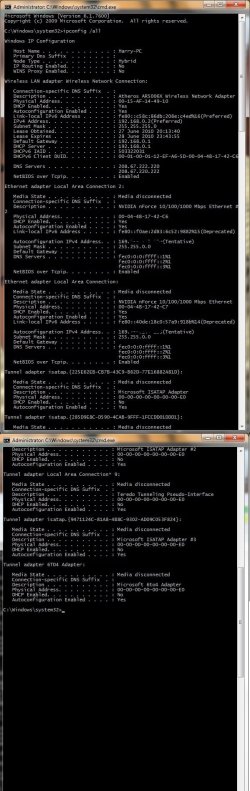
Here's my ipconfig. There is a laptop that connects to the wireless network that is running XP.

ipv6.jpg
 

My Computer My Computer

At a glance

Windows 8.1 Pro x64Intel Core i7 4790k8GB Corsair Dominator 1600MHzMSI TwinFrozr GeForce GTX770
Computer type
PC/Desktop
Computer Manufacturer/Model Number
Custom Built
OS
Windows 8.1 Pro x64
CPU
Intel Core i7 4790k
Motherboard
MSI Z97S Krait Edition
Memory
8GB Corsair Dominator 1600MHz
Graphics Card(s)
MSI TwinFrozr GeForce GTX770
Sound Card
ASUS Xonar DX/XD 7.1
Monitor(s) Displays
Dell 24" S2409W + Dell 20" E207WFP
Screen Resolution
1920x1080 + 1680x1050
Hard Drives
1x 120GB OCZ Agility 3, 1x 750GB Western Digital Caviar Black, 1x 1TB Western Digital Caviar Blue
PSU
Corsair HX850 modular
Case
Fractal Design Define R4
Cooling
Corsair H60 w/ twin Corsair SP120 fans
Keyboard
Logitech G510S Keyboard
Mouse
Logitech G500S Laser Mouse
Internet Speed
40Mbps
Antivirus
Microsoft Security Essentials
Browser
Google Chrome
Other Info
LG Blu-Ray player
Back
Top