
Changing system partition

xDinichx

New member
Hello!
I have two disks
C: - Windows XP
D: - Windows 7

I want to format XP so I can use only partition with 7 on it. I can't do it 'cause C: is system partition. Can I do something about it?

Note that this is all on a netbook so i run installation from another partition (E:)
 

My Computer

OS
Windows 7 build 7137
CPU
Intel Core duo 2 2.0ghz
Motherboard
MSI
Memory
3GB DDR2 Kingston
Graphics Card(s)
GF 9500GT 512 mb DDR3
Monitor(s) Displays
Philips 19V
Hard Drives
160GB SATA
40GB ATA
EXt 250GB SATA
I "believe" you could delete C, use a partitioning tool like PartedMagic to resize D to the entire disk, and then run a startup repair on Windows 7 to make it bootable.
 

My Computer

OS
Windows 7 Ultimate x64 SP1
CPU
Intel Core i7-2600
Motherboard
Gigabyte GA-P67A-UD3P-B3
Memory
12 GB Patriot Extreme DDR3-1333
Graphics Card(s)
Nvidia GTX 470
Monitor(s) Displays
Dell UltraSharp 2209WA
Hard Drives
OCZ Agility3 240 GB, WD5001AALS, WD7501AALS
PSU
OCZ ModStream 700W
Case
CoolerMaster HAF 912 Advanced
Cooling
CoolerMaster Hyper 212 Plus
I "believe" you could delete C, use a partitioning tool like PartedMagic to resize D to the entire disk, and then run a startup repair on Windows 7 to make it bootable.

That would delete the boot files.
 

My Computer

OS
ME/XP/Vista/Win7
That would delete the boot files.
Yes, but then the Startup Repair should put them back onto the Windows 7 partition, making that bootable.
 

My Computer

OS
Windows 7 Ultimate x64 SP1
CPU
Intel Core i7-2600
Motherboard
Gigabyte GA-P67A-UD3P-B3
Memory
12 GB Patriot Extreme DDR3-1333
Graphics Card(s)
Nvidia GTX 470
Monitor(s) Displays
Dell UltraSharp 2209WA
Hard Drives
OCZ Agility3 240 GB, WD5001AALS, WD7501AALS
PSU
OCZ ModStream 700W
Case
CoolerMaster HAF 912 Advanced
Cooling
CoolerMaster Hyper 212 Plus
I'll try to make iso from installation files, make bootable usb and post something here :D
 

My Computer

OS
Windows 7 build 7137
CPU
Intel Core duo 2 2.0ghz
Motherboard
MSI
Memory
3GB DDR2 Kingston
Graphics Card(s)
GF 9500GT 512 mb DDR3
Monitor(s) Displays
Philips 19V
Hard Drives
160GB SATA
40GB ATA
EXt 250GB SATA
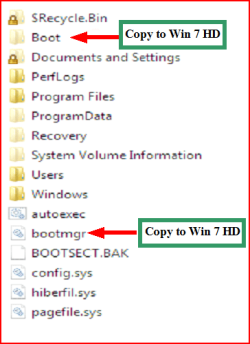
No files to repair, there deleted.
Do you understand the process I'm suggesting, or have you ever done a startup repair before?

Yes, the startup files will be deleted once C is deleted...but the startup repair makes the former D drive bootable by adding/replacing the necessary boot files. That's why it is called the startup repair....because it takes a non-booting partition, and makes it bootable. This is very common for people wanting to undo a dual-boot and make the system run one and only one OS.
 

My Computer

OS
Windows 7 Ultimate x64 SP1
CPU
Intel Core i7-2600
Motherboard
Gigabyte GA-P67A-UD3P-B3
Memory
12 GB Patriot Extreme DDR3-1333
Graphics Card(s)
Nvidia GTX 470
Monitor(s) Displays
Dell UltraSharp 2209WA
Hard Drives
OCZ Agility3 240 GB, WD5001AALS, WD7501AALS
PSU
OCZ ModStream 700W
Case
CoolerMaster HAF 912 Advanced
Cooling
CoolerMaster Hyper 212 Plus

My Computer

OS
Windows 7 Ultimate x64 SP1
CPU
Intel Core i7-2600
Motherboard
Gigabyte GA-P67A-UD3P-B3
Memory
12 GB Patriot Extreme DDR3-1333
Graphics Card(s)
Nvidia GTX 470
Monitor(s) Displays
Dell UltraSharp 2209WA
Hard Drives
OCZ Agility3 240 GB, WD5001AALS, WD7501AALS
PSU
OCZ ModStream 700W
Case
CoolerMaster HAF 912 Advanced
Cooling
CoolerMaster Hyper 212 Plus
Yea but to make USB i need iso and all I have are files from DVD...
 

My Computer

OS
Windows 7 build 7137
CPU
Intel Core duo 2 2.0ghz
Motherboard
MSI
Memory
3GB DDR2 Kingston
Graphics Card(s)
GF 9500GT 512 mb DDR3
Monitor(s) Displays
Philips 19V
Hard Drives
160GB SATA
40GB ATA
EXt 250GB SATA
I thought that was the tool MS offered for those who downloaded just the install files, and needed to turn them into the .iso file. I thought it pulled in those files and gave you a choice to output to .iso or to a USB drive.
 

My Computer

OS
Windows 7 Ultimate x64 SP1
CPU
Intel Core i7-2600
Motherboard
Gigabyte GA-P67A-UD3P-B3
Memory
12 GB Patriot Extreme DDR3-1333
Graphics Card(s)
Nvidia GTX 470
Monitor(s) Displays
Dell UltraSharp 2209WA
Hard Drives
OCZ Agility3 240 GB, WD5001AALS, WD7501AALS
PSU
OCZ ModStream 700W
Case
CoolerMaster HAF 912 Advanced
Cooling
CoolerMaster Hyper 212 Plus
Hello xDinichx.


If you want to delete XP and just run Windows 7?

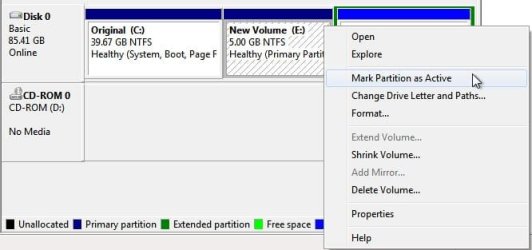
You will need to mark the D: as "Active" in disk management as I have E:, right click and select "Mark as Active" then you will need to run at least 3 separate startup repairs with re-starts between the repairs; have a look at the tutorial at the link below. Then you can delete XP if you want.

How to Run a Startup Repair in Windows 7
click image to enlarge
Active.JPG
 

My Computer

Computer Manufacturer/Model Number
* BFK Customs *
OS
W 7 64-bit Ultimate
CPU
Intel Q9550 Yorkfield
Motherboard
ASUS P5Q Pro
Memory
8GB Dominator 8500C5D
Graphics Card(s)
ATI : XFX 5870
Sound Card
Realtek HD Audio 7-1
Monitor(s) Displays
1x 47" LCD HDMI & 3x 26" LCD HDMI
Screen Resolution
1920x1080P & 1920x1200
Hard Drives
1x 80GB Intel X25-M G2 SSD : 1x 500GB & 1x 640GB WD Caviar Black(s)
PSU
Corsair 620HX
Case
Cooler Master RC-690
Cooling
Tuniq Tower 120, 2x 140mm and 3x 120mm case fans
Keyboard
Microsoft 500
Mouse
Razer Diamondback 3G
Internet Speed
14 Mb/s
Other Info
1x Koutech 3Gb/s SATA HDD Hot Swap Rack
Sorry on DP. I made and .iso file which I put on the USB with that tool you gave me and now the installation is working fine so far. If I find some errors or questions I'll post it here :D

Thank you again. Dino
 

My Computer

OS
Windows 7 build 7137
CPU
Intel Core duo 2 2.0ghz
Motherboard
MSI
Memory
3GB DDR2 Kingston
Graphics Card(s)
GF 9500GT 512 mb DDR3
Monitor(s) Displays
Philips 19V
Hard Drives
160GB SATA
40GB ATA
EXt 250GB SATA
MS made good on not providing ISO downloads here: Microsoft Fixes Windows 7 Student Edition Upgrade Problems

You can unlock all versions in the ISO using this tool: http://lifehacker.com/5438005/eicfg...-use-any-product-key-with-your-windows-7-disc

However to recover the MBR into Win7 so you can start it without XP, you only need a Repair CD: http://www.sevenforums.com/tutorials/2083-system-repair-disc-create.html

The procedure is to mark Win7 Active from XP disk management, or using DISKPART from the DVD Repair console or Repair CD: http://www.sevenforums.com/tutorials/71432-partition-mark-active.html

Next power down to unplug XP HD, change its cable to or set Win7 HD as first HD to boot in BIOS setup (after DVD drive), Boot the DVD Repair console or Repair CD, click through to Recovery Tools list to run Startup Repair up to 3 separate times with reboots until Win7 starts.
 
I ran clean installation with no problems :D thanks...
 

My Computer

OS
Windows 7 build 7137
CPU
Intel Core duo 2 2.0ghz
Motherboard
MSI
Memory
3GB DDR2 Kingston
Graphics Card(s)
GF 9500GT 512 mb DDR3
Monitor(s) Displays
Philips 19V
Hard Drives
160GB SATA
40GB ATA
EXt 250GB SATA
Hello again xDinichx.


Glad you found a solution that worked for you; thanks for the update.
 

My Computer

Computer Manufacturer/Model Number
* BFK Customs *
OS
W 7 64-bit Ultimate
CPU
Intel Q9550 Yorkfield
Motherboard
ASUS P5Q Pro
Memory
8GB Dominator 8500C5D
Graphics Card(s)
ATI : XFX 5870
Sound Card
Realtek HD Audio 7-1
Monitor(s) Displays
1x 47" LCD HDMI & 3x 26" LCD HDMI
Screen Resolution
1920x1080P & 1920x1200
Hard Drives
1x 80GB Intel X25-M G2 SSD : 1x 500GB & 1x 640GB WD Caviar Black(s)
PSU
Corsair 620HX
Case
Cooler Master RC-690
Cooling
Tuniq Tower 120, 2x 140mm and 3x 120mm case fans
Keyboard
Microsoft 500
Mouse
Razer Diamondback 3G
Internet Speed
14 Mb/s
Other Info
1x Koutech 3Gb/s SATA HDD Hot Swap Rack
Back
Top