

Hello all, went through every post in this tread looking for answers (and because I wanted MORE gadgets, lol). There were older posts I didn't want to bump. 1st one people didn't know reason for problem, and 2nd one people didn't have answer to fix (if possible:
http://www.sevenforums.com/gadgets/27919-problem-few-desktop-gadgets-pink-outline.html
http://www.sevenforums.com/gadgets/22879-gadget-windows-7-dpi.html
Now the guy in the 2nd post has it right. on SOME gadgets, a custom DPI (anything over 100%, even 101%) causes a pink outline, or sometimes just the corners on rounded gadgets.
My desktop, at 113%
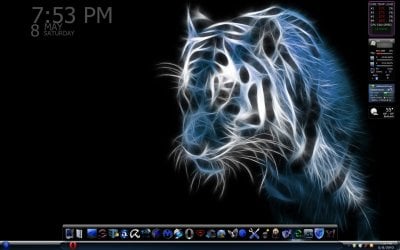
At 100%
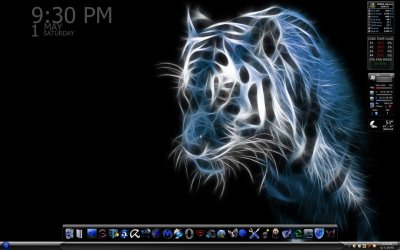
As you can see only the HWMonitor gadget displays like this. I'd love for it to display as it does at 100%, but would rather have my 113% for readability on this 1920 x 1200 desktop. And this gadget is customizable for text size, placement, and color, etc.
So, I know what causes it...now how can I fix it? I know sergiogarcia9 has posted gadgets, and see his name here, and am hoping he, or someone, anyone knows how to alter files, how, etc., or...?
I'm going to post the same thing at Virtual Customs so Mark and the others can have a go at this question too. I'll share any answers, thoughts between the two, if any.
Thanks in advance, hoping for any help, and also any tute for altering gadgets in general, if possible. A Guy
http://www.sevenforums.com/gadgets/27919-problem-few-desktop-gadgets-pink-outline.html
http://www.sevenforums.com/gadgets/22879-gadget-windows-7-dpi.html
Now the guy in the 2nd post has it right. on SOME gadgets, a custom DPI (anything over 100%, even 101%) causes a pink outline, or sometimes just the corners on rounded gadgets.
My desktop, at 113%
At 100%
As you can see only the HWMonitor gadget displays like this. I'd love for it to display as it does at 100%, but would rather have my 113% for readability on this 1920 x 1200 desktop. And this gadget is customizable for text size, placement, and color, etc.
So, I know what causes it...now how can I fix it? I know sergiogarcia9 has posted gadgets, and see his name here, and am hoping he, or someone, anyone knows how to alter files, how, etc., or...?
I'm going to post the same thing at Virtual Customs so Mark and the others can have a go at this question too. I'll share any answers, thoughts between the two, if any.
Thanks in advance, hoping for any help, and also any tute for altering gadgets in general, if possible. A Guy
My Computer
At a glance
Windows 10 Home x64INTEL Core i5-750 Quad-Core 3.37GHzHyperX Fury Black Series 8GB (2 x 4GB) 1866MhzEVGA GeForce GTX 750 Superclocked 1GB 128-Bit...
- Computer type
- PC/Desktop
- OS
- Windows 10 Home x64
- CPU
- INTEL Core i5-750 Quad-Core 3.37GHz
- Motherboard
- ASUS P7P55D
- Memory
- HyperX Fury Black Series 8GB (2 x 4GB) 1866Mhz
- Graphics Card(s)
- EVGA GeForce GTX 750 Superclocked 1GB 128-Bit GDDR5
- Monitor(s) Displays
- LG 32MA68HY 32" IPS
- Screen Resolution
- 1920 x 1080
- Hard Drives
- Samsung 840 Evo 120GB, SEAGATE 500GB Barracuda® 7200.12, SATA 3 Gb/s, 7200 RPM, 16MB cache
- PSU
- ANTEC TruePower New TP-550, 80 PLUS, 550W
- Case
- ANTEC Three Hundred Illusion
- Cooling
- COOLER MASTER Hyper 212 Plus, 4 x 120mm 1 x 140mm Noctua's
- Internet Speed
- 85 + Mbps
- Antivirus
- Avast
- Browser
- Vivaldi
 Could you please give a link here?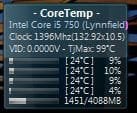

 . Thanks for the info, it does indeed go away at 125. Looks like some gagdets are designed for the various default settings, but not custom settings. Interesting. Thanks again. A Guy