Removing Glass effect and blur from taksbar?

etern1ty

New member
Local time
8:33 PM
Messages
10
Hi,

im currently running the clearscreen sharp theme by k-johnson and was wondering if i decided to make my own, is it possible to remove the white lines u see behind the taskbar and the blur aswell? ive used the utilities which removes blur from the whole theme such as behind the close buttons etc but its too difficult to read with more than one window open.

i plan on making the taskbar look sort of like a dock.. but id want to remove the background, the white lines and the blur so it doesnt look weird where the spaces between the start button and time etc are.
 

My Computer My Computer

At a glance

Windows 7Intel Core 2 Quad Q6600 @ 2.4ghz4GB DDR2 800mhznVidia 8800GT
Computer Manufacturer/Model Number
Home Built
OS
Windows 7
CPU
Intel Core 2 Quad Q6600 @ 2.4ghz
Motherboard
Gigabyte P35-DQ6
Memory
4GB DDR2 800mhz
Graphics Card(s)
nVidia 8800GT
Sound Card
ALC889A
Monitor(s) Displays
MAG 19" widescreen
Hard Drives
500gb, 250gb, 80gb, 1TB external
PSU
550W
Case
Antec 900
Cooling
Asus Tower
I don't think there's any way to clear blur on the taskbar alone, ie leaving other parts of the system unaffected. The 'white lines' can be removed though it's not a straightforward procedure and will require the use of Style Builder (sadly not free!)
 

My Computer My Computer

At a glance

Windows 7
OS
Windows 7

Attachments

My Computer My Computer

At a glance

Windows 7 Enterprise 64-bitAMD Phenom II X4 3.0GHz8GB G-Skill Ripjaws DDR3 1333PNY GeForce 460 GTX 1GB OC - Enthusiast Edition
OS
Windows 7 Enterprise 64-bit
CPU
AMD Phenom II X4 3.0GHz
Motherboard
ASUS M5A97
Memory
8GB G-Skill Ripjaws DDR3 1333
Graphics Card(s)
PNY GeForce 460 GTX 1GB OC - Enthusiast Edition
Sound Card
VIA High Definition Audio
Monitor(s) Displays
Dell 19"
Screen Resolution
1280x1024
Hard Drives
1TB - Primary
160GB - Secondary
250GB - External backup for important files
PSU
OCZ Fata1ty 700W Modular PSU
Case
ASUS
Keyboard
Microsoft Wireless Keyboard 2000
Mouse
Microsoft Wireless Mouse 2000
Internet Speed
3 Mbps/768 kbps

My Computer My Computer

At a glance

Microsoft Windows 10 Pro Insider Preview 64-bitIntel(R) Core(TM) i3-4130 CPU @ 3.40GHzCorsair Vengence 4GB x2 (8.00GB Dual-Channel ...2047MB GeForce GTS 450 (ZOTAC International)
Computer type
PC/Desktop
Computer Manufacturer/Model Number
Self Assembled
OS
Microsoft Windows 10 Pro Insider Preview 64-bit
CPU
Intel(R) Core(TM) i3-4130 CPU @ 3.40GHz
Motherboard
Gigabyte Technology Co., Ltd. B85M-D3H
Memory
Corsair Vengence 4GB x2 (8.00GB Dual-Channel DDR3 @ 798MHz)
Graphics Card(s)
2047MB GeForce GTS 450 (ZOTAC International)
Sound Card
Onboard (Realtek High Definition Audio)
Monitor(s) Displays
LG Flatron E2040T
Screen Resolution
1600x900
Hard Drives
Western Digital 1 TB
Seagate 500 GB
PSU
Corsair VS550
Case
Cooler Master K380
Cooling
Cooler Master Seidon 120V Plus
Keyboard
Logitech MK260r
Mouse
Logitech MK260r
Internet Speed
PMPL Broadband
Antivirus
Windows Defender + MBAM
Browser
Firefox
Other Info
Dell Studio 15" Laptop
hmm okay, thanks for the replies; ill try out those two programs =]

@dunfiddlin, is there a post that kinda walks you through using style builder to remove the white line things?
 

My Computer My Computer

At a glance

Windows 7Intel Core 2 Quad Q6600 @ 2.4ghz4GB DDR2 800mhznVidia 8800GT
Computer Manufacturer/Model Number
Home Built
OS
Windows 7
CPU
Intel Core 2 Quad Q6600 @ 2.4ghz
Motherboard
Gigabyte P35-DQ6
Memory
4GB DDR2 800mhz
Graphics Card(s)
nVidia 8800GT
Sound Card
ALC889A
Monitor(s) Displays
MAG 19" widescreen
Hard Drives
500gb, 250gb, 80gb, 1TB external
PSU
550W
Case
Antec 900
Cooling
Asus Tower
hmm okay, thanks for the replies; ill try out those two programs =]

@dunfiddlin, is there a post that kinda walks you through using style builder to remove the white line things?
You are welcome, pal :D Hope your mission will be successfully accomplished :p

And if you want some help ith style builder, there is a forum in style builders website, you may go there . In seven forums, still there is no such style builder help section :o
 

My Computer My Computer

At a glance

Microsoft Windows 10 Pro Insider Preview 64-bitIntel(R) Core(TM) i3-4130 CPU @ 3.40GHzCorsair Vengence 4GB x2 (8.00GB Dual-Channel ...2047MB GeForce GTS 450 (ZOTAC International)
Computer type
PC/Desktop
Computer Manufacturer/Model Number
Self Assembled
OS
Microsoft Windows 10 Pro Insider Preview 64-bit
CPU
Intel(R) Core(TM) i3-4130 CPU @ 3.40GHz
Motherboard
Gigabyte Technology Co., Ltd. B85M-D3H
Memory
Corsair Vengence 4GB x2 (8.00GB Dual-Channel DDR3 @ 798MHz)
Graphics Card(s)
2047MB GeForce GTS 450 (ZOTAC International)
Sound Card
Onboard (Realtek High Definition Audio)
Monitor(s) Displays
LG Flatron E2040T
Screen Resolution
1600x900
Hard Drives
Western Digital 1 TB
Seagate 500 GB
PSU
Corsair VS550
Case
Cooler Master K380
Cooling
Cooler Master Seidon 120V Plus
Keyboard
Logitech MK260r
Mouse
Logitech MK260r
Internet Speed
PMPL Broadband
Antivirus
Windows Defender + MBAM
Browser
Firefox
Other Info
Dell Studio 15" Laptop
cheers for the fast reply, im on the vista style builders forum atm haha trying to browse to find out how to remove those white lines but not sure what theyre called >< once i figure out how to mod itll post a screenie of my final work haha =D
 

My Computer My Computer

At a glance

Windows 7Intel Core 2 Quad Q6600 @ 2.4ghz4GB DDR2 800mhznVidia 8800GT
Computer Manufacturer/Model Number
Home Built
OS
Windows 7
CPU
Intel Core 2 Quad Q6600 @ 2.4ghz
Motherboard
Gigabyte P35-DQ6
Memory
4GB DDR2 800mhz
Graphics Card(s)
nVidia 8800GT
Sound Card
ALC889A
Monitor(s) Displays
MAG 19" widescreen
Hard Drives
500gb, 250gb, 80gb, 1TB external
PSU
550W
Case
Antec 900
Cooling
Asus Tower
Hi etern1ty ! I hope you bought Style Builder (coz there is no free trial). You get registered with the forums and ask the experts there how to do it with that tool. Actually the app is a bit difficult to use, and if you dont have any idea how to operate it ( sorry I dont know about you, as you are new here. You may have ample experience with that tool) there is a fare chance that everything is messed up.

But if you want to remove only blur from aero theme, both the tools posted by Product Fred and me are are efficient enough (and easy enough, too) to do it.
 

My Computer My Computer

At a glance

Microsoft Windows 10 Pro Insider Preview 64-bitIntel(R) Core(TM) i3-4130 CPU @ 3.40GHzCorsair Vengence 4GB x2 (8.00GB Dual-Channel ...2047MB GeForce GTS 450 (ZOTAC International)
Computer type
PC/Desktop
Computer Manufacturer/Model Number
Self Assembled
OS
Microsoft Windows 10 Pro Insider Preview 64-bit
CPU
Intel(R) Core(TM) i3-4130 CPU @ 3.40GHz
Motherboard
Gigabyte Technology Co., Ltd. B85M-D3H
Memory
Corsair Vengence 4GB x2 (8.00GB Dual-Channel DDR3 @ 798MHz)
Graphics Card(s)
2047MB GeForce GTS 450 (ZOTAC International)
Sound Card
Onboard (Realtek High Definition Audio)
Monitor(s) Displays
LG Flatron E2040T
Screen Resolution
1600x900
Hard Drives
Western Digital 1 TB
Seagate 500 GB
PSU
Corsair VS550
Case
Cooler Master K380
Cooling
Cooler Master Seidon 120V Plus
Keyboard
Logitech MK260r
Mouse
Logitech MK260r
Internet Speed
PMPL Broadband
Antivirus
Windows Defender + MBAM
Browser
Firefox
Other Info
Dell Studio 15" Laptop
hey arcs, thanks for the welcome :)

I did buy the style builder yes, haha im learning to use it, and i did just fix the issue with the white lines in the background, ill try those links posted above for the blur, though as it makes text hard to read, i might reconsider how id do my taskbar and make an appropriate image =]
 

My Computer My Computer

At a glance

Windows 7Intel Core 2 Quad Q6600 @ 2.4ghz4GB DDR2 800mhznVidia 8800GT
Computer Manufacturer/Model Number
Home Built
OS
Windows 7
CPU
Intel Core 2 Quad Q6600 @ 2.4ghz
Motherboard
Gigabyte P35-DQ6
Memory
4GB DDR2 800mhz
Graphics Card(s)
nVidia 8800GT
Sound Card
ALC889A
Monitor(s) Displays
MAG 19" widescreen
Hard Drives
500gb, 250gb, 80gb, 1TB external
PSU
550W
Case
Antec 900
Cooling
Asus Tower
So we are going ot have another theme maker among us :party:

Not simply welcome, pal !! You are most welcome :D Eagerly waiting to see the themes by you :D
 

My Computer My Computer

At a glance

Microsoft Windows 10 Pro Insider Preview 64-bitIntel(R) Core(TM) i3-4130 CPU @ 3.40GHzCorsair Vengence 4GB x2 (8.00GB Dual-Channel ...2047MB GeForce GTS 450 (ZOTAC International)
Computer type
PC/Desktop
Computer Manufacturer/Model Number
Self Assembled
OS
Microsoft Windows 10 Pro Insider Preview 64-bit
CPU
Intel(R) Core(TM) i3-4130 CPU @ 3.40GHz
Motherboard
Gigabyte Technology Co., Ltd. B85M-D3H
Memory
Corsair Vengence 4GB x2 (8.00GB Dual-Channel DDR3 @ 798MHz)
Graphics Card(s)
2047MB GeForce GTS 450 (ZOTAC International)
Sound Card
Onboard (Realtek High Definition Audio)
Monitor(s) Displays
LG Flatron E2040T
Screen Resolution
1600x900
Hard Drives
Western Digital 1 TB
Seagate 500 GB
PSU
Corsair VS550
Case
Cooler Master K380
Cooling
Cooler Master Seidon 120V Plus
Keyboard
Logitech MK260r
Mouse
Logitech MK260r
Internet Speed
PMPL Broadband
Antivirus
Windows Defender + MBAM
Browser
Firefox
Other Info
Dell Studio 15" Laptop
haha well, ill try my best at theme making.. i have some ideas but no way to really implement as my photoshop skills are below par =P and thanks for happy welcome :)

You know how to change the indicator images from the super bar, say when a program is open, and when it wants ur attention? ive got restorator i can use too considering im finding vsb hard to use.. its just a pain finding images with restorater haha
 

My Computer My Computer

At a glance

Windows 7Intel Core 2 Quad Q6600 @ 2.4ghz4GB DDR2 800mhznVidia 8800GT
Computer Manufacturer/Model Number
Home Built
OS
Windows 7
CPU
Intel Core 2 Quad Q6600 @ 2.4ghz
Motherboard
Gigabyte P35-DQ6
Memory
4GB DDR2 800mhz
Graphics Card(s)
nVidia 8800GT
Sound Card
ALC889A
Monitor(s) Displays
MAG 19" widescreen
Hard Drives
500gb, 250gb, 80gb, 1TB external
PSU
550W
Case
Antec 900
Cooling
Asus Tower
etern1ty;812204 You know how to change the indicator images from the super bar said:
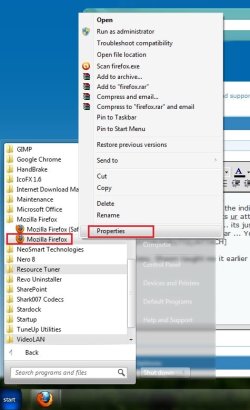
Easy, Shawn taught me it earlier. Suppose we are changing firefox icon (this)
Capture2.JPG
First , browse to firefox link in start menu, right click on it, and click properties
Untitled.jpg
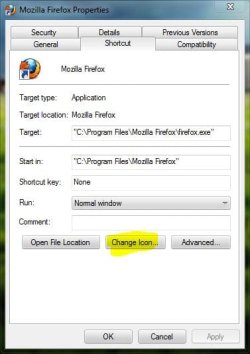
Now , click on change icon in properties window.
Capture3.JPG
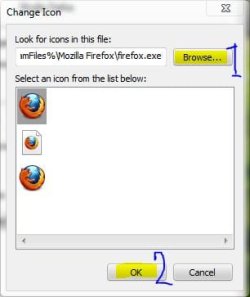
Browse to the location of the icon with which you are changing the existing icon, and when browsing is done, click on ok
Capture4.JPG
Now look at the properties window... icon is changed, click apply and then ok
Capture5.JPG
And you got this :D
Capture6.JPG

So nothing like restorator is needed at all. This program is needed to change system (windows ) icons. If you are eager to know it , you may cook below my sig :)
 

My Computer My Computer

At a glance

Microsoft Windows 10 Pro Insider Preview 64-bitIntel(R) Core(TM) i3-4130 CPU @ 3.40GHzCorsair Vengence 4GB x2 (8.00GB Dual-Channel ...2047MB GeForce GTS 450 (ZOTAC International)
Computer type
PC/Desktop
Computer Manufacturer/Model Number
Self Assembled
OS
Microsoft Windows 10 Pro Insider Preview 64-bit
CPU
Intel(R) Core(TM) i3-4130 CPU @ 3.40GHz
Motherboard
Gigabyte Technology Co., Ltd. B85M-D3H
Memory
Corsair Vengence 4GB x2 (8.00GB Dual-Channel DDR3 @ 798MHz)
Graphics Card(s)
2047MB GeForce GTS 450 (ZOTAC International)
Sound Card
Onboard (Realtek High Definition Audio)
Monitor(s) Displays
LG Flatron E2040T
Screen Resolution
1600x900
Hard Drives
Western Digital 1 TB
Seagate 500 GB
PSU
Corsair VS550
Case
Cooler Master K380
Cooling
Cooler Master Seidon 120V Plus
Keyboard
Logitech MK260r
Mouse
Logitech MK260r
Internet Speed
PMPL Broadband
Antivirus
Windows Defender + MBAM
Browser
Firefox
Other Info
Dell Studio 15" Laptop
hey, thanks for the awesome guide, helped me change my icons. some are stubborn and just dont change, but ill try my luck with icon packager ;D.

u know in the first pic that you uploaded, the gradient white behind the firefox icon? how would u change that image using either restorator or vsb? the explorer image that lets you know the program is running? i would like to change the images aswell, the ones that let you know if a program wants your attention and so it flashes etc. you know which i mean?
 

My Computer My Computer

At a glance

Windows 7Intel Core 2 Quad Q6600 @ 2.4ghz4GB DDR2 800mhznVidia 8800GT
Computer Manufacturer/Model Number
Home Built
OS
Windows 7
CPU
Intel Core 2 Quad Q6600 @ 2.4ghz
Motherboard
Gigabyte P35-DQ6
Memory
4GB DDR2 800mhz
Graphics Card(s)
nVidia 8800GT
Sound Card
ALC889A
Monitor(s) Displays
MAG 19" widescreen
Hard Drives
500gb, 250gb, 80gb, 1TB external
PSU
550W
Case
Antec 900
Cooling
Asus Tower

My Computer My Computer

At a glance

Microsoft Windows 10 Pro Insider Preview 64-bitIntel(R) Core(TM) i3-4130 CPU @ 3.40GHzCorsair Vengence 4GB x2 (8.00GB Dual-Channel ...2047MB GeForce GTS 450 (ZOTAC International)
Computer type
PC/Desktop
Computer Manufacturer/Model Number
Self Assembled
OS
Microsoft Windows 10 Pro Insider Preview 64-bit
CPU
Intel(R) Core(TM) i3-4130 CPU @ 3.40GHz
Motherboard
Gigabyte Technology Co., Ltd. B85M-D3H
Memory
Corsair Vengence 4GB x2 (8.00GB Dual-Channel DDR3 @ 798MHz)
Graphics Card(s)
2047MB GeForce GTS 450 (ZOTAC International)
Sound Card
Onboard (Realtek High Definition Audio)
Monitor(s) Displays
LG Flatron E2040T
Screen Resolution
1600x900
Hard Drives
Western Digital 1 TB
Seagate 500 GB
PSU
Corsair VS550
Case
Cooler Master K380
Cooling
Cooler Master Seidon 120V Plus
Keyboard
Logitech MK260r
Mouse
Logitech MK260r
Internet Speed
PMPL Broadband
Antivirus
Windows Defender + MBAM
Browser
Firefox
Other Info
Dell Studio 15" Laptop
haha dont worry, i know of the dangers with icon packager.. im using the latest build.. which actually is working fine with windows 7. i havent had any issues since its got support for it. but i always have a backup :)

and hmmm, well its a nice theme by ap-graphik but i wanna mod the one i have more for my tastes.. and learn how to do it so i can try make my own theme, i was just wondering if u knew how to change the actual graphics themselves, so that my taskbar is more unique to me.. like the icons that let u know when a program is active etc.

you know how to do that using wndows 7 style builder or restorator? =S

cheers =]
 

My Computer My Computer

At a glance

Windows 7Intel Core 2 Quad Q6600 @ 2.4ghz4GB DDR2 800mhznVidia 8800GT
Computer Manufacturer/Model Number
Home Built
OS
Windows 7
CPU
Intel Core 2 Quad Q6600 @ 2.4ghz
Motherboard
Gigabyte P35-DQ6
Memory
4GB DDR2 800mhz
Graphics Card(s)
nVidia 8800GT
Sound Card
ALC889A
Monitor(s) Displays
MAG 19" widescreen
Hard Drives
500gb, 250gb, 80gb, 1TB external
PSU
550W
Case
Antec 900
Cooling
Asus Tower
Among my friends, sergiogarcia9 and scoopeeedoo can make brilliant themes . Though there are others, too, like Mark, the Bull and Paulyog, but they are not as active as the first two nowadays . So I will suggest you to contact them . They, like all the other members of seven forums, are friendly and helpful. I hope they must guide you in using Style builder and Restorator .

I have tried the Style Builder thing once, but it needs too much concentration to manage all the parts properly :o So Stopped experimenting in that field .
 

My Computer My Computer

At a glance

Microsoft Windows 10 Pro Insider Preview 64-bitIntel(R) Core(TM) i3-4130 CPU @ 3.40GHzCorsair Vengence 4GB x2 (8.00GB Dual-Channel ...2047MB GeForce GTS 450 (ZOTAC International)
Computer type
PC/Desktop
Computer Manufacturer/Model Number
Self Assembled
OS
Microsoft Windows 10 Pro Insider Preview 64-bit
CPU
Intel(R) Core(TM) i3-4130 CPU @ 3.40GHz
Motherboard
Gigabyte Technology Co., Ltd. B85M-D3H
Memory
Corsair Vengence 4GB x2 (8.00GB Dual-Channel DDR3 @ 798MHz)
Graphics Card(s)
2047MB GeForce GTS 450 (ZOTAC International)
Sound Card
Onboard (Realtek High Definition Audio)
Monitor(s) Displays
LG Flatron E2040T
Screen Resolution
1600x900
Hard Drives
Western Digital 1 TB
Seagate 500 GB
PSU
Corsair VS550
Case
Cooler Master K380
Cooling
Cooler Master Seidon 120V Plus
Keyboard
Logitech MK260r
Mouse
Logitech MK260r
Internet Speed
PMPL Broadband
Antivirus
Windows Defender + MBAM
Browser
Firefox
Other Info
Dell Studio 15" Laptop
haha dont worry, i know of the dangers with icon packager.. im using the latest build.. which actually is working fine with windows 7. i havent had any issues since its got support for it. but i always have a backup :)

and hmmm, well its a nice theme by ap-graphik but i wanna mod the one i have more for my tastes.. and learn how to do it so i can try make my own theme, i was just wondering if u knew how to change the actual graphics themselves, so that my taskbar is more unique to me.. like the icons that let u know when a program is active etc.

you know how to do that using wndows 7 style builder or restorator? =S

cheers =]

With Windows Style Builder go to Taskbar & System Tray > TaskBand > Basic > TaskBand > TaskItemButton & edit the images(10) to your liking
Jerry
 

My Computer My Computer

At a glance

Win 7 Pro x64 / Win 10 ProIntel(R) Core(TM) i7-3630QM CPU @ 2.40GHz12 GB(1) Intel(R) HD Graphics 4000 (2) NVIDIA GeFo...
Computer type
Laptop
Computer Manufacturer/Model Number
Sager NP9170
OS
Win 7 Pro x64 / Win 10 Pro
CPU
Intel(R) Core(TM) i7-3630QM CPU @ 2.40GHz
Motherboard
CLEVO P170EM
Memory
12 GB
Graphics Card(s)
(1) Intel(R) HD Graphics 4000 (2) NVIDIA GeForce GTX 675M
Sound Card
(1) Realtek High Definition Audio (2) Intel(R) Display Aud
Monitor(s) Displays
17.3
Screen Resolution
1920x1080
Hard Drives
(1) Samsung 860 EVO 500GB(OS) (1) Samsung 860 EVO 500GB(Data)
Keyboard
Backlite
Antivirus
MSE, Malwarebytes Pro
Browser
Firefox
Other Info
DESKTOP: Custom-built.
OS: Win 10 Pro x64.
CASE: Rosewill R5.
CPU: Intel I5 4670K CPU @ 3.40GHz.
CPU COOLER: Cool Master Hyper 212 EVO.
MOTHERBOARD: Asus Z87-A.
MEMORY: Kingston HyperX 2x4 GB.
GPU: Nvidia Geforce 650 TI.
PSU: Corsair TX750.
DRIVES: (1) Samsung 840 120 GB SSD (2) Western Digital blue 500 GB 7200 RPM.
thanks for the reply mate, after looking through windows 7 style builder i didnt find the images u were referring to, although the rough images i need were in Windows 7> Taskbar & Tray Notifty> Basic> Taskbar> TaskItemButton etc

thanks =]
 

My Computer My Computer

At a glance

Windows 7Intel Core 2 Quad Q6600 @ 2.4ghz4GB DDR2 800mhznVidia 8800GT
Computer Manufacturer/Model Number
Home Built
OS
Windows 7
CPU
Intel Core 2 Quad Q6600 @ 2.4ghz
Motherboard
Gigabyte P35-DQ6
Memory
4GB DDR2 800mhz
Graphics Card(s)
nVidia 8800GT
Sound Card
ALC889A
Monitor(s) Displays
MAG 19" widescreen
Hard Drives
500gb, 250gb, 80gb, 1TB external
PSU
550W
Case
Antec 900
Cooling
Asus Tower
thanks for the reply mate, after looking through windows 7 style builder i didnt find the images u were referring to, although the rough images i need were in Windows 7> Taskbar & Tray Notifty> Basic> Taskbar> TaskItemButton etc

thanks =]

Are you using 1.4 I have 1.5 you should update it
 

My Computer My Computer

At a glance

Win 7 Pro x64 / Win 10 ProIntel(R) Core(TM) i7-3630QM CPU @ 2.40GHz12 GB(1) Intel(R) HD Graphics 4000 (2) NVIDIA GeFo...
Computer type
Laptop
Computer Manufacturer/Model Number
Sager NP9170
OS
Win 7 Pro x64 / Win 10 Pro
CPU
Intel(R) Core(TM) i7-3630QM CPU @ 2.40GHz
Motherboard
CLEVO P170EM
Memory
12 GB
Graphics Card(s)
(1) Intel(R) HD Graphics 4000 (2) NVIDIA GeForce GTX 675M
Sound Card
(1) Realtek High Definition Audio (2) Intel(R) Display Aud
Monitor(s) Displays
17.3
Screen Resolution
1920x1080
Hard Drives
(1) Samsung 860 EVO 500GB(OS) (1) Samsung 860 EVO 500GB(Data)
Keyboard
Backlite
Antivirus
MSE, Malwarebytes Pro
Browser
Firefox
Other Info
DESKTOP: Custom-built.
OS: Win 10 Pro x64.
CASE: Rosewill R5.
CPU: Intel I5 4670K CPU @ 3.40GHz.
CPU COOLER: Cool Master Hyper 212 EVO.
MOTHERBOARD: Asus Z87-A.
MEMORY: Kingston HyperX 2x4 GB.
GPU: Nvidia Geforce 650 TI.
PSU: Corsair TX750.
DRIVES: (1) Samsung 840 120 GB SSD (2) Western Digital blue 500 GB 7200 RPM.
yeah, im using 1.4 ill update it this arvo and see how i go, thnx =] is it possible to disable the colour overlay that windows does when u select an icon? like when it flashes yellow, or select an icon itll go with the highest percentage of colour seen in the icon?
 

My Computer My Computer

At a glance

Windows 7Intel Core 2 Quad Q6600 @ 2.4ghz4GB DDR2 800mhznVidia 8800GT
Computer Manufacturer/Model Number
Home Built
OS
Windows 7
CPU
Intel Core 2 Quad Q6600 @ 2.4ghz
Motherboard
Gigabyte P35-DQ6
Memory
4GB DDR2 800mhz
Graphics Card(s)
nVidia 8800GT
Sound Card
ALC889A
Monitor(s) Displays
MAG 19" widescreen
Hard Drives
500gb, 250gb, 80gb, 1TB external
PSU
550W
Case
Antec 900
Cooling
Asus Tower
Back
Top