
No Internet Access with WI-Fi

Dinesh

Wonder Man
Guru
Gold Member
SF Team
Local time
8:43 PM
Messages
8,471
Location
Mumbai, India
Hi, ever since I have setup a wifi router, the connection sometimes becomes intermittent. It happens only sometimes but its very frustrating.

The only way I could fix it is by restarting the computer or by disconnecting and reconnecting.
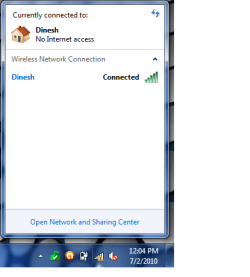
1.png

2.PNG


How do I fix this annoyance?


Dinesh.


P.S.: My internet works fine when I connect the LAN cable directly into the PC. So I know its not my ISP, its something to do with my router, I think.
 

My Computer My Computer

Computer Manufacturer/Model Number
Samsung NP530U4B-S02IN
OS
Windows® 8 Pro (64-bit)
CPU
Intel® Core™ i5 Processor 2467M (1.60GHz, 3MB L3 Cache)
Motherboard
Samsung Electronics
Memory
6GB DDR3 System Memory at 1,333MHz (on BD 4GB + 2GB x 1)
Graphics Card(s)
AMD Radeon™ HD7550M 1GB DDR3 (Ext. Graphic)
Sound Card
Realtek High Definition Audio
Monitor(s) Displays
35.56cm (14.0) SuperBright 300nit HD LED Display
Screen Resolution
1366x768
Hard Drives
1TB S-ATA II Hard Drive (5400RPM) with ExpressCache 16GB SSD
Internet Speed
sucks
Antivirus
Microsoft Security Essentials
Browser
Google Chrome (Sync enabled)
I would try resetting the router back to the Factory setting with the little pinhole button on it :) See if that works happened to me once and since I reset my router has been fine ever since :)


Steve
 

My Computer My Computer

Computer Manufacturer/Model Number
Over Clockers Ultima Viper 2.80Ghz
OS
Windows 7 Ultimate 64 - OEM Service Pack 1
CPU
Intel Core i7 930 2.80Ghz Bloomfield Socket LGA 1366
Motherboard
Gigabyte GA-X58A-UD3R Intel X58 Socket 1366 DDR3
Memory
Patriot Viper 6GB 3x2GB DDR3 PC3-1200C9 1600Mhz Tri Channel
Graphics Card(s)
Asus ATI Radeon HD 5770 CuCore 1024MB GDDR5 PCI Express
Sound Card
Realtek ALC889 @ Intel 82801JB ICH10 - High Definition Audio
Monitor(s) Displays
Samsung SyncMaster 920N 19"
Screen Resolution
1280*1024
Hard Drives
1 x OCZ Vertex2 Series 120GB 2.5" SATA-II SSD
1 x Seagate Barracuda 7200.12 1TB SATA-II 32MB Cache
1 x Western Digital Caviar Green 2TB SATA-II 64 MB Cache
PSU
Corsair TX 650W ATX SLi
Case
Antec 902 Ultimate Gaming Case Black
Cooling
Prolimatech Megahalems Rev B CPU Cooler Socket 775/1156/1366
Keyboard
Microsoft Comfort Curve Keyboard
Mouse
Microsoft Optical USB
Internet Speed
ADSL24 FTTC 34.2 Mbps Down 7.1Mbps Up
Other Info
OcUK 22x DVDSATA ReWriter Black
Akasa AK-FN058 Apache Black Super Silent 120mm Fan
Printer Epson Stylus Photo R300
Scanner Canon Canoscan 8000F
I would try resetting the router back to the Factory setting with the little pinhole button on it :) See if that works happened to me once and since I reset my router has been fine ever since :)


Steve

Hi Dinesh

You might want to backup your router settings before you reset it especially if you've set up security on it. I have done that so when I need to reset my router I can without having to re-setup my router. :)
 

My Computer My Computer

Computer Manufacturer/Model Number
ATX Custom Build 2012
OS
Windows 7 Enterprise x64 SP1
CPU
Intel Core i3-2100 @ 3.10GHz
Motherboard
Intel DH67CL desktop ATX
Memory
10 GB DDR3
Graphics Card(s)
Asus EAH5450 series (Radeon)
Monitor(s) Displays
Samsung SyncMaster 226BW, Samsung Syncmaster P2450H
Screen Resolution
226BW: 1680 x 1050 & P2450H: 1920 x 1080
Hard Drives
Western Digital 320 GB sata (boot), Samsung 640 GB sata, Seagate 2 TB sata (data)
PSU
Cooler Master Extreme Power Plus 500W
Case
Thermaltake V3 Black Edition
Cooling
stock cooling with added intake fan
Keyboard
HP Wireless Elite Keyboard Wireless Keyboard
Mouse
Microsoft Touch
Internet Speed
Comcast Cable business class <=18Mb {averages 12Mb}
Other Info
Optical drives: LG SuperMulti Blue, HP DVD 1260T
Other: Kensington Bluetooth Receiver
Network: Buffalo Wireless N USB, DLink N router/DLink Ethernet Switch/DLink Xtreme N wireless bridge
Printer: HP Photosmart Plus, HP Officejet Pro 8600 Plus
PCs: HP dv6-3040us (7 x64 SP1), HP DM4-2165dx (7 x64 SP1), HP Pavilion zv6130us (7 x86), Apple Macbook Air (Lion)
************
Hi, ever since I have setup a wifi router, the connection sometimes becomes intermittent. It happens only sometimes but its very frustrating.

The only way I could fix it is by restarting the computer or by disconnecting and reconnecting.
View attachment 82650

View attachment 82651


How do I fix this annoyance?


Dinesh.

P.S.: My internet works fine when I connect the LAN cable directly into the PC. So I know its not my ISP, its something to do with my router, I think.

I would first try using a different channel on the router. Channel 6 is default for most routers and you tend to get crosover when using that channel. Other than that resetting the router or updating the firmware will fix most other router problems you might be having. :)
 

My Computer My Computer

Computer type
PC/Desktop
Computer Manufacturer/Model Number
Home built
OS
Windows 7 Ult, Windows 8.1 Pro,
CPU
Q9650-4.275GHz, E8600 4.5GHz, E6750-3.8GHz
Motherboard
Evga 780i FTW
Memory
G.Skill PC2 9600 1200Mhz 5 5 5 15 2T
Graphics Card(s)
GTX480
Sound Card
Asus Xonar D2
Monitor(s) Displays
HannsG
Screen Resolution
1680X1050
Hard Drives
GSkill Phoenix Pro 120GB SSD
PSU
ThermalTake Toughpower 1000Watt modular
Case
ThermalTake XaserV
Cooling
Xigmatek S1283
Keyboard
Logitech G15
Mouse
Logitech G9
Internet Speed
T1
Ok I have resetted the router but I can't connect to Internet. I'm not sure what's wrong. Will be home in 2 hrs n will continue the troubleshooting.

Thanks for the suggestion guys. I hope it works. :)
 

My Computer My Computer

Computer Manufacturer/Model Number
Samsung NP530U4B-S02IN
OS
Windows® 8 Pro (64-bit)
CPU
Intel® Core™ i5 Processor 2467M (1.60GHz, 3MB L3 Cache)
Motherboard
Samsung Electronics
Memory
6GB DDR3 System Memory at 1,333MHz (on BD 4GB + 2GB x 1)
Graphics Card(s)
AMD Radeon™ HD7550M 1GB DDR3 (Ext. Graphic)
Sound Card
Realtek High Definition Audio
Monitor(s) Displays
35.56cm (14.0) SuperBright 300nit HD LED Display
Screen Resolution
1366x768
Hard Drives
1TB S-ATA II Hard Drive (5400RPM) with ExpressCache 16GB SSD
Internet Speed
sucks
Antivirus
Microsoft Security Essentials
Browser
Google Chrome (Sync enabled)
Ever since I have done a reset, its been working amazingly fast and constant. Thanks for the suggestion guys. The reset has worked. :)
 

My Computer My Computer

Computer Manufacturer/Model Number
Samsung NP530U4B-S02IN
OS
Windows® 8 Pro (64-bit)
CPU
Intel® Core™ i5 Processor 2467M (1.60GHz, 3MB L3 Cache)
Motherboard
Samsung Electronics
Memory
6GB DDR3 System Memory at 1,333MHz (on BD 4GB + 2GB x 1)
Graphics Card(s)
AMD Radeon™ HD7550M 1GB DDR3 (Ext. Graphic)
Sound Card
Realtek High Definition Audio
Monitor(s) Displays
35.56cm (14.0) SuperBright 300nit HD LED Display
Screen Resolution
1366x768
Hard Drives
1TB S-ATA II Hard Drive (5400RPM) with ExpressCache 16GB SSD
Internet Speed
sucks
Antivirus
Microsoft Security Essentials
Browser
Google Chrome (Sync enabled)
Sounds good Dinish, glad you got it working again.
 

My Computer My Computer

Computer type
PC/Desktop
Computer Manufacturer/Model Number
Home built
OS
Windows 7 Ult, Windows 8.1 Pro,
CPU
Q9650-4.275GHz, E8600 4.5GHz, E6750-3.8GHz
Motherboard
Evga 780i FTW
Memory
G.Skill PC2 9600 1200Mhz 5 5 5 15 2T
Graphics Card(s)
GTX480
Sound Card
Asus Xonar D2
Monitor(s) Displays
HannsG
Screen Resolution
1680X1050
Hard Drives
GSkill Phoenix Pro 120GB SSD
PSU
ThermalTake Toughpower 1000Watt modular
Case
ThermalTake XaserV
Cooling
Xigmatek S1283
Keyboard
Logitech G15
Mouse
Logitech G9
Internet Speed
T1
Back
Top