
Random periodical disconnection from internet.

NiaCat

New member
Local time
3:55 PM
Messages
4
I installed Windows 7 about 2 months ago, and since about 2-3 weeks ago my internet gets disrupted periodically.

Every now and then the internet drops and almost everything is disconnected (MSN, browser, etc) only to get reconnected immediately. This cuts me off almost every internet activity like streaming, download/uploading, and gaming. I live in a dorm and connect with a lan cable, through a proxy. But the internet connection itself is not the problem because I have checked everything I can check (I will explain in the following)

I don't know what's causing this, but I have narrowed it down considerably...
1. it's not the firewall, I tried turning it off.
2. it's not the antivirus programs, I tried uninstalling etc.
3. it's not viruses or malwares etc., I tried scanning with almost every scanner known.
4. It's not the cable, I tried changing it. Nor is it my connection because I had another computer use my connection and there weren't any problems.
5. It's not the drivers, I updated it.

I am out of ideas and I am not really looking forward to reinstalling Windows (which at this point is my remaining option I guess). Please help :(
 

My Computer My Computer

Computer Manufacturer/Model Number
HP G5060EO
OS
Windows 7
CPU
Intel T2130 dual processor 1.86GHz
Memory
2 Gigabytes
Graphics Card(s)
Mobile Intel 945 Express Chipset Family
I installed Windows 7 about 2 months ago, and since about 2-3 weeks ago my internet gets disrupted periodically.

Every now and then the internet drops and almost everything is disconnected (MSN, browser, etc) only to get reconnected immediately. This cuts me off almost every internet activity like streaming, download/uploading, and gaming. I live in a dorm and connect with a lan cable, through a proxy. But the internet connection itself is not the problem because I have checked everything I can check (I will explain in the following)

I don't know what's causing this, but I have narrowed it down considerably...
1. it's not the firewall, I tried turning it off.
2. it's not the antivirus programs, I tried uninstalling etc.
3. it's not viruses or malwares etc., I tried scanning with almost every scanner known.
4. It's not the cable, I tried changing it. Nor is it my connection because I had another computer use my connection and there weren't any problems.
5. It's not the drivers, I updated it.

I am out of ideas and I am not really looking forward to reinstalling Windows (which at this point is my remaining option I guess). Please help :(


Are you using homegroup, or workgroup for networking?


ken
 

My Computer My Computer

Computer Manufacturer/Model Number
HP Pavillion dv-7 1005 Tx
OS
Win 8 Release candidate 8400
CPU
[email protected]
Memory
4 gigs
Graphics Card(s)
Nvidia 9600M
Sound Card
HD built-in
Monitor(s) Displays
17" Wxga
Screen Resolution
1440x900
Cooling
none
Internet Speed
45Mb down 5Mb up
Hi, Ken...

I can never set up "home group" for some reason... If I try to create one it just asks me for a password and then says it's the wrong password (even though I never made any home group ever).
And the work group is set as home. I hope that's what you meant.

Thank you for replying.
 

My Computer My Computer

Computer Manufacturer/Model Number
HP G5060EO
OS
Windows 7
CPU
Intel T2130 dual processor 1.86GHz
Memory
2 Gigabytes
Graphics Card(s)
Mobile Intel 945 Express Chipset Family
Hi, Ken...

I can never set up "home group" for some reason... If I try to create one it just asks me for a password and then says it's the wrong password (even though I never made any home group ever).
And the work group is set as home. I hope that's what you meant.

Thank you for replying.

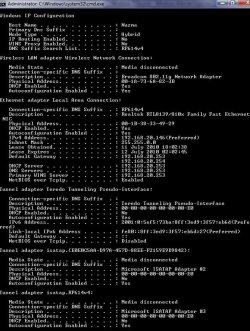
Yep can you do the following. type cmd in search>type ipconfig /all and upload it to us.


Ken
 

My Computer My Computer

Computer Manufacturer/Model Number
HP Pavillion dv-7 1005 Tx
OS
Win 8 Release candidate 8400
CPU
[email protected]
Memory
4 gigs
Graphics Card(s)
Nvidia 9600M
Sound Card
HD built-in
Monitor(s) Displays
17" Wxga
Screen Resolution
1440x900
Cooling
none
Internet Speed
45Mb down 5Mb up
Hi again. You mean like this?

attachment.php


Btw, i just turned off IPV 6 before this but it has no effect (just in case you wonder why it's disabled).
Thank you once again.
 

Attachments

  • IpconfigAll.jpg
    IpconfigAll.jpg
    97.6 KB · Views: 216

My Computer My Computer

Computer Manufacturer/Model Number
HP G5060EO
OS
Windows 7
CPU
Intel T2130 dual processor 1.86GHz
Memory
2 Gigabytes
Graphics Card(s)
Mobile Intel 945 Express Chipset Family
Great, now it's even becoming slower too, i can't even check my google mail account without 5-6 times erroring.
*sigh* what is wrong with my internet...
 

My Computer My Computer

Computer Manufacturer/Model Number
HP G5060EO
OS
Windows 7
CPU
Intel T2130 dual processor 1.86GHz
Memory
2 Gigabytes
Graphics Card(s)
Mobile Intel 945 Express Chipset Family
You have 2 default gateways.

Open a command prompt and type: ipconfig /release
Once it has return to the prompt type: ipconfig /renew

Then do an ipconfig /all and see if you have still have 2 default gateways. If so call whomever is responsible for the dorms networking and have them check the DHCP server as it is issueing 2 gateways. I am surprised you are getting any network at all.
 

My Computer My Computer

Computer Manufacturer/Model Number
Home Built
OS
Windows 7; Server 08; Window Home Server; Vista; XP
CPU
Intel E8400 @ 3.4Ghz
Motherboard
Gigabyte P35 DS3L
Memory
8 Gb Patriot DDr2 800
Graphics Card(s)
NVidia GTX460 OC
Sound Card
Onboard
Monitor(s) Displays
Samsung 21"
Screen Resolution
1920x1080
Hard Drives
Seagate 160Gb x2
Samsung 250Gb
PSU
Cooler Master 650w 52a on 12v
Case
Antec 300
Cooling
Stock
Keyboard
HP Standard USB
Mouse
Logitech 518
Internet Speed
25Mbit Down 1.5Mbit up
Other Info
http://www.speedtest.net/result/723924362.png
as haxcid says, it looks like you have 2 gateways, do you have more than 1 router by any chance?
 

My Computer My Computer

Computer type
PC/Desktop
Computer Manufacturer/Model Number
Medion Erazer (note to self: insert model number) - with custom additions
OS
Windows 10 Pro x64
CPU
Intel Core i5 7400 @ 3.00GHz
Motherboard
OEM supllied with PC
Memory
8GB 2133Mhz DDR4 (OEM supplied)
Graphics Card(s)
Gygabyte Windforce GTX 1050Ti (Factory Overclocked)
Sound Card
Realtek
Monitor(s) Displays
Acer Al1980 + HKC
Screen Resolution
1360*768(HKC) / 1280*1024(Acer)
Hard Drives
1TB Toshiba
1TB WD Caviar Green
120GB Samsung Evo 840
PSU
OEM supplied (no power rating on case)
Case
OEM Supplied
Cooling
Stock
Keyboard
Logitech Wireless
Mouse
Logitect Wireless
Internet Speed
40Mb/s Down 10Mb/s Up
Antivirus
Defender
Browser
Firefox
Back
Top