svchost.exe problem - not running any services

goluxor

New member
Local time
4:56 PM
Messages
6
I am running 32-bit Windows 7 Professional on my laptop [Core2Duo P9300; 2GB RAM] and everything was going smoothly up until yesterday when suddenly, the fan started to ramp up and continue blowing at startup (usually, when I press the power button, the fan will start, but then it'll die down by the time the OS boots up).

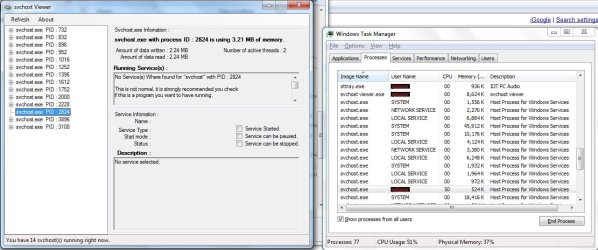
That's when I opened up Task Manager and noticed svchost.exe was using ~50 in the CPU column. I tried checking what services were running under it, but when I clicked "go to Services," no services were highlighted! What's even stranger is, under the "User Name" heading, instead of System, Local Service, or Network Service [like the other instances of svchost running], it just says my computer's name [for the purpose of privacy, we'll say my computer's name is goluxor].

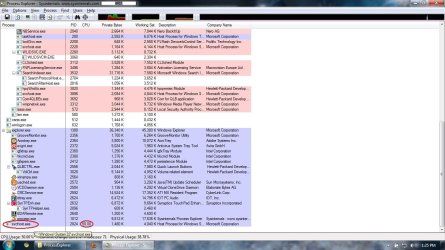
I then used Process Explorer to double check things [screenshot attached], and it also showed nothing was running under it.

svchost Viewer also yielded nothing. In fact, this is what it said verbatim:
No Service(s) Where [sic] found for "svchost" with PID :2824

This is not normal, it is strongly recommended you check
if this is a program you want to have running.

Command line used to start the process:
C:\Windows\system32\svchost.exe -k netsvcs

Path to the executable file:
C:\Windows\system32\svchost.exe

Description:
svchost.exe
On a lark, I decided to "end process" the errant svchost.exe, and that seems to have freed up my CPU and stopped my fan. However, upon restart, the same problems comes back. I've ran anti-viruses (Avast and Malwarebytes Anti-Malware), but they haven't picked anything up. My Windows Automatic Updater is also disabled. Now, I'm all out of ideas on what to do, and I hope y'all can help. Thanks.
 

Attachments

  • svchost_prob01.jpg
    svchost_prob01.jpg
    146.8 KB · Views: 209
  • svchost_prob02.jpg
    svchost_prob02.jpg
    112.4 KB · Views: 132

My Computer My Computer

OS
windows 7 pro

My Computer My Computer

Computer type
PC/Desktop
Computer Manufacturer/Model Number
Dell XPS 420
OS
Windows 10, Home Clean Install
CPU
Intel Core2 processsor Q8200(2.33Ghz 1333FSB) Quad Core Tech
Motherboard
Dell
Memory
6 gb
Graphics Card(s)
ATI Radeon 256MB HD3650
Sound Card
Intergrated 7.1 Channel Audio
Monitor(s) Displays
Dell SP2009W 20"
Hard Drives
640 GB Serial ATA Hard drive
Cooling
Fan
Keyboard
Dell USB Keyboard
Mouse
Dell Premium Optical USB
Internet Speed
DSL 2.85
Have you run an Anti-virus/malware scan, just to make sure you haven't picked something up?
 

My Computer My Computer

Computer type
PC/Desktop
Computer Manufacturer/Model Number
Bruce ... somewhere in his 40's
OS
Windows 7 Ultimate 32bit SP1
CPU
Intel(R) Core(TM)2 Quad CPU @ 2.40GHz, 2400 MHz
Motherboard
INTEL/D975XBX2
Memory
4 GB
Graphics Card(s)
ATI Radeon HD 2600 Pro
Monitor(s) Displays
Samsung SyncMaster 914v
Screen Resolution
1280 x 1024
Hard Drives
2/500GB each ... ST3500630AS ATA Device.
One is not connected
PSU
Rocketfish 700 W
Case
G.Skill Gigabyte Chassis
Keyboard
Standard PS/2 Keyboard
Mouse
Microsoft PS/2 Mouse
Internet Speed
DSL
Antivirus
Avira Internet Security
Browser
IE 11
Other Info
ATI HDMI Audio
Have you run an Anti-virus/malware scan, just to make sure you haven't picked something up?
Did that already. I've done some other things I also mentioned in my original post, but so far no progress. Hopefully y'all can suggest some stuff I haven't thought of yet. Thanks!
 

My Computer My Computer

OS
windows 7 pro

My Computer My Computer

Computer type
PC/Desktop
Computer Manufacturer/Model Number
Bruce ... somewhere in his 40's
OS
Windows 7 Ultimate 32bit SP1
CPU
Intel(R) Core(TM)2 Quad CPU @ 2.40GHz, 2400 MHz
Motherboard
INTEL/D975XBX2
Memory
4 GB
Graphics Card(s)
ATI Radeon HD 2600 Pro
Monitor(s) Displays
Samsung SyncMaster 914v
Screen Resolution
1280 x 1024
Hard Drives
2/500GB each ... ST3500630AS ATA Device.
One is not connected
PSU
Rocketfish 700 W
Case
G.Skill Gigabyte Chassis
Keyboard
Standard PS/2 Keyboard
Mouse
Microsoft PS/2 Mouse
Internet Speed
DSL
Antivirus
Avira Internet Security
Browser
IE 11
Other Info
ATI HDMI Audio
How about a system restore to before yesterday. This is an interesting problem. I have never seen a svchost.exe without an associated .dll.
 

My Computer My Computer

Computer Manufacturer/Model Number
HP, Dell, Gateway, Toshiba - 4 laptops and 2 desktops
OS
Vista, Windows7, Mint Mate, Zorin, Windows 8
CPU
from 1.6GHz Duo to i7
Monitor(s) Displays
2x HP w2207
Hard Drives
5x HDD, 7x SSD, 12x Externals
Keyboard
with trackball - no mices
Mouse
Trackball mice
Internet Speed
DSL 6000
Success! I tried my antivirus programs again after updating the definitions lists from yesterday and I seem to have caught a "Trojan.Dropper" named wwwbyh32.exe. Seems to be very new or very rare b/c Goggle turned up barely anything on it, but it seems to have fixed my problem as there is no longer a rogue svchost.exe and my CPU is now back to its old idling levels of single-digits.

Thanks Jacee for recommending another virus check. I didn't think there'd be a new definition for it so soon, but looks like there is.


How about a system restore to before yesterday. This is an interesting problem. I have never seen a svchost.exe without an associated .dll.
I actually considered doing that, but I found out my last system restore point was from last year (much too old for the programs I need to use). I'm not sure if I turned it off or something, but is it supposed to automatically come up with restore points or do I have to do it manually? Also, out of curiosity, since I use it so infrequently, is System Restore the same as "Backup and Restore?" Thanks!
 

My Computer My Computer

OS
windows 7 pro
Glad to hear it sounds like you've found the culprit and abolished it from your PC.

I just wanted to add and ask, when running Process Explorer, did you run it as an administrator?

Right click Procexp and choose run as admin, ...then click "yes" for the uac pop-up. It does make a difference in the amount of info shown.

Good Luck, and I hope the malware is gone for good.

BTW, I checked it at viruswatchlite (Kaspersky), and it didn't have it listed either so it does seem to be something new as there pretty good with tracking, listing, blocking malware. I entered the name of your offending malware into the filter and it came up with nothing. So glad you got it, good job. :cool:

Kaspersky Viruswatchlite
 

My Computer My Computer

Computer Manufacturer/Model Number
POS
OS
OS3.5
CPU
celery
Motherboard
Good Question ...Unknown
Memory
memory never forgets
Graphics Card(s)
OB
Sound Card
OB
Monitor(s) Displays
HUGE
Screen Resolution
168000000x105000000
Hard Drives
full
PSU
OEM 65watt
Case
N/A
Cooling
OB
Keyboard
OB
Mouse
mouse
Internet Speed
1 Trillion MBps
Other Info
Still An Awesome Forum!
Glad to hear it sounds like you've found the culprit and abolished it from your PC.

I just wanted to add and ask, when running Process Explorer, did you run it as an administrator?

Right click Procexp and choose run as admin, ...then click "yes" for the uac pop-up. It does make a difference in the amount of info shown.

Good Luck, and I hope the malware is gone for good.

BTW, I checked it at viruswatchlite (Kaspersky), and it didn't have it listed either so it does seem to be something new as there pretty good with tracking, listing, blocking malware. I entered the name of your offending malware into the filter and it came up with nothing. So glad you got it, good job. :cool:

Kaspersky Viruswatchlite
Thanks for the tip. I remember I did run Process Explorer as "run as admin" at least once (I think on accident), but I don't actually remember noticing anything different unfortunately.

Hopefully this is the end of that virus, but I hope others can benefit from this thread.
 

My Computer My Computer

OS
windows 7 pro
Just wanted to show the difference in running it in limited vs. admin. Its making my images a lier out of me now, as I just opened it up again with limited user permissions and some apps were described. I'd imagine it would make a difference when working with the processes. There are tools within Procexe that allow you to kill processes and if in a limited user setting, it might not let you do certain things. I'm for sure they're others that could tell you more about procexp than I, so I'll leave it at that. lol

Main thing is your problem is fixed and all this talk about procexp, should be started on another thread (thats my fault, ...its always my fault lol).

View attachment 84882
 
Last edited:

My Computer My Computer

Computer Manufacturer/Model Number
POS
OS
OS3.5
CPU
celery
Motherboard
Good Question ...Unknown
Memory
memory never forgets
Graphics Card(s)
OB
Sound Card
OB
Monitor(s) Displays
HUGE
Screen Resolution
168000000x105000000
Hard Drives
full
PSU
OEM 65watt
Case
N/A
Cooling
OB
Keyboard
OB
Mouse
mouse
Internet Speed
1 Trillion MBps
Other Info
Still An Awesome Forum!
download TFC by Old Timer TFC - Temp File Cleaner by OldTimer -> Anti-malware Tools -> Downloads and save it to your desktop.
Save any unsaved work. TFC will close ALL open programs including your browser!
Double-click on TFC.exe to run it. If you are using Vista/Windows 7 right-click on the file and choose Run As Administrator.

Click the Start button to begin the cleaning process and let it run uninterrupted to completion.

Important! If TFC prompts you to reboot, please do so immediately. If not prompted, manually reboot the machine anyway to ensure a complete clean.

TFC (Temp File Cleaner) will clear out all temp folders for all user accounts (temp, IE temp, java, FF, Opera, Chrome, Safari), including Administrator, All Users, LocalService, NetworkService, and any other accounts in the user folder. It also cleans out the %systemroot%\temp folder and checks for .tmp files in the %systemdrive% root folder, %systemroot%, and the system32 folder (both 32bit and 64bit on 64bit OSs). It shows the amount removed for each location found (in bytes) and the total removed (in MB). Before running, it will stop Explorer and all other running apps. When finished, if a reboot is required the user must reboot to finish clearing any in-use temp files.

TFC only cleans temp folders. TFC will not clean URL history, prefetch, or cookies. Depending on how often someone cleans their temp folders, their system hardware, and how many accounts are present, it can take anywhere from a few seconds to a minute or more. TFC will completely clear all temp files where other temp file cleaners may fail. TFC requires a reboot immediately after running. Be sure to save any unsaved work before running TFC.

Now, set a clean system restore point!
 

My Computer My Computer

Computer type
PC/Desktop
Computer Manufacturer/Model Number
Bruce ... somewhere in his 40's
OS
Windows 7 Ultimate 32bit SP1
CPU
Intel(R) Core(TM)2 Quad CPU @ 2.40GHz, 2400 MHz
Motherboard
INTEL/D975XBX2
Memory
4 GB
Graphics Card(s)
ATI Radeon HD 2600 Pro
Monitor(s) Displays
Samsung SyncMaster 914v
Screen Resolution
1280 x 1024
Hard Drives
2/500GB each ... ST3500630AS ATA Device.
One is not connected
PSU
Rocketfish 700 W
Case
G.Skill Gigabyte Chassis
Keyboard
Standard PS/2 Keyboard
Mouse
Microsoft PS/2 Mouse
Internet Speed
DSL
Antivirus
Avira Internet Security
Browser
IE 11
Other Info
ATI HDMI Audio
me too!

Hi

I just thought I'd see if anyone has any more information on this. My vista laptop has started suffereing from the same problem (namely svchost.exe taking up 50% CPU and having no associated .dll services running under it.) It also runs under my user name rather than SYSTEM, LOCAL or NETWORK service.

I fear it may be a virus, but i get clean scans from AVG, malwarebytes and avira.
Wonder if its a mutation on the original posters issue?

Many thanks
Rob
 

My Computer My Computer

OS
vista 32
Hi everyone (I hope Goluxor sees this..)

I think I am having the same problem, I have a svchost.exe taking up a lot of my CPU usage and it has no services operating under it. Closing it or ending the process helps only momentarily as another svchost.exe starts running in its place after a few minutes which also has no services running under it and the PID is different.
I want Goluxor to see the as he/she is the one who solved this issue, so I am really curious what scans you ran and what 'definitions' you used to find this. I know its been a while since you had this issue but if there's anything you remember I'm sure it would help

Cheers,
Silas
 

My Computer My Computer

OS
Windows 7 64 bit.
Ok I have an update on my issue.
I ran Malwarebytes anti-malware and it found something I think. Through out the scan and now afterwards, the svchost.exe that has been causing problems has been repeatedly closed down by host process windows services with these details:

Problem signature:
Problem Event Name: BEX
Application Name: svchost.exe
Application Version: 6.1.7600.16385
Application Timestamp: 4a5bc100
Fault Module Name: StackHash_e8ad
Fault Module Version: 0.0.0.0
Fault Module Timestamp: 00000000
Exception Offset: 74dec9f1
Exception Code: c0000005
Exception Data: 00000008
OS Version: 6.1.7601.2.1.0.768.3
Locale ID: 3081
Additional Information 1: e8ad
Additional Information 2: e8adce1c2b9e7be834b4063ac3c53863
Additional Information 3: e8ad
Additional Information 4: e8adce1c2b9e7be834b4063ac3c53863

----

Each time host process does this Malwarebytes has notified me that it has quarantined a threat. This threat is called Trojan.0Access from C:\$RECYCLE.BIN, and the filename is ALWAYS the same.
I have said that this particular svchost.exe re-appears after a short time after closure and due to that I now have over 30 of these Trojans in quarantine.
I am not sure what to do next as it just seems to duplicate itself in a never ending cycle of deleting this file...The RECYCLE.BIN file is empty when I went to look into it.
Does anyone have any idea about what I can do here???

Many thanks,

Silas
 

My Computer My Computer

OS
Windows 7 64 bit.
Back
Top