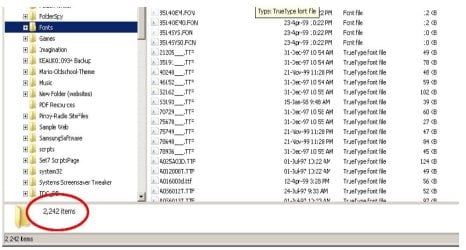
How to manage MANY fonts?

esha

New member
Power User
Local time
1:22 PM
Messages
98
I like collecting fonts. Currently I have about 1.400 :eek:
Ok, I don't like all of them, but even if I get rid of 200 or 300 there still remain many others.
Win seems to be a bit slower on startup since I have transferred all those fonts from my former system to the new one.
I guess there are font managers that can switch off and on the fonts as needed and I think I might need something like that. Does anybode have experience with this?
 

My Computer My Computer

OS
Win 7 Professional 64bit
CPU
Intel i7-3930K @ 3.2GHz
Memory
16 GB
Graphics Card(s)
NVIDIA GeForce GTX 650
Monitor(s) Displays
1 CRT, 1 LCD
Hard Drives
3 hard drives
I like collecting fonts. Currently I have about 1.400 :eek:
Ok, I don't like all of them, but even if I get rid of 200 or 300 there still remain many others.
Win seems to be a bit slower on startup since I have transferred all those fonts from my former system to the new one.
I guess there are font managers that can switch off and on the fonts as needed and I think I might need something like that. Does anybode have experience with this?
I don't have the knowledge you are looking for but how about putting all the fonts you don't use into a new folder named Fonts2. Leaving just a few fonts in the main Fonts folder will make you PC start up at the old speed, I think! Save introducing more third party software and its simple too!
 

My Computer My Computer

Computer type
PC/Desktop
OS
Microsoft Windows 7 Home Premium 64-bit 7601 Multiprocessor Free Service Pack 1
CPU
Intel(R) Core(TM) i7-3770 CPU @ 3.40GHz
Motherboard
ASUSTeK COMPUTER INC. P8H77-M
Memory
8.00 GB
Graphics Card(s)
Intel(R) HD Graphics 4000
Sound Card
On Board
Monitor(s) Displays
Dell 24"
Screen Resolution
1920 x 1080
Hard Drives
(1) INTEL SSDSC2CT180A3 ATA Device (2) ST500DM002-1BD142 ATA Device (3) WDC WD3200AAKS-75L9A0 ATA Device (4) Generic- Compact Flash USB Device (5) Generic- MS/MS-Pro USB Device (6) Generic- SD/MMC USB Device (7) Generic- SM/xD-Picture USB
PSU
500w Corsair
Case
Cooler Master
Cooling
3 Fans
Keyboard
Logitech MK300
Mouse
Logitech WOM
Internet Speed
75Mb
Antivirus
Norton 360
Browser
Firefox, Opera, IE
There are plenty of freeware font managers, but I'm not sure if they let you turn on/off each font. They may just add, view, and delete them. That might be a function of paid software, but I'd be willing to bet something exists. A simple google search should find you some products.

As for the startup speed, adding a lot of extra fonts will affect boot up speed.
 

My Computer My Computer

OS
Windows 7 Ultimate x64 SP1
CPU
Intel Core i7-2600
Motherboard
Gigabyte GA-P67A-UD3P-B3
Memory
12 GB Patriot Extreme DDR3-1333
Graphics Card(s)
Nvidia GTX 470
Monitor(s) Displays
Dell UltraSharp 2209WA
Hard Drives
OCZ Agility3 240 GB, WD5001AALS, WD7501AALS
PSU
OCZ ModStream 700W
Case
CoolerMaster HAF 912 Advanced
Cooling
CoolerMaster Hyper 212 Plus
Wow! :p

You're like me! I'm also doing the same since I'm in sort of using those fonts in some special use (like website creation and graphics layout).
 

Attachments

  • fonts.jpg
    fonts.jpg
    63 KB · Views: 30

My Computer My Computer

Computer Manufacturer/Model Number
SONY VAIO Laptop
OS
Windows® 7 Home Basic 64bit, Build 7600
CPU
Inter Core 2 Duo CPU T6600 @ 2.20GHz
Memory
4GB
Graphics Card(s)
nVidia GeForce G210M
Sound Card
Realtek HD Integrated Audio
Monitor(s) Displays
LG TV-1 (NVIDIA High Definition Audio)
Screen Resolution
1366 x 768 (Wide)
Hard Drives
320GB HDD - Internal
360GB - External
500GB (x2) - External
1TB - External
PSU
Internal
Keyboard
Integrated
Mouse
Synaptic Keypad & A4tech Cordless MOuse
Internet Speed
LAN, T1
Other Info
A4tech Analog Joypad
I'm using High-Logics Main Type to manage my fonts (sadly paid for). I tried anything compatible with XP when I was first looking and they all ended up looking pretty much of a much. With Main Type all of my (except everyday/system) fonts are stored on a seperate drive. You can elect to "load" or "install" from there. The beauty about the load option is that when you reboot they unload. Sadly I've not come across any free font managers that give the ability to truly manage, but I always like to be proved wrong!!
 

My Computer My Computer

OS
Windows 7 x64
Here's a free one.
But it is free...............so read the comments below as you make your decision.
Best Free Font Manager

Let us know your findings.
 

My Computer My Computer

Computer Manufacturer/Model Number
HP M9077c
OS
Windows 7 Home Premium 64bit
CPU
Intel(R)Core(TM)2 quad [email protected] 2.39GHz
Motherboard
ASUSeK
Memory
6GB DDR2 6400
Graphics Card(s)
GeForce 8500/512MB
Sound Card
Realtek High Def Audio
Monitor(s) Displays
HP w2408 LCD 24" widescreen
Screen Resolution
1920x1200
Cooling
6 pack of Bud
Keyboard
MS wireless Inteli
Mouse
MS wireless Inteli
Back
Top